identity
118 TopicsArchitecting Microsoft 365 Environments for Multi-National Enterprises: Lessons from the Field
Introduction In today’s global economy, enterprises rely on Microsoft 365 to empower seamless collaboration across borders. However, deploying and securing multi-national M365 environments introduces complex technical, operational, and compliance challenges. With over two decades architecting cloud environments across the Americas, EMEA and APAC, I’ve led numerous deployments and migrations requiring hybrid identity resilience, data sovereignty compliance, and global operational continuity. This article presents field-tested lessons and strategic best practices to guide architects and IT leaders in designing robust, compliant, and scalable Microsoft 365 environments for multi-national operations. Key Challenges in Multi-National M365 Deployments 1. Hybrid Identity Complexity Managing synchronization between on-premises Active Directory and Azure AD becomes exponentially complex across regions. https://learn.microsoft.com/en-us/azure/active-directory/hybrid/whatis-hybrid-identity can introduce replication delays and login failures if not properly planned. Tip: Always assess latency impact on Kerberos authentication, token issuance, and Azure AD Connect synchronization cycles. 2. Data Residency and Compliance Many countries enforce strict data sovereignty laws restricting where personal and sensitive data can reside. Selecting tenant regions and enabling https://learn.microsoft.com/en-us/microsoft-365/enterprise/microsoft-365-multi-geo?view=o365-worldwide become critical to avoid compliance violations. Impact Example: A financial institution with European operations faced potential GDPR breaches until Multi-Geo was implemented to ensure Exchange Online and OneDrive data remained within EU boundaries. 3. Licensing and Cost Control Balancing E3, E5, and F3 licenses across countries with varying user roles and local currencies adds administrative and financial complexity. Best Practice: Implement https://learn.microsoft.com/en-us/azure/active-directory/enterprise-users/licensing-groups-assign, aligning assignments with security groups mapped to user personas. 4. Secure Collaboration Across Borders External sharing in SharePoint, OneDrive, and Teams federation introduces security risks if not precisely configured. Default sharing settings often exceed local compliance requirements, risking data leakage. Lesson Learned: Always validate external sharing policies against each country’s data protection laws and client contractual agreements. 5. Operational Support and SLA Alignment Global operations require support models beyond single-region business hours, demanding proactive incident response and escalation planning. Example: Implementing follow-the-sun support with regional admins trained on Microsoft 365 admin centers and PowerShell mitigates downtime risks. Strategic Solutions and Best Practices 1. Architect Hybrid Identity with Redundancy Deploy https://learn.microsoft.com/en-us/entra/identity/hybrid/connect/how-to-connect-sync-staging-server in alternate datacenters. Implement Password Hash Sync to reduce dependency on VPN and WAN availability for authentication. 2. Utilize Microsoft 365 Multi-Geo Capabilities Leverage https://learn.microsoft.com/en-us/microsoft-365/enterprise/microsoft-365-multi-geo?view=o365-worldwide to meet data residency requirements per geography. Validate licensing implications and admin configurations for each satellite location. 3. Segment Licensing by User Persona Define clear user personas (executives, knowledge workers, frontline staff). Map license types accordingly, optimizing costs while ensuring productivity needs are met. Use https://learn.microsoft.com/en-us/azure/active-directory/enterprise-users/licensing-groups-assign for scalable management. 4. Design Conditional Access Policies by Geography Create https://learn.microsoft.com/en-us/azure/active-directory/conditional-access/location-condition. Integrate with Intune compliance policies to block or limit access for non-compliant devices. 5. Implement a Global Governance Model Establish clear local vs. global admin roles to maintain accountability. Enforce https://learn.microsoft.com/en-us/azure/active-directory/privileged-identity-management/pim-configure to control and audit privileged access. Lessons Learned from the Field Latency is a silent killer – Always test Microsoft Teams and OneDrive performance across regions before production rollouts. Communication is critical – Local IT teams must align early with global security and compliance strategies. Compliance first – Never assume Microsoft’s default data location suffices for local regulations. Cost optimization is ongoing – Conduct license audits and adjust assignments every six months. Conclusion Architecting Microsoft 365 for a multi-national enterprise demands strategic integration of compliance, hybrid identity resilience, secure collaboration, and cost optimization. Cloud success in a global enterprise is not an accident – it is architected. By applying these best practices validated against Microsoft recommendations and real-world deployments, organizations can empower global collaboration without sacrificing governance or security. About the Author Gonzalo Brown Ruiz is a Senior Office 365 Engineer with over 21 years architecting secure, compliant cloud environments across North America, Latin America, EMEA and APAC. He specializes in Microsoft Purview, Entra ID, Exchange Online, eDiscovery, and enterprise cloud security.219Views0likes1Comment
Microsoft Feedback Portal account is not working
I changed my Microsoft password a year ago, and it updated everywhere other than the Feedback Portal. As a result, I get an error when I try to login, or do anything on the page. Microsoft account support's suggestion was to login to the Feedback Portal which is insane given I'm having issues accessing it. How can I get this issue resolved? I've got three separate support tickets now and they keep asking me to wait 24 hours to get the issue resolved. Can someone from the Feedback Portal team please contact me to resolve this?" This is what Microsoft Support have said: "understand your frustration, and yes—this is an account‑related issue because the Feedback Portal is still tied to your old alias, which causes login conflicts and forces you out. Your Microsoft account itself signs in correctly, but the Feedback Portal is pulling outdated identity data that you cannot update on your own. Since you cannot access the Portal to submit feedback, directing you back there is not a workable solution. What you need is for Support to escalate this to the internal Identity/Feedback Platform engineering team so they can manually correct the outdated alias mapping on the backend. In this situation, the Feedback Portal and Tech Community teams are the ones who manage and maintain that specific platform. Because the issue appears on the Feedback Portal side—even though your Microsoft account is working normally—only their dedicated team can make the necessary corrections on their end. That’s why we are guiding you to connect with them through the links provided: https://techcommunity.microsoft.com/ or https://feedbackportal.microsoft.com/feedback. They will be able to review the portal‑specific account data and assist you further. I understand why this is frustrating. Since you’re unable to stay signed in to the Feedback Portal, I completely see why posting there isn’t possible for you. However, I do need to be transparent: I’m not able to escalate this issue directly to the Feedback Portal team, as they don’t provide internal escalation channels for us and only accept requests through their own platform. "41Views0likes1CommentHow Do I Target the Azure VPN Client in a Conditional Access Policy?
I am using the Azure VPN Client to connect users to an Azure VPN Gateway using their Entra ID credentials to authenticate. I want to target this application with a CA policy that requires MFA every time it connects. The problem is that I don't see the applications in my Enterprise Apps and all of my searching says that it won't appear because it was "pre-certified" by Microsoft. In the Gateway setup I used the Audience GUID of c632b3df-fb67-4d84-bdcf-b95ad541b5c8. And this is working as expected. The only solution that I have found for targeting the Azure VPN Client app is to create a Service Principal using that Audience GUID. This seems like a bit of a hack, so I am posting here to see if there are any other methods that I am missing to target this app when it doesn't appear in my Enterprise Apps list.236Views0likes3CommentsWhy Entra ID attributes don’t always appear on Microsoft 365 profile cards
While working with Microsoft Entra ID and Microsoft 365 profile cards, I ran into a behavior that often causes confusion: attributes like EmployeeType can exist in Entra ID and Microsoft Graph, yet not appear consistently on Microsoft 365 profile cards. This post breaks down why this happens, what’s actually happening behind the scenes, and what you can realistically expect when working with profile card attributes in real environments. Profile cards should be treated as a presentation layer, not a guaranteed real-time reflection of every Entra ID attribute. If you’ve seen similar behavior with other attributes or workloads, I’d love to hear how you’ve approached it in your environments.133Views1like1CommentAccount Hacked
Hello Community, My account has been hacked, copied and/or duplicated with some other account as I was originally Sids1 with this email for more than 6 months now and this has changed somehow. It's very concerning to me since I also found some other person named Siddhartha when I was logging into my account. I reported that to the Microsoft Account Team but have not received any replies yet. Please suggest anything that can be done to catch this hacker who is stealing my identity to and fro. Best Regards Siddhartha SharmaSolved1.1KViews1like4Comments
Hacked Live account
Hello, On of our customers accounts was hacked. This is a Live account linked to his own emailadres (not hotmail) from his Internet Provider. A few weeks ago someone gained access to this account. They changed the recovery email address and the phone number. The customer has a paid Office 36 family account, which is paid for with his MasterCard and he can provide the invoice from the last years.. We tried the account recovery Form multiple times, opened a case with CDOC Case Management. We simply got the reply that they could not do anything but to suspend the account. I Think this is crazy, is there no solution to this ? Thanks,132Views0likes2CommentsMoving Exchange Account Source Account
I have a very complex environment I'm hoping someone might jump start my search. We have two domains syncing to Entra ID. One domain is a resource forest where our Exchange environment sits. That domain contains disabled stub accounts synced to our primary domain where the actual user accounts sit. The source for all EXO mailboxes are the stubs in the resource forest. Those accounts are kept in sync using FIM 2008. We're wanting to decom that entire resource environment and move all of the attributes to the primary domain. The resource domain schema is the last version of Ex 2016. The primary domain schema is Ex 2010 SP1. I know my first step is to update the primary schema, however, has anyone encountered a situation like this? Any help would be greatly appreciated.88Views0likes1CommentMicrosoft Authenticator Passkeys for Entra ID on unmanaged devices
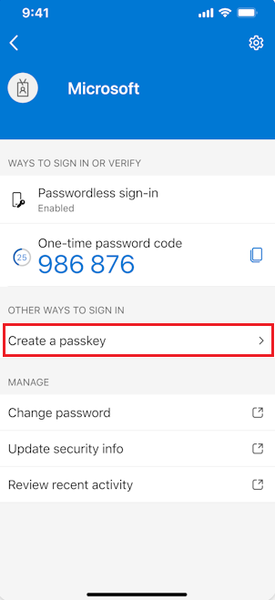
Hello, has anyone successfully registered passkeys on an unmanaged phone in an organisation with device compliance policies? Use case is to provide a phishing-resistant MFA option via Authenticator app for logging into apps on their desktop. Users already have authenticator app on their phone and do number matching MFA. https://learn.microsoft.com/en-us/entra/identity/authentication/how-to-register-passkey-authenticator?tabs=iOS When I select "Create a passkey" - I need to log into my account. However I'm blocked from successful authentication because I have conditional access policies to require compliant devices. As my mobile phone is not enrolled into Intune, I never get to the step where the passkey is created and registered. Based on the constraints - it seems like passkeys cannot be used for unmanaged/BYOD devices for organisations that have device compliance policies. It can only be used for users who have enrolled their mobile phone. Looking to see if anyone has tips or different experience using passkeys on unmanaged mobile phones to log into Entra?451Views0likes1Comment
Microsoft Authenticator issues
I’m simply locked out of my personal account because I lost access to my 2FA and the recovery form rejects due to active two-step verification. I’ve tried my verifying email and phone number but it rejects is due the active two step verification. I need manual identity verification or an escalation so my 2FA can be reset. Can you point me to the correct support channel for personal account recovery, because the link you sent is not working193Views0likes1CommentEffortless Time Tracking in Teams, Outlook and M365 Copilot
How do you stay in the flow of work when tasks move across Teams, Outlook and now M365 Copilot? Many of us already collaborate and manage our day in these Microsoft 365 tools, but logging time often feels like something separate that interrupts our focus. With https://www.klynke.com/ time tracking stays right where your work happens. It runs inside Teams, Outlook and M365 Copilot, creating one consistent and natural experience for logging hours without leaving your workflow. We shared more in our blog: https://www.klynke.com/post/log-time-in-teams-outlook-copilot, and were grateful that Microsoft featured our story in a Tech Community interview: Building Secure SaaS on Microsoft Cloud. A quick look under the hood Microsoft 365 SSO (Entra ID) – Employees sign in with their existing credentials Tenant-based storage and security – Data stays within your Microsoft 365 tenant, under IT control Native experience – Same workflow in Teams, Outlook and M365 Copilot Simple reporting – Export to Excel, Power BI or dashboards How do you currently manage time tracking in Microsoft 365? Would having it built directly into Teams, Outlook and M365 Copilot make a difference in your day? CTO at Klynke248Views0likes2Comments