IT Pro
2 Topics
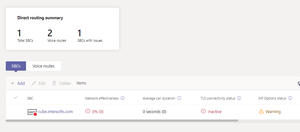
"Egypt" TLS 1.2 between Cisco CUBE and MS Direct Routing TLS connectivity status Inactive
TLS 1.2 between Cisco CUBE and MS Direct Routing TLS connectivity status Inactive kindly I have made all steps below and still facing the TlS connectivity status Inactive. 1-Created a CSR from CUBE and signed it from GoDaddy public SSL certificate then imported the signed again. 2-Created a Public DNS pointing to the FQDN of the Cube which is NATed to the private IP of the cube. 3-opened all needed Ports even opened the whole ports still facing the same error. 4-made the whole dial peers that is needed. Please check the below screen shoot1.3KViews0likes1Comment
Image not Rendering in MS Teams Adaptive Card
Hi Team, We have a .net application which has been designed to send any communication or announcements to end users through MS Teams bot, as an adaptive card. The adaptive card contains image, text and button. The image and text are being fetched from Azure storage account. The storage account is being accessible for only to the app service IP addresses which are whitelisted. But the image was not rendering the user’s MS teams bot. Hence we have been advised to whitelist the MS Teams server IP ranges (https://docs.microsoft.com/en-us/microsoft-365/enterprise/urls-and-ip-address-ranges?view=o365-worldwide#skype-for-business-online-and-microsoft-teams). But we could not able to whitelist multiple IP ranges in the Azure Storage account. Some of them are, 52.112.0.0/14, 52.120.0.0/14, 2603:1063::/38, 52.238.119.141/32, 52.244.160.207/32, 2603:1027::/48, 2603:1037::/48, 2603:1047::/48, 2603:1057::/48, 2620:1ec:6::/48, 2620:1ec:40::/42 It is causing that, the image is not rendering in user’s machine sometime. Kindly help us to sort out this issue on high priority.848Views0likes0Comments