it pro
206 Topics
Limiting Team invitations to specific members
Dear Microsoft, Within our organization, the ability to limit teams invites is a must for meetings. When we create a meeting, without doing so, optional members are added to the teams meeting. You can imagine that when a team meeting is created and 200 people are a member of a team but only 5 are invited, that a meeting can quickly become unproductive. We've also noted that using private channels does not allow you to create meetings. And, in fact, using a private channel would be ideal when you don't want 200+ personnel invited to a meeting that don't belong. Can we suggest two feature updates? 1. Prevent Teams from broadcasting to the whole team. Only invite the required personnel. Optional members should be just that, only receive the invite if you were included on the Optional field. Users would be able to see if they're optional or not. 2. Allow Teams to utilize private channels for more meeting control or to allow for meetings which require extreme privacy (i.e., investigations, meetings about personal health discussions, etc.). Thank you, TC1.2KViews0likes3Comments
Teams duplicates contacts until it maxed out at 15000
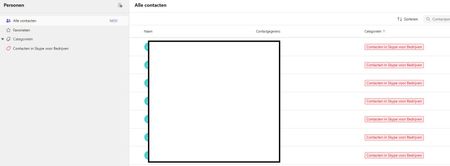
Hi, I have a weird issue with some users, Teams seems to be duplicating old Skype for Business contacts until it maxes out at 15000 contacts. I have been digging into it a bit and found out the location of the folder through Exchange powershell but I can't clear or delete it. Skype for Business is phased out and disabled in my tenant for a long time now so I couldn't do much there, I can't login to it through powershell. We've had Teams since like 2017 so I suspect this is a niche legacy issue popping up recently somehow. Manual deleting is possible through the browser environment but that is such a hassle because it keeps glitching if you delete per 100 and skipping pages and stuff, need to refresh constantly. Just a pain, it would take days. And no guarentee its not coming back either. See screenshots. Does anyone know why this is happening and how to fix this? Thanks for reading, cheers!106Views0likes3Comments
Microsoft Teams PowerShell Module 7.6.0 is broken
Dear Community I have a few Script with Microsoft Teams PowerShell, witch authenticate via Access Token. Everything works fine until latest Microsoft Teams PowerShell Module Update 7.6.0. I got following Error with the Script. Connect-MicrosoftTeams : Could not load file or assembly 'Microsoft.IdentityModel.JsonWebTokens, Version=8.3.0.0, Culture=neutral, PublicKeyToken=31bf3856ad364e35' or one of its dependencies. The system cannot find the file specified. If I downgrade my environment from Version 7.6.0 to Version 7.5.0 and rerun my script, the authentication is working as expected. What is wrong here with latest PowerShell Module 7.6.0 and how can I resolve the issue Many thanks for sharing any hint or tip ANDY323Views2likes2CommentsMulti-app camera - Stops Teams from detecting webcams
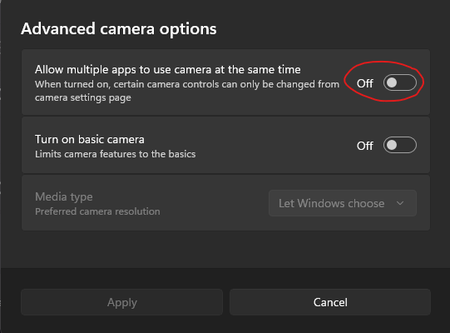
Hi. We have a load of shared meeting rooms that are setup with Jabra panacast webcams. When you open Teams it shows that no devices are connected but if you open the camera app or any other app like zoom the camera works fine. The only way to get it to work is to enable this setting. This settings for Multi-app camera cannot be enabled by Intune or powershell/regedit. There are some posts on reddit that suggest I am not alone and there are others having this issues too. So.. its either a bug with the Teams app itself or the windows OS Thanks, Cam93Views0likes0Comments
Out-of-warranty Lenovo MTR Reimage - can't upgrade to Windows 11
Hello everyone. Got a couple of Lenovo MTR NUCs that we needed to reimage. Cause they are out of warranty, Lenovo only provides the image that it was shipped with for reimage (I can't use Cloud Deploy). The problem is, when trying to run the Windows 11 update, I get the error code "0x0000400". This is because these come with the Windows 10 IoT Enterprise edition, which is known to have this problem. The issue is that I can't use the ISO file or load the Windows 11 image, as this will get rid of the MTR system. Does anyone know a way around this/is there an image available? Thanks!52Views0likes0CommentsRemoving Teams from a Specific User Profile via Script in Intune
Hi, Working on a process with using PowerShell to remove Microsoft Teams from a specific user that is not the primary user of that computer on multiple Windows 11 devices using Microsoft Intune. However, I need a script to make this happen. Can I get some help from the community on this? Has anyone else seen this before? Thanks, ZC4653Views0likes0CommentsAnatomy of an Outage: How Microsoft focuses on Transparency during and post incident
Outages happen—no matter the hyperscale provider, no matter the architecture. What separates resilient organizations from the rest is how quickly they detect issues, how effectively they communicate, and how well they learn from the inevitable. Rick Claus had the opportunity to co-present a session on the topic of how Microsoft communicates during outages and what YOU can do to be more proactive on how your Azure based infra is weathering the storm. He and Tajinder Pal Singh Ahluwalia pull back the curtain on how Microsoft handles major incidents—from the first customer impact signal to the deep‑dive retrospectives that follow.459Views1like0CommentsRequire approval from IT to join a Team and/or Shared Channels
My company has two sides to its business. Both sides are under the same Microsoft 365 tenant. They can be called Group A and Group B. Group A should not be able to add those from Group B into teams and channels on their own. Likewise, Group B should not be able to add those from Group A. If either side wants to add the other to a team or channels, they should have to get approval from IT, with IT making the additions to the team or channel. We would rather not have this just done over emails. This has to be done while still allowing members of Group A and members of Group B the ability to have 1 on 1 and group chats. Does anyone have any suggestion how to do this?173Views1like1Comment
Latest Version of Teams not installing on Server 2019
Is anyone else able to install 24335.208.3315.1951 or higher on Windows Server 2019? We use the Deployment Image Servicing and Management command but since this version it fails to install with "Error: 15606. Package could not be registered." Versions 24295.605.3225.8804 and below install without error. Very strange.Solved13KViews18likes44Comments
Please tell me how to disable the Pin Copilot message
Morning! I wrote a message yesterday but nobody replied, so here's another one so it doesn't get lost Can somebody tell me how to disable the annoying "Pin Copilot Chat" popup? every morning I have to say "Maybe Later" when I really mean to say NEVER IN A THOUSAND YEARS230Views0likes1Comment