graph api
400 Topics
Microsoft Graph: Private channel SharePoint site URL naming appears to have changed
📄 Question We are creating private channels using the Microsoft Graph API: POST https://graph.microsoft.com/v1.0/teams/{team-id}/channels With the following payload: { "@odata.type": "#microsoft.graph.channel", "displayName": "Project-Channel-001", "description": "Sample private channel for testing", "membershipType": "private", "members": [ { "@odata.type": "#microsoft.graph.aadUserConversationMember", "******@odata.bind": "https://graph.microsoft.com/v1.0/users/{user-id}", "roles": ["owner"] } ] } 🔍 Observed Behavior When the private channel is created, the associated SharePoint site is provisioned automatically (as expected). However, the URL format appears to have changed. Previously observed behavior: https://{tenant}.sharepoint.com/sites/ProjectTeamURL-Project-Channel-001 Current behavior: https://{tenant}.sharepoint.com/sites/ProjectTeamName-Project-Channel-001 ❗ Impact This change introduces several issues: Breaks deterministic URL generation logic Produces longer and less predictable URLs Introduces dependency on display name, which is mutable and may contain unexpected characters Impacts existing automation and integrations relying on the previous pattern ❓ Questions Has there been a recent change in how SharePoint site URLs are generated for private channels? Is this behavior intentional and documented, or a regression? Is there any way (via Graph or otherwise) to: Control the generated SharePoint site URL, or Retrieve the final site URL deterministically without relying on pattern assumptions? Is the previous {ParentTeamUrl}-{ChannelName} format still expected in some scenarios, or has it been deprecated? 🧪 Additional Notes This behavior is observed when creating channels via Microsoft Graph (v1.0) The issue is reproducible across multiple test scenarios 🙏 Any clarification from Microsoft or others encountering this would be appreciated.9Views0likes0Comments
Intune – Unable to reliably validate application installation status via Microsoft Graph APIs
Hi Everyone, I am working on application deployment and validation using Microsoft Intune, and I am trying to implement an automated validation step to confirm whether applications are successfully installed. My primary requirement Verify application installation status Confirm per‑device installation status Validate installation for specific Intune‑managed devices Use Graph APIs as part of an automation workflow APIs tested so far 1️⃣ App installation status per device (NOT working / not usable) I initially tried using the documented API: HTTP GET https://graph.microsoft.com/beta/deviceAppManagement/mobileApps/{mobileAppId}/deviceStatuses Issue: This API is not working for us It either returns no data or behaves as if it is not a valid / usable endpoint It does not return reliable installation status Hence, we cannot use this API for validation in automation At this point, deviceStatuses is not usable as a primary source of truth in our environment. 2️⃣ Detected Apps (secondary confirmation only) We are also using the Detected Apps API: HTTP GET /deviceManagement/managedDevices/{deviceId}/detectedApps This does work, however: It only confirms app presence It does not confirm Intune assignment or installation intent We are using it strictly as a secondary confirmation, not a primary validation method 3️⃣ Intune internal API observed via browser inspection We also tested the API that appears to be used internally by the Intune portal: HTTP GET https://graph.microsoft.com/beta/users/{user-id}/mobileAppIntentAndStates/{device-id} Observations: The API returns data However, installState frequently shows unknown The Intune portal shows a different and final status (Installed / Failed / Pending) This makes the API unreliable for automation It appears to be troubleshooting‑oriented, not intended for reporting or validation Questions I am looking for guidance on Is deviceStatuses known to be unreliable, tenant‑dependent, or effectively unsupported? What is the recommended API to retrieve actual app installation status per device? Are there any v1.0 APIs available for: Device‑level app installation status? User‑level app installation validation? What is Microsoft’s recommended best practice to validate Intune‑installed applications via automation? Is there official documentation that clearly explains: Which API should be used for reporting vs troubleshooting Expected delays or data inconsistencies between Graph APIs and the Intune portal Goal The goal is to build a reliable and supported automation‑based validation mechanism to confirm that Intune‑deployed applications are successfully installed on target devices. Any official guidance, confirmation of known limitations, or alternative approaches would be very helpful. Thanks in advance for your support.38Views0likes1Comment
Unable to retrieve all attachments from forwarded Outlook emails using Graph API
We have integrated Outlook with our system using Microsoft Graph API and subscribed to message events. Whenever we receive an event, we process the email message at our end. Currently, we are facing an issue related to attachments in forwarded email conversations. Scenario An email conversation contains multiple replies. Some of these replies contain attachments. When a user forwards the entire email thread, Outlook generates a forwarded email that includes the conversation history in the email body. Problem When we receive the forwarded email event and fetch the message details using the Microsoft Graph API, we observe the following: The forwarded email only contains the latest reply's attachment. Attachments from earlier replies in the thread are not included in the forwarded message attachments. In some cases: The first reply contains an attachment. Subsequent replies do not contain attachments. When the user forwards the email, the forwarded message JSON shows: hasAttachments: false But, the forwarded email body still contains the previous conversation that had attachments. Our Questions Is there a way to retrieve all attachments from the entire email thread when a conversation is forwarded? Can we retrieve these attachments using the current user's access token via Microsoft Graph API? If there is a way, please also let us know how we can identify forwarded emails using the Microsoft Graph API, so that we can apply this solution only for forwarded emails. Our Requirement We need a reliable solution that works in production to ensure that all attachments from the email conversation are retrieved, even when the email thread is forwarded. This issue is currently impacting our production system, so we would greatly appreciate any guidance on the correct approach. Thank you in advance for your support.42Views0likes0Comments
How to create a dependency using Graph API in PowerShell
hi, I used following documentations to create a dependency via Graph API in Powershell: https://learn.microsoft.com/en-us/graph/api/intune-apps-mobileappdependency-list?view=graph-rest-beta https://learn.microsoft.com/en-us/powershell/module/microsoft.graph.beta.devices.corporatemanagement/new-mgbetadeviceappmanagementmobileapprelationship?view=graph-powershell-beta Both ways give me the same error: New-MgBetaDeviceAppMgtMobileAppRelationship : No OData route exists that match template ~/singleton/navigation with http verb POST for request /AppLifecycle_2602/StatelessAppMetadataFEService/deviceAppManagement/mobileAppRelationships. Status: 400 (BadRequest) ErrorCode: No method match route template Seems like these Endpoints do not support POST/PATCH requests at all. Is there any other way to create a dependency using Graph API in PowerShell?95Views0likes1CommentControlling Excel Add-ins and Microsoft Store App Installations
We have a requirement to block users from adding add-ins to Excel and Installing certain application directly which utilize Microsoft Store apps. Below are the two scenarios we need to address. I would appreciate any guidance or recommendations on how to implement these controls. 1) Blocking Excel Add-ins from Microsoft Store Users are currently able to add add-ins such as “Claude by Anthropic in Excel” directly from the Microsoft Store apps. For example, if a user accesses the URL: https://marketplace.microsoft.com/en-us/product/saas/wa200009404?tab=overview they can proceed to add the add-in to Excel. So, We need a method to prevent users from adding Office add-ins from the Microsoft Marketplace or external sources. 2) Blocking Installation of Microsoft Store Apps (e.g., WhatsApp) We are currently blocking Microsoft Store apps on OS level. However, users can still download and install applications such as WhatsApp directly from the vendor website, which utilize Microsoft store apps in backend: https://www.whatsapp.com/download We are considering configuring the Intune policy “Only Private Store is enabled.” However, we noticed that enabling this setting prevents users from accessing certain built-in applications (e.g., Notepad). Is there any other way to block access Microsoft Store apps directly? Thank you in advance for your assistance. Dilan176Views0likes1Comment
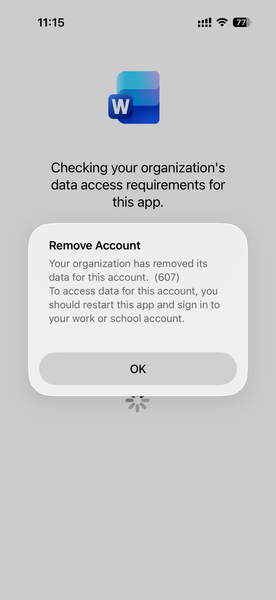
Intune MAM BYOD: Remove Account message for iOS devices
Hello, I am seeing an issue for Intune MAM BYOD(iOS) users. After a user account password reset, it causes Intune to remove the account configured from mobile applications like MS Outlook, Work, OneDrive, etc. Current Intune Configuration: Done - App Protection Policy Done - Conditional access policy --> Grant --> Requires app protection policy (checked) Users had to re-enrol to access his/her data. Here is the screenshot, Thank you,154Views0likes1Comment
Is principalId Always a GUID in Microsoft Graph ??
{ "error": { "code": "Request_BadRequest", "message": "Invalid GUID:HR", "innerError": { "date": "2026-02-13T06:44:24", "request-id": "87678d90-1d94-4131-a705-4356ad3568a4", "client-request-id": "63569c7b-1dea-42d4-8d72-aa3668c78418" } } } We’re encountering an issue with the Microsoft Graph API response for directoryRole Recently, one of our Graph API calls started returning a response where the principalId value appears to be a custom string instead of the expected GUID. In our code, we loop through each id from the delta response, assuming it will always be a valid GUID. However, we are now getting errors because one of the returned principalId values does not match the expected format. Our questions: Is it possible for Microsoft Graph API to return a custom string instead of a GUID for principalId? Has anyone experienced similar behavior with delta queries for directoryRole or any other object? Are there any known scenarios where the principalId format differs from the standard GUID? Any insights would be appreciated.34Views0likes0CommentsMicrosoft Graph Command Line Tools Blocked by CA
Hi All I hope you are well. Anyway, I recently turned ON a Conditional Access Policy Template, "Require MDM-enrolled and compliant device to access cloud apps for all users (Preview)" this seems to work fine until our IT Admins try to use the AutoPilot script which gets blocked based on: Microsoft Graph Command Line Tools Any ideas on how to allow AutoPilot / Microsoft Graph Command Line Tools through CA? Info appreciated2.9KViews0likes15Comments