graph api
36 Topics
Unable to retrieve all attachments from forwarded Outlook emails using Graph API
We have integrated Outlook with our system using Microsoft Graph API and subscribed to message events. Whenever we receive an event, we process the email message at our end. Currently, we are facing an issue related to attachments in forwarded email conversations. Scenario An email conversation contains multiple replies. Some of these replies contain attachments. When a user forwards the entire email thread, Outlook generates a forwarded email that includes the conversation history in the email body. Problem When we receive the forwarded email event and fetch the message details using the Microsoft Graph API, we observe the following: The forwarded email only contains the latest reply's attachment. Attachments from earlier replies in the thread are not included in the forwarded message attachments. In some cases: The first reply contains an attachment. Subsequent replies do not contain attachments. When the user forwards the email, the forwarded message JSON shows: hasAttachments: false But, the forwarded email body still contains the previous conversation that had attachments. Our Questions Is there a way to retrieve all attachments from the entire email thread when a conversation is forwarded? Can we retrieve these attachments using the current user's access token via Microsoft Graph API? If there is a way, please also let us know how we can identify forwarded emails using the Microsoft Graph API, so that we can apply this solution only for forwarded emails. Our Requirement We need a reliable solution that works in production to ensure that all attachments from the email conversation are retrieved, even when the email thread is forwarded. This issue is currently impacting our production system, so we would greatly appreciate any guidance on the correct approach. Thank you in advance for your support.42Views0likes0Comments
Is principalId Always a GUID in Microsoft Graph ??
{ "error": { "code": "Request_BadRequest", "message": "Invalid GUID:HR", "innerError": { "date": "2026-02-13T06:44:24", "request-id": "87678d90-1d94-4131-a705-4356ad3568a4", "client-request-id": "63569c7b-1dea-42d4-8d72-aa3668c78418" } } } We’re encountering an issue with the Microsoft Graph API response for directoryRole Recently, one of our Graph API calls started returning a response where the principalId value appears to be a custom string instead of the expected GUID. In our code, we loop through each id from the delta response, assuming it will always be a valid GUID. However, we are now getting errors because one of the returned principalId values does not match the expected format. Our questions: Is it possible for Microsoft Graph API to return a custom string instead of a GUID for principalId? Has anyone experienced similar behavior with delta queries for directoryRole or any other object? Are there any known scenarios where the principalId format differs from the standard GUID? Any insights would be appreciated.34Views0likes0Comments
How to Retrieve Windows Edition (SKU) from managedDevices API
Hi everyone, I am working with the Microsoft Graph API endpoint /v1.0/deviceManagement/managedDevices to iterate through all devices in a tenant and collect operating system related information. For Windows devices, the operatingSystem field only returns "Windows". However, Windows has multiple editions such as Enterprise, Education, and Pro. For my use case, I need the specific Windows edition. Is it possible to retrieve this information using only the v1.0 endpoint, or is the beta endpoint /beta/deviceManagement/managedDevices/{managedDeviceId} required to get the SKU family? Thanks in advance for your help.69Views0likes0CommentsResource not found while trying to access the available resource
I am attempting to automate CRUD operations on Microsoft Entra objects using the Microsoft Graph API. However, I am encountering a Resource not found error when accessing a resource programmatically, even though the same resource is accessible without issue when invoking the API endpoint via Postman.147Views0likes2Comments
403 Forbidden when sending mail with app-only token via Microsoft Graph
Hello, I am trying to send emails from my Outlook account using a registered enterprise application in Azure AD. We created an application registration in our tenant, assigned the relevant users, and granted admin consent for these Microsoft Graph application permissions: Mail.Send and Mail.ReadWrite and Mail.Send.Shared. I authenticate with application credentials (client_id, client_secret, tenant_id) and successfully retrieve an app-only access token using MSAL in Python: def get_access_token() -> str: load_dotenv() client_id = os.getenv("CLIENT_ID") client_secret = os.getenv("CLIENT_SECRET") tenant_id = os.getenv("TENANT_ID") authority = f"https://login.microsoftonline.com/{tenant_id}" scopes = ["https://graph.microsoft.com/.default"] # app-only token app = msal.ConfidentialClientApplication( client_id=client_id, client_credential=client_secret, authority=authority ) result = app.acquire_token_for_client(scopes=scopes) if "access_token" not in result: raise RuntimeError(f"Auth failed: {result.get('error_description') or result}") return result["access_token"] The token is retrieved successfully. However, when I try to send an email with: GRAPH_BASE = "https://graph.microsoft.com/v1.0" def send_email(access_token: str, from_user: str, to_address: str, subject: str, body_text: str, save_to_sent: bool = True) -> bool: """ Sends a plain-text email via POST /users/{from_user}/sendMail using an app-only token. Returns True on success; raises HTTPError on failure. """ payload = { "message": { "subject": subject, "body": {"contentType": "Text", "content": body_text}, "toRecipients": [{"emailAddress": {"address": to_address}}], }, "saveToSentItems": bool(save_to_sent), } r = requests.post( f"{GRAPH_BASE}/users/{from_user}/sendMail", headers={"Authorization": f"Bearer {access_token}"}, json=payload, timeout=20, ) r.raise_for_status() return True …I get this error: 403 Client Error: Forbidden for url: https://graph.microsoft.com/v1.0/users/{from_user}/sendMail File "C:\mail\src\mail.py", line 53, in send_email r.raise_for_status() ~~~~~~~~~~~~~~~~~~^^ File "C:\mail\src\mail.py", line 111, in <module> send_email(token, from_user, to, "Hello from Microsoft Graph", "Hello Human") ~~~~~~~~~~^^^^^^^^^^^^^^^^^^^^^^^^^^^^^^^^^^^^^^^^^^^^^^^^^^^^^^^^^^^^^^^^^^^ requests.exceptions.HTTPError: 403 Client Error: Forbidden for url: https://graph.microsoft.com/v1.0/users/{from_user}/sendMail where {from_user} is my actual mailbox address (e.g., email address removed for privacy reasons). Since the app has Mail.Send (Application) permission with admin consent, my understanding is that the app should be able to send mail on behalf of any user in the tenant using /users/{user}/sendMail. Is there another configuration step I am missing (e.g., Application Access Policy or mailbox-level Send As requirement)? Any guidance on why this 403 happens despite having Mail.Send application permissions with admin consent would be very helpful. Thank you!223Views0likes1Comment
Change Teams Meeting Options (Who can bypass lobby) via Graph API
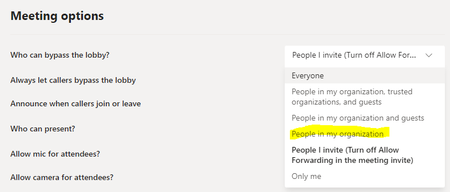
I would like to change the who can bypass lobby meeting options of teams meeting via power automate using graph api. So, I checked the meeting options via teams user interface like below first photo. Then I tried to apply this configuration on power automate via graph. So, I checked the documentation of Update Event for Teams meeting as recommended the link following: https://docs.microsoft.com/en-us/graph/api/onlinemeeting-update?view=graph-rest-1.0&tabs=http But there is not any options to restrict the user outside of my organization like the parameter "People in my organization" in the teams meeting options user interface for lobbybyPassSettings parameter. I checked how the lobbybypassSettings gets the value if the who can bypass lobby parameter has been set via teams meeting options user interface via powerautomate. It sets this parameter as "unknownFutureValue". But when I checked the documentation, Microsoft does't recommend this value to set.1.7KViews0likes2Comments
Microsoft Graph API : Some attributes are null when filtering by signInActivity/lastSignInDateTime
Hi. I have trouble retrieving the user's givenName and surname using Microsoft Graph API together with filtering using signInActivity/lastsignInDateTime. Here is the url I'm using: const graphUsersUrl = "https://graph.microsoft.com/V1.0/users?$top=999&$filter=signInActivity/lastSignInDateTime ge 2025-06-24T14:45:15Z and signInActivity/lastSignInDateTime le 2025-06-25T14:45:15Z&$select=id,givenName,surname,identities,signInActivity"; function mapUserEmails(userData: Array<any>) { return userData.map((userInstance) => { console.log(userInstance.givenName); return { userId: userInstance.id, givenName: userInstance.givenName, lastName: userInstance.surname, issuerAssignedId: userInstance.issuerAssignedId, userEmail: ( userInstance.identities as Array<{ signInType: string; issuerAssignedId: string; }> ).find((userIdentity) => userIdentity.signInType === "emailAddress") ?.issuerAssignedId, lastSignInDateTime: userInstance.signInActivity?.lastSignInDateTime, }; }); } In the returned result, the userId and lastSignInDateTime have values, but givenName and lastName are null. How can I get the values for givenName and surname? Any help is appreciated.419Views0likes7Comments
Microsoft Graph API: Outlook Contact NOT Permanently Deleted with PermanentDelete.PostAsync()
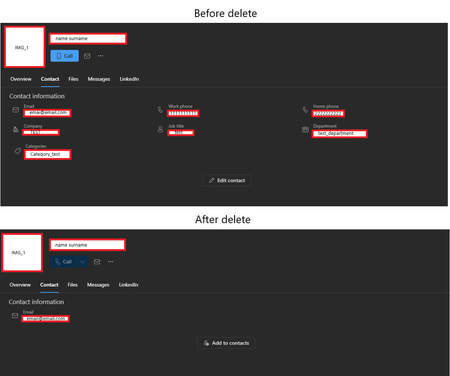
I'm encountering an issue when attempting to permanently delete an Outlook contact using the Microsoft Graph API. The contact was previously inserted without any problems via the API, and I also assigned a profile picture to it, uploaded via the API. Contact? contactAdded = await _graphClient.Users["{user-id}"] .ContactFolders["{folder-id}"] .Contacts.PostAsync(contactToBeAdd, cancellationToken: cancelToken); I'm using the PermanentDelete endpoint as described in the Microsoft Graph documentation: https://learn.microsoft.com/en-us/graph/api/contact-permanentdelete?view=graph-rest-1.0&tabs=http My C# code looks like this: await graphClient.Users["{user-id}"].ContactFolders["{folder-id}"].Contacts["{contact-id}"].PermanentDelete.PostAsync(); The code executes successfully without throwing any exceptions. However, when I check the Outlook application (desktop or web), the contact still exists. It appears that almost all of the contact's information has been deleted, but the contact itself remains visible and still appears in searches. Has anyone else experienced this issue and can suggest a solution or an alternative approach to permanently delete Outlook contacts using the Graph API? Thanks in advance for any help.134Views0likes0CommentsStatus code keep changing after every query (404 & 200)
I am using the graph api to get the folders under my OneDrive root directory but the result is different in every run (most of the time failing). I have given it the Files.Read and Files.ReadWrite permission. This happened after I changed my microsoft password, but changing it again doesn't fix the issue. The query: https://graph.microsoft.com/v1.0/me/drive/root/children?%24select=name%2C%20id The screen recording: https://youtu.be/NIaz0Q37osg Timestamp: 0:00 - 0:13: 404 Not found error 0:16 - 0:26: 200 Files are found correctly 0:27 - 0:32: 404 Not found error again, without changing the query75Views0likes0Comments