getting started
200 TopicsExecutive Reporting Made Simple with Windows 11 Copilot
In today’s fast-paced business environment, executives don’t have time to sift through raw spreadsheets, scattered dashboards, or lengthy email threads. They need clear, concise, and data-driven insights fast. That’s where Windows 11 Copilot steps in. With artificial intelligence now embedded directly into the operating system, organizations can transform how they gather, analyze, and present executive-level reports. Powered by innovations from Microsoft, Windows 11 Copilot acts as a built-in AI assistant that simplifies data analysis, accelerates report creation, and improves decision-making workflows. https://dellenny.com/executive-reporting-made-simple-with-windows-11-copilot/81Views0likes0CommentsCopilot Chat vsus. Microsoft 365 Copilot What's the difference?
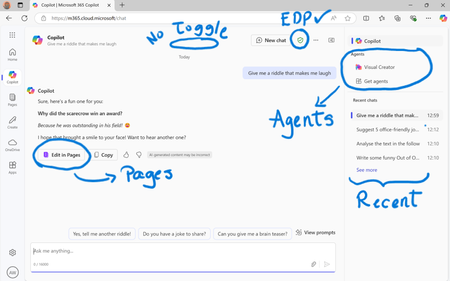
While their names sound similar at first glance - Microsoft 365 Copilot and Microsoft 365 Copilot Chat - they differ in several aspects. And more importantly, one can't be without another. What is Microsoft 365 Copilot Chat? First since first. Microsoft 365 Copilot Chat is also called Copilot Chat. Copilot Chat generates answers based on web content, while Microsoft 365 Copilot is also grounded on users' data, like emails, meetings, files, and more. Since January 15, Microsoft 365 Copilot Chat is available for everyone. Everyone in organizations. Also customers with a Microsoft 365 Business Basic subscriptions can enjoy using Copilot Chat securily. The screenshot below shows how Copilot Chat looks like and highlights its main capabilities. Note that EDP - Enterprise Data Protection is available. What is Microsoft 365 Copilot? Microsoft 365 Copilot is an add-on available for specific Microsoft 365 Subscriptions: Microsoft 365 E3, E5, A3, A5, and Business Standard & Premium. It includes Copilot Chat in addition to other Copilot features: Microsoft 365 Copilot also includes a chat grounded on users' meetings, emails, chats, and documents. It integrates into Microsoft 365 apps, like Outlook, Teams, Word, Excel, and more. It brings the capability to create agents and additional Copilot management features such as SharePoint Advanced Management and Copilot Dashboard. The screenshot below shows how the Copilot chat experience for those users who got the Microsoft 365 Copilot license. Note that EDP - Enterprise Data Protection is available here too. Copilot Chat can be pinned in MS Teams and MS Outlook as App. How can I access Microsoft 365 Copilot Chat? Copilot Chat is nowadays accessible via m365copilot.com using your Entra account. In contrast to Microsoft 365 Copilot licensed users, Microsoft 365 Copilot Chat users cannot see, by default, Copilot Chat pinned on the Microsoft 365 homepage. Microsoft 365 Copilot Administrators will have to pin the chat in the admin center so it is easy for Copilot Chat users to access it. What's the difference? There are some aspects, such as licensing requirements, subscription fees, data sources, or access to organization content, that determine the differences between Copilot Chat and Microsoft 365 Copilot. I have listed it in the screenshot below. 👇 Image showing a 3-column table: Aspect, Microsoft 365 Copilot Chat, and Microsoft 365 Copilot.Solved49KViews38likes42CommentsMicrosoft 365, Copilot & Copilot Studio News
February News Roundup for Technical and Business Leaders (2026) February 2026 was a significant month for enterprise AI across Microsoft 365, Microsoft Copilot, and Microsoft Copilot Studio. From large-scale enterprise deployments to governance updates and expanded model flexibility, Microsoft continues transitioning from AI experimentation to enterprise AI at scale. Here’s your strategic and technical breakdown of what mattered most this month. https://dellenny.com/microsoft-365-copilot-copilot-studio-news/107Views0likes0CommentsCommon Mistakes Orgs Make When Adopting Agentic AI
Agentic AI is quickly becoming one of the most talked-about innovations in enterprise technology. Unlike traditional automation tools, agentic systems can plan, reason, take initiative, and execute complex multi-step tasks with minimal human intervention. Powered by advances in large language models and autonomous decision frameworks, agentic AI promises to transform how organizations operate. But here’s the hard truth: many organizations rush into adoption without fully understanding what they’re implementing. The result? Wasted budgets, frustrated teams, compliance risks, and AI initiatives that quietly fade away. If your organization is exploring or actively implementing agentic AI, understanding the common pitfalls can save you time, money, and reputation. Below are the most frequent mistakes companies make — and what to do instead. https://dellenny.com/common-mistakes-orgs-make-when-adopting-agentic-ai/127Views0likes0CommentsCopilot for Planner and To Do Automating Task Management
In today’s fast-paced digital workplace, managing tasks effectively is one of the most important skills for productivity and team success. Between meetings, emails, chats, and deadlines, it’s easy for key action items to fall through the cracks. Microsoft’s latest innovation—Copilot for Planner and To Do—aims to change that by using artificial intelligence to automate and simplify task management. This powerful integration between Microsoft 365 Copilot, Planner, and To Do allows individuals and teams to automatically generate, organize, and monitor tasks using natural language. Instead of spending hours setting up task lists or following up manually, you can let Copilot do the heavy lifting. https://dellenny.com/copilot-for-planner-and-to-do-how-ai-automates-task-management/1.1KViews0likes2CommentsOptimizing Network and Connectivity for Copilot Performance
In today’s AI-driven workplace, tools like Microsoft Copilot are quickly becoming essential for productivity. Whether you’re drafting documents, analyzing spreadsheets, summarizing meetings, or generating code, Copilot relies heavily on fast, stable network connectivity. Yet many organizations focus on licensing and deployment while overlooking one critical component: network optimization. If Copilot feels slow, inconsistent, or unreliable, the issue is often not the AI itself it’s the network. In this guide, we’ll walk through how to optimize network and connectivity for Copilot performance, explore technical configuration steps, and share practical best practices to ensure your users experience seamless AI assistance. https://dellenny.com/optimizing-network-and-connectivity-for-copilot-performance/65Views0likes0CommentsData Boundaries and Permissions in an Agentic Copilot World
We’re entering a new era of AI one where copilots don’t just answer questions but take action. They schedule meetings, update CRM records, draft contracts, analyze dashboards, trigger workflows, and even coordinate across tools. These “agentic” copilots move beyond passive assistance into active participation. But as AI systems become more capable and autonomous but a critical question emerges: Where are the data boundaries? And who controls permissions in an agentic copilot world? If your AI can act on your behalf, it must also respect the same guardrails you would. Otherwise, the promise of productivity quickly turns into a governance nightmare. Let’s dig what data boundaries mean in this new landscape and how organizations can think clearly about permissions before scaling AI agents across their systems. https://dellenny.com/data-boundaries-and-permissions-in-an-agentic-copilot-world/68Views0likes0Comments
What's difference creating Agent from Copilot page vs from Copilot Studio -> Copilot for M365?
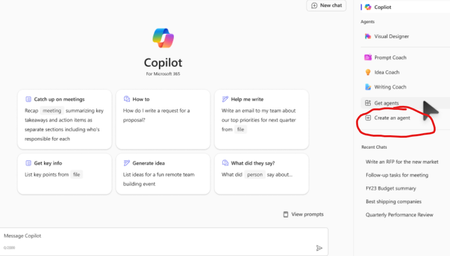
Hello, I am learning about Copilot and was very confused by these two different ways to do it. My understanding is both are "Declarative Agents" which lets the Microsoft 365 Copilot do the most heavy lifting. Method 1. First way is to go to Copilot page and clicking 'Create an Agent' w3 Method 2: Going to Copilot Studio -> Agents -> Copilot for Microsoft 365 -> New Agent (Couldn't find a screenshot) Q1. Anyway, first, I created an Agent using the first Method 1 above, and now I see it on the Copilot page under 'Agents' section. However, when I go to Copilot Studio -> Agents -> Copilot for Microsoft 365, I don't see that Agent there. Is this normal and intended? Q2. Is an Agent created using the Method 1 only available to people who have Copilot license? (as long as they are shared; I see options are only me, anyone in the organization, and specific users in the organization) Q3. Could you please confirm agents created using either way above are both "Declarative Agents"? Sorry for the newbie questions in advance... I took the course MS-4010 and reviewed several posts but still confusing...3.6KViews4likes10Comments
Copilot Studio - failed to publish new agent
Hi Experts, I am beginner of Copilot Studio. I wanted to subscribe to Pay-As-You-Go. Recently I have subscribed Azure Subscription Plan. Under Power Platform admin centre have create billing plan for Copilot Studio with PAYG. In Copilot Studio when I tried to Publish newly created agent I received "You currently do not have a user license that allows you to publish in Copilot Studio. Please contact your administrator to upgrade your license or enable the necessary permissions". Did I miss out anything? Am I required to have Copilot Pro ? Thanks in advance Regards KC517Views0likes2CommentsDesigning Safe Agentic Workflows with Microsoft Copilot
Agentic AI is no longer a futuristic concept it’s already reshaping how teams work. Microsoft Copilot has evolved beyond a simple assistant that responds to prompts. Today, it can act as an agent: planning tasks, making decisions, calling tools, and collaborating across systems like Microsoft 365, Power Platform, Azure, and enterprise data sources. But with great autonomy comes great responsibility. Designing safe agentic workflows is critical. Without proper guardrails, Copilot-powered agents can expose sensitive data, take unintended actions, or produce results that undermine trust. In this blog, we’ll explore how to design secure, reliable, and auditable agentic workflows using Microsoft Copilot, with clear architectural principles and hands-on technical steps. Whether you’re a developer, architect, or IT leader, this guide will help you move from experimentation to production safely. https://dellenny.com/designing-safe-agentic-workflows-with-microsoft-copilot/174Views0likes0Comments