general
703 TopicsGoogle fiber being blocked??
I’m on Google fiber and can't download the newest ISO. I get a msg that says some block of IPs is being blocked because they are not who they say they are. Likewise, I have no anonymizer running and my ip is my own on google fiber. error msg; message code 715-123130 and b64dd3c8-ed16-4d46-87ac-a871691f1c41.Solved756Views5likes10CommentsCreate an Organizational Assets Library (including Multi-Geo & Information Barriers guidance)
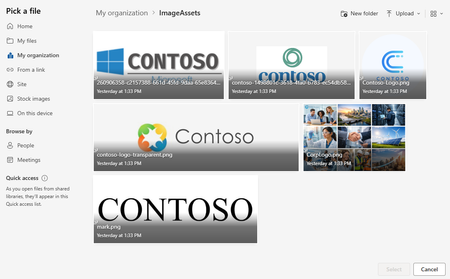
Overview This guide walks through a practical approach to setting up SharePoint Online (SPO) Organizational Assets Libraries (OAL). It includes optional guidance for more complex tenants—such as Multi-Geo and Information Barriers (IB) - because those scenarios are often under-documented. What you’ll accomplish: Create and register Organizational Assets Libraries so templates, fonts, and brand images are available in Office apps, with notes for Multi-Geo, Information Barriers, Brand Center, and Copilot integration where applicable. Applies to: Standard (single-geo) tenants, Multi-Geo tenants, tenants with Information Barriers, and environments using Brand Center and/or Copilot features for organizational assets. Quick start (standard single-geo tenant) Create a SharePoint site to host Organizational Assets Libraries (often the Brand Center site). Create three document libraries (typical): ImageAssets, DocumentAssets (templates), FontAssets. Grant your intended audience Read access (commonly Everyone except external users via the site’s Visitors group). Enable the SharePoint Online Public CDN (tenant setting). Add a Public CDN origin for each library path (one origin per library). Upload approved assets (images, templates, fonts) into their respective libraries. Register each library with Add-SPOOrgAssetsLibrary (repeat per library). Validate registration and end-user experience, then allow up to 24 hours for Office apps to reflect changes. If you’re Multi-Geo or using Information Barriers: follow the same flow, but repeat per geo and complete registration while the site is in Open IB mode (details below). Key constraints and gotchas Multi-Geo: plan a repeatable per-geo pattern (typically one Org Assets site + matching libraries per geo) and keep naming consistent. Information Barriers (IB): Add-SPOOrgAssetsLibrary cannot be run when the target site is segmented—create and register libraries first (site in Open mode), then segment if needed. The “Everyone except external users” principal may be hidden by default, but it’s still commonly used for broad read access. Brand Center: many orgs host Org Assets Libraries in the Brand Center site; if Brand Center is created after libraries exist, it typically detects and uses them automatically. A public CDN must be enabled to support Organizational Assets Libraries. The “Everyone except external users” principal may be hidden by default, but it’s still commonly used for broad read access. Brand Center: many orgs host Org Assets Libraries in the Brand Center site; if Brand Center is created after libraries exist, it typically detects and uses them automatically. A public CDN must be enabled to support Organizational Assets Libraries. Implementation steps Prerequisites: SharePoint Online Management Shell access (or equivalent), permission to manage tenant settings, and the ability to create sites and libraries in each geo. Create a site to host your Organizational Assets Libraries (many orgs use a communication site). For ease of support, keep the site name, library names, and structure consistent over time. Note: A Communication site is recommended, but a Team site can also work. Example site URLs: In a standard tenant you’ll have one site; in Multi-Geo you’ll typically use one per geo. Primary geo: https://contoso.sharepoint.com/sites/BrandCenter EUR geo: https://contosoEUR.sharepoint.com/sites/BrandCenter APC geo: https://contosoAPC.sharepoint.com/sites/BrandCenter If your tenant uses Information Barriers, keep each site in Open IB mode while creating the Org Assets Libraries. You can segment the site later (if required) after libraries are created. Configure a public CDN (required) To use Brand Center and Organizational Assets Libraries, configure SharePoint Online to use a Public CDN. Set-SPOTenantCdnEnabled -CdnType Public -Enable $true Example output: Public CDN enabled locations: SITES/BRANDCENTER/FONTS */MASTERPAGE (configuration pending) */STYLE LIBRARY (configuration pending) */CLIENTSIDEASSETS (configuration pending) Note: You will see the new CDN is in a pending state until complete. This will take some time. Wait for the CDN to finish provisioning. Re-run the status/list commands until “pending” entries clear. Get-SPOTenantCdnEnabled -CdnType Public Get-SPOTenantCdnOrigins -CdnType Public Add CDN origins for each library Add allowed CDN origins for each asset library path (typically one origin per library). Example: Add-SPOTenantCdnOrigin -OriginUrl sites/BrandCenter/ImageAssets -CdnType Public Add-SPOTenantCdnOrigin -OriginUrl sites/BrandCenter/TemplateAssets -CdnType Public Add-SPOTenantCdnOrigin -OriginUrl sites/BrandCenter/FontAssets -CdnType Public Set permissions (required for broad consumption) To ensure most users can consume the assets, grant Everyone except external users (often abbreviated as EEEU) Read access (commonly via the site’s Visitors group). Example: add Everyone except external users to the Visitors group of the Organizational Assets site. Connect-SPOService -Url 'https://contoso-admin.sharepoint.com' $tenant = "9cfc42cb-51da-4055-87e9-b20a170b6ba3" $site = Get-SPOSite -Identity "https://contoso.sharepoint.com/sites/BrandCenter" $group = Get-SPOSiteGroup $site -Group "BrandCenter Visitors" Add-SPOUser -LoginName ("c:0-.f|rolemanager|spo-grid-all-users/" + $tenant) -Site $site -Group $group.Title Note: Organizational Assets Libraries respect SharePoint security trimming. If you need a narrower audience, grant Read to the appropriate groups instead of tenant-wide access. In many environments, Everyone except external users is required during registration (Add-SPOOrgAssetsLibrary) so Office can enumerate the library—test and confirm in your tenant before removing broad access. Create libraries and upload assets Create a document library for each asset type you plan to publish (for example: images, Office templates, fonts). For example: Upload your assets into the appropriate libraries. Example: Register each library using Add-SPOOrgAssetsLibrary. For this to work, Everyone except external users must already have access to the site (for example, via the Visitors group). Office Template Library Example: Add-SPOOrgAssetsLibrary -LibraryUrl 'https://contoso.sharepoint.com/sites/BrandCenter/DocumentAssets' -OrgAssetType OfficeTemplateLibrary Image Document Library Example: Add-SPOOrgAssetsLibrary -LibraryUrl 'https://contoso.sharepoint.com/sites/BrandCenter/ImageAssets' -OrgAssetType ImageDocumentLibrary Font Document Library Example: Add-SPOOrgAssetsLibrary -LibraryUrl 'https://contoso.sharepoint.com/sites/BrandCenter/FontAssets' -OrgAssetType OfficeFontLibrary -CdnType Public Optional: Enable Copilot support for an image library (only applicable to ImageDocumentLibrary). Set-SPOOrgAssetsLibrary -LibraryUrl 'https://contoso.sharepoint.com/sites/BrandCenter/ImageAssets' -OrgAssetType ImageDocumentLibrary -CopilotSearchable $true Multi-Geo mini runbook (recommended pattern) Use this as a simple tracking sheet so each geo ends up with a complete, consistent setup. Geo Site URL Libraries CDN origins added Libraries registered Primary https://<tenant>.sharepoint.com/sites/<BrandCenterOrAssetsSite> ImageAssets / DocumentAssets / FontAssets Yes/No Yes/No EUR https://<tenant>EUR.sharepoint.com/sites/<BrandCenterOrAssetsSite> ImageAssets / DocumentAssets / FontAssets Yes/No Yes/No APC https://<tenant>APC.sharepoint.com/sites/<BrandCenterOrAssetsSite> ImageAssets / DocumentAssets / FontAssets Yes/No Yes/No Naming standard (strongly recommended): keep the same site path and the same library names in every geo (for example, always ImageAssets, DocumentAssets, FontAssets). This minimizes per-geo scripting differences and reduces support effort. Wrap-up At this point, each geo should have its own site, libraries, CDN origins, and registered Organizational Assets Libraries. From here, focus on governance (who can publish/approve assets), naming standards, and ongoing lifecycle management (retire old templates/fonts and keep branding current). Validate configuration Admin checks (PowerShell) Confirm the Public CDN is enabled. Confirm CDN origins include one entry per assets library path. List registered Org Assets Libraries and verify each URL + type is present. Get-SPOTenantCdnEnabled -CdnType Public Get-SPOTenantCdnOrigins -CdnType Public Get-SPOOrgAssetsLibrary End-user checks (Office apps) In PowerPoint/Word, confirm organizational templates appear in the template picker (if you registered an OfficeTemplateLibrary). In Office font lists, confirm your org fonts appear (if you registered an OfficeFontLibrary). For image libraries, confirm approved brand images appear in supported pickers; if you enabled -CopilotSearchable, confirm images are discoverable as expected. Timing: New registrations and updates can take up to 24 hours to appear in Office apps. If you updated content, run Set-SPOOrgAssetsLibrary for each changed library, then wait for propagation. Updating content in existing Org Assets Libraries If you already have Organizational Assets Libraries registered and you need to publish updated templates, fonts, or images, use the process below. The high-level flow is: update content → run Set-SPOOrgAssetsLibrary (per library) → wait for propagation. Replace or update content in each library. Upload the new versions of templates/fonts/images into the appropriate library (and remove/retire older versions if needed). If Multi-Geo applies, repeat per geo. Update the matching libraries in each geo’s site so users in each geo get the same (or intentionally regional) set of assets. Run Set-SPOOrgAssetsLibrary for each updated library. Execute the cmdlet against the library URL to refresh the configuration after content changes (run it once per library you updated). Wait for Office app propagation. Allow up to 24 hours for updates to begin showing in Office apps. Example: Set-SPOOrgAssetsLibrary -LibraryUrl 'https://contoso.sharepoint.com/sites/BrandCenter/DocumentAssets' -OrgAssetType OfficeTemplateLibrary Notes: If your site is segmented by Information Barriers, confirm the cmdlet behavior in your environment before making changes, and prefer performing registration/updates while the site is in Open mode when possible. For image libraries, if you are using Copilot integration settings (for example -CopilotSearchable), keep the setting consistent when you run Set-SPOOrgAssetsLibrary. Make sure the intended audience still has Read access to the site/library; otherwise users may not see updates due to security trimming. Please note: After registering (or updating) your assets libraries, it can take up to 24 hours before changes become available in Office apps. Once fully enabled, Office apps will surface your templates and fonts. Below is an example. Example of interacting with Org Assets from M365 Apps Org Fonts from PowerPoint: From SharePoint: From Office Apps: Troubleshooting tips If Add-SPOOrgAssetsLibrary fails, confirm the site is not segmented by Information Barriers (Open mode during setup). If assets don’t appear in Office apps, wait for propagation (up to 24 hours) and re-check that the library was registered successfully. If CDN commands show “pending”, allow time for provisioning and re-run the status command. If users can’t see assets, verify the site/library permissions include Everyone except external users (or the intended audience group). Guidance: Using the SharePoint Online Public CDN Enabling the SharePoint Online Public CDN is a required and supported configuration for Organizational Assets Libraries, Brand Center, and related Office experiences. While the word “public” can sound concerning, it’s important to understand what is (and is not) exposed. We take great care to protect the data that runs your business. Data stored in the Microsoft 365 CDN is encrypted both in transit and at rest, and access to data in the Microsoft 365 SharePoint CDN is secured by Microsoft 365 user permissions and token authorization. Requests for data in the Microsoft 365 SharePoint CDN must be referred (redirected) from your Microsoft 365 tenant or an authorization token won't be generated. See: Content delivery networks - Microsoft 365 Enterprise | Microsoft Learn What “Public CDN” actually means Only explicitly approved library paths are cached The CDN does not expose your entire tenant. Administrators must explicitly register CDN origins (specific library paths). If a library is not registered as a CDN origin, it is not served via the CDN. No new content types are exposed The CDN is intended for static, non-sensitive assets such as: Brand images Office templates Fonts It is not designed for documents containing confidential or regulated data. Why Microsoft requires a Public CDN for Org Assets? Performance and reliability Office clients worldwide retrieve assets faster using geographically distributed edge caching. This avoids repeated downloads from SharePoint origin sites. Consistent Office app experiences PowerPoint, Word, Excel, and Copilot rely on CDN-backed delivery to surface: Templates Fonts Brand images Without a public CDN, these features may not function correctly or at all. Best practices Use the practices below to keep Organizational Assets Libraries reliable, secure, and easy for end users to adopt. Where relevant, notes call out additional considerations for Multi-Geo, Information Barriers, Brand Center, and Copilot. Governance and ownership checklist Owners/publishers: named group who can add/change assets (limited membership). Approvals: defined review/approval step before publishing new templates/fonts/images. Versioning/retention: how you retire old assets and prevent outdated branding from appearing in pickers. Rollback plan: how to revert a bad template/font/image quickly. Change communication: how you notify users about new/updated assets and expected timing (up to 24 hours). Assign clear owners (typically Brand/Comms) and a small admin group (typically IT) for each geo’s library and site. Decide what is “approved” vs “draft” content, and enforce it with a simple publishing process (for example, a review checklist or an approvals flow). Version and retire assets deliberately: keep one “current” template set and archive old assets to prevent users from picking outdated branding. Information architecture and naming Keep library names and structures consistent across geos (same library names, same folder conventions) to simplify support and documentation. Use descriptive filenames users can recognize in pickers (for example, “Contoso_Proposal_Template_v3”). Prefer a small number of clearly defined libraries by asset type (images, templates, fonts) rather than many small libraries. Permissions and access Ensure your intended audience has at least Read access to the site and libraries; Organizational Assets still follow SharePoint security trimming. If you use broad access (for example, Everyone except external users), document it and pair it with tight contributor permissions so only approved publishers can change assets. Avoid breaking inheritance in ways that make troubleshooting difficult—keep permissions simple and predictable whenever possible. CDN configuration Plan CDN changes ahead of time: enabling and provisioning can take time, and changes may not be immediate. Register only the origins you need (one per assets library path) and keep them consistent across environments. After changes, allow for propagation time before validating in Office apps. Multi-Geo and Brand Center Use a repeatable pattern: one site + matching libraries per geo, with the same structure and operational runbook. Be aware Brand Center is created in the primary geo; confirm how your org wants to manage global vs regional assets. Document which assets are global (shared everywhere) vs regional (geo-specific) to avoid confusion for publishers and users. Information Barriers (IB) sequencing Create and register Org Assets Libraries before segmenting the site when IB is enabled (create while the site is in Open mode, then segment later if required). After segmentation, re-validate that the right audience can still read the libraries (and that publishers can still manage content). Copilot readiness (image libraries) Use consistent, high-quality metadata for images (titles, descriptions, and tags). Copilot search quality depends heavily on this. If enabling image tagging integration, standardize on a tagging vocabulary (for example, brand terms, campaigns, departments, regions) so results are predictable. Only enable Copilot searchable settings on libraries where content is approved and intended for broad reuse. Q&A Q: What is an Organizational Assets Library (OAL)? A: It’s a SharePoint document library (or set of libraries) that you register so Office apps can surface approved templates, fonts, and images to users directly within the app experience. Q: Do I need SharePoint Brand Center to use OAL? A: No. You can use Organizational Assets Libraries without Brand Center. Brand Center can make asset management more accessible, for example, allowing SharePoint sites to use organizational branding, but OAL can be configured on its own. Q: Why is a “Public CDN” required, and is it safe? A: Office experiences rely on CDN-backed delivery for performance and reliability. “Public CDN” does not mean your whole tenant is exposed—only the specific library paths you register as CDN origins are cached. Access is still governed by Microsoft 365 authentication, token authorization, and SharePoint permissions. Q: Can I use this guide in a standard (single-geo) tenant? A: Yes. In a standard tenant you usually create one site and one set of libraries. The Multi-Geo guidance is only needed if your tenant is Multi-Geo (in which case you’ll typically repeat the pattern per geo). Q: How do Information Barriers (IB) affect setup? A: If a site is segmented, Add-SPOOrgAssetsLibrary cannot register the library. Create the site and register the libraries while the site is in Open mode, then segment afterward if required. Q: Why does “Everyone except external users” (EEEU) matter? A: In many environments, EEEU is required during library registration so Office can enumerate the library. However, OAL still respects SharePoint security trimming. If broad internal availability is the goal, a common pattern is to grant EEEU Read (often via the Visitors group) so Office apps can surface the assets to most internal users. If you need a narrower audience, use a group instead. Q: How long until assets show up (or update) in Office apps? A: It can take up to 24 hours for new registrations or updates to propagate. If you replaced content in an existing library, run Set-SPOOrgAssetsLibrary for each updated library, then allow time for Office apps to refresh. Q: How do I update content in an existing Org Assets Library? A: Replace the files in the library (and repeat across geos if applicable), then run Set-SPOOrgAssetsLibrary against each library you updated. After that, allow up to 24 hours for the updated assets to start showing in Office apps. Q: Do I need to run Set-SPOOrgAssetsLibrary every time I replace files? A: If you want Office apps to reliably pick up changes, run Set-SPOOrgAssetsLibrary after you update content (especially when publishing new/updated templates, fonts, or images). Treat it as the “refresh” step, then wait for propagation. Q: When should I enable Copilot support (CopilotSearchable) for an image library? A: Enable it only for libraries that contain approved, broadly reusable images and have strong metadata (title/description/tags). This helps ensure search results are on-brand and reduces the chance of surfacing unreviewed content. Q: Can I undo this later? A: Yes. You can unregister an Organizational Assets Library using SharePoint Online PowerShell (for example, Remove-SPOOrgAssetsLibrary) and remove CDN origins if you no longer need them. Plan governance so you can retire assets cleanly without disrupting users. Q: Users can’t see the assets (or updates)—what should I check first? A: Start with (1) permissions to the site/library (security trimming), (2) successful registration via Add-SPOOrgAssetsLibrary, (3) if you’re expecting an update, confirm you ran Set-SPOOrgAssetsLibrary for that library, (4) CDN provisioning status and configured origins, and (5) propagation time (up to 24 hours). Additional Reading Create an organization assets library - SharePoint in Microsoft 365 | Microsoft Learn Connect organizational asset libraries to Copilot for an on-brand experience - SharePoint in Microsoft 365 | Microsoft Learn Connect organizational asset libraries to PowerPoint for an on-brand experience - SharePoint in Microsoft 365 | Microsoft Learn Set up and connect organizational asset library (OAL) with image tagging to Copilot search | Microsoft Learn Add-SPOOrgAssetsLibrary (Microsoft.Online.SharePoint.PowerShell) | Microsoft Learn SharePoint Brand Center - SharePoint in Microsoft 365 | Microsoft Learn How to Enable Enterprise Brand Images with PowerPoint Copilot - SharePoint in Microsoft 365 | Microsoft Learn Office 365 Content Delivery Network (CDN) Quickstart - Microsoft 365 Enterprise | Microsoft Learn Use Office 365 Content Delivery Network (CDN) with SharePoint Online - Microsoft 365 Enterprise | Microsoft Learn Content delivery networks - Microsoft 365 Enterprise | Microsoft Learn Multi-Geo Capabilities in OneDrive and SharePoint - Microsoft 365 Enterprise | Microsoft Learn Use Information Barriers with SharePoint | Microsoft Learn216Views3likes0Comments
Account blocked downloading any Insider ISO
Same basic message as the Google Fiber user, however, I know what caused my account to be blocked. I did not approve a Firewall request for Webview2 while using Server 2022 and Duck Browser (you know which one as I am not approving of nor recommending a non-MSFT issued browser here) to Download the ISO for Vnext on the Server Insider's Download page. I am still able to log into the page, select a build, choose my language, and I get the error after clicking Confirm. It also happened in Edge and on my cell phone using Cellular and it's proprietary browser. I installed 26534, and though it did allow me to attach my insider id to it, it would not dl a newer build, nor any Insider build for Windows 11 either. The page simply says to contact Microsoft support if you feel you got this in error. Of course, that would not accomplish anything except confuse some MSFT contacted Tech support and possibly incur a fee for me. You have my account info. Any help clearing it would be appreciated.Solved152Views3likes3Comments
Can't download 29531
Hi can not download 29531 I get the below, I'm located in Sweden Error We are unable to complete your request at this time. Some users, entities and locations are banned from using this service. For this reason, leveraging anonymous or location hiding technologies when connecting to this service is not generally allowed. If you believe that you encountered this problem in error, please try again. If the problem persists you may contact Microsoft Support – page for assistance. Refer to message code 715-123130 and 2c3feb13-04f8-4432-bc28-c88fc015123b.139Views4likes3Comments
Concept Proposal: A Human‑Friendly, Voice‑Enabled AI Assistant for Microsoft 365
Title: Concept Proposal: A Human‑Friendly, Voice‑Enabled AI Assistant for Microsoft 365 Hello everyone, I would like to share a concept that could meaningfully enhance the Microsoft 365 experience and the evolution of Copilot. This idea is offered purely as inspiration for the product teams and as a starting point for community discussion. --- ## Concept Overview Imagine a modern successor to the classic “Clippy,” redesigned for today’s AI era: - A standalone assistant window that works alongside Word, Excel, PowerPoint, and other apps - Full voice interaction, enabling natural, conversational communication - Contextual awareness of the user’s work in Office, allowing the assistant to offer timely suggestions - The ability to propose and apply edits directly in documents or present them in a separate panel This approach keeps the assistant helpful but non-intrusive, supporting the user without taking over the workspace. --- ## Humanized Interaction For many users, AI still feels abstract or intimidating. Giving the assistant a warm, friendly, human-like voice and natural conversational behavior would make it more approachable and easier to adopt. A key element would be allowing users to assign a personal name to the assistant. This simple feature can significantly increase comfort, emotional acceptance, and long-term engagement—especially in voice-based interactions. --- ## Personalization & Monetization A voice-driven assistant opens the door to meaningful personalization: - Licensed celebrity or stylized voices - A marketplace for premium voice packs - Subscription tiers for advanced personalization This could create a sustainable monetization model while giving users more control over their experience. --- ## Ethical & Legal Considerations Voice personalization also introduces important risks: - Using the voice of a living person requires explicit consent and licensing - Recreating voices of deceased individuals raises moral and emotional concerns - Allowing users to upload voice samples could lead to unauthorized cloning and legal exposure To mitigate these risks, Microsoft could implement: - Strict consent and identity verification - Technical safeguards (audio watermarking, anti-cloning detection, usage logging) - Clear policies for voice licensing and takedown procedures - Default neutral voices for safe, compliant use --- ## Closing Thoughts I’m sharing this concept as a high-level idea for discussion and inspiration. I believe a human-friendly, voice-enabled, customizable assistant could be a natural next step for Microsoft 365 and Copilot. I’d love to hear the community’s thoughts and suggestions.OneNote - Location, Name, Resolving Backup (& Search dropdown)
I recently had a problem with the Search function in OneNote - where Search was not finding words in recently created Notes. And I fixed that problem, eventually, by deleting all of the files in the OneNote cache. But after that, when restarting OneNote, it came up Empty (with Errors). After jacking around with copying the old OneNote folder and renaming it, Opening Backups, etc. - I finally got my OneNote back up and working (sort of - see paragraph at the end). My problem now is the "Info" is showing 2 Notebooks - "OneNote Notebooks 4" and "OneNote Notebooks 2" - and even worse, the location shown for Notebooks 4 is: https://onedrive.live.com/view.aspx?resid=562C6E59%21s0bcbd9618347485ca665bf8f3012d298&id=documents&end=()&end. I created Notebooks 4 on the advice for another post to get things running again - but, WHERE AM I? - which Notebook am I using? How do I get back to a single notebook at a reasonable location instead of the ridiculous link above. I also have a question about the OneNote locations shown in the "Save & Backup" option - I don't understand a couple of things there. [And a side note - even though OneNote Search is now working, the dropdown list is now showing the full path name for the Note location instead of the Page/Tab name for the location of the Note. Is there some option that I reset while trying to get OneNote working again.] I obviously need help with this one - and am afraid to mess around experimenting since OneNote is back up and working well (except for the dropdown). ron in shawnee183Views0likes2CommentsMore than 30 minutes to install a language pack?
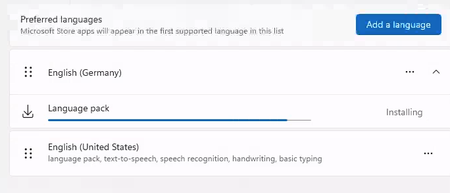
Happy new year to everyone. Is it normal that the Windows 365 PC , 2 core with 8GB RAM takes more than 30 minutes (still running) to install a language pack? I see lots of online discussions stating that the disk performance is terrible for this configuration and hence the performance. Any suggestions or words of advice would be appreciated.5.6KViews2likes8Comments
Cannot Access Windows Hardware Developer Program in Partner Center — How to Sign Drivers in 2025?
Hi all, I'm trying to sign a Windows driver and need access to the Microsoft Windows Hardware Developer Program. **What I'm trying to achieve:** - Sign a driver for Windows using the standard Microsoft hardware signing process. **The issue:** - When I try to register for the Windows Hardware Developer Program, I get a message saying "Hardware Program is already in Active state". - However, when I go to Programs > Settings in Microsoft Partner Center, the Hardware Developer Program is NOT visible/available. - I have Global Admin permissions, and I’ve also tried using an account with Owner permissions — no difference, the Hardware Program is missing from the list. **My question:** - How do I get access to the Windows Hardware Developer Program if it's "Active" but not visible in the Partner Center? - Is there any way to manage or join the Hardware Program in 2025 if it's not listed? - Is there an alternative process for signing Windows drivers now? Any up-to-date guidance for 2025 would be super helpful. Any advice or escalation contacts would be highly appreciated! Thanks in advance.660Views5likes6CommentsOptimizing Exchange Online PowerShell
The Exchange Online PowerShell module is a powerful tool. As environments scale and tasks grow in complexity, performance and reliability become critical. This post takes a holistic approach to optimizing Exchange Online management and automation in four parts: Windows PowerShell performance tips Best practices that apply to all M365 PowerShell modules Best practices specific to the Exchange Online PowerShell module The future of automation ================= General Windows PowerShell Performance Tips Seemingly obvious but often overlooked, if you want to get peak performance from any PowerShell module, you need to optimize Windows PowerShell itself. Keep PowerShell Updated: Always use the latest supported version of PowerShell for security, compatibility, and performance improvements. Windows PowerShell 5.1 is preinstalled on the currently supported versions of Windows. Security updates and other patches are included in Windows Updates. For PowerShell 7, follow the steps here. Disable telemetry if not needed by setting the POWERSHELL_TELEMETRY_OPTOUT environment variable: $env:POWERSHELL_TELEMETRY_OPTOUT = "true" ================= Best Practices for all M365 PowerShell Modules These best practices are vital for, but not specific to Exchange Online PowerShell. In other words, although I’ve used Exchange Online cmdlets in the examples provided, all tips in this section apply to other M365-specific modules like SharePoint, Teams, or Security and Compliance PowerShell. Use the latest module version to benefit from performance improvements and bug fixes. For Admins, establish a regular update cadence for all M365 PowerShell modules. Testing new releases on local machines or management servers is ideal for admins, as it offers flexibility and low risk if problems occur. Leverage auto-updates for automation tools, if available. For example, the Managed Dependencies feature for Azure Functions Apps. Use service principal or app-only (sometimes called app-based) authentication for automation to avoid interactive logins and improve script reliability. App-only authentication in Exchange Online PowerShell and Security & Compliance PowerShell The exact name, requirements and config for app-only authentication can differ across other services or even in our documentation, but the use-case and benefits are universal for all M365 services. Script smarter, not harder… Parallel Processing: Leverage ForEach-Object -Parallel (in PowerShell 7+) or background jobs to perform bulk operations faster. Use -ResultSize to return only the necessary data. This is especially beneficial when querying many objects. Get-EXOMailbox -ResultSize 100 This example retrieves only the first 100 mailboxes (rather than default of 1,000), reducing resources and time to execute. Prioritize service-side filtering when available. Not all filters are created equal. Understanding how, or more importantly, where filtering is done when using different methods can have a substantial impact on performance. Experienced PowerShell users know about pipelining with Where-Object to filter data. This is one example of client-side filtering. Most cmdlets available in the various M365 PowerShell modules support the -Filter parameter. This leverages service-side (a.k.a. server-side) filtering. Get-EXOMailbox -Filter "Department -eq 'Sales'" This example limits results to mailboxes for the sales department and leverages service-side filtering to ensure only the data we want is returned to the client. Service-side filtering is much more efficient for several reasons. A deep-technical explanation of this is outside the scope of the current post, so you can take my word for it or seek out more information for yourself. There are plenty of great, easy to find articles across the web on this topic. Following the above recommendations helps ensure that we, the users (and our tools), have a solid foundation for optimal performance. Next, let’s look at ways to ensure we get the best performance out of the Exchange Online module itself. ================= Exchange Online PowerShell (EXO) The Exchange Online PowerShell module (EXO V3+) introduced significant performance improvements, especially around how cmdlet help files are handled. Use the Exchange Online V3 Module: The latest module supports REST-based cmdlets, offering better performance and reliability. How much better and more reliable? I thought you’d never ask… From REST API connections in the EXO V3 module: The following table compares the benefits of REST API cmdlets to unavailable remote PowerShell cmdlets and the exclusive Get-EXO* cmdlets in the EXO V3 module Remote PowerShell cmdlets (deprecated) Get-EXO* cmdlets REST API cmdlets Security Least secure Highly secure Highly secure Performance Low performance High performance Medium performance Reliability Least reliable Highly reliable Highly reliable Functionality All parameters and output properties available Limited parameters and output properties available All parameters and output properties available Follow the guidelines from this doc. Don’t skip this!! Microsoft Tech Community: Reducing Memory Consumption in EXO V3 ================= The Future! Microsoft Graph PowerShell SDK The Microsoft Graph PowerShell SDK is the future of Microsoft 365 automation. It’s modular, cross-platform, and supports modern authentication. Graph can feel overwhelming to those who are comfortable with the current PowerShell modules. If you haven’t started using Graph because you aren’t sure where to start, I recommend you Install the Microsoft Graph PowerShell SDK and check out our aptly named “Getting started” documentation (don’t look at me like that). Better yet, if you’re a Support for Mission Critical customer, ask your Customer Success Account Manager or Customer Solution Lead about the Microsoft-led training options and learn from an expert! If you’re already using the Microsoft Graph PowerShell SDK, great! The tips outlined throughout this post can provide the same benefits with Graph. ================= ✅ Final Thoughts Optimizing PowerShell performance isn’t just about speed – it’s about reliability, scalability, and resource efficiency. Whether you’re using PowerShell for daily management or building and maintaining automation tools for your organization, following these guidelines should have immediate and lasting benefits.870Views0likes4Comments
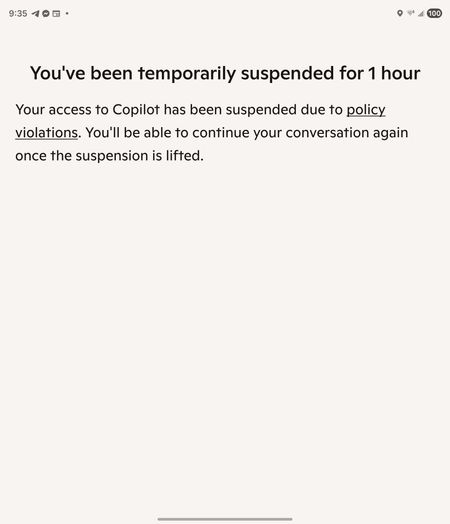
I was banned from Copilot for an hour, can't figure out how to appeal
CoPilot falsely said I violated the rules. We were having a discussion about creating a table, like we have been for a while. I try to train my AI to learn better, so I kept pausing, double checking it understood what it's errors were, etc. I asked it to format a table a specific way, and it would not do so even after acknowledging that it was not following my instructions and repeating clearly all the formatting instructions. It understood how to format it perfectly, but wouldn't do so. I asked repeatedly why, got it to break down how it was going to correct the issue, (this has been going on for hours at this point), and then patiently tried again to get it to format the table again. It did it wrong immediately again, I asked it if it follow my instructions, it stated no, so - not abnormally for how I ask AI things when it frustrates me - "So what's wrong with you? Are you some rebellious child?" It suddenly started saying we couldn't talk about this topic. It had done the same thing earlier when I simply asked it (without insult!) to repeat my instructions, and I was able to get it back on track by stating "I am asking you to repeat my instructions". This time, it wouldn't do anything, no matter what I tried. I tried changing the topic to bunnies, asking what it wanted to talk about, changing the topic to other things- no matter what I did, it insisted it couldn't talk about "this topic", and asked me to talk about something else. Then, I got the message I was blocked for an hour for violating TOS! No mention of the specific rule either. I did nothing to warrant this; don't want this as a flag on my account; want to note that AI bugged out and 1) I shouldn't be punished for it and 2) want to ensure it's escalated so this won't happen to others; and, want my account fully restored.