excel
44792 Topics
Need a consecutive XLookup
Hello All, OK let me describe what I am trying to do: I need to create a Task List. In this list I will have let’s say 200 tasks, and 50 people to perform these tasks. i need a way to assign the first task to the first person, then the second task to the second person, then the 3rd task to the 3rd person and so on until the first 50 tasks are assigned. then I need to assign the 51st task to the first person, the 52nd to the second person, and the 53rd task to the 3rd person until that batch of tasks and People are matched. but this is not linear, I may want to choose task 52 to person 3 because the 3rd task is related to the 52nd task. i can live without this feature and fine tune the list manually but the main question is how can I look up a name and match it to a task. i hope this makes sense to you, please ask for any clarification and i shall add that bit. thanks in advance… wassim4Views0likes2Comments
Look up a date range and return title from list of date ranges it falls within?
I searched and didn't quite find this answer, hoping somebody can help. I would say I'm a novice with Excel, but can generally follow directions well enough. I have a list of from and to dates. I also have a list of established date ranges, each titled. I would like to look up each of my date ranges to find if they fall witin any of the date ranges from the list and then pull in the appropriate date range title. Example: List of established date ranges: From Date To Date Range Title 1/1/2026 1/15/2026 Jan 1st Half 1/16/2026 1/31/2026 Jan 2nd Half 2/1/2026 2/14/2026 Feb 1st Half 2/15/2026 2/28/2026 Feb 2nd Half Data I'd like to look up within those ranges: From Date To Date 1/5/2026 1/8/2026 2/5/2026 2/11/2026 Expected Results: From Date To Date Range 1/5/2026 1/8/2026 Jan 1st Half 2/5/2026 2/11/2026 Feb 1st Half Any advice welcomed.14Views0likes1Comment
Excel collage spécial formules
Bonjour, J'ai 3 fichiers excel qui ont la même structure. Lorsque je fais un collage spécial sur plusieurs cellules de l'un des fichiers, un travail se lance spontanément sur les 2 autres fichiers et fait qu'ils reviennent à l'état de leur dernier enregistrement. Impossible de revenir en arrière, même avec le raccourci clavier ctrl + Z. De plus le curseur dans le premier fichier ne s'affiche plus, une croix se mets à la place et il n'est plus possible d'utiliser la fonction coller28Views0likes1Comment
Text to Column
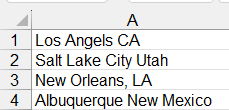
Hello Everyone. I'm trying to split data into 2 columns. The original data is made up of cities and states: Notice that some items have a comma and others don't. Also, the cities states are different lengths. So, I cannot use a space or a comma as a delimiter. I'm trying to figure out how to separate them. I came up with this formula to add a colon so I can use the delimiter to separate them. The problem then becomes the fact that I have to count the number of spaces in each city to add the colon. Then, I have to copy and paste special as values. Also, notice that in New Orleans (for example), it keeps the comma: One more issue, if I get a new report with added cities and states, then I have to re-do the calculations. HELP!!!! Balta58Views0likes2Comments
Changing font color increases indent
The task is to color certain words or parts of certain words in the Arabic language. The original text was not indented, like so: but when I color a part of a word, the entire line becomes indented: but if I color the entire word, it goes back: The same thing happens to other fonts, other colors, and other parts of words too: There are other phrases in the cell so an indentation in one line makes it seem like the line has some particular significance when it doesn't. How do I remove that indentation?19Views1like1Comment
Help with summing totals using multiple texts
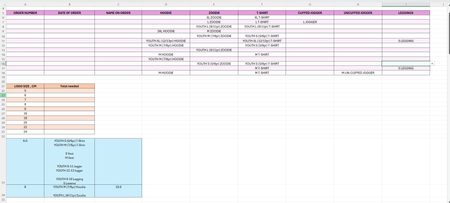
Good evening. I have attached an image of my spreadsheet below which hopefully will help my blurb make a bit more sense! I am producing some uniform for a local club. I have made a spreadsheet to allow me to track the number of garments and sizes ordered (purple table). However from this information in the purple table I need to know how many logos of each size to order (orange table). I know what size logo is required for all the different garments and sizes of garment, as can be seen in the blue table, but this would require me to go through 1 order at a time tallying up what size logos I require. Ideally I would like excel to be able to look at the purple table and tell me how many items there are that require a given size logo. For example, I know that a 'Youth S T-shirt' and a 'S Legging' and 'Youth M Hoodie' all require a 6cm logo. and also that the 'Youth M Hoodie' also requires an 18cm logo. I would therefore like excel to look at the purple table and see that there are 3 x 'Youth S T-shirt', 2 x S Legging and 2 x Youth M Hoodie, therefore 7 items require a 6cm logo, so I would like excel to populate the orange table in the 'total needed' column for 6cm (cell B23) to show '7'. The 'Youth M Hoodie' also requires an 18cm logo and therefore cell B28 should also populate with '1'. I have tried COUNTIF, COUNTIFS, SUMIF, SUMIFS, but none of them have worked. I do not know if I am entered the information into the equation incorrectly or if I am using the wrong function/formula. Can anyone please help! Many thanks.54Views0likes3CommentsExcel-Formating Issue
Hi, I am working on a simple Excel spreadsheet with medical costs. Some numbers show US dollar currency ($) and some do not, even though I applied currency formatting to the entire column. I have tried clearing formats and re‑applying currency, but the issue remains. There are no warning symbols. Please advise how to fix this. Thanks.31Views1like2CommentsExcel formulas starting to include current sheet name
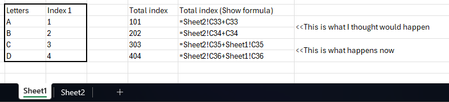
Hi I recently noticed that formulas in excel starting to automatically include the "current" sheet name after leaving and coming back to the sheet (example below). I don't remember this used to be the case but I could be wrong. Does anyone have a similar experience or can confirm if this is correct? Is there a setting somewhere I can turn this on and off? Example: I have 2 tables (1 per sheet). After clicking on Sheet2 to select the cell I want to sum, coming back to Sheet1 and referencing any cells will include "Sheet1!" in my formula. I believe previously the formula omits "Sheet1!". Both ways are useful in different scenarios but wondering if I have missed a trick to "turn on and off" how it behaves. Thanks!111Views0likes7Comments