Excel
44548 Topics
Why can't I post my reply to this thread
Hi, Why can't I post my reply to this thread: Calculate hours using pivot table | Microsoft Community Hub I have tried several times so far to post my reply and at first moment it seems to be accepted because the page displays my replay, but after refreshing the page it "disappears", meaning it no longer exists. Anyone have any ideas? Thnx.48Views0likes3Comments
Chat with Copilot popup on every Excel launch
An ad for Copilot shows up every single time I open Excel. Clicking Not Now closes it, only for it to reopen again when I open Excel later. Is there any way to disable this or remember my selection each time? It is frustrating to have to deal with it all day long. I do not have a Copilot tab in File > Options. Optional connected experiences is already disabled. Microsoft® Excel® for Microsoft 365 MSO (Version 2511 Build 16.0.19426.20218) 64-bit Windows 11 Pro 25H29Views0likes0Comments
Need assistance to correct a formula
I am using the following formula to calculate weekly hours. I want to change it to calculate the hours with the starting on Monday going to Sunday and display the result in column G on the Sunday. For example - calculate totals from Monday Jan 6 to Sunday Jan 12, inclusive. Thanks in advance for your help. =IF(WEEKDAY(B6)=7, IF(SUMIFS(D:D,B:B, ">="&B6-6,B:B, "<="&B6)>0, SUMIFS(D:D,B:B, ">="&B6-6,B:B, "<="&B6), ""), "") A B C D E F G 1 Date Hours Purchases Rate Daily Cost Hrs / wk 2 1-Jan Wed 5 $20.00 $100.00 3 2-Jan Thu 5 $0.00 4 3-Jan Fri $20.00 5 4-Jan Sat $20.00 10.00 6 5-Jan Sun 7 $20.00 $140.00 7 6-Jan Mon $20.00 8 7-Jan Tue $20.00 9 8-Jan Wed $20.00 10 9-Jan Thu $20.00 11 10-Jan Fri $20.00 12 11-Jan Sat $20.00 7.00 13 12-Jan Sun 3 $20.00 $60.0074Views0likes5CommentsSimplifying cost calculation using array instead of IF statement
Hello, I am in the process of calculating the cost of refining precious metals based on user input of specific parameters. For example, if a certain dore intake of Silver has 90% Silver (Ag) content then lookup the specific processes and multiply the cost per oz with the intake ounces. I have attempted to combine IFS and Xlookup for each process separately but the formula looks very unwieldy. I am also enclosing a slightly simpler formula of IFS and sum where the total cost is calculated in one cell (Q12). Here is the link: https://docs.google.com/spreadsheets/d/1hizmF6EwhxOPEeR10bXJsBOKeOtXude8/edit?usp=drive_link&ouid=103354753371375324640&rtpof=true&sd=true I am looking to see if I can have a more dynamic iteration of the formula in Cell Q12 as well as in the calculation of the individual processes in Row 4 , Cols P:V. Thank you. Regards, Shams.16Views0likes0Comments
Not Allowing Entries to be blank
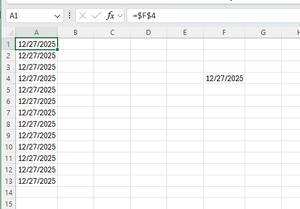
I have a cell that is formatted for a date that will get updated by the user (F4 Below). And then column A is just copying that value all the way down. I want to prevent the information in column A from being deleted accidentally. It will likely be a hidden column, so accidentally deleting it is possible. I tried data validation and rules, and they worked in all cases except if they are deleted. How can I prevent A1 from being deleted, but still have the user be able to update the date in F4 and have A1 update.70Views0likes2CommentsSimplifying cost calculation using array instead of IF statement
Hello, I am in the process of calculating the cost of refining precious metals based on user input of specific parameters. For example, if a certain dore intake of Silver has 90% Silver (Ag) content then lookup the specific processes and multiply the cost per oz with the intake ounces. I have attempted to combine IFS and Xlookup for each process separately but the formula looks very unwieldy. I am also enclosing a slightly simpler formula of IFS and sum where the total cost is calculated in one cell (Q12). Here is the link: https://docs.google.com/spreadsheets/d/1hizmF6EwhxOPEeR10bXJsBOKeOtXude8/edit?usp=drive_link&ouid=103354753371375324640&rtpof=true&sd=true I am looking to see if I can have a more dynamic iteration of the formula in Cell Q12 as well as in the calculation of the individual processes in Row 4 , Cols P:V. Thank you. Regards, Shams.1View0likes0CommentsHelp with changing a formula
Hi - I am using a formula to sum hours worked for a week. Currently it calculating the values beginning on Sunday to Saturday. I would like to change it to sum from Monday to Sunday and display the result in column G on the Sunday of that week. I'm hoping you can help me. TIA I am currently using the following formula. =IF(WEEKDAY(A2)=7, IF(SUMIFS(C:C,A:A, ">="&A2-6,A:A, "<="&A2)>0, SUMIFS(C:C,A:A, ">="&A2-6,A:A, "<="&A2), ""), "") A B C D E F G H 1 Date Hours Purchases Rate Daily Cost Hrs / wk 2 1-Jan Wed 2.5 $20.00 $50.00 3 2-Jan Thu 4 3-Jan Fri $20.00 5 4-Jan Sat 3 $20.00 $60.00 5.50 6 5-Jan Sun $20.00 7 6-Jan Mon $20.00 8 7-Jan Tue $20.00 9 8-Jan Wed $20.00 10 9-Jan Thu $20.00 11 10-Jan Fri $20.00 12 11-Jan Sat 3 $20.00 $60.00 3.00 13 12-Jan Sun 3 $20.00 $60.0055Views0likes1Comment
Move repeating columns into rows
Hello guys, I have a set of data that looks like this: Name Hours Date Hours Date Hours Date John 3 1-Jan 4 5-Jan Ann 4 4-Jan 2 8-Jan 2 9-Jan Each Hours data cell have a comment in it, and I'm trying to turn it into something like this: Name Hours Date John 3 1-Jan John 4 5-Jan Ann 4 4-Jan Ann 2 8-Jan Ann 2 9-Jan Is there a way for me to do that while retaining all the comments in each Hours data cell? I'm using Excel 2016. Best Regards, John83Views1like3Comments
Calculate hours using pivot table
Hi, Im making a personell planning sheet and I want to calculute the hours each teacher is teaching using a pivot table. My data is formatted in 2 tables like this (simplified): Lesson Hours Teacher 1 Teacher 2 Lesson 1 2 Paul Lesson 2 3 Pete Lesson 3 2 Paul Pete Teacher Max working hours Paul 10 Pete 15 Now its easy to create an overview of how many hours each teacher is teaching with one teacher collumn. But it need to calculate the hours based on 2 collumns like this: Paul -> Lesson 1 + Lesson 3 = 4 hours Pete -> Lesson 2 + Lesson 3 = 5 hours Then the next step is to use a metric or KPI to calculate if the teacher is exceeding their max working hours. I hope someone can help me out with this... Thanks!43Views0likes1Comment