error
71 Topics
Insights from Copilot have stopped working for us
We're all licensed (verified) with M365 Copilot, and for about the last week, one of our workhorse intake forms has stopped working with regards to the "Insights from Copilot" feature. When we attempt to refresh the insights, it presents the message, "Your form has XX responses. Copilot is analyzing the data to provide insights.", then spins for about 30 seconds, and then presents the error, "The insights haven't been generated successfully. Please try again." We're syncing responses to an Excel workbook, and that seems fine, but after about a week these "insights" just started failing in this fashion. We've done basic troubleshooting like trying InPrivate browsing, cache clearing, and since we are only at about 100 responses for this particular small form we're not hitting any limits. Regardless, it's wedged stuck in this state. I reported it via the M365 Admin portal and received the usual "No issues found" reply. 🙄 Anyone else seeing this problem? Does anyone actually use this feature? 😜295Views0likes2Comments
Opening Form through a non compliant browser looses full URL
When opening a Form on a non compliant browser - access is blocked and an option to Launch in Edge is suggested. Once Launch in Edge is selected a full URL to exact Form is lost and general page opens: https://www.microsoft.com/en-gb/microsoft-365/online-surveys-polls-quizzes Other resources such as specific files on sharepoint - onedrive opens fine. This is especially painful when Forms are being opened via QR. QR Code > Camera > Default Browser > Block > Managed Browser > General Forms Page. Does this sound like a design choice for Forms ?25Views0likes0Comments
This form can't be distributed as it is asking for personal or sensitive information
Two issues, one with what the system flagged, and the second with how the system is not designed to help you correct the error. First Issue: It took me an hour of clicking in form fields and making minor text changes to get the system to momentarily clear the error and allow me to make a copy of the form for rough cut deletion of the offending section. That was a pain and part of what I will get into in part 2. When I finally had a copy I could work with, I deleted sections until I got to the question “EA Passes” with the subtext “how many Early Access Passes does your crew need”. This was the offending question. EA Passes. I changed it to EA Games, EA Medical, EA Social Security… these were all fine. But “EA Passes”. Flagged. This is not sensitive info, you may wish to have your system let that one go. Second Issue: and this is user satisfaction related. The system flags and makes the entire form unusable rather than flagging the individual question or phrase. Having a helpful popup showing what is flagged and making the form usable without this question would be wonderful! Especially considering the fact that the term flagged was not clear or even remotely sensitive in nature. Thank you for considering 1. The flagging of “EA Passes”, I changed this to Early Access Passes to get past it, and 2. Some help fixing/flagging the issue/phrase rather than dynamiting the form and forcing you to delete most if not all of your work to try to find the issue.188Views1like1CommentExcel Does Not Sync Until Opened
I created a form linked to an Excel spreadsheet in SharePoint as well as a Power Automate approval flow triggered on submission. In addition to sending out confirmation/approval emails, the flow also updates the associated Excel spreadsheet with the approval/denial. The flow was working fine until last week but since then has failed 2 consecutive times. The failures appear to be related to the flow unable to find the automatically generated submission ID in the Excel spreadsheet. When I open the linked spreadsheet, the submission is not immediately present at first but the file does sync at that point and the entry appears. When re-triggered after the sync, the flow completes successfully. Not sure if it is related, but MS form/linked spreadsheets have been updated by Microsoft recently and I was prompted to go through an update process for synced Excel spreadsheets. I completed the update with this specific form last week after the flow failed for the first time. TLDR - my form only syncs with the spreadsheet once opened. Any ideas how to get MS Forms to update the spreadsheet in real-time as opposed to when it is opened?4.5KViews3likes4CommentsWhy is Excel macros sometimes missing ?
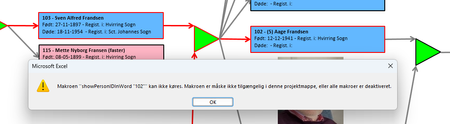
I have an excel file with a lot of rectangular shapes showing a tree structure for a family. When the user clicks on one of the rectangulat shapes the 'story' of that person opens up in a Word dokument. BUT ... Most often the macro 'assigned' to the OnAction WONT run - instead this message comes up: The macros is NOT shown when I "show macros" but it IS present in the VBA section when I press alt+F11 ! When it's working it's most often reight after a reboot og the machine - then it maybe works in 10-30 minuts and then the problem is back again ! I HAVE chesked the security setting allowing macros to be activated ! I have tha SAME file running under Window 10 for years WITHOUT any problems !!!! I can see out there that people FOR YEARS have had similar problems with missing macros - but unfortunately I found no solution ! What the _BEEP_ is wrong here ?524Views0likes9Comments
Microsoft forms and external upload files possible?
Good afternoon, We as a company want to create forms that our customers can fill in with the data we need. Like plans and technical drawings. I hoped that it would be possible to create these forms, but when i try to add the upload file question I need to change the settings to only internal. Is there no possibility to create forms that have the request of uploading files from external parties we send the link to? Kind regards, Carina48KViews0likes6Comments
OneDrive, SharePoint Offline access through File explorer
The connection through a short cut to file explorer is bugged and MS does no seem any keen to resolve this. I took a business support ticket only to be told that the issue is with development and they do not have any indication that it will be addressed any time soon. Any associated applcation with Office 365, seems will not be attempted to be bug fixed. This is very unfortunate for those who took for granted that MS will support.38Views0likes0Comments
Error installing Apps 365, command not supported.
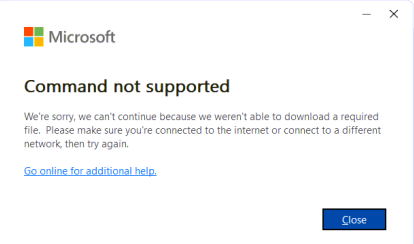
I was performing an Online Repair for a user. It did the uninstall fine, but then threw this error. I tried to reinstall, same error. Used the MS Cleanup tool, ran SFC, cleared temp files, cache... Internet connection is stable. Disabled security software (Zscaler). I'm out of ideas. I'm hoping someone has seen this before. Thanks for any help!Solved241Views0likes2Comments
BioEnrollmentHost.exe failes setting up Windows Hello (August 2025)
Hello, when trying to add another fingerprint, there is a failure. The editing interface does not open - it disappears without displaying an error message. The eventlog shows the error: Log Name: Application Source: Application Error Date: 25.08.2025 9:09:22 Event ID: 1000 Task Category: Application Crashing Events Level: Error Description: Faulting application name: BioEnrollmentHost.exe, version: 10.0.26100.4484, time stamp: 0x3a2c5e36 Faulting module name: Windows.UI.Xaml.dll, version: 10.0.26100.4946, time stamp: 0x4374ba0f Exception code: 0xc000027b Fault offset: 0x0000000000903d13 Faulting process id: 0x3B10 Faulting application start time: 0x1DC158F2982572A Faulting application path: C:\Windows\SystemApps\Microsoft.BioEnrollment_cw5n1h2txyewy\BioEnrollmentHost.exe Faulting module path: C:\Windows\System32\Windows.UI.Xaml.dll Report Id: da35663e-a5e8-4638-b202-5afed9fd901c Faulting package full name: Microsoft.BioEnrollment_10.0.19587.1000_neutral__cw5n1h2txyewy Faulting package-relative application ID: App There is no problem with OS integrity > PS C:\WINDOWS\system32> DISM.exe /Online /Cleanup-image /Scanhealth Deployment Image Servicing and Management tool Version: 10.0.26100.1150 Image Version: 10.0.26100.4946 [==========================100.0%==========================] No component store corruption detected. The operation completed successfully. PS C:\WINDOWS\system32> PS C:\WINDOWS\system32> DISM.exe /Online /Cleanup-image /Restorehealth Deployment Image Servicing and Management tool Version: 10.0.26100.1150 Image Version: 10.0.26100.4946 [==========================100.0%==========================] The restore operation completed successfully. The operation completed successfully. PS C:\WINDOWS\system32> PS C:\WINDOWS\system32> sfc /scannow Beginning system scan. This process will take some time. Beginning verification phase of system scan. Verification 100% complete. Windows Resource Protection did not find any integrity violations. PS C:\WINDOWS\system32> chkdsk c: /scan /perf The type of the file system is NTFS. ... Windows has scanned the file system and found no problems. No further action is required. ... PS C:\WINDOWS\system32> PS C:\WINDOWS\system32> systeminfo | findstr /B /C:"OS Name" /B /C:"OS Version" OS Name: Microsoft Windows 11 Enterprise LTSC OS Version: 10.0.26100 N/A Build 26100 PS C:\WINDOWS\system32> Any ideas?547Views0likes4Comments“Word Online Transcribe shows ‘Go Premium’ despite active Microsoft 365 Family subscription”
On all of my Chromebook devices, Word Online Transcribe shows ‘Go Premium’ despite an active Microsoft 365 Family subscription. So, I'm effectively blocked from using that function because it requires an upgrade that I already have. I have already contacted support. Support replied: Microsoft confirmed a recent bug where Transcribe incorrectly showed “Upgrade to Premium” for active subscribers. The fix was rolled back, but cached tokens may still cause issues. Clearing cookies or signing in via InPrivate usually resolves this. The “Go Premium” message in Word Online’s Transcribe feature is a known bug, not a new paywall, and it persists for some Microsoft 365 subscribers even with an active plan. However, their suggested fixes (clearing cache, reinstalling PWA, updating Chrome OS, setting language to English US) have not resolved this problem for me. Support was not able to provide any further potential solutions. They suggested using OneNote dictation, which uses the same transcription protocol, but I haven't figured out how to use it on OneNote, as I typically don't use it. Also, the main use case for me is to upload recorded content and having Word Online transcribe with time stamps and speaker labels. Other than buying another service to do this, MS Word Online was the best way to achieve this.261Views0likes7Comments