device management
1459 Topics
Disabling PIN-based login on Entra-joined PCs
Hi guys. Yesterday I took two machines off the domain and Entra joined them. The goal was 1) remove their access to domain resources 2) have tenant users login to the machine and get enriched tokens every time. this works as desired. The problem is every user gets prompted to set a pin. these are both shared secondary/tertiary PC's - there is no point to having a 6 digit PIN on them. I thought the new Authentication Methods tools had controls for this, but apparently not. A script was run to change certain related Reg Keys (by my onsite tech) but this had no change on reboot. textreg add "HKEY_LOCAL_MACHINE\SOFTWARE\Policies\Microsoft\PassportForWork" /v Enabled /t REG_DWORD /d 0 /freg add "HKEY_LOCAL_MACHINE\SOFTWARE\Policies\Microsoft\PassportForWork" /v DisablePostLogonProvisioning /t REG_DWORD /d 1 /f HKEY_LOCAL_MACHINE\SOFTWARE\Policies\Microsoft\PassportForWork Enabled key was set to 0, and DisablePostLogonProvisioning was set to 1. These are from various help threads I found here and other resources. Unfortunately, they do not work. Not sure what to do here. I've read there are InTune controls for this - but I don't really have the time to work out WindowsPC ennrollment profiles for 2 machines. The site has InTune, but only for iOS mobile management. Thoughts?1.3KViews0likes2Comments
Unknown memory leak on Win 11 pro
Hello, For the past couple months I have been experiencing a weird issue on my windows machine. Usually around 8 or so hours after a clean reboot, task manager will start reporting 170+GB of 190GB of RAM is in use. However, when I tally the entire list of processes I can only account for 4GB in use. When I use RAMMap its the same story, I can account for 4GB and it appears windows has simply misplaced a 150GB of memory. The only other symptom I notice is when I shutdown, the shutdown process will take 40+ minutes sometimes as if some microslop process is refusing to die. This does not occur when I shutdown while memory usage appears normal. So far I have tried: Using different web browsers and uninstalling the one I had been using. Removing pretty much every piece of software I have been using while the issue occurred. Ensured windows, firmware and drivers were properly updated.9Views0likes0CommentsMicrosoft Technical Takeoff 2026: Windows + Intune
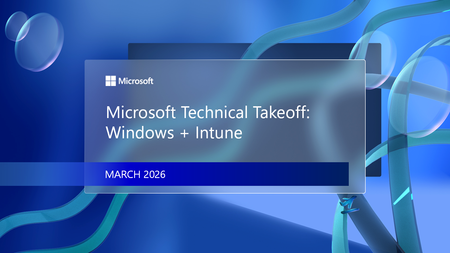
Mondays in March. Deep dives. AMAs. Windows, Intune, Windows 365, and Azure Virtual Desktop. Join us for Microsoft Technical Takeoff 2026 for Windows + Intune! This virtual technical skilling event takes you deep inside the latest features, capabilities, and scenarios for commercial organizations and the IT professionals that support them. Skill up and get answers to your questions from the engineering and product teams behind the features. How do I participate? Create your own agenda. Select “Add to Calendar” on a session page to save the date, then click the “Attend” button to save your spot, receive event reminders, and participate in the Q&A. If you can’t make the live session, don’t worry. You can post your questions in advance and catch up on the answers and insights later in the week. All sessions for Tech Takeoff will be recorded and available on demand immediately after airing. Don't see the "Attend" button or the ability to post Comments? Make sure to first sign in on the Tech Community! MONDAY MARCH 2 MONDAY MARCH 9 MONDAY MARCH 16 MONDAY MARCH 23 7:00 AM Let's talk Windows and Intune: 2026 edition 7:00 AM The latest in security for Windows 365 and Azure Virtual Desktop 7:00 AM Why smarter Windows management starts with Intune 7:00 AM AMA: The latest in Windows hardware security 7:30 AM The latest in Windows 11 security 7:30 AM Secure Boot certificate updates explained 7:30 AM Reporting at scale with Windows Autopatch update readiness 7:30 AM Zero Trust DNS: Securing Windows one connection at a time 8:00 AM Uplevel business continuity with Windows 365 Reserve 8:00 AM Feedback wanted: App management in the enterprise 8:00 AM User experience updates: Windows 365 Boot and more 8:00 AM AMA: Secure and manage AI and agentic capabilities in Windows 8:30 AM Hotpatch updates demystified: answers to real-world questions 8:30 AM Ready day one: how to get Windows users up and running fast 8:30 AM AI roundup: Intune agents for outcome-oriented innovation 8:30 AM Deploy and manage Windows 365 with Microsoft Intune 9:00 AM Zero Trust in action: securing endpoints with Intune 9:00 AM Making the most of your Intune data 9:00 AM AMA: Getting the most from Security Copilot in Intune 9:00 AM Unpacking Endpoint Management: Live from Tech Takeoff 2026 9:30 AM AMA: Windows Autopilot 9:30 AM Windows 365 reporting and monitoring updates 9:30 AM Manage Apple devices at scale: Intune security best practices 9:30 AM Azure Virtual Desktop for hybrid environments 10:00 AM The AI‑powered admin: emerging trends in endpoint management 10:00 AM Least privilege on Windows with Endpoint Privilege Management 10:00 AM Click less, manage more: simplify app deployment with Intune 10:00 AM Protect users, stop attacks: Passkeys on Windows 10:30 AM Eliminating NTLM in Windows 10:30 AM Windows 365 Frontline expands with Cloud Apps and more 10:30 AM App Control for Business: same roots, new playbook 10:30 AM AMA: AI and agentic features for Windows 365 11:00 AM One platform, many industries: smart Android management with Intune 11:00 AM From panic to productive: point-in-time restore in Windows 11:00 AM Intune timing demystified: what really happens behind the scenes 11:00 AM Transitioning to post-quantum cryptography 11:30 AM Resiliency with Windows 365 and Azure Virtual Desktop 11:30 AM The Intune playbook for iOS management at scale 11:30 AM Migrating from VDI to Windows 365 11:30 AM Resilience for the modern era: Windows quick machine recovery This event will feature AI-generated captions during the live broadcast. Human-generated captions will be available by the end of the week.27KViews9likes19Comments
Canon Pixma MG 3550 set up
Have installed the latest driver for my Canon Pixma MG 3550. I am fully up to date with Windows 11, have selected the correct WiFi network, followed all instructions to the letter. It refuses to detect the printer. Tried installing via USB, also refuses to detect the printer. Immensely frustrating. Would be grateful for any advice please.632Views0likes1Comment
Create a task which runs for all user
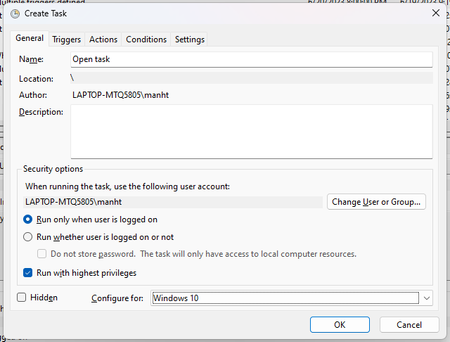
I want to use Task Schedule to run an app at log-on for all users on my PC using admin rights. How can I do that? I tried to choose to start at log-on for any user in the tab Triggers but the task only runs on my admin account. When I log out and log in to my user accounts it doesn't work. Thank you for reading.2.1KViews0likes4Comments
Battery shows as 0%, but on battery report and in settings shows as 100% charged
On Lenovo Ideapad Slim 5 14AHP9, Windows 11 Have had this suddenly without any recent updates or applications installed. Battery shows as 0% in the bottom right corner, and will shut down immediately if not on AC power. However from battery report and in the power section of settings it shows as 100% charged, or having charge. There was also a period of one day where it fixed itself and went back to normal, before returning to this state. Have tried multiple things to fix this so far including - Full discharge and disconnecting/reconnecting the battery - BIOS update - Turning off power saving settings in battery - Deleting battery drivers Looking for any suggestions of how to proceed. Particularly confused as it worked as normal for a day, making me think perhaps it's not the battery having died? Not sure tho Battery Report from powercfg https://limewire.com/d/nPeaG#QLIFLOWqKH Battery screenshots https://ibb.co/RkqznTrt https://ibb.co/xSgpCd5T36Views0likes2CommentsHow to globally restore the old compact context menu in Windows 11?
In some applications, the old white compact right-click menu can still be seen, displaying more options in a dense layout. Is there a way to forcibly enable this old menu in all windows (especially File Explorer), instead of the new one?14Views0likes0CommentsHow can I easily install pending Windows updates on my PC?
Call 1-855-535-7109. To install pending Windows updates easily on your Windows PC, follow these steps: Open Windows Settings: Press Windows + I to quickly open the Settings menu. Go to Update & Security: In the Settings window, select Update & Security. Check for Updates: Under the Windows Update section, click Check for updates. Windows will search for any pending updates. Install Updates: If updates are available, click on Install to begin the installation process. Windows will automatically download and install the updates. Restart Your Computer: After updates are installed, a restart may be required. Windows will prompt you to restart, or you can manually restart your PC. Use Windows Update Troubleshooter (if issues occur): If updates aren’t installing properly, try using the Windows Update Troubleshooter. Go to Settings > Update & Security > Troubleshoot > Additional troubleshooters, then select Windows Update and run the troubleshooter.60KViews3likes3Comments