copilot
69 TopicsWhat’s New in Microsoft EDU, Bett Edition January 2026
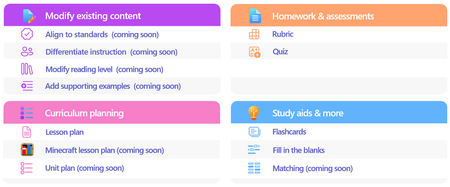
Welcome to our update for Microsoft Education and our special Bett 2026 edition! The Bett conference takes place in London during the week of January 21st - January 23rd, and Microsoft Education has 18 exciting updates to share! Check out the official Bett News blog here, and for our full Bett schedule and session times, be sure to check out our Microsoft EDU Bett 2026 guide. January 2026 topics: Microsoft 365 Updates for Educators Microsoft Learning Zone Microsoft 365 Updates for Students Teams EDU and OneNote EDU Updates Microsoft 365 LTI Updates Minecraft EDU 1. New Educator tools coming to the Teach Module in Microsoft 365 Unit Plans Soon educators will be able to create unit plans in Teach. Using a familiar interface, educators will be able to describe their unit, ground in existing content and educational standards, and attach any existing lesson plans. Unit plans will be created as Microsoft Word documents to facilitate easy edits and sharing. When: Preview in Spring 2026 Minecraft Lesson Plans Minecraft Education prepares students for the future workplace by helping build skills like collaboration, creative problem-solving, communication, and computational thinking. Coming soon, you will be able to create lesson plans in Teach that are fully teachable in Minecraft Education. And if you’re new to Minecraft Education, the lesson plan includes step-by-step instructions to get started. Just like the existing lesson plan tool in Teach, Minecraft Lessons can be grounded on your class details, existing content, and educational standards from 35+ countries. When: Preview in February 2026 Modify Content When: In Preview now Teach supports educators in modifying their existing teaching materials using AI-powered tools that save time and help meet the diverse needs of learners. With Modify existing content, educators can quickly adapt lessons they already use—without starting from scratch—by aligning materials to standards, differentiating instructions, adjusting reading levels, and enhancing text with supporting examples. Each modification tool accepts direct text input or file uploads from cloud storage, making it easy to transform current curriculum resources. These tools help educators maintain instructional intent while ensuring content is accessible, standards aligned, and effective for all learners. Align materials to standards Aligning instructional content to educational standards helps ensure lessons clearly support required learning goals and set the right expectations for learners. The Align to Standards tool rewrites existing lesson instructions so they reflect the intent of the selected standard—focusing on what learners should understand or be able to do—without copying the standard’s wording. Scenario: An educator has a lesson instruction for a reading activity on ecosystems. After selecting a state science standard, the educator uses Align to Standards to produce a revised instruction that emphasizes system interactions and evidence-based explanations while preserving the lesson’s original purpose. This allows the educator to strengthen alignment quickly without rewriting the lesson from scratch. Differentiate instructions Differentiation helps ensure every learner—regardless of readiness, background knowledge, or support needs—can access and engage with instructional tasks. The Differentiate Instructions tool adapts existing instructions based on specific supports an educator selects, such as adjusting reading level, including a single type of scaffold, or targeting a desired length. Because this tool is designed for single shot use, it produces a clear, accurate adaptation that adheres directly to the selected inputs. Scenario: A secondary biology educator has lab instructions written for general education learners but needs versions for learners requiring additional scaffolding. Using Differentiate Instructions, the educator quickly generates modified instructions that include step-by-step breakdowns, sentence starters, or graphic organizers—making the lab more accessible without changing the learning goal. Modify reading level Adjusting the reading level helps ensure instructional content remains accessible while preserving essential vocabulary and core concepts. The Modify reading level tool rewrites text to match a specified grade level, simplifying or increasing complexity as needed while maintaining meaning. Educators can also choose to generate a glossary with clear, age-appropriate definitions of key terms. Scenario: A social studies educator wants students to work with a primary source written at a university reading level. Using Modify reading level, the educator creates a version that maintains the document’s key ideas and important historical terms while simplifying sentence structure for lower secondary learners. By adding a glossary, students can access learner friendly definitions alongside the adapted text. Add supporting examples Concrete examples strengthen understanding by connecting abstract ideas to real world applications. The Add Supporting Examples tool enhances existing instructional content by appending relevant, accurate, and age-appropriate examples—without altering the original paragraph. Scenario: An educator teaching thermal energy transfer has a paragraph explaining that heat moves from warmer objects to cooler ones, but the concept feels abstract. Using Add Supporting Examples, the educator adds real world examples—such as a metal spoon warming in hot soup or an ice cube melting on a countertop—to help learners visualize how heat transfer works. These examples reinforce understanding and make the concept more accessible for secondary learners. Fill in the Blanks, Matching and Quizzing New Learning Activities are coming soon! We’re excited to introduce three new Learning Activities designed to make classroom experiences more dynamic and personalized: Fill in the Blanks, Matching, and Quizzes. Whether it’s completing paragraphs to strengthen comprehension, pairing terms with definitions in a timed matching game, or testing knowledge through quick self-assessments, these activities bring variety and fun to learning. Fill in the blanks creates paragraphs where learners can check their understanding by filling in missing terms. Matching is a game where learners can match terms and definitions while racing against the clock, aiming for fast completion and accuracy. And Quizzes allows students to quiz themselves and assess their comprehension. Learning Activities are available across our education products, in a standalone web app, in the Teach Module, in Teams for Education, in the Study and Learn agent and Study Guides. When: Spring 2026 Teach Module updates in Teams Classwork In Teams Classwork, you can already use Copilot to create Lesson Plans, Flashcards, and Fill in the Blank Activities. Coming this Spring, you will see the ability to create and modify more content, better matching the capabilities of Teach in the Microsoft 365 Copilot App. This includes modifying content with AI, Minecraft Lessons, and more! When: Coming soon Teach Module and Class Notebook integration We're bringing Copilot-powered creation tools directly into OneNote Class Notebook. Teachers will be able to generate Learning Activities and quizzes or modify existing content (like adjusting reading level or adding supporting examples) without leaving the page where they're already planning. When: Coming soon 2. Spark classroom engagement with Microsoft Learning Zone Educators worldwide are always looking for innovative ways to engage students, personalize learning, and support individual growth, yet limited time and resources often stand in their way. Microsoft Learning Zone, a new Windows app, empowers educators to transform any idea or resource into an interactive, personalized lesson using AI on Copilot+ PCs. The app also provides actionable insights to guide instruction and support every student’s progress. Learning Zone is now available to download from the Windows app store and included at no additional cost with all Microsoft Education licenses. Just in time for Bett 2026, Learning Zone has earned the prestigious ISTE Seal of Alignment - a recognized mark of quality, accessibility, and inclusive design. This recognition reflects our commitment to delivering meaningful, inclusive, and research-backed digital learning experiences for every learner. As noted by ISTE reviewers: "Microsoft Learning Zone saves educators valuable time while delivering personalized instruction that addresses individual learning needs." Getting started with Microsoft Learning Zone is simple. Educators begin by defining their lesson goals and preferences and can also choose to reference their teaching materials or trusted in-app resources by OpenStax. From there, AI does the heavy-lifting, generating a complete, interactive lesson with engaging content slides and a variety of practice activities. Educators can also quickly create Kahoot! quizzes using AI, bringing live classroom gamification into their lessons with just a few clicks. Learning Zone is more than content creation; it provides a full classroom-ready solution: from assignment to actionable insights. Once a lesson is created and reviewed, educators can assign it to students. Students complete lessons at their own pace, on any device, while the lesson flow adapts to their responses, helping reinforce understanding, revisit missed concepts, and build confidence over time. Educators, in turn, gain clear, actionable insights into student progress and mastery, enabling them to personalize instruction and better support every learner’s growth. Learning Zone is a classroom ready solution including management and actionable insights Learning Zone also includes an extensive library of ready-to-learn lessons developed in collaboration with leading global organizations, including the Nobel Peace Center, PBS NewsHour, the World Wildlife Fund (WWF), NASA, OpenStax, Figma, and Minecraft Education. Ready-to-learn lessons are available to educators and students on any Windows device and are a great way to inspire curiosity and bring meaningful learning of different subjects into the classroom. Ready-to-learn library in partnership with trusted global organizations Learning Zone is available today: Visit https://learningzone.microsoft.com to learn more and download the app. 3. New AI-powered tools for student learning in Microsoft 365 Study and Learn Agent Bring the interactive, conversational Study and Learn Agent in the Microsoft 365 Copilot App to your students. Available to all Microsoft EDU customers, the agent does not require an additional Copilot license. It is going into preview now, in January 2026. Join the Microsoft Education Insiders community at https://aka.ms/joinEIP and get information about getting access to the Preview. Study and Learn helps learners understand concepts, practice skills with activities like flashcards, and prepare for tests with study guides and quizzes. Additional activities including fill-in-the-blanks, matching, and others that will continue to be added. Purpose-built for learning in collaboration with learning science experts, Study and Learn aims to help foster reflective and critical thinking. Over time, it will provide a more personalized, adaptive, inclusive experience to make learning relevant and bolster motivation. When: January 2026 Preview Learning Activities app The Learning Activities Web App is now here! This web-based experience brings all your favorite activities together in one place, making it easier than ever to create, customize, and share engaging content. Whether you’re an educator designing lessons or a student building study sets, the web app offers a streamlined interface for finding or creating Flashcards and Fill in the Blanks with Matching, and Quizzes coming soon. You can easily access all your activities that you have created in other products from the web app, too. When: Available now! 4. Updates for your favorite teaching tools - Teams EDU and OneNote EDU Set AI Guidelines in Teams To help bring clarity to AI use in the classroom, AI Guidelines in Assignments allow educators to set clear expectations for when and how students can use AI—directly within the assignment experience. Educators start with a set of default, standardized AI use levels, and can apply them at the class or assignment level, with the ability to customize descriptions to reflect their school or district guidelines. These guidelines are clearly visible to students, reducing confusion and supporting responsible, transparent AI use, while also encouraging learners to use secure, education-ready Copilot. When: In Preview Q1 Add Learning Activities to Teams Assignments Learning Activities are coming to Teams Assignments and supported LMS platforms in preview, helping educators integrate interactive practice into the assignment workflows they already use. Educators can add activities such as Flashcards, Fill in the blanks, and Matching, and share resource documents that enable students to create their own learning activities within an assignment or the Classwork module. Students complete activities seamlessly within Assignments or their LMS, with progress captured as part of the assignment experience—supporting active, student driven learning while keeping setup, instruction and review in one familiar place. Students can create their own learning activities from educator-shared resources within an assignment or Classwork. When: In Preview Q1 New information literacy features in Search Progress in Teams Assignments Now students don't just gather sources—they investigate them. Four new research prompts (Source Reputation, Factual Importance, Cross-check, Source Purpose) make their thinking visible as they research. Read more about these new features in the preview blog here, and stay tuned for Microsoft Learn course updates to come. When: Available now Add Learning Zone lessons to Teams Assignments and LMS Learning Zone lessons are coming to Teams Assignments and Microsoft 365 LTI for LMS platforms in preview, allowing educators to bring interactive lessons directly into the assignments and grading workflows they already use. Educators can attach Learning Zone lessons during assignment creation, while students complete them fully embedded within Assignments or their LMS, with progress and scores automatically synchronized for review. This preview helps educators save time, reduce manual setup and grading steps, and confidently deliver interactive learning experiences—while keeping assignment creation, student work, and review all in one place. When: Preview in February Embed Learning Activities in OneNote You asked, we're building it. Soon, learners and educators alike will be able to copy a Learning Activity link, paste it into any OneNote classic page, and have it render inline – all to help folks engage without leaving the page. When: NH Spring 2026 5. Create with Copilot in your LMS In addition to supporting the new Learning Zone lessons in assignments, we are adding exciting new Create with Copilot options in Microsoft 365 LTI which bring the AI-powered capabilities of the Teach Module directly into LMS content creation workflows. From within their course, educators can use Copilot to draft lesson materials and other instructional content which is seamlessly published to the course using familiar Microsoft 365 tools. Create with Copilot is also available in LMS content editors to help educators compose content, discussion posts, and more. This includes the ability to modify existing content, if supported by the LMS platform. By embedding the creation experience where courses are designed and managed, Microsoft 365 LTI helps educators preserve instructional intent, reduce context switching, and move more quickly from planning to teaching. Microsoft 365 LTI is available to any Microsoft Education customer without additional licensing. LMS administrators can deploy the integration to an LTI 1.3 compatible LMS like Canvas, Blackboard, PowerSchool Schoology Learning, D2L/Brightspace and Moodle to get started! When: Preview in February 6. Dedicated servers coming to Minecraft Education Minecraft Education is launching a new feature that enables IT administrators and educators to run dedicated servers to host persistent worlds for use in classrooms and after-school programs, similar to Minecraft Bedrock’s dedicated servers (for the consumer version of the game). Dedicated servers enable cross-tenant gameplay, which is a gamechanger for expanding multiplayer experiences in the classroom or running Minecraft esports programs with other schools. This feature is currently in Beta to release in February for general availability for all Minecraft Education users. (Minecraft Education is available in Microsoft A3 and A5 software subscriptions for schools.) ___________________________________________________________________________________ And finally, just to recap all the news we have for you this month, here’s a quick review of all the features that are generally available or are rolling out soon: Teach Module Microsoft 365 Updates for Educators • Unit Plans – available in spring • Minecraft Lesson plans – preview in February • Modify content – align to standards. Private preview now • Modify content – modify reading level. Private preview now • Modify content – add supporting examples Private preview now • Modify content – differentiate instructions. Private preview now • Teach Module integration into OneNote Class Notebooks – preview in spring Microsoft Learning Zone • Available to download from the Windows store, at no additional cost • Provide full classroom ready solution including lesson management and insights • Teach Module, Teams Assignments and LMS integration in March Microsoft 365 Updates for Students • Study and Learn Agent – preview in late January • Learning Activities – Fill in the Blanks generally available • Learning Activities – Matching Activities in private preview now • Learning Activities – Self-quizzing available in private preview in February Teams and OneNote EDU Updates • Set expected AI use in Assignments – private preview end of January • Add Flashcards to Assignments – private preview in February • New information literacy features in Search Progress • Embed Learning Activities in OneNote – private preview in spring Copilot in your Learning Management System Dedicated Minecraft EDU servers Have any feedback to share with us? As always, we'd love to hear it! Mike Tholfsen Group Product Manager Microsoft Education774Views2likes1CommentMicrosoft Education Solutions Guide - available for all IT Admins, partners and schools
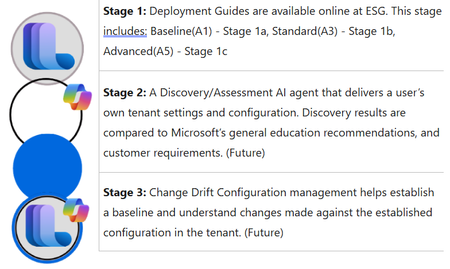
What is ESG- Education Solutions Guide The Microsoft Education Solution Guide (ESG) was developed to simplify and enhance understanding of the license features and products that you have available to you in a Microsoft 365 tenant. Initial focus and intent were to create better tools to understand the tenant setup and configuration to enhance security and compliance. Link to full guide is here. It consists of three stages: Goals and Objectives for ESG Goals Develop prescriptive deployment guides that provide a centralized resource with education-specific scenarios to assist organizations in defining, managing, and organizing their tenant and appropriate applications. Reduce the overall complexity of tenant and service deployment. Establish baseline recommended pathways to facilitate a common and agreed-upon configuration based on subject-matter experts. Utilize AI technology to uncover and compare recommended settings against user requirements based on documented configurations. Implement phased configurations to aid customers and partners in understanding what they may not know or should consider during discovery to meet customer expectations. Highlight unused features and products to ensure customers fully leverage the potential and benefits of their purchased product licenses. Identify opportunities for partner participation in achieving customer goals and expectations based on customer requirements and ESG findings. Create an easy pathway for customer change management to enhance control, security, compliance, and privacy of tenants. Develop custom assessments to evaluate product entry for items such as Copilot, Defender, Purview, Intune, Zero-Trust, and Microsoft Entra ID. Objectives Deliver information for features available (used/unused) to users based on license model. Prescriptive recommendations based on education scenarios. - Present upgrade license opportunities from A1 to A3 to A5. Security analysis exposing gaps and issues proactively to allow modifications before it's too late. Promote partner access to customers that have defined gaps based on assessments and are requesting partner assistance. Better discovery and assessment analysis with new tools. Designed to be more self-serving customer and partner access management. Speed up user adoption for educators and IT Admins alike. Recommended Roles for Implementation IT Admin Identity Admin Security Admin Compliance Admin OneDrive Admin SharePoint Admin Exchange Online Admin Teams Admin Navigation ESG has seven main sections in the navigations. ESG – Microsoft Solutions Guide overall, Microsoft Education license (A1-A3-A5), and Microsoft addons licenses. Baseline Phase – Overview, Products and Features, Licenses. All five sections (Setup, Identity, Applications, Security and Compliance, and Devices) Standard Phase - Overview, Products and Features, Licenses All five sections (Setup, Identity, Applications, Security and Compliance, and Devices. Advanced Phase - Overview, Products and Features, Licenses. Three sections (Identity, Applications, and Security and Compliance) Addons – Any addon products and when/where they can be added to your current license configuration. Windows – Education specific Windows based products and features. References – Any process or configuration that is not outlined in the three license phases will be included here. Phases Deployment Sequence The Baseline phase is the first step in the three-phase approach: Baseline (A1) → Standard (A3) → Advanced (A5) The Baseline phase is the foundational first phase in the Microsoft Education Solution Guide deployment sequence, aligned with the Microsoft 365 A1 education license. Standard Phase - The Standard phase is the second phase in the Microsoft Education Solution Guide deployment sequence, aligned with the Microsoft 365 A3 education license. The Advanced phase is the third and most comprehensive phase in the Microsoft Education Solution Guide deployment sequence, aligned with the Microsoft 365 A5 education license. Sections Setup Tenant setup is key to establishing a secure and valid tenant. Setup goes through domain assignments, administration, and service management. Identity Establishing an identity via Microsoft Entra ID and establishing authentication methods, Single Sign-On, and user procurement methodologies. Applications Applications like Microsoft Teams, SharePoint, OneDrive, Exchange Online is the core to a Microsoft tenant. Getting these applications setup are essential to allow users in education to access services and apps like Learning Accelerators. Security and Compliance Security via each phase is essential to maintain order and blocking access for bad actors. Along with security compliance/privacy considerations that are established to adhere to a multitude of local and government requirements worldwide. Devices Managed and unmanaged devices are another key to helping secure the network and potential cyber-security considerations that enter the network via these devices. How do you use ESG? ESG uses deployment guidelines for content that contain education scenario specifics. These prescriptive “Purple Boxes” allow education organizations the ability to see prescriptive guidelines and recommendations based on an edu scenario. ESG has a linked path for each modules based on the phase (Baseline,Standard,Advanced). Users can follow the deployment content to establish or redefine the tenant configuration in order to enable additional services and products. What’s Next Go to https://aka.ms/esg to access Microsoft Education Solutions Guide. Stage 2 – A custom agent to discover the tenant configuration settings and allow customers and partners the ability to qualify what is set to standard recommendation. This agent will also have the ability to access partner content and internal Microsoft resources. Using an AI Agent to discover tenant settings based on Graph API calls and Microsoft MCP Server for Enterprise to evaluate against known Microsoft recommended settings. Part 3 – Change management from discovery data baselines to access and deliver any updates/changes/modifications, daily/weekly/monthly.508Views0likes0CommentsHands-On Session: Teach Module in Copilot (available for all educators)
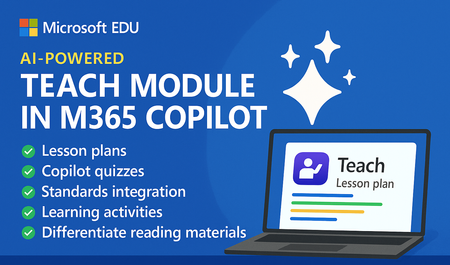
Join us on Wednesday, December 10th, 2025 @ 8am Pacific Time for an in-depth professional development webinar on the new AI-powered "Teach" module in Microsoft 365 that is fully rolled out and available to all educators. This will be a 45 minute hands-on webinar where the Product team will walk through the new updates in detail and you can follow- along at home with your own M365 account! Sign up for the session at this link. And don’t worry – we’ll be recording these and posting on our Microsoft Education YouTube channel so you’ll always to able to watch later or share with others! Here is our training agenda for the webinar 👇 How to use the new AI-powered "Teach" module in M365. Includes: ✅ Lesson plans ✅ Copilot Quizzes ✅ Standards integration ✅ Learning Activities ✅ Differentiate reading materials ✅ Teams EDU integration and Classwork ✅ First look at OneNote EDU and Teach Module integration We look forward to having you attend the event! Mike Tholfsen Group Product Manager Microsoft Education1.7KViews3likes0CommentsAI-powered Teach Module in M365 now rolled out to all educators!
Here is an end-to-end tutorial video on the new AI-powered "Teach" module in M365 Copilot. This is available today for ALL Microsoft 365 educators globally! Includes: 📘 Lesson plans 📊 Rubrics 📝 Quizzes 🌍 Standards grounding (35 countries) 🎯 Learning Activities ➕ Lots more YouTube 📺 https://youtu.be/WkXVukl62KU?si=UT3FzN5fqXQ7KlBd112Views2likes0CommentsCalling all IT Admins - webinar on configuring Microsoft 365 Copilot Chat and new updates for 13+
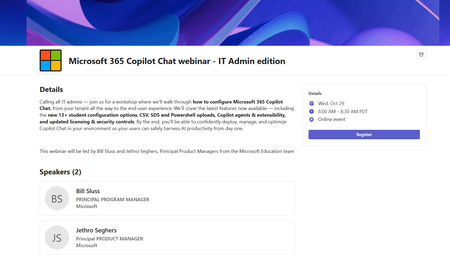
Calling all IT admins — join us for a workshop where we’ll walk through how to configure Microsoft 365 Copilot Chat, from your tenant all the way to the end-user experience. We’ll cover the latest features now available — including the new 13+ student configuration options, CSV, SDS and Powershell uploads, Copilot agents & extensibility, and updated licensing & security controls. By the end, you’ll be able to confidently deploy, manage, and optimize Copilot Chat in your environment so your users can safely harness AI productivity from day one. This webinar will be led by Bill Sluss and Jethro Seghers, Principal Product Managers from the Microsoft Education team When: Wednesday, October 29th @ 8am Pacific Time Register: https://msit.events.teams.microsoft.com/event/7b0cfbc2-e169-461b-9ea2-48effc009d4c@72f988bf-86f1-41af-91ab-2d7cd011db471.9KViews2likes2CommentsStep-by-Step: Setting Up GitHub Student and GitHub Copilot as an Authenticated Student Developer
To become an authenticated GitHub Student Developer, follow these steps: create a GitHub account, verify student status through a school email or contact GitHub support, sign up for the student developer pack, connect to Copilot and activate the GitHub Student Developer Pack benefits. The GitHub Student Developer Pack offers 100s of free software offers and other benefits such as Azure credit, Codespaces, a student gallery, campus experts program, and a learning lab. Copilot provides autocomplete-style suggestions from AI as you code. Visual Studio Marketplace also offers GitHub Copilot Labs, a companion extension with experimental features, and GitHub Copilot for autocomplete-style suggestions. Setting up your GitHub Student and GitHub Copilot as an authenticated Github Student Developer405KViews14likes16CommentsWhat's New in Microsoft EDU - October 2025 (AI for all edition)
Join us on Wednesday, October 22nd, 2025 for our latest "What's New in Microsoft EDU" webinar! This will be a special one where we go into depth about all of the AI powered tools for educators and students who use Microsoft 365 in Education that we just announced. These 30-minute webinars are put on by the Microsoft Education Product Management group and happen once per month, this month both 8:00am Pacific Time and 4:00pm Pacific time to cover as many global time zones as possible around the world. And don’t worry – we’ll be recording these and posting on our Microsoft Education YouTube channel in the new “What’s New in Microsoft EDU” playlist, so you’ll always to able to watch later or share with others! Here is our October 2025 webinar agenda: M365 Copilot and AI updates for Educators and Students Learning Zone public preview and the Copilot+ PC Microsoft 365 LTI for Learning Management Systems AMA - Ask Microsoft EDU Anything (Q&A) We look forward to having you attend the event! How to sign up OPTION 1: October 22nd, Wednesday @ 8:00am Pacific Time Register here OPTION 2: October 22nd, Wednesday @ 4:00pm Pacific Time Register here This is what the webinar portal will look like when you register: We look forward to seeing you there! Mike Tholfsen Group Product Manager Microsoft Education2.2KViews1like0CommentsStep-by-Step: How to Setup Copilot Chat in VS Code
Copilot Chat is an AI-powered chatbot leveraging OpenAI's GPT-4, designed to enhance your coding workflow. Learn how to set up Copilot Chat step by step in Visual Studio Code (VS Code). Benefit from personalized and flexible coding environments, code analysis, automated unit test generation, and bug fixes. Prerequisites include an active GitHub account and the latest version of VS Code. Elevate your coding efficiency to new heights with Copilot Chat.110KViews7likes8CommentsMicrosoft Copilot Studio: Créer et déployer un chatbot
Qu’est-ce que Copilot Studio ? Copilot Studio est un outil faisant parti de Microsoft 365 qui permet de créer facilement des Chatbots. Un Agent Copilot est capable de discuter avec les utilisateurs en langage naturel. Ils peuvent répondre à des questions, guider les utilisateurs ou même déclencher des actions comme envoyer un courriel ou récupérer des données. Un outil sans code Avec Copilot, pas besoin d’avoir une connaissance en programmation. Son interface est simple, on peut écrire des questions, définir des réponses, ajouter des boutons et même le connecter à d’autres services comme Power Automate, SharePoint ou la Dataverse. Un grand avantage : Décrire pour créer Avec Copilot Studio, on peut décrire en quelque lignes ce que l’on veut que notre chatbot fasse, et Copilot Studio génère automatiquement un chatbot de base avec des sujets et des réponses. Exemple : « Tu es un assistant virtuel pour les étudiants d’une université. Tu réponds aux questions sur les horaires de cours, l’accès à la bibliothèque, les inscriptions, et les coordonnées du secrétariat. » Copilot Vs Chatbot classique Contrairement à un simple chatbot basé sur des mots-clés, un Agent Copilot peut : Comprendre le langage naturel S’adapter aux différentes manières de poser une question Se connecter à des données personnalisées. Être déployé sur plusieurs canaux comme Microsoft Teams, Power Apps, site web, etc… Exemple concret : Un responsable d’un projet d’étudiant qui veut créer un assistant virtuel pour répondre aux questions fréquentes sur le projet : Quels sont les horaires de la bibliothèque ? Comment envoyer un rapport final ? Qui est le coordinateur pédagogique ? En quelque minutes, on pourrait créer un agent Copilot qui répond à toutes ces questions. C’est ça l’utilité de Copilot Studio. Créer Un Copilot Agent Accéder à Copilot Studio - Depuis votre navigateur préfère (Edge, Chrome…) - Ouvrir la page : https://copilotstudio.microsoft.com - Connectez-vous à votre compte Microsoft (Scolaire ou professionnel) - Une fois connecté, vous arrivez sur le tableau de bord - Dans la fenêtre de chat, sous Décrire votre assistant pour le créer, mettons ce texte - Vous êtes un assistant qui aide à répondre aux questions sur les déplacements en toute sécurité dans le pays et à l’international. Veuillez répondre poliment. - Avec ceci, Copilot Studio crée un assistant qui comprend déjà les thèmes, et que l’on peut ensuite personnaliser. D’ici l’assistant est presque prêt, dans la conversation, Copilot nous suggère un nom pour notre assistant Conseiller Sécurité Voyage. On peut confirmer ceci si le nom nous va. - On met « Ok » dans la case de conversation et tapé sur Entré - Sélectionner le bouton Créer pour continuer A ce niveau, Copilot Studio nous configure notre chatbot et nous redirige vers la page de configuration. Sur cette nouvelle page, on peut modifier certaines parties comme le nom du chatbot, les instructions, ajouter des connaissances, des déclencheurs, des requêtes et autres. Descendons un peut vers le bas pour ajouter des connaissances et activer l’option Recherche sur le Web. Dans la fenêtre Ajouter des connaissances, on sélectionne Sites web publics et taper ceci (https://europa.eu/youreurope/citizens/ ) dans la case Lien du site web public puis taper sur ajouter ensuite taper sur Ajouter à l’assistant pour fermer la fenêtre. Tester et déployer Copilot Maintenant notre Copilot est prêt. Dans la partie Tester votre assistant, on peut tester le chatbot voir si la connaissance ajoutée fonctionne bien. Avec le teste fait dans cette démo, l’assistant nous retour une réponse avec des liens redirigeant vers le site ajouté a la liste des connaissances. Selon les réponses données par l’assistant ou le chatbot, on peut corriger les sujets si nécessaire. Ce test permet d’assurer que notre chatbot comprend bien l’utilisateur et répond de manière utile. Notre chatbot est prêt, on peut le publier. - Cliquez sur Publier en haut à droite. - La publication prend quelques secondes. Maintenant le chatbot est prêt à être utiliser dans d’autres plateformes ou canaux. On peut l’ajouter à Microsoft Teams, à un site web, à SharePoint et autre plateforme. Conclusion Créer un Copilot personnalisé avec Microsoft Copilot Studio, c’est à la portée de tous même sans expérience en développement. En un bout de temps, on peut : - Décrire l’assistant en un phrase simple - Laisser l’intelligence artificielle générer les sujets de discussion - Ajouter des réponses et des actions - Le tester, le publier et le déployer sur Microsoft Teams, SharePoint, site web et autres. Curieux d’exploiter l’univers de l’intelligence artificielle, Copilot Studio est un excellent point de départ pour apprendre à créer des expériences interactives utiles et modernes. Pourquoi ne pas créer ton premier Copilot dès aujourd’hui ? Pour plus d’information, aller sur la page de Microsoft Learn : https://learn.microsoft.com/fr-fr/microsoft-copilot-studio/201Views0likes0CommentsWhat's New in Microsoft EDU webinar - August 2025
Join us on Wednesday, August 20th, 2025 for our latest "What's New in Microsoft EDU" webinar! These 30-minute webinars are put on by the Microsoft Education Product Management group and happen once per month, this month both 8:00am Pacific Time and 4:00pm Pacific time to cover as many global time zones as possible around the world. And don’t worry – we’ll be recording these and posting on our Microsoft Education YouTube channel in the new “What’s New in Microsoft EDU” playlist, so you’ll always to able to watch later or share with others! Here is our August 2025 webinar agenda: Microsoft Copilot and Copilot Chat for students 13+ M365 Copilot updates for Educators and Students Learning Zone public preview and the Copilot+ PC Microsoft 365 LTI for Learning Management Systems Learning Accelerator updates Microsoft 365 app updates AMA - Ask Microsoft EDU Anything (Q&A) We look forward to having you attend the event! How to sign up OPTION 1: August 20th, Wednesday @ 8:00am Pacific Time Register here OPTION 2: August 20th, Wednesday @ 4:00pm Pacific Time Register here This is what the webinar portal will look like when you register: Look forward to seeing you there! Mike Tholfsen Group Product Manager Microsoft EDU1.6KViews1like0Comments