Community
2624 Topics
Want a formula result to update across Sheets?
I have figured out how to get a formula result to appear in multiple sheets. The formula for example that gets pasted into sheets references a result! I enter formula and (B5) is where the sum location of =sum(b1:b3) will be delivered' I create a new formula that will reference previous calculation label this in cell B7 =Aux!B5 I use =Aux!B5 where Aux is the sheet where all calculations take place and this result will want to appear in selected work sheets Then i select sheets (using Shift+ selected sheets) then in first sheet of selected sheets I select a location and paste V (value) i get the result across all selected tabs. Here is my question ! how do i get a location to update all worksheets with a value from a formula from sheet Aux? I want to be able to change the Value in Aux (sheet where all calculations occur), then have that new value appear where former locations were pasted the result. (this should put result in B22 Ex: i create a total =sum(B1:B3) (in A22 of the aux sheet ) that result i put in a new location with a new formula so new location ( B22) formula =aux!A22 It is this location that if i change a value in origional EX: b1 from 3 to 5 the result is updated in B22 but it will not update the sheets with =aux!B22 hope not to confusingSolved90Views0likes4Comments
How to create a multi-tiered percentage-based bar chart?
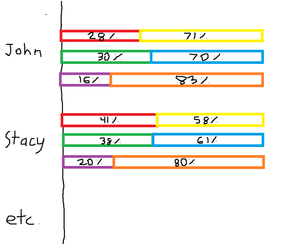
Hello, I would like to create a multi-tiered percentage-based bar chart based on the data found below (test data evidently). Column B and C add up to 100%, Column D and E add up to 100%, and lastly column F and G add up to 100%. I would like each set of variables to equate to 100% on the graph, as the source data is percentage based anyways, but all be organized in their own separate row on the graph underneath the employee name. I have included a diagram drawn in MS paint to portray the desired output (with an accompanying legend). Thanks in advance! Employee Name Number of Sales Made % Number of Sales Made from Other Competitors % Number of Calls Made % Number of Calls Made from Other Competitors % Number of Individual Employees % (always is 1) Number of competitor employees % John 28.57% 71.43% 30.00% 70.00% 16.67% 83.33% Stacy 41.67% 58.33% 38.71% 61.29% 20.00% 80.00% Richard 47.06% 52.94% 47.06% 52.94% 14.29% 85.71% Andy 42.31% 57.69% 40.48% 59.52% 10.00% 90.00%133Views0likes5Comments
Windows 11 23H2 → 25H2 in-place upgrade fails in SAFE_OS / MIGRATE_DATA
I'm trying to in-place upgrade a Windows 11 23H2 system to 25H2 and consistently get a rollback in the SAFE_OS / MIGRATE_DATA phase with 0x8007042B – 0x2000D. After a lot of analysis (Panther logs, SetupDiag, DISM, etc.), the failure always points to migration problems around Microsoft-Windows-TPM-Driver-WMI (CCSIAgent) and, secondarily, Microsoft-Windows-DirectoryServices-ADAM-Client (adammigrate.dll). I'd like to confirm whether this is a known 25H2 migration issue (especially on Education) and if there is any supported workaround short of a clean install. --- ENVIRONMENT - OS: Windows 11 Education 23H2, Build 22631.6276 - Edition: Education (confirmed via winver and Settings → System → About) - Target: Windows 11 25H2 (26200.6584, "2025 Update") - Upgrade method tried: - Windows Update feature enablement - Windows 11 Installation Assistant - Official 25H2 ISO (26200.6584.250915-1905.25h2_ge_release_svc_refresh_CLIENT_CONSUMER_x64FRE_en-us.iso) mounted locally → setup.exe - Hardware: - Motherboard: Gigabyte Z690 AORUS PRO (BIOS F31) - SSD: WD_BLACK SN770 NVMe (firmware 731130WD, WD Dashboard reports "Healthy", no errors) - TPM 2.0: Intel PTT (firmware TPM) enabled - Secure Boot: Enabled - BitLocker on C: OFF (fully decrypted) --- SYMPTOM Every full in-place upgrade attempt (23H2 → 25H2) behaves as follows: 1. Setup runs, copies files, reboots to SAFE_OS phase. 2. During MIGRATE_DATA, setup fails and rolls back to 23H2. 3. Message on screen: "0x8007042B – 0x2000D The installation failed in the SAFE_OS phase with an error during MIGRATE_DATA operation" In C:\$WINDOWS.~BT\Sources\Panther\setuperr.log / setupact.log, the failure is always in SAFE_OS / MIGRATE_DATA and includes: V2VArbitrate: Source migration unit <System>\Microsoft-Windows-TPM-Driver-WMI (CCSIAgent) is not supported on the destination machine and it will not be restored V2VArbitrate: Source migration unit is critical, arbitration will fail V2V Arbitration failed. Last error: 0x00000032 pSPExecuteApply: Apply operation failed. Error: 0x0000002C Apply (machine-independent apply, offline phase): Migration phase failed. Result: 44 ExecuteOperations: Failed execution phase Safe OS. Error: 0x8007042B On some runs, just before the TPM arbitration failure, there are also errors related to DirectoryServices-ADAM-Client: Failure while calling IPostApply->ApplySuccess for Plugin="Microsoft-Windows-DirectoryServices-ADAM-Client\adammigrate.dll"… Error: 0x80070002 Error READ, 0x00000002 while gathering/applying object: apply-success, Action,CMXEXmlPlugin, C:\$WINDOWS.~BT\Sources\ReplacementManifests, Microsoft-Windows-DirectoryServices-ADAM-Client\adammigrate.dll… However, the ADAM plugin errors are logged as "ignore" in some traces, while the actual rollback is always tied to the critical TPM-Driver-WMI migration unit. --- WHAT I HAVE ALREADY TRIED I've tried to rule out all the usual suspects and a bit more: 1. Health checks & storage - sfc /scannow → no integrity violations - DISM /Online /Cleanup-Image /ScanHealth / CheckHealth / RestoreHealth → clean - chkdsk C: /scan → no file system / bad sector issues - WD Dashboard extended test → drive healthy, no SMART warnings 2. Drivers, TPM, AV, services - TPM: - Device: "Trusted Platform Module 2.0" (ACPI\MSFT0101\1) - Driver provider: Microsoft (inbox TPM driver), no OEM TPM drivers - pnputil /enum-drivers | findstr /i tpm shows only Microsoft TPM entries; any OEM/TMP-related oem*.inf were removed. - Legacy / problematic drivers: - Removed old Intel CougarPoint USB driver (oem25.inf) via pnputil /delete-driver oem25.inf /uninstall /force. - Antivirus / security: - McAfee WebAdvisor fully uninstalled. - Kaspersky products uninstalled via standard uninstallers and then cleaned with Kaspersky's kavremover in Safe Mode. - No Kaspersky services, drivers, files, or uninstall entries remain. - Currently only Microsoft Defender is active. - Telemetry: - Connected User Experiences and Telemetry (DiagTrack) service set to Manual and Running to avoid telemetry-related cancellation (0x800704C7). 3. Upgrade artefacts / component cleanup - Deleted: - C:\$WINDOWS.~BT - C:\$GetCurrent - C:\$WINDOWS.~WS - C:\Windows\SoftwareDistribution\Download - Ran: - DISM /Online /Cleanup-Image /StartComponentCleanup /ResetBase - Then again DISM /Online /Cleanup-Image /RestoreHealth and sfc /scannow 4. ISO & media verification - 23H2 ISO: Win11_23H2_English_x64.iso (official multi-edition ISO, SHA-256 verified). - 25H2 ISO: 26200.6584.250915-1905.25h2_ge_release_svc_refresh_CLIENT_CONSUMER_x64FRE_en-us.iso (official 25H2 ISO, SHA-256 verified). - Both mounted locally; upgrade run via setup.exe from the ISO (no third-party media tools). - Tried with Dynamic Update enabled and disabled (/DynamicUpdate Disable). 5. Compatibility scan vs full upgrade behavior - Running from 25H2 ISO: setup.exe /Compat ScanOnly /DynamicUpdate Disable → completes WITHOUT logging the earlier TPM-Driver-WMI / MIGRATE_DATA critical failures. - However, when running a FULL in-place upgrade (same ISO, same environment, DynamicUpdate disabled, "Keep personal files and apps"), the upgrade still fails in SAFE_OS / MIGRATE_DATA with the same TPM-Driver-WMI critical arbitration error and rollback. So, compatibility scan looks clean, but the real SAFE_OS/MIGRATE_DATA phase still hits the TPM-Driver-WMI migration problem. 6. ADAM / DirectoryServices-ADAM-Client state - DISM shows DirectoryServices-ADAM-Client feature as Disabled. - The ADAM migration plugin (adammigrate.dll) logs 0x80070002 during IPostApply->ApplySuccess on some runs. - As suggested in other cases, I have tried: - dism /online /enable-feature /featurename:DirectoryServices-ADAM-Client /norestart → reboot - dism /online /disable-feature /featurename:DirectoryServices-ADAM-Client /norestart → reboot - The ADAM error sometimes disappears or is logged as "ignored", but the TPM-Driver-WMI critical arbitration error persists and still causes rollback. 7. Attempt to repair TPM-Driver-WMI as a package (failed) Following the idea that TPM-Driver-WMI might be a partially removed servicing package, I: - Ran: DISM /Online /Get-Packages | findstr /i "TPM-Driver-WMI" → NO ENTRIES. There is no Microsoft-Windows-TPM-Driver-WMI-Package~… installed as a standalone package. - Mounted Win11_23H2_English_x64.iso as G: and searched for *TPM-Driver-WMI*.cab: → No such cab found anywhere in the ISO. - Mounted install.wim (index 4, Education) read-only and inspected Windows\servicing\Packages, and ran offline DISM /Image:... /Get-Packages | findstr TPM: → No Microsoft-Windows-TPM-Driver-WMI package or mum/cab. Only the component payload exists in WinSxS (amd64_microsoft-windows-tpm-driver-wmi_31bf3856ad364e35_10.0.22621.1...), but there is no installable package to feed into DISM /Add-Package. So there is NO STANDALONE TPM-Driver-WMI package that I can re-add or repair via DISM; it appears baked into the base image. --- CURRENT SITUATION - TPM driver: Microsoft inbox, no OEM TPM drivers. - AV: only Defender. - Component store: DISM /RestoreHealth and sfc /scannow are clean. - Storage: healthy. - Telemetry service: running. - ADAM client: "enable → disable" cycle tried. - 25H2 compatibility scan: now passes without TPM migration errors. - Full upgrade: still fails in SAFE_OS / MIGRATE_DATA with: - Source migration unit <System>\Microsoft-Windows-TPM-Driver-WMI (CCSIAgent) is not supported on the destination machine and it will not be restored - Source migration unit is critical, arbitration will fail - V2V Arbitration failed. Last error: 0x00000032 - pSPExecuteApply: Apply operation failed. Error: 0x0000002C - ExecuteOperations: Failed execution phase Safe OS. Error: 0x8007042B At this point, the only remaining options I can see are: - In-place repair install of 23H2 using the 23H2 ISO (setup.exe → keep apps & data), to rebuild the whole servicing/migration stack, and then retry 25H2; - Or clean install 25H2 from scratch. Before I go down that path, I'd like to know: --- QUESTIONS 1. Is this a known migration issue in Windows 11 25H2 (especially for Education) involving Microsoft-Windows-TPM-Driver-WMI (CCSIAgent)? In other words, is the "not supported on the destination machine" for this migration unit an expected symptom of a current 25H2 bug or a misconfiguration on my side? 2. Is there any supported way to reset/repair/ignore the TPM-Driver-WMI migration unit on the source side, given that: - there is no standalone Microsoft-Windows-TPM-Driver-WMI-Package~*.cab in the 23H2 ISO, and - DISM /Get-Packages does not list such a package? 3. Is an in-place repair install of 23H2 the recommended next step in this scenario, or is the official guidance to perform a clean install of 25H2 when SAFE_OS / MIGRATE_DATA fails on a critical migration unit like this? 4. Is there any known difference between consumer vs Education/volume 25H2 media that could affect whether the TPM-Driver-WMI migration manifest is present on the target image? Any official guidance or confirmation (e.g., "this is a known issue; wait for an updated 25H2 image or cumulative update" vs "your 23H2 install is irreparably corrupted, clean install recommended") would be very helpful before I commit to a wipe-and-reinstall. Thank you in advance.1.6KViews2likes10Comments
Is it safe to have multiple DLL files suddenly appearing on the D drive in Windows 11?
Multiple dynamic link library (DLL) files were unexpectedly discovered on the D drive (non-system drive) of a Windows 11 system. The origin of these files is uncertain—whether they are remnants from system/program updates or potential risks. I am seeking methods to identify them and recommendations for handling them.18Views0likes1Comment
Windows 11 Version 25H2 Update failed install
I currently have HP Laptop 3C0C5E63 with windows 11 version 24H2 build 26100.6584. I have repeatedly tried to install the Version 25H2 update which continued to fail. Last error code was 0x800f0983. I understand that this error message just like previous error messages has to do with a corrupted file. Is there going to be a replacement update file??? I would appreciate any help with this as I would like to get this new version installed. Thanks missykat22Views0likes1Comment
Windows 11 new device setup PIN stuck on spinning circle screen
When performing initial setup on a new computer, facial recognition failed and prompted me to set a PIN. However, after entering information on the PIN setup page, the interface continuously spins (no progress bar, no error message), preventing me from completing setup and accessing the system. Please advise on how to force skip this step or resolve the issue.38Views0likes3CommentsSave the date: Windows Office Hours - January 15, 2026
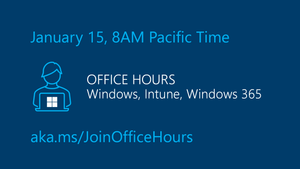
Join us for our next monthly Windows Office Hours, January 15, from 8:00-9:00 AM PT! We will have a broad group of product experts, servicing experts, and engineers representing Windows, Microsoft Intune, Configuration Manager, Windows 365, Windows Autopilot, security, public sector, FastTrack, and more. They will be standing by -- in chat -- to provide guidance, discuss strategies and tactics, and, of course, answer any specific questions you may have. For more details about how Windows Office Hours works, go to our Windows IT Pro Blog. If you can't make it at 8:00 a.m. Pacific Time, post your questions on the Windows Office Hours: January 15th event page, up to 2 days in advance.30Views0likes0CommentsMVP Dominick Raimato Showcases Real-Time Intelligence with Microsoft Fabric & IoT
What Happens When Real‑Time Data Gets Hands‑On? MVP Dominick Raimato Shows Us When you walk into a conference session and someone immediately pulls out a Raspberry Pi, you know you’re in for something fun. And when that someone is Microsoft MVP Dominick Raimato, you’re definitely about to learn something unforgettable. At the PASS Data Community Summit, Dominick showcased in his session how real‑time intelligence becomes real‑world magic - powered by Microsoft Fabric, a few pocket‑sized devices, and a whole lot of creativity. His goal? Make real‑time data feel tangible, interactive, and exciting for everyone - no technical background required. ‑on real‑time intelligence demo with Microsoft Fabric Why Raspberry Pi? Because Seeing Is Believing Dominick didn’t choose Raspberry Pi because it’s trendy. He used it because people learn best when they can touch what they’re learning. Years ago, at The Hershey Company, he and a colleague built a portable IoT‑to‑ML solution that streamed predictions in real time so stakeholders could literally watch data come alive. That same idea - “let people touch the data” - is what inspired him to bring Raspberry Pi into the Microsoft Fabric world. With Fabric, he rebuilt the experience so anyone in the room could influence the data themselves. Tap the device. Trigger events. Watch predictions stream instantly. It’s hands‑on learning meets high‑energy show‑and‑tell. The Demo Challenge No One Sees Coming Conference sessions move fast. Like - really fast. Dominick had just minutes between sessions to set up a network for six devices and connect to a projector. Re‑creating his old Ubuntu‑powered portable network didn’t go smoothly (RIP to the stability issues), but a recommendation for the perfect travel router saved the day. Because of course: behind every great demo is a great piece of travel gear. Explaining Real‑Time Intelligence… Without the Jargon If you’re new to the topic, Dominick has a way of making it all click immediately. Take this example he uses: You get alerts on your phone all day - messages, news, reminders. Now imagine getting a proactive heads‑up that you need an umbrella before stepping outside. That’s real‑time intelligence: constant, instant insights that help you decide what to do right now. Why Real‑Time Data Matters More Than Ever Businesses aren’t waiting for dashboards anymore - they need information as it happens. In healthcare, fraud detection, retail, and manufacturing, a 15‑minute delay isn’t acceptable. In some cases, it’s life‑or‑death. Real‑Time Intelligence enables immediate action: the moment something changes, your system knows - and responds. How Fabric Makes It All Easier Traditionally, real‑time architecture requires stitching together Event Hubs, Stream Analytics, storage containers, ML models, and more. With Microsoft Fabric? You can run the whole pipeline in one place, without spinning up any Azure resources. It’s simpler, faster, and far more accessible - perfect for demos, teaching, and prototyping bold ideas. Real‑World Impact: From Weather Sensors to… Twizzlers? One of Dominick’s favorite examples is a project from his time at Hershey. Using concepts like his demo, their team created a solution to predict Twizzlers product weights during extrusion - helping operators avoid underweights (rework) and overweights (giving away product). The goal wasn’t to replace workers; it was to empower them with real-time insights for better control. You can read more how Hershey used IoT for improved efficiency in making Twizzlers. Want to Try It Yourself? Dominick points newcomers to a few easy, approachable ways to start experimenting: A no‑cost Microsoft Fabric Real-Time Intelligence exercise using Santander Cycles data. His own Raspberry Pi series (in progress!) where you can replicate his demo step by step. No engineering background required - just curiosity. The Future: Data That Moves People Dominick sees a world where event‑driven systems are core to modern analytics. Real‑time dashboards shouldn’t be “hotel art”—interesting to look at but driving no action. The future belongs to insights that trigger immediate decisions, escalating eventually into full automation as organizations mature their data strategy. The Most Underrated Skills for This Work Here’s the part that surprises many aspiring data pros: Dominick says the most important skills aren’t technical at all. Communication, project management, building business cases, and cross‑team collaboration often matter more than coding. Real‑time projects touch many parts of an organization, and success requires navigating that complexity with people skills. One Last Piece of Advice If you’re thinking of taking on a similar project: expect things to go wrong. Dominick’s demo has broken – spectacularly - mid‑presentation three times. But failures are part of innovation. Keep your eyes on the bigger picture and the long-term value your idea can bring. About MVP Dominick Raimato Dominick is a Microsoft MVP recognized for expertise in data analytics and cloud technologies. He’s passionate about making complex topics feel simple, approachable, and - most of all - fun. Through hands‑on demos, real‑world stories, and community contributions, he inspires data professionals to explore the future of real-time intelligence and IoT. Photo credit of Dominick Raimato at Pittsburgh SQL Saturday: MVP Eugene Meidinger153Views1like1Comment