community
3209 TopicsOld to New PC Transfer
I have a question for you since I've decided to move to AMD and change all my PC. How can I transfer my Windows 11 disk system with my files and programs (200Gb on classic Sata SSD) to a fresh new PC (new motherboard, new AMD processor, new M2 Nvme disk which is totally blank)? Should I install Windows 11 on the new PC first and restore via Windows tool? Or is there a simpler way?34Views0likes2Comments
Windows 11 account issues: lock screen skipped, device not showing in Microsoft account
Hi everyone, I’m facing a few strange issues on Windows 11 that seem to be limited only to my main user profile, and I’m hoping to fix them without creating a new profile and migrating all my data. Settings > Apps > Advanced app settings: I see a sign-in-related issue & an error code 0x80860010. The lock screen is skipped when the PC starts. On power-on or restart, the lock screen flashes for a split second, and then Windows directly goes to the PIN entry screen. This happens only on my main user account. If I create a new local or Microsoft account, the lock screen works perfectly even after a restart or cold boot. My Windows PC does not appear under Devices on my Microsoft account page, even though the PC is signed in with my Microsoft account locally. I’ve already tried restarting, signing out and back into my Microsoft account, checking sign-in options, and testing Fast Startup on and off. Since everything works fine on newly created accounts, I believe my existing user profile or account state may be corrupted. I’m trying to avoid creating a new profile and manually migrating data if possible. Any guidance on repairing the current user profile, re-linking the device to my Microsoft account, or restoring normal lock screen behavior would be greatly appreciated. Thanks in advance for any help. ~Gourav56Views0likes2Comments
Summary sheet, copy entire row if a cell criteria is met
https://arengio-my.sharepoint.com/:x:/g/personal/melanie_stokes_areng_io/IQC2OhPfZnKEQL6qfPj11gqfAQSh8Em3Zp95fkYbLBTZc3g?e=oNU1pEHi Can you please help me, I have a schedule for jobcards, each tab is a book that is given to someone, if that specific jobcard is invoices, then in column T where it says "Incomplete", I want that entire row to be copied to the "Outstanding Jobcards"tab. As a new book is handed out, a new tab is create and the tab is named according to the book sequence. This is updated daily as jobcards are being invoiced.20Views0likes1CommentStarting a User Group: What You Need to Know
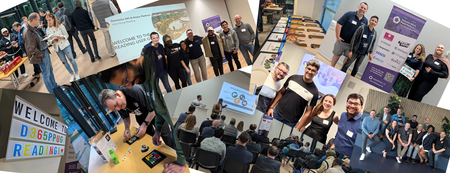
I first got involved with the Microsoft Community in 2021 when I was fortunate to be a speaker at the very first South Coast Summit. I got ‘the bug,’ as some people say. I knew I wanted to help others in the community more. I wanted to share what I could to contribute to it and help it grow. I had moved to Reading the same year and wanted to meet and network with others involved in the Dynamics 365 and Power Platform space where I lived. However, I found there was no user group at the time local to me so I reached out to the UK Dynamics 365 and Power Platform User Groups and asked to set up a local user group in Reading with the Group’s help. Finding Your Team Since starting the Reading user group in 2023, we have hosted 4 events a year. We had to change venue 3 times and faced several challenges (did you know vegan pizza comes uncut?). We learned a lot about hosting user group events in the process. I say ‘we’ as running a user group is not a one-person undertaking. It needs a community to get going and keep going. As soon as word got out I was looking to start a Reading User Group, those in the community that knew people local to me (even if they didn’t know me personally) did what they could to help me find some willing supporters. This is one of many examples why this community and the people in it are so wonderful and I am still very grateful for this. I was lucky enough to meet Fraser Dear and Tim Leung who were as excited about starting the Reading User Group as I was and we became the organisers of the Reading User Group. Since then the team has expanded to include Ban Hasan! With the support of the UK Dynamics 365 and Power Platform User Groups we managed to secure a room at the Microsoft offices at Thames Valley Park. Local MVPs Chris Huntingford and Carl Cookson offered to be our first speakers and get the word out to promote our event – what a first speaker line up! Not Everyone will Turn Up As user groups are community events and often free to attendees (and the ones within the UK Dynamics 365 and Power Platform User Groups always are as we have annual sponsors), our Reading user group events were also completely free. We had over 50 people sign up for our first event and I was looking forward to meeting them all! I got to meet about 20 of them. As I found out, with free events there is often a 40-50% drop out as people lose nothing by not showing up. I can’t tell you why people don’t update their RSVP status (don't get me started). All I can tell you is that they don’t. Be prepared for this. Don’t be disheartened if you have a low number of sign-ups and/or a low number of attendees for your first event. It takes time for the word to get out, no user group is a success overnight. What You Need to Know Here I share what you need to know and consider in the areas of: Venue Date and Time Speakers Attendees Promotion Communications On the Day If you remember one thing, make it this: This is supposed to be fun. Running a user group is not supposed to be a second unpaid job you have. If it starts feeling like that, ask for help! Venue When looking for a venue, consider: Capacity – how big do you need your venue to be? Will you have an attendee limit? Sponsor offices – if you have a sponsor(s), do they have a space that can be used free of charge? Business Parks – Is there a local business park that can attract more attendees from the businesses hosted there? Suitability – Does the venue have everything required for a user group (e.g. projector, chairs, tables for food) Availability – does the venue have availability for the date(s) you are expecting to host the user group? (see tips for date/time below) Cost – if the venue is not free of charge, is the cost within your cost limits? Insurance – does the venue need the UG to have it’s own insurance? Transport – Is the venue easy to get to using a variety of transport options? It will limit attendee numbers if not. Parking – Does the venue have parking options/free parking nearby? Accessibility – Is the venue easy to access for those with a disability? Easy to find – Is the venue and room where the UG will be taking place easy to find? If not can you put signs/banners up? Date and Time When choosing the date and time of your user group, consider: Local User Groups – do any of the other local user groups have an event close to that date or on that date? This will reduce attendees and available speakers. Holidays – does the date fall on any important holiday dates that will make attendance lower – e.g. half term/school holidays for parents? Religious Festivals – does the date fall during or close to a religious festival? Consider all faiths here. UG Team – can everyone in your organizing team make the date and be there to support? Timing – is the time of the event going to be convenient for attendees? E.g. Starting at 18:00 so people can get there after work or not finish too late for those that need to get back. Duration – is the duration of the event enough to cover what is planned but not too long of a commitment for attendees? We usually have evening events last between 2-3 hours max. Speakers When looking for and engaging with speakers, consider: Finding Speakers The Community Network – The people you know in the community are part of a vast network of people and MVPs within the community that can be potential speakers – ask for help! Sessionize also has a speaker directory you can utilise. Speaker Form – Make sure you set up a form that potential speakers can fill in to express their interest and promote it to your attendees through a QR code – they could be future speakers! Session Details – Make sure you have a clear title and session description from potential speakers before selecting a session to verify the session is appropriate for the event. Discourage sessions that are to be product sales pitches unless they are an event sponsor. Before the Event Expenses – If you are not covering any speaker expenses make sure your speakers are clear on this before committing. Slide Deck Template – if you have a slide deck template, encourage speakers to use it and at least have the sponsor slide in their presentations (if you have sponsors). Event Details – Make sure speakers are clear on the exact location and timing of the event, particularly if the event is in person. Accessibility - Make sure speakers have checked their slide deck for accessibility and have considered attendee requirements (e.g. having live captions for hearing-impaired attendees). Speakers Sync Call – consider having a planning call with your speakers before the event to answer any questions they have and offer any support they need. Promotion - Ask your speakers to post on their socials about the event. If they feel up to it maybe also to post a short video introducing themselves and their session. Extra points if they include a link to the speaker form and event registration to spread the word! After the Event Appreciation – Speakers spend a lot of time preparing their session, consider giving them a gift (e.g. box of chocolates) at the end as a token of appreciation for their efforts and for their involvement in the event. Photos – Take photos of the speakers as they are presenting and share them with them afterwards. Ask them to post on their socials about the experience and promote the next event (and to include a link to the speaker form!). Attendees Help attendees enjoy the experience! Name Tags – As the organizers, consider wearing the same polos and name tags so you are easy to identify. Also offer attendees name tags (sticky labels always an easy option) to make networking easier. Access/Dietary Requirements – It is worth using the functionality within MeetUp (or other platform of your choice) to ask attendees when registering whether they have any access or dietary requirements. This will allow you to consider these in advance and cater for what is needed. Ice Breaker –Consider having something to act as an ice breaker/help people network while people arrive (e.g. a round of Genius Square anyone?). Swag – Official UG/Microsoft swag for your event (e.g. stickers!) can help promote the UG. This will also give your attendees something to take away with them. Pizza Cutter – Only relevant if you are ordering pizza and someone has an allergy/dietary requirement. Consider having a pizza cutter specifically for this (e.g. gluten free/vegan pizzas) as they often come uncut. Feedback – Consider creating a short feedback form and having a slide at the end with the feedback form QR code. This will help you understand how the event went and what you can do better next time. Promotion Spreading the word is vital. Meetup – If you are using a platform like meetup for your event registrations, make sure you create and announce the event. Microsoft Community – Set up your User Group within the Dynamics 365 and Power Platform community sites to drive awareness and list your events on there (with a link to meetup in the description if you are using that). Socials – Consider setting up a Linkedin page for your user group and add your event on Linkedin as well. As people within the community to share/comment/repost to share the word! You can also set up a Whatsapp Community (or just a chat) to allow instant comms to those interested. Communications Before the event 1 to 2 Weeks Before –The date/time, venue, speakers may have changed since the event was announced so it’s worth sending a message with key information to those already registered for the event one or two weeks before it and asking them to update their RSVP if they can no longer attend. Day Before – Final reminder for the event, asking them again to update their RSVP if they can no longer attend and providing any last-minute information, guidance, contact details for ‘on the day’. After the event Thank You Message – Message sent to all attendees that RSVPed (regardless of whether they attended or not) to thank those that managed to attend for joining and to encourage those that didn’t to join next time! Give a link to the speakers’ LinkedIn profiles and promote the next event for them to sign up. On the Day The big day is here – all the excitement! But don’t forget…. Banners – If you have them, place them strategically so they help people find you. Music – Consider bringing a Bluetooth speaker. Having music on as people come in creates a nice atmosphere! We have even had people from the community play a few songs live. You will be surprised at people's hidden skills. ‘Stuff’ – Refreshments/Ice breakers/Swag, make sure it’s all out there. Slides Reel – Consider having a timed slide show that provides key info to attendees as they wait for the event to start (e.g. today’s agenda/timings, sponsor slide, next event registration QR code, info on the UG team, speaker form QR code). Speakers – Make sure they have everything they need/happy with the set up, big them up if its their first time presenting! Spread the Love – Consider having a closing slide at the end promoting other local UG events or community events your members might be interested in. Have Fun – Take the time to enjoy it all, and if something doesn’t go to plan, there’s always next time. Just keep going! So remember... As you can see, there is a ton of things to consider when looking to put a user group event together. This is why it is a team effort and why you shouldn’t try to do this alone. It is a lot of work. I promise you it’s worth it. You will see the difference it makes to the attendees, to the speakers and to you. Good luck and keep me posted how you get on! I am cheering you on! Author Bio Areti Iles - With over 15 years in the technology sector, I am Head of Professional Services at Telefonica Tech's UK AI Business Solutions division. Over my career as a Dynamics 365 & Power Platform solution architect, I have delivered a wide range of complex projects for FTSE 250/500 companies across several sectors. Outside my job role I am part of Microsoft’s Global UGs Committee representing Europe and Advisory Board member for the UK D365 and Power Platform UGs. I also lead both the Reading D365 and Power Platform UG and London All Day UG and I am on the organizing committee for the Scottish Summit. I host the Power Delivery podcast with two other Microsoft MVPs providing project delivery guidance and am a mentor as part of the Women in Power Platform group. I am also an annual participant of the United Nations UK delegation for the Commission on the Status of Women and speak internationally on AI tools, legislation and their adoption. Resources Reading UG on Dynamics 365 Community Reading UG on Power Platform Community Meetup Events Page46Views0likes0CommentsWomen For Technical Talks: Building Visibility, Confidence, and Impact
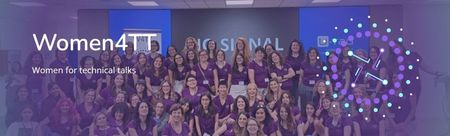
Technical Content and Tracks The agenda reflected a broad and diverse technical scope, structured into four main tracks: Track 1: AI, Cybersecurity, and Economy Track 2: Motivation and Power Platform Track 3: Power BI Track 4: Data and Development with Power Platform The distribution of accepted sessions highlighted strong interest in artificial intelligence and motivation focused topics, alongside core technical areas. Topics such as AI (6 sessions) and Motivation (6 sessions) led the agenda, followed by Data (3), Development (3), Power Platform (2), and Power BI (1). In total, 21 thematic sessions were delivered within this structure. Community Engagement and Live Streaming Reach Attendance and engagement metrics further demonstrated the event’s success. The conference welcomed 291 registered attendees, with a notably high female participation rate of 79.04%, while male participation accounted for 20.96%. This balance illustrates the inclusive nature of the event while remaining open to the broader community. Participants joined from a wide range of countries, with Spain representing 68.04% of attendance, followed by Argentina (5.84%) and Colombia (4.12%). Additional participation came from countries across Europe, Latin America, and North America, including the United States, Germany, Mexico, Peru, Brazil, Portugal, and others, reflecting the global resonance of the initiative. Live streaming played a key role in amplifying the event’s impact. Chat interactions and real‑time engagement during sessions confirmed strong participation and interest across both days. Presence in Major Technical Events Beyond its own events, Women For Technical Talks (W4TT) has maintained an active presence in major conferences such as Bizz Summit, Power BI Days, .NET events, Global AI events, and other international conferences. In many of these, the community is given a dedicated 10‑minute space to present its mission and activities. These moments have proven especially impactful, as they consistently attract new women who approach the team afterwards to ask how they can participate as future speakers. Learning Moments and Community Anecdotes Like any live event, the journey included learning moments. There were last‑minute track changes and the occasional loss of a speaker, all handled through collaboration and community support. One particularly memorable moment came from reading the live chat, where attendees openly encouraged new speakers. Several first‑time presenters shared how they paused, breathed deeply, and realized—often mid‑session—that they were successfully delivering their talk to a supportive audience. These moments reinforce the emotional and human value behind the numbers. In the words of attendees: - Alba Catoira – “It has been an honor to share this space with so many inspiring professionals, to hear their stories, learn from their journeys, and feel the energy of a community that champions female talent in technology. Heartfelt thanks to the organizers for their dedication and hard work in making this event a success, to the speakers and participants for their generosity in sharing knowledge and experiences, and to the sponsors for supporting initiatives that promote diversity and inclusion in the tech sector. I leave feeling inspired and having learned so much.” - Yesarelly Salazar – “What a wonderful experience!!! What once was just an idea has now become a reality. Thank you to Women For Technical Talks (W4TT) for creating these spaces full of learning, to the sponsors for supporting this kind of initiative, and to everyone who dedicated their time to take part.” Looking Ahead: What’s Next for W4TT Women For Technical Talks is already preparing the next steps. The community plans to strengthen its monthly activity, creating a consistent rhythm of engagement and learning. A new in-person conference is planned for June, with a clear goal of increasing the number of participating countries and further reinforcing its international identity. Future priorities also include increasing visibility on social networks, improving the community website, and identifying new needs and formats for monthly activities. Each decision continues to be guided by the same principle that started W4TT: ensuring that more women feel confident, visible, and supported when sharing their technical knowledge.
Phone link issue with full connectivity
How to fix 'some features may not be working right now in link to windows' full connectivity in Phone Link On PC go to ctrl alt delete > task manager > details > PhoneExperienceHost.exe and end task. Start Phone Link app Restart Phone and PC17Views0likes0Comments
Windows 11 23H2 → 25H2 in-place upgrade fails in SAFE_OS / MIGRATE_DATA
I'm trying to in-place upgrade a Windows 11 23H2 system to 25H2 and consistently get a rollback in the SAFE_OS / MIGRATE_DATA phase with 0x8007042B – 0x2000D. After a lot of analysis (Panther logs, SetupDiag, DISM, etc.), the failure always points to migration problems around Microsoft-Windows-TPM-Driver-WMI (CCSIAgent) and, secondarily, Microsoft-Windows-DirectoryServices-ADAM-Client (adammigrate.dll). I'd like to confirm whether this is a known 25H2 migration issue (especially on Education) and if there is any supported workaround short of a clean install. --- ENVIRONMENT - OS: Windows 11 Education 23H2, Build 22631.6276 - Edition: Education (confirmed via winver and Settings → System → About) - Target: Windows 11 25H2 (26200.6584, "2025 Update") - Upgrade method tried: - Windows Update feature enablement - Windows 11 Installation Assistant - Official 25H2 ISO (26200.6584.250915-1905.25h2_ge_release_svc_refresh_CLIENT_CONSUMER_x64FRE_en-us.iso) mounted locally → setup.exe - Hardware: - Motherboard: Gigabyte Z690 AORUS PRO (BIOS F31) - SSD: WD_BLACK SN770 NVMe (firmware 731130WD, WD Dashboard reports "Healthy", no errors) - TPM 2.0: Intel PTT (firmware TPM) enabled - Secure Boot: Enabled - BitLocker on C: OFF (fully decrypted) --- SYMPTOM Every full in-place upgrade attempt (23H2 → 25H2) behaves as follows: 1. Setup runs, copies files, reboots to SAFE_OS phase. 2. During MIGRATE_DATA, setup fails and rolls back to 23H2. 3. Message on screen: "0x8007042B – 0x2000D The installation failed in the SAFE_OS phase with an error during MIGRATE_DATA operation" In C:\$WINDOWS.~BT\Sources\Panther\setuperr.log / setupact.log, the failure is always in SAFE_OS / MIGRATE_DATA and includes: V2VArbitrate: Source migration unit <System>\Microsoft-Windows-TPM-Driver-WMI (CCSIAgent) is not supported on the destination machine and it will not be restored V2VArbitrate: Source migration unit is critical, arbitration will fail V2V Arbitration failed. Last error: 0x00000032 pSPExecuteApply: Apply operation failed. Error: 0x0000002C Apply (machine-independent apply, offline phase): Migration phase failed. Result: 44 ExecuteOperations: Failed execution phase Safe OS. Error: 0x8007042B On some runs, just before the TPM arbitration failure, there are also errors related to DirectoryServices-ADAM-Client: Failure while calling IPostApply->ApplySuccess for Plugin="Microsoft-Windows-DirectoryServices-ADAM-Client\adammigrate.dll"… Error: 0x80070002 Error READ, 0x00000002 while gathering/applying object: apply-success, Action,CMXEXmlPlugin, C:\$WINDOWS.~BT\Sources\ReplacementManifests, Microsoft-Windows-DirectoryServices-ADAM-Client\adammigrate.dll… However, the ADAM plugin errors are logged as "ignore" in some traces, while the actual rollback is always tied to the critical TPM-Driver-WMI migration unit. --- WHAT I HAVE ALREADY TRIED I've tried to rule out all the usual suspects and a bit more: 1. Health checks & storage - sfc /scannow → no integrity violations - DISM /Online /Cleanup-Image /ScanHealth / CheckHealth / RestoreHealth → clean - chkdsk C: /scan → no file system / bad sector issues - WD Dashboard extended test → drive healthy, no SMART warnings 2. Drivers, TPM, AV, services - TPM: - Device: "Trusted Platform Module 2.0" (ACPI\MSFT0101\1) - Driver provider: Microsoft (inbox TPM driver), no OEM TPM drivers - pnputil /enum-drivers | findstr /i tpm shows only Microsoft TPM entries; any OEM/TMP-related oem*.inf were removed. - Legacy / problematic drivers: - Removed old Intel CougarPoint USB driver (oem25.inf) via pnputil /delete-driver oem25.inf /uninstall /force. - Antivirus / security: - McAfee WebAdvisor fully uninstalled. - Kaspersky products uninstalled via standard uninstallers and then cleaned with Kaspersky's kavremover in Safe Mode. - No Kaspersky services, drivers, files, or uninstall entries remain. - Currently only Microsoft Defender is active. - Telemetry: - Connected User Experiences and Telemetry (DiagTrack) service set to Manual and Running to avoid telemetry-related cancellation (0x800704C7). 3. Upgrade artefacts / component cleanup - Deleted: - C:\$WINDOWS.~BT - C:\$GetCurrent - C:\$WINDOWS.~WS - C:\Windows\SoftwareDistribution\Download - Ran: - DISM /Online /Cleanup-Image /StartComponentCleanup /ResetBase - Then again DISM /Online /Cleanup-Image /RestoreHealth and sfc /scannow 4. ISO & media verification - 23H2 ISO: Win11_23H2_English_x64.iso (official multi-edition ISO, SHA-256 verified). - 25H2 ISO: 26200.6584.250915-1905.25h2_ge_release_svc_refresh_CLIENT_CONSUMER_x64FRE_en-us.iso (official 25H2 ISO, SHA-256 verified). - Both mounted locally; upgrade run via setup.exe from the ISO (no third-party media tools). - Tried with Dynamic Update enabled and disabled (/DynamicUpdate Disable). 5. Compatibility scan vs full upgrade behavior - Running from 25H2 ISO: setup.exe /Compat ScanOnly /DynamicUpdate Disable → completes WITHOUT logging the earlier TPM-Driver-WMI / MIGRATE_DATA critical failures. - However, when running a FULL in-place upgrade (same ISO, same environment, DynamicUpdate disabled, "Keep personal files and apps"), the upgrade still fails in SAFE_OS / MIGRATE_DATA with the same TPM-Driver-WMI critical arbitration error and rollback. So, compatibility scan looks clean, but the real SAFE_OS/MIGRATE_DATA phase still hits the TPM-Driver-WMI migration problem. 6. ADAM / DirectoryServices-ADAM-Client state - DISM shows DirectoryServices-ADAM-Client feature as Disabled. - The ADAM migration plugin (adammigrate.dll) logs 0x80070002 during IPostApply->ApplySuccess on some runs. - As suggested in other cases, I have tried: - dism /online /enable-feature /featurename:DirectoryServices-ADAM-Client /norestart → reboot - dism /online /disable-feature /featurename:DirectoryServices-ADAM-Client /norestart → reboot - The ADAM error sometimes disappears or is logged as "ignored", but the TPM-Driver-WMI critical arbitration error persists and still causes rollback. 7. Attempt to repair TPM-Driver-WMI as a package (failed) Following the idea that TPM-Driver-WMI might be a partially removed servicing package, I: - Ran: DISM /Online /Get-Packages | findstr /i "TPM-Driver-WMI" → NO ENTRIES. There is no Microsoft-Windows-TPM-Driver-WMI-Package~… installed as a standalone package. - Mounted Win11_23H2_English_x64.iso as G: and searched for *TPM-Driver-WMI*.cab: → No such cab found anywhere in the ISO. - Mounted install.wim (index 4, Education) read-only and inspected Windows\servicing\Packages, and ran offline DISM /Image:... /Get-Packages | findstr TPM: → No Microsoft-Windows-TPM-Driver-WMI package or mum/cab. Only the component payload exists in WinSxS (amd64_microsoft-windows-tpm-driver-wmi_31bf3856ad364e35_10.0.22621.1...), but there is no installable package to feed into DISM /Add-Package. So there is NO STANDALONE TPM-Driver-WMI package that I can re-add or repair via DISM; it appears baked into the base image. --- CURRENT SITUATION - TPM driver: Microsoft inbox, no OEM TPM drivers. - AV: only Defender. - Component store: DISM /RestoreHealth and sfc /scannow are clean. - Storage: healthy. - Telemetry service: running. - ADAM client: "enable → disable" cycle tried. - 25H2 compatibility scan: now passes without TPM migration errors. - Full upgrade: still fails in SAFE_OS / MIGRATE_DATA with: - Source migration unit <System>\Microsoft-Windows-TPM-Driver-WMI (CCSIAgent) is not supported on the destination machine and it will not be restored - Source migration unit is critical, arbitration will fail - V2V Arbitration failed. Last error: 0x00000032 - pSPExecuteApply: Apply operation failed. Error: 0x0000002C - ExecuteOperations: Failed execution phase Safe OS. Error: 0x8007042B At this point, the only remaining options I can see are: - In-place repair install of 23H2 using the 23H2 ISO (setup.exe → keep apps & data), to rebuild the whole servicing/migration stack, and then retry 25H2; - Or clean install 25H2 from scratch. Before I go down that path, I'd like to know: --- QUESTIONS 1. Is this a known migration issue in Windows 11 25H2 (especially for Education) involving Microsoft-Windows-TPM-Driver-WMI (CCSIAgent)? In other words, is the "not supported on the destination machine" for this migration unit an expected symptom of a current 25H2 bug or a misconfiguration on my side? 2. Is there any supported way to reset/repair/ignore the TPM-Driver-WMI migration unit on the source side, given that: - there is no standalone Microsoft-Windows-TPM-Driver-WMI-Package~*.cab in the 23H2 ISO, and - DISM /Get-Packages does not list such a package? 3. Is an in-place repair install of 23H2 the recommended next step in this scenario, or is the official guidance to perform a clean install of 25H2 when SAFE_OS / MIGRATE_DATA fails on a critical migration unit like this? 4. Is there any known difference between consumer vs Education/volume 25H2 media that could affect whether the TPM-Driver-WMI migration manifest is present on the target image? Any official guidance or confirmation (e.g., "this is a known issue; wait for an updated 25H2 image or cumulative update" vs "your 23H2 install is irreparably corrupted, clean install recommended") would be very helpful before I commit to a wipe-and-reinstall. Thank you in advance.1.9KViews2likes12Commentssolucion imposible
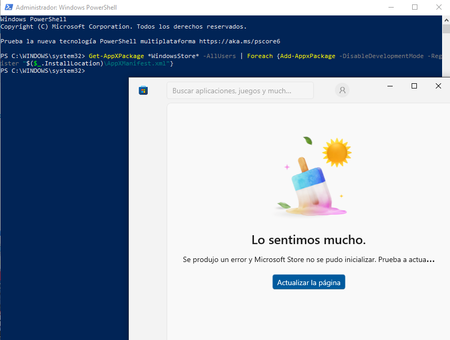
spanish version....... teniendo problemas con la aplicacion de microsoft store al iniciar la aplicacion de un momento a otro salto con un mensaje en pantalla "lo sentimos mucho se produjo un error y microsoft store no se pudo inicializar. prueba a actualizar o vuelve mas tarde" he intentado realizar distintos metodos para solucionar el problema como realizar reinstalacion con la opcion de actualizar este pc del programa media creator tool para instalar windows 10 y aun el problema persiste, he realizado un intento por la powershell con el siguiente comando Get-AppXPackage *WindowsStore* -AllUsers | Foreach {Add-AppxPackage -DisableDevelopmentMode -Register "$($_.InstallLocation)\AppXManifest.xml"} descrito en varias respuesta para casos similares dispuestos en el foro de la comunidad de microsoft respuesta proporcionada por el usuario KapilArya en el hub "https://techcommunity.microsoft.com/discussions/windowsinsiderprogram/microsoft-store-wont-launch/1513414" tambien junto a un agente de soporte se intento realizar una solucion con la creacion de un usuario nuevo para solventar y no funciono tambien se realizo el diagnostico para la instalacion de windows 11 pero mi equipo no cuenta con las caracteristicas minimas para que este sea instalado y aun asi sigo sin poder solucionar el problema y no me gustaria realizar la reinstalacion de windows 10 por medio externos (USB) por que asi perderia demasiada informacion sobre las aplicaciones y datos que tengo de varios años de recoleccion y me gustaria saber si puedo hacer algo mas para poder solucionar este problema sin perder datos me dustaria obtener ayuda lo mas pronto posible gracias por brindarme su atencion y ayuda para resolver este caso adjunto evidencias sobre problema y metodos realizados. english version...... Having problems with the Microsoft Store app. When I launch it, it suddenly pops up with a message on the screen: "We're very sorry, an error occurred and the Microsoft Store could not be initialized. Please try updating or come back later." I've tried various methods to solve the problem, such as reinstalling with the "Update this PC" option in the Media Creator Tool to install Windows 10, and the problem still persists. I tried using PowerShell with the following command: Get-AppXPackage *WindowsStore* -AllUsers | Foreach {Add-AppxPackage -DisableDevelopmentMode -Register "$($_.InstallLocation)\AppXManifest.xml"} Described in several answers for similar cases posted on the Microsoft community forum. Answer provided by user KapilArya on the hub "https://techcommunity.microsoft.com/discussions/windowsinsiderprogram/microsoft-store-wont-launch/1513414" Also, together with a support agent, a solution was attempted by creating a new user to solve the problem, but it didn't work. A diagnosis was also performed for the installation of Windows 11, but my computer doesn't have the minimum specifications for it to be installed. And even so, I still can't solve the problem and I wouldn't like to reinstall Windows 10 using external media (USB) because I would lose too much information about the applications and data that I have from several years of experience. I'm collecting and would like to know if I can do anything else to resolve this issue without losing data. I would like to get help as soon as possible. Thank you for your attention and help in resolving this issue. I attach evidence of the problem and the methods used.79Views0likes2Comments