charting
1683 Topics
How to create a multi-tiered percentage-based bar chart?
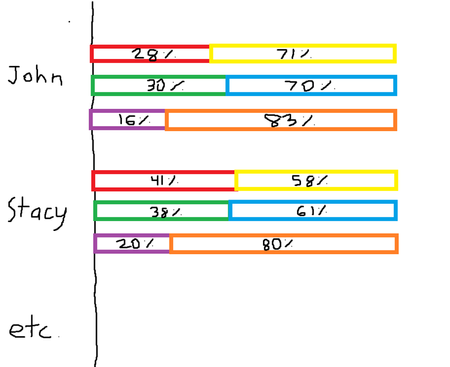
Hello, I would like to create a multi-tiered percentage-based bar chart based on the data found below (test data evidently). Column B and C add up to 100%, Column D and E add up to 100%, and lastly column F and G add up to 100%. I would like each set of variables to equate to 100% on the graph, as the source data is percentage based anyways, but all be organized in their own separate row on the graph underneath the employee name. I have included a diagram drawn in MS paint to portray the desired output (with an accompanying legend). Thanks in advance! Employee Name Number of Sales Made % Number of Sales Made from Other Competitors % Number of Calls Made % Number of Calls Made from Other Competitors % Number of Individual Employees % (always is 1) Number of competitor employees % John 28.57% 71.43% 30.00% 70.00% 16.67% 83.33% Stacy 41.67% 58.33% 38.71% 61.29% 20.00% 80.00% Richard 47.06% 52.94% 47.06% 52.94% 14.29% 85.71% Andy 42.31% 57.69% 40.48% 59.52% 10.00% 90.00%170Views0likes6Comments
Moving a column of text data into 3 columns of data?
I have a column of text data cells 1,2,3,4,5,6,7,8,9 and longer. I want to create 3 column of data to graph and manipulate Cell in Columns. 1,2,3 3,4,5 5,6,7 8,9,10 and longer. So i need to create 3 columns of data from 1 column of data. I am using Mac Excel 16 and I can not make this happen. I have tried all sorts of solutions. Help? Thank you,134Views0likes4CommentsNeed help creating a dynamic graph from data extracted from a pivot table
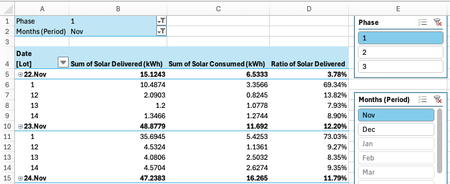
Hi experts, I have hourly data collected from our shared solar system (14 lots). I can get that data into an excel table easily, then use a pivot table to get it summarised by Date-Month.Day (rather than by hour) and Lot. A calculated column in the pivot table gives the percentage ratio of the solar power delivered each day to each lot. [Sidenote: The solar power is not delivered equally every day, but is demand based with an overall objective of eventually sharing the power equally, where equally depends on the strata lot allocations, so some lots get a different percentage than others. Furthermore, the distribution is split into 3 phases, where a given set of 4 or 5 lots share the same phase] I've added slicers to the resulting pivot so I can look at each month of data for each phase. [Note that the system went into operation on Nov 22, so the November data is only a few days, beginning Nov 22] What I'm trying to achieve is to get the data graphed to show the Ratio of Solar Delivered per day per Lot. Something like this, which is fine for Phase 1 for the month of November only: To create this graph, I used array formulas in some spare cells in the pivot table to tabulate the data like this: The table extends dynamically as I add months and/or phases to the pivot table display - which is great. Just what I wanted. BUT... the graph stays stuck on showing just the first four lots and the first 9 days because that was the size of the table when I grated the graph. I WANT THE GRAPH TO EXPAND DYNAMICALLY AS THE TABLE EXPANDS I've tried changing the Chart data range to accommodate the extra data, but if I then change back to a smaller set of data, the graph size does not change. viz- below is how the graph looks after changing the Chart data range to accommodate some extra data, then reduced to the original data set: I WANT THE GRAPH TO CONTRACT DYNAMICALLY AS THE TABLE CONTRACTS In other words, when I change the slicers to show the original data set, I want the graph to return to its original format ~------------------------------------------------------------------------------------~ I've read posts that talk about formatting your data as a table. Bit if I try and format by "helper" data as a table, I get the following warning: If I exclude the calculated headings, I get #SPILL errors ------------------------------------------------------------------------------------ I'm at a loss to work out how to create a dynamic graph. I'm hoping someone in the community can help - good luck and happy new year. And thanks for taking the effort to read this rather long post. If I can figure out how to add my source file to this post, I'll add it. In the meantime, you can view/download my source file here: https://1drv.ms/x/c/c95331b296c5ed04/IQCxxcpJWbyOTIXiDxyvmg9mAS5xcAADjTrP0JXBbs1IHBI?e=JJvVYH RedNectarSolved157Views0likes4Comments
Chart linking with Name Manager
so it's known chart behave different than other items, i linked it to a box that indirect the limit of which it should take values from a column, like i used this code to do it: =OFFSET('Study '!$F$25,1,0,'Study '!$BD$26), but this fails when i want it to take starting and ending limit with offset command, it just re input values, like if i want beginning to be 100 and ending to be 300 it reads first 100 and then reread them plus the extra 200 so i have 400 values. is it possible to make it so from column F it starts taking values from lets say box BC and the ending limit to be from BD? i tried looking it up and figuring it but you know how it goes with charts83Views0likes2CommentsHow to sum chain values from N-number cells?
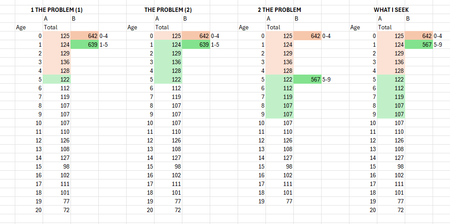
Hello, I have data of people by age, but 100 different values on a line chart would look... bad. Hence the need to group ages in sets of 5 or 10 on a separe line in chain, but what is the function to do this? It certainly isn't the humble SUM function, since it moves the range by one, producing "1 the problem". Sure, I could do the SUM chain and delete four cells between keepers, yielding "2 the problem", but that's just awful. Or I could do "WHAT I SEEK" manually, if I had an enernity... Thanks in advance, and have a wonderful day!325Views0likes5Comments
multi Vehicle maintenance log record
i need to make a vehicle maintenance log that will have 7 different vehicles, track all the oil changes, inspections, registrations that will notify us when something is expiring, and be able to attach receipts and documents to it. what is the best way to do this?18KViews0likes2CommentsHow to make a pie chart dynamically update by selecting a role from a slicer in Excel Pivot Table?
Hi everyone, I’ve created a table in Excel using Power Query, and the table name is All-Training. The table has the following columns: Process Training deliverables name Relevant to (workday role) Here’s a small data sample: Process Training deliverables name Relevant to (workday role) Compliance Training Data Privacy and Protection Employee Compliance Training Anti-Bribery and Corruption Employee Technical Training Excel Essentials Employee Technical Training Power BI Basics Employee Leadership Skills Coaching for Growth Manager Leadership Skills Leading High-Performing Teams Manager Compliance Training Workplace Ethics Manager Performance Management Goal Setting and Review Manager Technical Training Azure Fundamentals Engineer Technical Training Kubernetes Essentials Engineer Compliance Training Health and Safety Standards Engineer Performance Management Feedback Conversations Analyst Technical Training SQL for Data Analysts Analyst Reporting and Dashboards Power BI Advanced Reports Analyst Goal: I want to create an interactive Pivot Table and a Pie Chart that dynamically update when I select different roles from a slicer. Here’s what I expect: The slicer should allow selecting roles such as Employee, Manager, Engineer, or Analyst. When I select Employee, the Pie Chart should show two equal halves (50–50), because there are four training deliverables — two under Compliance Training and two under Technical Training. Similarly, when I select Manager, Engineer, or Analyst, the chart should update automatically to show the distribution of training deliverables across their respective Process values. I’ve already created a Pivot Table and inserted a slicer, but the pie chart doesn’t seem to update interactively when I change the slicer selection. Can someone guide me step-by-step on how to link the slicer, Pivot Table, and chart properly so the pie chart reflects the selected role’s data automatically? Thanks,73Views1like1CommentHow to create a Date-Time Temperature Graph
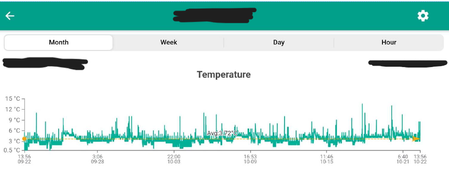
Hi there, I was wondering if Excel is able to create a similar Date Time vs Temperature graph as shown, the green coded one? (the data was extracted from an app) I want to be able to show the Date AND Time on my Excel chart I have the raw number data but is unable to convert it into a graph similar to the one shown above, for reference the format of my raw data looks like this (below), but my raw data have three thousands results. Thank you in advance to anyone who can help me! - Non130Views0likes1Comment