broken
4 Topics
Favicons for bookmarks broken since Edge v149 update
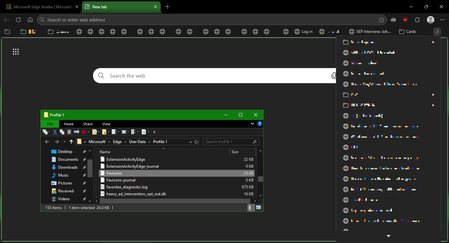
I've recently had Edge update to the v149.0.4022.52 stable-channel releases, and ALL my bookmarks now have no favicons. When I visit any webpage, Edge successfully loads the favicon for the tab of that website. But when I visit a bookmark, the favicon doesn't get updated after it has loaded for the site. And new bookmarks I add also don't show a favicon. If I go into my Edge profile-folder (which can found via edge://profile-internals/ , clicking the heading, then looking next to "Profile Path"), then it is still creating the "Favicon" and "Favicons-journal" files, but I assume isn't populating them with anything? I've tried deleting both files, restarting my PC, but even after Edge recreates them, no bookmarks are gaining any favicons. Is anyone else getting this issue...? OS: Windows 10 Home 22H2 x64 (OS Build: 19045.7291 : May 2026 ESU)537Views1like3Comments"Repeat every..." seems to be broken (custom recurrance)
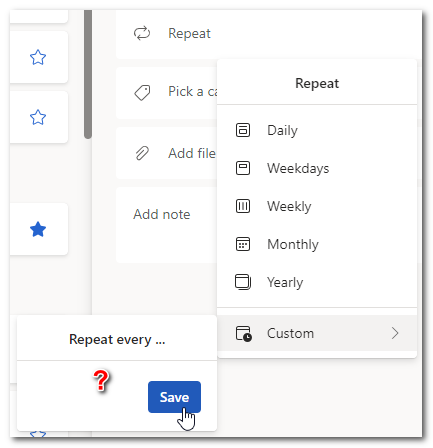
I want a task to repeat once a quarter. Once I click "Custom" repeat, this is what comes up. "Repeat every..." does nothing. I'm using Edge using To Do as a web app. There seem to be no mechanism for me to let them know this isn't functioning. I believe I've used custom repeat in the past but it's hard to remember.458Views0likes0CommentsEdge Insider won't open after Update, Repair doesn't fix the issue.
Edge Insider (119.0.2132.0) won't open after Update, Modify Repair doesn't fix the issue, neither does restarting. Small blue wheel for a brief second then nothing. No third party security software running, scanning the system comes up clean. Not sure where to go from here or how to further debug the issue. I have all my passwords stored in edge and don't want to lose those. If anyone can help it would be greatly appreciated. Thanks!1.1KViews0likes3Comments