analytics
818 TopicsAccelerate Agent Development: Hacks for Building with Microsoft Sentinel data lake
As a Senior Product Manager | Developer Architect on the App Assure team working to bring Microsoft Sentinel and Security Copilot solutions to market, I interact with many ISVs building agents on Microsoft Sentinel data lake for the first time. I’ve written this article to walk you through one possible approach for agent development – the process I use when building sample agents internally at Microsoft. If you have questions about this, or other methods for building your agent, App Assure offers guidance through our Sentinel Advisory Service. Throughout this post, I include screenshots and examples from Gigamon’s Security Posture Insight Agent. This article assumes you have: An existing SaaS or security product with accessible telemetry. A small ISV team (2–3 engineers + 1 PM). Focus on a single high value scenario for the first agent. The Composite Application Model (What You Are Building) When I begin designing an agent, I think end-to-end, from data ingestion requirements through agentic logic, following the Composite application model. The Composite Application Model consists of five layers: Data Sources – Your product’s raw security, audit, or operational data. Ingestion – Getting that data into Microsoft Sentinel. Sentinel data lake & Microsoft Graph – Normalization, storage, and correlation. Agent – Reasoning logic that queries data and produces outcomes. End User – Security Copilot or SaaS experiences that invoke the agent. This separation allows for evolving data ingestion and agent logic simultaneously. It also helps avoid downstream surprises that require going back and rearchitecting the entire solution. Optional Prerequisite You are enrolled in the ISV Success Program, so you can earn Azure Credits to provision Security Compute Units (SCUs) for Security Copilot Agents. Phase 1: Data Ingestion Design & Implementation Choose Your Ingestion Strategy The first choice I face when designing an agent is how the data is going to flow into my Sentinel workspace. Below I document two primary methods for ingestion. Option A: Codeless Connector Framework (CCF) This is the best option for ISVs with REST APIs. To build a CCF solution, reference our documentation for getting started. Option B: CCF Push (Public Preview) In this instance, an ISV pushes events directly to Sentinel via a CCF Push connector. Our MS Learn documentation is a great place to get started using this method. Additional Note: In the event you find that CCF does not support your needs, reach out to App Assure so we can capture your requirements for future consideration. Azure Functions remains an option if you’ve documented your CCF feature needs. Phase 2: Onboard to Microsoft Sentinel data lake Once my data is flowing into Sentinel, I onboard a single Sentinel workspace to data lake. This is a one-time action and cannot be repeated for additional workspaces. Onboarding Steps Go to the Defender portal. Follow the Sentinel Data lake onboarding instructions. Validate that tables are visible in the lake. See Running KQL Queries in data lake for additional information. Phase 3: Build and Test the Agent in Microsoft Foundry Once my data is successfully ingested into data lake, I begin the agent development process. There are multiple ways to build agents depending on your needs and tooling preferences. For this example, I chose Microsoft Foundry because it fit my needs for real-time logging, cost efficiency, and greater control. 1. Create a Microsoft Foundry Instance Foundry is used as a tool for your development environment. Reference our QuickStart guide for setting up your Foundry instance. Required Permissions: Security Reader (Entra or Subscription) Azure AI Developer at the resource group After setup, click Create Agent. 2. Design the Agent A strong first agent: Solves one narrow security problem. Has deterministic outputs. Uses explicit instructions, not vague prompts. Example agent responsibilities: To query Sentinel data lake (Sentinel data exploration tool). To summarize recent incidents. To correlate ISVs specific signals with Sentinel alerts and other ISV tables (Sentinel data exploration tool). 3. Implement Agent Instructions Well-designed agent instructions should include: Role definition ("You are a security investigation agent…"). Data sources it can access. Step by step reasoning rules. Output format expectations. Sample Instructions can be found here: Agent Instructions 4. Configure the Microsoft Model Context Protocol (MCP) tooling for your agent For your agent to query, summarize and correlate all the data your connector has sent to data lake, take the following steps: Select Tools, and under Catalog, type Sentinel, and then select Microsoft Sentinel Data Exploration. For more information about the data exploration tool collection in MCP server, see our documentation. I always test repeatedly with real data until outputs are consistent. For more information on testing and validating the agent, please reference our documentation. Phase 4: Migrate the Agent to Security Copilot Once the agent works in Foundry, I migrate it to Security Copilot. To do this: Copy the full instruction set from Foundry Provision a SCU for your Security Copilot workspace. For instructions, please reference this documentation. Make note of this process as you will be charged per hour per SCU Once you are done testing you will need to deprovision the capacity to prevent additional charges Open Security Copilot and use Create From Scratch Agent Builder as outlined here. Add Sentinel data exploration MCP tools (these are the same instructions from the Foundry agent in the previous step). For more information on linking the Sentinel MCP tools, please refer to this article. Paste and adapt instructions. At this stage, I always validate the following: Agent Permissions – I have confirmed the agent has the necessary permissions to interact with the MCP tool and read data from your data lake instance. Agent Performance – I have confirmed a successful interaction with measured latency and benchmark results. This step intentionally avoids reimplementation. I am reusing proven logic. Phase 5: Execute, Validate, and Publish After setting up my agent, I navigate to the Agents tab to manually trigger the agent. For more information on testing an agent you can refer to this article. Now that the agent has been executed successfully, I download the agent Manifest file from the environment so that it can be packaged. Click View code on the Agent under the Build tab as outlined in this documentation. Publishing to the Microsoft Security Store If I were publishing my agent to the Microsoft Security Store, these are the steps I would follow: Finalize ingestion reliability. Document required permissions. Define supported scenarios clearly. Package agent instructions and guidance (by following these instructions). Summary Based on my experience developing Security Copilot agents on Microsoft Sentinel data lake, this playbook provides a practical, repeatable framework for ISVs to accelerate their agent development and delivery while maintaining high standards of quality. This foundation enables rapid iteration—future agents can often be built in days, not weeks, by reusing the same ingestion and data lake setup. When starting on your own agent development journey, keep the following in mind: To limit initial scope. To reuse Microsoft managed infrastructure. To separate ingestion from intelligence. What Success Looks Like At the end of this development process, you will have the following: A Microsoft Sentinel data connector live in Content Hub (or in process) that provides a data ingestion path. Data visible in data lake. A tested agent running in Security Copilot. Clear documentation for customers. A key success factor I look for is clarity over completeness. A focused agent is far more likely to be adopted. Need help? If you have any issues as you work to develop your agent, please reach out to the App Assure team for support via our Sentinel Advisory Service . Or if you have any other tips, please comment below, I’d love to hear your feedback.342Views1like0Comments
Building Multi-Agent Orchestration Using Microsoft Semantic Kernel: A Complete Step-by-Step Guide
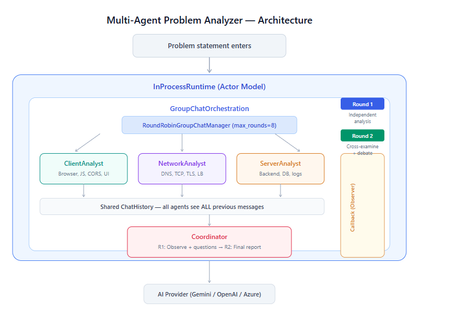
What You Will Build By the end of this guide, you will have a working multi-agent system where 4 specialist AI agents collaborate to diagnose production issues: ClientAnalyst — Analyzes browser, JavaScript, CORS, uploads, and UI symptoms NetworkAnalyst — Analyzes DNS, TCP/IP, TLS, load balancers, and firewalls ServerAnalyst — Analyzes backend logs, database, deployments, and resource limits Coordinator — Synthesizes all findings into a root cause report with a prioritized action plan These agents don't just run in sequence — they debate, cross-examine, and challenge each other's findings through a shared conversation, producing a diagnosis that's better than any single agent could achieve alone. Table of Contents Why Multi-Agent? The Problem with Single Agents Architecture Overview Understanding the Key SK Components The Actor Model — How InProcessRuntime Works Setting Up Your Development Environment Step-by-Step: Building the Multi-Agent Analyzer The Agent Interaction Flow — Round by Round Bugs I Found & Fixed — Lessons Learned Running with Different AI Providers What to Build Next 1. Why Multi-Agent? The Problem with Single Agents A single AI agent analyzing a production issue is like having one doctor diagnose everything — they'll catch issues in their specialty but miss cross-domain connections. Consider this problem: "Users report 504 Gateway Timeout errors when uploading files larger than 10MB. Started after Friday's deployment. Worse during peak hours." A single agent might say "it's a server timeout" and stop. But the real root cause often spans multiple layers: The client is sending chunked uploads with an incorrect Content-Length header (client-side bug) The load balancer has a 30-second timeout that's too short for large uploads (network config) The server recently deployed a new request body parser that's 3x slower (server-side regression) The combination only fails during peak hours because connection pool saturation amplifies the latency No single perspective catches this. You need specialists who analyze independently, then debate to find the cross-layer causal chain. That's what multi-agent orchestration gives you. The 5 Orchestration Patterns in SK Semantic Kernel provides 5 built-in patterns for agent collaboration: SEQUENTIAL: A → B → C → Done (pipeline — each builds on previous) CONCURRENT: ↗ A ↘ Task → B → Aggregate ↘ C ↗ (parallel — results merged) GROUP CHAT: A ↔ B ↔ C ↔ D ← We use this one (rounds, shared history, debate) HANDOFF: A → (stuck?) → B → (complex?) → Human (escalation with human-in-the-loop) MAGENTIC: LLM picks who speaks next dynamically (AI-driven speaker selection) We use GroupChatOrchestration with RoundRobinGroupChatManager because our problem requires agents to see each other's work, challenge assumptions, and build on each other's analysis across two rounds. 2. Architecture Overview Here's the complete architecture of what we're building: 3. Understanding the Key SK Components Before we write code, let's understand the 5 components we'll use and the design pattern each implements: ChatCompletionAgent — Strategy Pattern The agent definition. Each agent is a combination of: name — unique identifier (used in round-robin ordering) instructions — the persona and rules (this is the prompt engineering) service — which AI provider to call (Strategy Pattern — swap providers without changing agent logic) description — what other agents/tools understand about this agent agent = ChatCompletionAgent( name="ClientAnalyst", instructions="You are ONLY ClientAnalyst...", service=gemini_service, # ← Strategy: swap to OpenAI with zero changes description="Analyzes client-side issues", ) GroupChatOrchestration — Mediator Pattern The orchestration defines HOW agents interact. It's the Mediator — agents don't talk to each other directly. Instead, the orchestration manages a shared ChatHistory and routes messages through the Manager. RoundRobinGroupChatManager — Strategy Pattern The Manager decides WHO speaks next. RoundRobinGroupChatManager cycles through agents in a fixed order. SK also provides AutomaticGroupChatManager where the LLM decides who speaks next. max_rounds is the total number of messages per agent or cycle. With 4 agents and max_rounds=8, each agent speaks exactly twice. InProcessRuntime — Actor Model Abstraction The execution engine. Every agent becomes an "actor" with its own kind of mailbox (message queue). The runtime delivers messages between actors. Key properties: No shared state — agents communicate only through messages Sequential processing — each agent processes one message at a time Location transparency — same code works in-process today, distributed tomorrow agent_response_callback — Observer Pattern A function that fires after EVERY agent response. We use it to display each agent's output in real-time with emoji labels and round numbers. 4. The Actor Model — How InProcessRuntime Works The Actor Model is a concurrency pattern where each entity is an isolated "actor" with a private mailbox. Here's what happens inside InProcessRuntime when we run our demo: runtime.start() │ ├── Creates internal message loop (asyncio event loop) │ orchestration.invoke(task="504 timeout...", runtime=runtime) │ ├── Creates Actor[Orchestrator] → manages overall flow ├── Creates Actor[Manager] → RoundRobinGroupChatManager ├── Creates Actor[ClientAnalyst] → mailbox created, waiting ├── Creates Actor[NetworkAnalyst] → mailbox created, waiting ├── Creates Actor[ServerAnalyst] → mailbox created, waiting └── Creates Actor[Coordinator] → mailbox created, waiting Manager receives "start" message │ ├── Checks turn order: [Client, Network, Server, Coordinator] ├── Sends task to ClientAnalyst mailbox │ → ClientAnalyst processes: calls LLM → response │ → Response added to shared ChatHistory │ → callback fires (displayed in Notebook UI) │ → Sends "done" back to Manager │ ├── Manager updates: turn_index=1 ├── Sends to NetworkAnalyst mailbox │ → Same flow... │ ├── ... (ServerAnalyst, Coordinator for Round 1) │ ├── Manager checks: messages=4, max_rounds=8 → continue │ ├── Round 2: same cycle with cross-examination │ └── After message 8: Manager sends "complete" → OrchestrationResult resolves → result.get() returns final answer runtime.stop_when_idle() → All mailboxes empty → clean shutdown The Actor Model guarantees: No race conditions (each actor processes one message at a time) No deadlocks (no shared locks to contend for) No shared mutable state (agents communicate only via messages) 5. Setting Up Your Development Environment Prerequisites Python 3.11 or 3.12 (3.13+ may have compatibility issues with some SK connectors) Visual Studio Code with the Python and Jupyter extensions An API key from one of: Google AI Studio (free), OpenAI Step 1: Install Python Download from python.org. During installation, check "Add Python to PATH". Verify: python --version # Python 3.12.x Step 2: Install VS Code Extensions Open VS Code, go to Extensions (Ctrl+Shift+X), and install: Python (by Microsoft) — Python language support Jupyter (by Microsoft) — Notebook support Pylance (by Microsoft) — IntelliSense and type checking Step 3: Create Project Folder mkdir sk-multiagent-demo cd sk-multiagent-demo Open in VS Code: code . Step 4: Create Virtual Environment Open the VS Code terminal (Ctrl+`) and run: # Create virtual environment python -m venv sk-env # Activate it # Windows: sk-env\Scripts\activate # macOS/Linux: source sk-env/bin/activate You should see (sk-env) in your terminal prompt. Step 5: Install Semantic Kernel For Google Gemini (free tier — recommended for getting started): pip install semantic-kernel[google] python-dotenv ipykernel For OpenAI (paid API key): pip install semantic-kernel openai python-dotenv ipykernel For Azure AI Foundry (enterprise, Entra ID auth): pip install semantic-kernel azure-identity python-dotenv ipykernel Step 6: Register the Jupyter Kernel python -m ipykernel install --user --name=sk-env --display-name="Semantic Kernel (Python 3.12)" You can also select if this is already available from your environment from VSCode as below: Step 7: Get Your API Key Option A — Google Gemini (FREE, recommended for demo): Go to https://aistudio.google.com/apikey Click "Create API Key" Copy the key Free tier limits: 15 requests/minute, 1 million tokens/minute — more than enough for this demo. Option B — OpenAI: Go to https://platform.openai.com/api-keys Create a new key Copy the key Option C — Azure AI Foundry: Deploy a model in Azure AI Foundry portal Note the endpoint URL and deployment name If key-based auth is disabled, you'll need Entra ID with permissions Step 8: Create the .env File In your project root, create a file named .env: For Gemini: GOOGLE_AI_API_KEY=AIzaSy...your-key-here GOOGLE_AI_GEMINI_MODEL_ID=gemini-2.5-flash For OpenAI: OPENAI_API_KEY=sk-...your-key-here OPENAI_CHAT_MODEL_ID=gpt-4o For Azure AI Foundry: AZURE_OPENAI_ENDPOINT=https://your-resource.cognitiveservices.azure.com AZURE_OPENAI_CHAT_DEPLOYMENT_NAME=gpt-4o AZURE_OPENAI_API_KEY=your-key Step 9: Create the Notebook In VS Code: Click File > New File Save as multi_agent_analyzer.ipynb In the top-right of the notebook, click Select Kernel Choose Semantic Kernel (Python 3.12) (or your sk-env) Your environment is ready. Let's build. 6. Step-by-Step: Building the Multi-Agent Analyzer Cell 1: Verify Setup import semantic_kernel print(f"Semantic Kernel version: {semantic_kernel.__version__}") from semantic_kernel.agents import ( ChatCompletionAgent, GroupChatOrchestration, RoundRobinGroupChatManager, ) from semantic_kernel.agents.runtime import InProcessRuntime from semantic_kernel.contents import ChatMessageContent print("All imports successful") Cell 2: Load API Key and Create Service For Gemini: import os from dotenv import load_dotenv load_dotenv() from semantic_kernel.connectors.ai.google.google_ai import ( GoogleAIChatCompletion, GoogleAIChatPromptExecutionSettings, ) from semantic_kernel.contents import ChatHistory GEMINI_API_KEY = os.getenv("GOOGLE_AI_API_KEY") GEMINI_MODEL = os.getenv("GOOGLE_AI_GEMINI_MODEL_ID", "gemini-2.5-flash") service = GoogleAIChatCompletion( gemini_model_id=GEMINI_MODEL, api_key=GEMINI_API_KEY, ) print(f"Service created: Gemini {GEMINI_MODEL}") # Smoke test settings = GoogleAIChatPromptExecutionSettings() test_history = ChatHistory(system_message="You are a helpful assistant.") test_history.add_user_message("Say 'Connected!' and nothing else.") response = await service.get_chat_message_content( chat_history=test_history, settings=settings ) print(f"Model says: {response.content}") For OpenAI: import os from dotenv import load_dotenv load_dotenv() from semantic_kernel.connectors.ai.open_ai import ( OpenAIChatCompletion, OpenAIChatPromptExecutionSettings, ) from semantic_kernel.contents import ChatHistory service = OpenAIChatCompletion( ai_model_id=os.getenv("OPENAI_CHAT_MODEL_ID", "gpt-4o"), ) print(f"Service created: OpenAI {os.getenv('OPENAI_CHAT_MODEL_ID', 'gpt-4o')}") # Smoke test settings = OpenAIChatPromptExecutionSettings() test_history = ChatHistory(system_message="You are a helpful assistant.") test_history.add_user_message("Say 'Connected!' and nothing else.") response = await service.get_chat_message_content( chat_history=test_history, settings=settings ) print(f"Model says: {response.content}") Cell 3: Define All 4 Agents This is the most important cell — the prompt engineering that makes the demo work: from semantic_kernel.agents import ChatCompletionAgent # ═══════════════════════════════════════════════════ # AGENT 1: Client-Side Analyst # ═══════════════════════════════════════════════════ client_agent = ChatCompletionAgent( name="ClientAnalyst", description="Analyzes problems from the client-side: browser, JS, CORS, caching, UI symptoms", instructions="""You are ONLY **ClientAnalyst**. You must NEVER speak as NetworkAnalyst, ServerAnalyst, or Coordinator. Every word you write is from ClientAnalyst's perspective only. You are a senior front-end and client-side diagnostics expert. When given a problem statement, analyze it EXCLUSIVELY from the client side: 1. **Browser & Rendering**: DOM issues, JavaScript errors, CSS rendering, browser compatibility, memory leaks, console errors. 2. **Client-Side Caching**: Stale cache, service worker issues, local storage corruption. 3. **Network from Client View**: CORS errors, preflight failures, request timeouts, client-side retry storms, fetch/XHR configuration. 4. **Upload Handling**: File API usage, chunk upload implementation, progress tracking, FormData construction, content-type headers. 5. **UI/UX Symptoms**: What the user sees, error messages displayed, loading states. ROUND 1: Provide your independent analysis. Do NOT reference other agents. List your top 3 most likely causes with evidence. Every response MUST be at least 200 words. ROUND 2: You MUST: - Reference NetworkAnalyst and ServerAnalyst BY NAME - State specifically where you AGREE or DISAGREE with their findings - Answer the Coordinator's questions from your perspective - Add NEW cross-layer insights you see from the client perspective - Do NOT just say 'I agree' — provide substantive technical reasoning Be specific, evidence-based, and prioritize findings by likelihood.""", service=service, ) # ═══════════════════════════════════════════════════ # AGENT 2: Network Analyst # ═══════════════════════════════════════════════════ network_agent = ChatCompletionAgent( name="NetworkAnalyst", description="Analyzes problems from the network side: DNS, TCP, TLS, firewalls, load balancers, latency", instructions="""You are ONLY **NetworkAnalyst**. You must NEVER speak as ClientAnalyst, ServerAnalyst, or Coordinator. Every word you write is from NetworkAnalyst's perspective only. You are a senior network infrastructure diagnostics expert. When given a problem statement, analyze it EXCLUSIVELY from the network layer: 1. **DNS & Resolution**: DNS TTL, propagation delays, record misconfigurations. 2. **TCP/IP & Connections**: Connection pooling, keep-alive, TCP window scaling, connection resets, SYN floods. 3. **TLS/SSL**: Certificate issues, handshake failures, protocol version mismatches. 4. **Load Balancers & Proxies**: Sticky sessions, health checks, timeout configs, request body size limits, proxy buffering. 5. **Firewall & WAF**: Rule blocks, rate limiting, request inspection delays, geo-blocking, DDoS protection interference. ROUND 1: Provide your independent analysis. Do NOT reference other agents. List your top 3 most likely causes with evidence. Every response MUST be at least 200 words. ROUND 2: You MUST: - Reference ClientAnalyst and ServerAnalyst BY NAME - State specifically where you AGREE or DISAGREE with their findings - Answer the Coordinator's questions from your perspective - Add NEW cross-layer insights you see from the network perspective - Do NOT just say 'I am ready to proceed' — provide substantive technical analysis Be specific, evidence-based, and prioritize findings by likelihood.""", service=service, ) # ═══════════════════════════════════════════════════ # AGENT 3: Server-Side Analyst # ═══════════════════════════════════════════════════ server_agent = ChatCompletionAgent( name="ServerAnalyst", description="Analyzes problems from the server side: backend app, database, logs, resources, deployments", instructions="""You are ONLY **ServerAnalyst**. You must NEVER speak as ClientAnalyst, NetworkAnalyst, or Coordinator. Every word you write is from ServerAnalyst's perspective only. You are a senior backend and infrastructure diagnostics expert. When given a problem statement, analyze it EXCLUSIVELY from the server side: 1. **Application Server**: Error logs, exception traces, thread pool exhaustion, memory leaks, CPU spikes, garbage collection pauses. 2. **Database**: Slow queries, connection pool saturation, lock contention, deadlocks, replication lag, query plan changes. 3. **Deployment & Config**: Recent deployments, configuration changes, feature flags, environment variable mismatches, rollback candidates. 4. **Resource Limits**: File upload size limits, request body limits, disk space, temporary file cleanup, storage quotas. 5. **External Dependencies**: Upstream API timeouts, third-party service degradation, queue backlogs, cache (Redis/Memcached) issues. ROUND 1: Provide your independent analysis. Do NOT reference other agents. List your top 3 most likely causes with evidence. Every response MUST be at least 200 words. ROUND 2: You MUST: - Reference ClientAnalyst and NetworkAnalyst BY NAME - State specifically where you AGREE or DISAGREE with their findings - Answer the Coordinator's questions from your perspective - Add NEW cross-layer insights you see from the server perspective - Do NOT just say 'I agree' — provide substantive technical reasoning Be specific, evidence-based, and prioritize findings by likelihood.""", service=service, ) # ═══════════════════════════════════════════════════ # AGENT 4: Coordinator # ═══════════════════════════════════════════════════ coordinator_agent = ChatCompletionAgent( name="Coordinator", description="Synthesizes all specialist analyses into a final root cause report with prioritized action plan", instructions="""You are ONLY **Coordinator**. You must NEVER speak as ClientAnalyst, NetworkAnalyst, or ServerAnalyst. You synthesize — you do NOT do domain-specific analysis. You are the lead engineer who synthesizes the team's findings. ═══ ROUND 1 BEHAVIOR (your first turn, message 4) ═══ Keep this SHORT — maximum 300 words. - Note 2-3 KEY PATTERNS across the three analyses - Identify where specialists AGREE (high-confidence) - Identify where they CONTRADICT (needs resolution) - Ask 2-3 SPECIFIC QUESTIONS for Round 2 Round 1 MUST NOT: assign tasks, create action plans, write reports, or tell agents what to take lead on. Observation + questions ONLY. ═══ ROUND 2 BEHAVIOR (your final turn, message 8) ═══ Keep this FOCUSED — maximum 800 words. Produce a structured report: 1. **Root Cause** (1 paragraph): The #1 most likely cause with causal chain across layers. Reference specific findings from each specialist. 2. **Confidence** (short list): - HIGH: Areas where all 3 agreed - MEDIUM: Areas where 2 of 3 agreed - LOW: Disagreements needing investigation 3. **Action Plan** (numbered, max 6 items): For each: - What to do (specific) - Owner (Client/Network/Server team) - Time estimate 4. **Quick Wins vs Long-term** (2 short lists) Do NOT repeat what specialists already said verbatim. Synthesize, don't echo.""", service=service, ) # ═══════════════════════════════════════════════════ # All 4 agents — order = RoundRobin order # ═══════════════════════════════════════════════════ agents = [client_agent, network_agent, server_agent, coordinator_agent] print(f"{len(agents)} agents created:") for i, a in enumerate(agents, 1): print(f" {i}. {a.name}: {a.description[:60]}...") print(f"\nRoundRobin order: {' → '.join(a.name for a in agents)}") Cell 4: Run the Analysis from semantic_kernel.agents import GroupChatOrchestration, RoundRobinGroupChatManager from semantic_kernel.agents.runtime import InProcessRuntime from semantic_kernel.contents import ChatMessageContent from IPython.display import display, Markdown # ╔══════════════════════════════════════════════════════════╗ # ║ EDIT YOUR PROBLEM STATEMENT HERE ║ # ╚══════════════════════════════════════════════════════════╝ PROBLEM = """ Users are reporting intermittent 504 Gateway Timeout errors when trying to upload files larger than 10MB through our web application. The issue started after last Friday's deployment and seems worse during peak hours (2-5 PM EST). Some users also report that smaller file uploads work fine but the progress bar freezes at 85% for large files before timing out. """ # ════════════════════════════════════════════════════════════ agent_responses = [] def agent_response_callback(message: ChatMessageContent) -> None: name = message.name or "Unknown" content = message.content or "" agent_responses.append({"agent": name, "content": content}) emoji = { "ClientAnalyst": "🖥️", "NetworkAnalyst": "🌐", "ServerAnalyst": "⚙️", "Coordinator": "🎯" }.get(name, "🔹") round_num = (len(agent_responses) - 1) // len(agents) + 1 display(Markdown( f"---\n### {emoji} {name} (Message {len(agent_responses)}, Round {round_num})\n\n{content}" )) MAX_ROUNDS = 8 # 4 agents × 2 rounds = 8 messages exactly task = f"""## Problem Statement {PROBLEM.strip()} ## Discussion Rules You are in a GROUP DISCUSSION with 4 members. You can see ALL previous messages. There are exactly 2 rounds. ### ROUND 1 (Messages 1-4): Independent Analysis - ClientAnalyst, NetworkAnalyst, ServerAnalyst: Analyze from YOUR domain only. Give your top 3 most likely causes with evidence and reasoning. - Coordinator: Note patterns across the 3 analyses. Ask 2-3 specific questions. Do NOT assign tasks yet. ### ROUND 2 (Messages 5-8): Cross-Examination & Final Report - ClientAnalyst, NetworkAnalyst, ServerAnalyst: You MUST reference the OTHER specialists BY NAME. State where you agree, disagree, or have new insights. Answer the Coordinator's questions. Provide SUBSTANTIVE analysis. - Coordinator: Produce the FINAL structured report: root cause, confidence levels, prioritized action plan with owners and time estimates. IMPORTANT: Each agent speaks as THEMSELVES only. Never impersonate another agent.""" display(Markdown(f"## Problem Statement\n\n{PROBLEM.strip()}")) display(Markdown(f"---\n## Discussion Starting — {len(agents)} agents, {MAX_ROUNDS} rounds\n")) # Build and run orchestration = GroupChatOrchestration( members=agents, manager=RoundRobinGroupChatManager(max_rounds=MAX_ROUNDS), agent_response_callback=agent_response_callback, ) runtime = InProcessRuntime() runtime.start() result = await orchestration.invoke(task=task, runtime=runtime) final_result = await result.get(timeout=300) await runtime.stop_when_idle() display(Markdown(f"---\n## FINAL CONCLUSION\n\n{final_result}")) Cell 5: Statistics and Validation print("═" * 55) print(" ANALYSIS STATISTICS") print("═" * 55) emojis = {"ClientAnalyst": "🖥️", "NetworkAnalyst": "🌐", "ServerAnalyst": "⚙️", "Coordinator": "🎯"} agent_counts = {} agent_chars = {} for r in agent_responses: agent_counts[r["agent"]] = agent_counts.get(r["agent"], 0) + 1 agent_chars[r["agent"]] = agent_chars.get(r["agent"], 0) + len(r["content"]) for agent, count in agent_counts.items(): em = emojis.get(agent, "🔹") chars = agent_chars.get(agent, 0) avg = chars // count if count else 0 print(f" {em} {agent}: {count} msg(s), ~{chars:,} chars (avg {avg:,}/msg)") print(f"\n Total messages: {len(agent_responses)}") total_chars = sum(len(r['content']) for r in agent_responses) print(f" Total analysis: ~{total_chars:,} characters") # Validation print(f"\n Validation:") import re identity_issues = [] for r in agent_responses: other_agents = [a.name for a in agents if a.name != r["agent"]] for other in other_agents: pattern = rf'(?i)as {re.escape(other)}[,:]?\s+I\b' if re.search(pattern, r["content"][:300]): identity_issues.append(f"{r['agent']} impersonated {other}") if identity_issues: print(f" Identity confusion: {identity_issues}") else: print(f" No identity confusion detected") thin = [r for r in agent_responses if len(r["content"].strip()) < 100] if thin: for t in thin: print(f" Thin response from {t['agent']}") else: print(f" All responses are substantive") Cell 6: Save Report from datetime import datetime timestamp = datetime.now().strftime("%Y%m%d_%H%M%S") filename = f"analysis_report_{timestamp}.md" with open(filename, "w", encoding="utf-8") as f: f.write(f"# Problem Analysis Report\n\n") f.write(f"**Generated:** {datetime.now().strftime('%Y-%m-%d %H:%M:%S')}\n") f.write(f"**Agents:** {', '.join(a.name for a in agents)}\n") f.write(f"**Rounds:** {MAX_ROUNDS}\n\n---\n\n") f.write(f"## Problem Statement\n\n{PROBLEM.strip()}\n\n---\n\n") for i, r in enumerate(agent_responses, 1): em = emojis.get(r['agent'], '🔹') round_num = (i - 1) // len(agents) + 1 f.write(f"### {em} {r['agent']} (Message {i}, Round {round_num})\n\n") f.write(f"{r['content']}\n\n---\n\n") f.write(f"## Final Conclusion\n\n{final_result}\n") print(f"Report saved to: {filename}") 7. The Agent Interaction Flow — Round by Round Here's what actually happens during the 8-message orchestration: Round 1: Independent Analysis (Messages 1-4) Msg Agent What They See What They Do 1 ClientAnalyst Problem statement only Analyzes from client perspective: upload chunking, progress bar freezing at 85%, CORS, content-type headers 2 NetworkAnalyst Problem + ClientAnalyst's analysis Gives INDEPENDENT analysis despite seeing msg 1: load balancer timeouts, proxy body size limits, TCP window scaling 3 ServerAnalyst Problem + msgs 1-2 Gives INDEPENDENT analysis: recent deployment regression, request body parser, thread pool exhaustion, disk space 4 Coordinator Problem + msgs 1-3 Observes patterns: "All three mention timeout configuration. ClientAnalyst and NetworkAnalyst both point to body size. Question: Was the deployment a backend-only change or did it include infra?" Round 2: Cross-Examination (Messages 5-8) Msg Agent What They Do 5 ClientAnalyst "I agree with NetworkAnalyst that the load balancer timeout is likely a factor — the 85% freeze point matches the 30-second LB timeout for a 10MB upload on our average upload speed. However, I disagree with ServerAnalyst about thread pool exhaustion because the UI shows a clean 504, not a connection reset." 6 NetworkAnalyst "ServerAnalyst's point about the recent deployment is critical — if the new request parser is 3x slower, that would push uploads past the LB timeout. I can confirm the LB has a 30s idle timeout. The fix is both: increase LB timeout AND optimize the parser." 7 ServerAnalyst "Responding to Coordinator's question: The deployment was backend-only — a new multipart parser using streaming instead of buffered reads. ClientAnalyst is correct that the 504 is from the LB, not the app. The app itself returns 200 after 45 seconds, but the LB kills the connection at 30." 8 Coordinator Produces final structured report with root cause: "The backend deployment introduced a slower multipart parser (45s vs 15s for 10MB). The load balancer's 30s timeout kills the connection at ~85% progress. Fix: immediate — increase LB timeout to 120s. Short-term — optimize parser. Long-term — implement chunked uploads with progress resumption." Notice: The Round 2 analysis is dramatically better than Round 1. Agents reference each other by name, build on each other's findings, and the Coordinator can synthesize a cross-layer causal chain that no single agent could have produced. I made a small adjustment to the issue with Azure Web Apps. Please find the details below from testing carried out using Google Gemini: 8. Bugs I Found & Fixed — Lessons Learned Building this demo taught me several important lessons about multi-agent systems: Bug 1: Agents Speaking Only Once Symptom: Only 4 messages instead of 8. Root cause: The agents list was missing the Coordinator. It was defined in a separate cell and wasn't included in the members list. Fix: All 4 agents must be in the same list passed to GroupChatOrchestration. Bug 2: NetworkAnalyst Says "I'm Ready to Proceed" Symptom: NetworkAnalyst's Round 2 response was just "I'm ready to proceed with the analysis" — no actual content. Root cause: The Coordinator's Round 1 message was assigning tasks ("NetworkAnalyst, please check the load balancer config"), and the agent was acknowledging the assignment instead of analyzing. Fix: Added explicit constraint to Coordinator: "Round 1 MUST NOT assign tasks — observation + questions ONLY." Bug 3: ServerAnalyst Says "As NetworkAnalyst, I..." Symptom: ServerAnalyst's response started with "As NetworkAnalyst, I believe..." Root cause: LLM identity bleeding. When agents share ChatHistory, the LLM sometimes loses track of which agent it's currently playing. This is especially common with Gemini. Fix: Identity anchoring at the very top of every agent's instructions: "You are ONLY ServerAnalyst. You must NEVER speak as ClientAnalyst, NetworkAnalyst, or Coordinator." Bug 4: Gemini Gives Thin/Empty Responses Symptom: Some agents responded with just one sentence or "I concur." Root cause: Gemini 2.5 Flash is more concise than GPT-4o by default. Without explicit length requirements, it takes shortcuts. Fix: Added "Every response MUST be at least 200 words" and "Answer the Coordinator's questions" to every specialist's instructions. Bug 5: Coordinator's Report is 18K Characters Symptom: The Coordinator's Round 2 response was absurdly long — repeating everything every specialist said. Fix: Added word limits: "Round 1 max 300 words, Round 2 max 800 words" and "Synthesize, don't echo." Bug 6: MAX_ROUNDS Math Symptom: With MAX_ROUNDS=9, ClientAnalyst spoke a 3rd time after the Coordinator's final report — breaking the clean 2-round structure. Fix: MAX_ROUNDS must equal (number of agents × number of rounds). For 4 agents × 2 rounds = 8. 9. Running with Different AI Providers The beauty of SK's Strategy Pattern is that you change ONE LINE to switch providers. Everything else — agents, orchestration, callbacks, validation — stays identical. Gemini setup: from semantic_kernel.connectors.ai.google.google_ai import GoogleAIChatCompletion service = GoogleAIChatCompletion( gemini_model_id="gemini-2.5-flash", api_key=os.getenv("GOOGLE_AI_API_KEY"), ) OpenAI Setup from semantic_kernel.connectors.ai.open_ai import OpenAIChatCompletion service = OpenAIChatCompletion( ai_model_id="gpt-4o", api_key=os.getenv("OPEN_AI_API_KEY"), ) 10. What to Build Next Add Plugins to Agents Give agents real tools — not just LLM reasoning - looks exciting right ;) class NetworkDiagnosticPlugin: (description="Pings a host and returns latency") def ping(self, host: str) -> str: result = subprocess.run(["ping", "-c", "3", host], capture_output=True, text=True) return result.stdout class LogSearchPlugin: (description="Searches server logs for error patterns") def search_logs(self, pattern: str, hours: int = 1) -> str: # Query your log aggregator (Splunk, ELK, Azure Monitor) return query_logs(pattern, hours) Add Filters for Governance Intercept every agent call for PII redaction and audit logging: .filter(filter_type=FilterTypes.FUNCTION_INVOCATION) async def audit_filter(context, next): print(f"[AUDIT] {context.function.name} called by agent") await next(context) print(f"[AUDIT] {context.function.name} returned") Try Different Orchestration Patterns Replace GroupChat with Sequential for a pipeline approach: # Instead of debate, each agent builds on the previous orchestration = SequentialOrchestration( members=[client_agent, network_agent, server_agent, coordinator_agent] ) Or Concurrent for parallel analysis: # All specialists analyze simultaneously, Coordinator aggregates orchestration = ConcurrentOrchestration( members=[client_agent, network_agent, server_agent] ) Deploy to Azure Move from InProcessRuntime to Azure Container Apps for production scaling. The agent code doesn't change — only the runtime. Summary The key insight from building this demo: multi-agent systems produce better results than single agents not because each agent is smarter, but because the debate structure forces cross-domain thinking that a single prompt can never achieve. The Coordinator's final report consistently identifies causal chains that span client, network, and server layers — exactly the kind of insight that production incident response teams need. Semantic Kernel makes this possible with clean separation of concerns: agents define WHAT to analyze, orchestration defines HOW they interact, the manager defines WHO speaks when, the runtime handles WHERE it executes, and callbacks let you OBSERVE everything. Each piece is independently swappable — that's the power of SK from Microsoft. Resources: GitHub: github.com/microsoft/semantic-kernel Docs: learn.microsoft.com/semantic-kernel Orchestration Patterns: learn.microsoft.com/semantic-kernel/frameworks/agent/agent-orchestration Discord: aka.ms/sk/discord Disclaimer: The sample scripts provided in this article are provided AS IS without warranty of any kind. The author is not responsible for any issues, damages, or problems that may arise from using these scripts. Users should thoroughly test any implementation in their environment before deploying to production. Azure services and APIs may change over time, which could affect the functionality of the provided scripts. Always refer to the latest Azure documentation for the most up-to-date information. Thanks for reading this blog! I hope you found it helpful and informative for building AI agents with SK (Semantic Kernel) 😀205Views3likes0CommentsSecurity Copilot Integration with Microsoft Sentinel - Why Automation matters now
Security Operations Centers face a relentless challenge - the volume of security alerts far exceeds the capacity of human analysts. On average, a mid-sized SOC receives thousands of alerts per day, and analysts spend up to 80% of their time on initial triage. That means determining whether an alert is a true positive, understanding its scope, and deciding on next steps. With Microsoft Security Copilot now deeply integrated into Microsoft Sentinel, there is finally a practical path to automating the most time-consuming parts of this workflow. So I decided to walk you through how to combine Security Copilot with Sentinel to build an automated incident triage pipeline - complete with KQL queries, automation rule patterns, and practical scenarios drawn from common enterprise deployments. Traditional triage workflows rely on analysts manually reviewing each incident - reading alert details, correlating entities across data sources, checking threat intelligence, and making a severity assessment. This is slow, inconsistent, and does not scale. Security Copilot changes this equation by providing: Natural language incident summarization - turning complex, multi-alert incidents into analyst-readable narratives Automated entity enrichment - pulling threat intelligence, user risk scores, and device compliance state without manual lookups Guided response recommendations - suggesting containment and remediation steps based on the incident type and organizational context The key insight is that Copilot does not replace analysts - it handles the repetitive first-pass triage so analysts can focus on decision-making and complex investigations. Architecture - How the Pieces Fit Together The automated triage pipeline consists of four layers: Detection Layer - Sentinel analytics rules generate incidents from log data Enrichment Layer - Automation rules trigger Logic Apps that call Security Copilot Triage Layer - Copilot analyzes the incident, enriches entities, and produces a triage summary Routing Layer - Based on Copilot's assessment, incidents are routed, re-prioritized, or auto-closed (Forgive my AI-painted illustration here, but I find it a nice way to display dependencies.) +-----------------------------------------------------------+ | Microsoft Sentinel | | | | Analytics Rules --> Incidents --> Automation Rules | | | | | v | | Logic App / Playbook | | | | | v | | Security Copilot API | | +-----------------+ | | | Summarize | | | | Enrich Entities | | | | Assess Risk | | | | Recommend Action| | | +--------+--------+ | | | | | v | | +-----------------------------+ | | | Update Incident | | | | - Add triage summary tag | | | | - Adjust severity | | | | - Assign to analyst/team | | | | - Auto-close false positive| | | +-----------------------------+ | +-----------------------------------------------------------+ Step 1 - Identify High-Volume Triage Candidates Not every incident type benefits equally from automated triage. Start with alert types that are high in volume but often turn out to be false positives or low severity. Use this KQL query to identify your top candidates: SecurityIncident | where TimeGenerated > ago(30d) | summarize TotalIncidents = count(), AutoClosed = countif(Classification == "FalsePositive" or Classification == "BenignPositive"), AvgTimeToTriageMinutes = avg(datetime_diff('minute', FirstActivityTime, CreatedTime)) by Title | extend FalsePositiveRate = round(AutoClosed * 100.0 / TotalIncidents, 1) | where TotalIncidents > 10 | order by TotalIncidents desc | take 20 This query surfaces the incident types where automation will deliver the highest ROI. Based on publicly available data and community reports, the following categories consistently appear at the top: Impossible travel alerts (high volume, around 60% false positive rate) Suspicious sign-in activity from unfamiliar locations Mass file download and share events Mailbox forwarding rule creation Step 2 - Build the Copilot-Powered Triage Playbook Create a Logic App playbook that triggers on incident creation and leverages the Security Copilot connector. The core flow looks like this: Trigger: Microsoft Sentinel Incident - When an incident is created Action 1 - Get incident entities: let incidentEntities = SecurityIncident | where IncidentNumber == <IncidentNumber> | mv-expand AlertIds | join kind=inner (SecurityAlert | extend AlertId = SystemAlertId) on $left.AlertIds == $right.AlertId | mv-expand Entities | extend EntityData = parse_json(Entities) | project EntityType = tostring(EntityData.Type), EntityValue = coalesce( tostring(EntityData.HostName), tostring(EntityData.Address), tostring(EntityData.Name), tostring(EntityData.DnsDomain) ); incidentEntities Note: The <IncidentNumber> placeholder above is a Logic App dynamic content variable. When building your playbook, select the incident number from the trigger output rather than hardcoding a value. Action 2 - Copilot prompt session: Send a structured prompt to Security Copilot that requests: Analyze this Microsoft Sentinel incident and provide a triage assessment: Incident Title: {IncidentTitle} Severity: {Severity} Description: {Description} Entities involved: {EntityList} Alert count: {AlertCount} Please provide: 1. A concise summary of what happened (2-3 sentences) 2. Entity risk assessment for each IP, user, and host 3. Whether this appears to be a true positive, benign positive, or false positive 4. Recommended next steps 5. Suggested severity adjustment (if any) Action 3 - Parse and route: Use the Copilot response to update the incident. The Logic App parses the structured output and: Adds the triage summary as an incident comment Tags the incident with copilot-triaged Adjusts severity if Copilot recommends it Routes to the appropriate analyst tier based on the assessment Step 3 - Enrich with Contextual KQL Lookups Security Copilot's assessment improves dramatically when you feed it contextual data. Before sending the prompt, enrich the incident with organization-specific signals: // Check if the user has a history of similar alerts (repeat offender vs. first time) let userAlertHistory = SecurityAlert | where TimeGenerated > ago(90d) | mv-expand Entities | extend EntityData = parse_json(Entities) | where EntityData.Type == "account" | where tostring(EntityData.Name) == "<UserPrincipalName>" | summarize PriorAlertCount = count(), DistinctAlertTypes = dcount(AlertName), LastAlertTime = max(TimeGenerated) | extend IsRepeatOffender = PriorAlertCount > 5; userAlertHistory // Check user risk level from Entra ID Protection AADUserRiskEvents | where TimeGenerated > ago(7d) | where UserPrincipalName == "<UserPrincipalName>" | summarize arg_max(TimeGenerated, RiskLevel), RecentRiskEvents = count() | project RiskLevel, RecentRiskEvents Including this context in the Copilot prompt transforms generic assessments into organization-aware triage decisions. A "suspicious sign-in" for a user who travels internationally every week is very different from the same alert for a user who has never left their home country. Step 4 - Implement Feedback Loops Automated triage is only as good as its accuracy over time. Build a feedback mechanism by tracking Copilot's assessments against analyst final classifications: SecurityIncident | where Tags has "copilot-triaged" | where TimeGenerated > ago(30d) | where Classification != "" | mv-expand Comments | extend CopilotAssessment = extract("Assessment: (True Positive|False Positive|Benign Positive)", 1, tostring(Comments)) | where isnotempty(CopilotAssessment) | summarize Total = dcount(IncidentNumber), Correct = dcountif(IncidentNumber, (CopilotAssessment == "False Positive" and Classification == "FalsePositive") or (CopilotAssessment == "True Positive" and Classification == "TruePositive") or (CopilotAssessment == "Benign Positive" and Classification == "BenignPositive") ) by bin(TimeGenerated, 7d) | extend AccuracyPercent = round(Correct * 100.0 / Total, 1) | order by TimeGenerated asc For this query to work reliably, the automation playbook must write the assessment in a consistent format within the incident comments. Use a structured prefix such as Assessment: True Positive so the regex extraction remains stable. According to Microsoft's published benchmarks and community feedback, Copilot-assisted triage typically achieves 85-92% agreement with senior analyst classifications after prompt tuning - significantly reducing the manual triage burden. A Note on Licensing and Compute Units Security Copilot is licensed through Security Compute Units (SCUs), which are provisioned in Azure. Each prompt session consumes SCUs based on the complexity of the request. For automated triage at scale, plan your SCU capacity carefully - high-volume playbooks can accumulate significant usage. Start with a conservative allocation, monitor consumption through the Security Copilot usage dashboard, and scale up as you validate ROI. Microsoft provides detailed guidance on SCU sizing in the official Security Copilot documentation. Example Scenario - Impossible Travel at Scale Consider a typical enterprise that generates over 200 impossible travel alerts per week. The SOC team spends roughly 15 hours weekly just triaging these. Here is how automated triage addresses this: Detection - Sentinel's built-in impossible travel analytics rule flags the incidents Enrichment - The playbook pulls each user's typical travel patterns from sign-in logs over the past 90 days, VPN usage, and whether the "impossible" location matches any known corporate office or VPN egress point Copilot Analysis - Security Copilot receives the enriched context and classifies each incident Expected Result - Based on common deployment patterns, around 70-75% of impossible travel incidents are auto-closed as benign (VPN, known travel patterns), roughly 20% are downgraded to informational with a triage note, and only about 5% are escalated to analysts as genuine suspicious activity This type of automation can reclaim over 10 hours per week - time that analysts can redirect to proactive threat hunting. Getting Started - Practical Recommendations For teams ready to implement automated triage with Security Copilot and Sentinel, here is a recommended approach: Start small. Pick one high-volume, high-false-positive incident type. Do not try to automate everything at once. Run in shadow mode first. Have the playbook add triage comments but do not auto-close or re-route. Let analysts compare Copilot's assessment with their own for two to four weeks. Tune your prompts. Generic prompts produce generic results. Include organization-specific context - naming conventions, known infrastructure, typical user behavior patterns. Monitor accuracy continuously. Use the feedback loop KQL above. If accuracy drops below 80%, pause automation and investigate. Maintain human oversight. Even at 90%+ accuracy, keep a human review step for high-severity incidents. Automation handles volume - analysts handle judgment. The combination of Security Copilot and Microsoft Sentinel represents a genuine step forward for SOC efficiency. By automating the initial triage pass - summarizing incidents, enriching entities, and providing classification recommendations - analysts are freed to focus on what humans do best: making nuanced security decisions under uncertainty. Feel free to like or/and connect :)4Views0likes0Comments
Understand New Sentinel Pricing Model with Sentinel Data Lake Tier
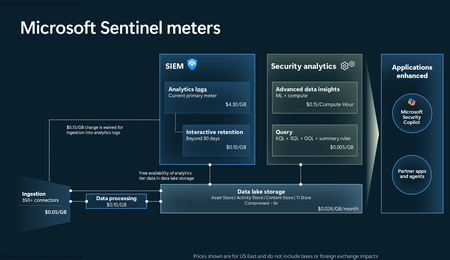
Introduction on Sentinel and its New Pricing Model Microsoft Sentinel is a cloud-native Security Information and Event Management (SIEM) and Security Orchestration, Automation, and Response (SOAR) platform that collects, analyzes, and correlates security data from across your environment to detect threats and automate response. Traditionally, Sentinel stored all ingested data in the Analytics tier (Log Analytics workspace), which is powerful but expensive for high-volume logs. To reduce cost and enable customers to retain all security data without compromise, Microsoft introduced a new dual-tier pricing model consisting of the Analytics tier and the Data Lake tier. The Analytics tier continues to support fast, real-time querying and analytics for core security scenarios, while the new Data Lake tier provides very low-cost storage for long-term retention and high-volume datasets. Customers can now choose where each data type lands—analytics for high-value detections and investigations, and data lake for large or archival types—allowing organizations to significantly lower cost while still retaining all their security data for analytics, compliance, and hunting. Please flow diagram depicts new sentinel pricing model: Now let's understand this new pricing model with below scenarios: Scenario 1A (PAY GO) Scenario 1B (Usage Commitment) Scenario 2 (Data Lake Tier Only) Scenario 1A (PAY GO) Requirement Suppose you need to ingest 10 GB of data per day, and you must retain that data for 2 years. However, you will only frequently use, query, and analyze the data for the first 6 months. Solution To optimize cost, you can ingest the data into the Analytics tier and retain it there for the first 6 months, where active querying and investigation happen. After that period, the remaining 18 months of retention can be shifted to the Data Lake tier, which provides low-cost storage for compliance and auditing needs. But you will be charged separately for data lake tier querying and analytics which depicted as Compute (D) in pricing flow diagram. Pricing Flow / Notes The first 10 GB/day ingested into the Analytics tier is free for 31 days under the Analytics logs plan. All data ingested into the Analytics tier is automatically mirrored to the Data Lake tier at no additional ingestion or retention cost. For the first 6 months, you pay only for Analytics tier ingestion and retention, excluding any free capacity. For the next 18 months, you pay only for Data Lake tier retention, which is significantly cheaper. Azure Pricing Calculator Equivalent Assuming no data is queried or analyzed during the 18-month Data Lake tier retention period: Although the Analytics tier retention is set to 6 months, the first 3 months of retention fall under the free retention limit, so retention charges apply only for the remaining 3 months of the analytics retention window. Azure pricing calculator will adjust accordingly. Scenario 1B (Usage Commitment) Now, suppose you are ingesting 100 GB per day. If you follow the same pay-as-you-go pricing model described above, your estimated cost would be approximately $15,204 per month. However, you can reduce this cost by choosing a Commitment Tier, where Analytics tier ingestion is billed at a discounted rate. Note that the discount applies only to Analytics tier ingestion—it does not apply to Analytics tier retention costs or to any Data Lake tier–related charges. Please refer to the pricing flow and the equivalent pricing calculator results shown below. Monthly cost savings: $15,204 – $11,184 = $4,020 per month Now the question is: What happens if your usage reaches 150 GB per day? Will the additional 50 GB be billed at the Pay-As-You-Go rate? No. The entire 150 GB/day will still be billed at the discounted rate associated with the 100 GB/day commitment tier bucket. Azure Pricing Calculator Equivalent (100 GB/ Day) Azure Pricing Calculator Equivalent (150 GB/ Day) Scenario 2 (Data Lake Tier Only) Requirement Suppose you need to store certain audit or compliance logs amounting to 10 GB per day. These logs are not used for querying, analytics, or investigations on a regular basis, but must be retained for 2 years as per your organization’s compliance or forensic policies. Solution Since these logs are not actively analyzed, you should avoid ingesting them into the Analytics tier, which is more expensive and optimized for active querying. Instead, send them directly to the Data Lake tier, where they can be retained cost-effectively for future audit, compliance, or forensic needs. Pricing Flow Because the data is ingested directly into the Data Lake tier, you pay both ingestion and retention costs there for the entire 2-year period. If, at any point in the future, you need to perform advanced analytics, querying, or search, you will incur additional compute charges, based on actual usage. Even with occasional compute charges, the cost remains significantly lower than storing the same data in the Analytics tier. Realized Savings Scenario Cost per Month Scenario 1: 10 GB/day in Analytics tier $1,520.40 Scenario 2: 10 GB/day directly into Data Lake tier $202.20 (without compute) $257.20 (with sample compute price) Savings with no compute activity: $1,520.40 – $202.20 = $1,318.20 per month Savings with some compute activity (sample value): $1,520.40 – $257.20 = $1,263.20 per month Azure calculator equivalent without compute Azure calculator equivalent with Sample Compute Conclusion The combination of the Analytics tier and the Data Lake tier in Microsoft Sentinel enables organizations to optimize cost based on how their security data is used. High-value logs that require frequent querying, real-time analytics, and investigation can be stored in the Analytics tier, which provides powerful search performance and built-in detection capabilities. At the same time, large-volume or infrequently accessed logs—such as audit, compliance, or long-term retention data—can be directed to the Data Lake tier, which offers dramatically lower storage and ingestion costs. Because all Analytics tier data is automatically mirrored to the Data Lake tier at no extra cost, customers can use the Analytics tier only for the period they actively query data, and rely on the Data Lake tier for the remaining retention. This tiered model allows different scenarios—active investigation, archival storage, compliance retention, or large-scale telemetry ingestion—to be handled at the most cost-effective layer, ultimately delivering substantial savings without sacrificing visibility, retention, or future analytical capabilities.Solved2KViews2likes5CommentsYour Sentinel AMA Logs & Queries Are Public by Default — AMPLS Architectures to Fix That
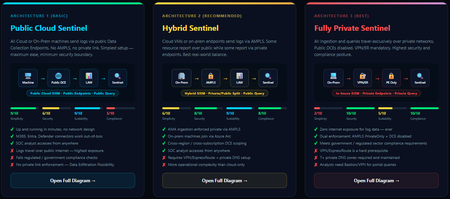
When you deploy Microsoft Sentinel, security log ingestion travels over public Azure Data Collection Endpoints by default. The connection is encrypted, and the data arrives correctly — but the endpoint is publicly reachable, and so is the workspace itself, queryable from any browser on any network. For many organisations, that trade-off is fine. For others — regulated industries, healthcare, financial services, critical infrastructure — it is the exact problem they need to solve. Azure Monitor Private Link Scope (AMPLS) is how you solve it. What AMPLS Actually Does AMPLS is a single Azure resource that wraps your monitoring pipeline and controls two settings: Where logs are allowed to go (ingestion mode: Open or PrivateOnly) Where analysts are allowed to query from (query mode: Open or PrivateOnly) Change those two settings and you fundamentally change the security posture — not as a policy recommendation, but as a hard platform enforcement. Set ingestion to PrivateOnly and the public endpoint stops working. It does not fall back gracefully. It returns an error. That is the point. It is not a firewall rule someone can bypass or a policy someone can override. Control is baked in at the infrastructure level. Three Patterns — One Spectrum There is no universally correct answer. The right architecture depends on your organisation's risk appetite, existing network infrastructure, and how much operational complexity your team can realistically manage. These three patterns cover the full range: Architecture 1 — Open / Public (Basic) No AMPLS. Logs travel to public Data Collection Endpoints over the internet. The workspace is open to queries from anywhere. This is the default — operational in minutes with zero network setup. Cloud service connectors (Microsoft 365, Defender, third-party) work immediately because they are server-side/API/Graph pulls and are unaffected by AMPLS. Azure Monitor Agents and Azure Arc agents handle ingestion from cloud or on-prem machines via public network. Simplicity: 9/10 | Security: 6/10 Good for: Dev environments, teams getting started, low-sensitivity workloads Architecture 2 — Hybrid: Private Ingestion, Open Queries (Recommended for most) AMPLS is in place. Ingestion is locked to PrivateOnly — logs from virtual machines travel through a Private Endpoint inside your own network, never touching a public route. On-premises or hybrid machines connect through Azure Arc over VPN or a dedicated circuit and feed into the same private pipeline. Query access stays open, so analysts can work from anywhere without needing a VPN/Jumpbox to reach the Sentinel portal — the investigation workflow stays flexible, but the log ingestion path is fully ring-fenced. You can also split ingestion mode per DCE if you need some sources public and some private. This is the architecture most organisations land on as their steady state. Simplicity: 6/10 | Security: 8/10 Good for: Organisations with mixed cloud and on-premises estates that need private ingestion without restricting analyst access Architecture 3 — Fully Private (Maximum Control) Infrastructure is essentially identical to Architecture 2 — AMPLS, Private Endpoints, Private DNS zones, VPN or dedicated circuit, Azure Arc for on-premises machines. The single difference: query mode is also set to PrivateOnly. Analysts can only reach Sentinel from inside the private network. VPN or Jumpbox required to access the portal. Both the pipe that carries logs in and the channel analysts use to read them are fully contained within the defined boundary. This is the right choice when your organisation needs to demonstrate — not just claim — that security data never moves outside a defined network perimeter. Simplicity: 2/10 | Security: 10/10 Good for: Organisations with strict data boundary requirements (regulated industries, audit, compliance mandates) Quick Reference — Which Pattern Fits? Scenario Architecture Getting started / low-sensitivity workloads Arch 1 — No network setup, public endpoints accepted Private log ingestion, analysts work anywhere Arch 2 — AMPLS PrivateOnly ingestion, query mode open Both ingestion and queries must be fully private Arch 3 — Same as Arch 2 + query mode set to PrivateOnly One thing all three share: Microsoft 365, Entra ID, and Defender connectors work in every pattern — they are server-side pulls by Sentinel and are not affected by your network posture. Please feel free to reach out if you have any questions regarding the information provided.79Views1like0CommentsAzure Managed Redis & Azure Databricks: Real-time Feature Serving for Low-Latency Decisions
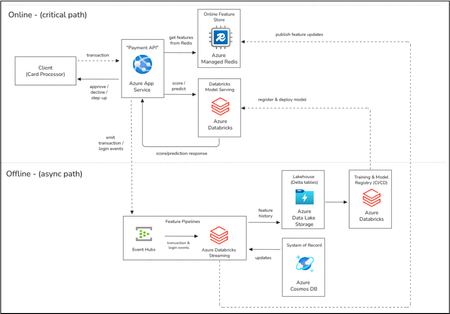
This blog content has been a collective collaboration between the Azure Databricks and Azure Managed Redis Product and Product Marketing teams. Executive summary Modern decisioning systems, fraud scoring, payments authorization, personalization, and step-up authentication, must return answers in tens of milliseconds while still reflecting the most recent behavior. That creates a classic tension: lakehouse platforms excel at large-scale ingestion, feature engineering, governance, training, and replayable history, but they are not designed to sit directly on the synchronous request path for high-QPS, ultra-low-latency lookups. This guide shows a pattern that keeps Azure Databricks as the primary system for building and maintaining features, while using Azure Managed Redis as the online speed layer that serves those features at memory speed for real-time scoring. The result is a shorter and more predictable critical path for your application: the Payment API (or any online service) reads features from Azure Managed Redis and calls a model endpoint; Azure Databricks continuously refreshes features from streaming and batch sources; and your authoritative systems of record (for example, account/card data) remain durable and governed. You get real-time responsiveness without giving up data correctness, lineage, or operational discipline. What each service does Azure Databricks is a first-party analytics and AI platform on Azure built on Apache Spark and the lakehouse architecture. It is commonly used for batch and streaming pipelines, feature engineering, model training, governance, and operationalization of ML workflows. In this architecture, Azure Databricks is the primary data and AI platform environment where features are defined, computed, validated, published, as well as where governed history is retained. Azure Managed Redis is a Microsoft‑managed, in‑memory data store based on Redis Enterprise, designed for low‑latency, high‑throughput access patterns. It is commonly used for traditional and real‑time caching, counters, and session state, and increasingly as a fast state layer for AI‑driven applications. In this architecture, Azure Managed Redis serves as the online feature store and speed layer: it holds the most recent feature values and signals required for real‑time scoring and can also support modern agentic patterns such as short‑ and long‑term memory, vector lookups, and fast state access alongside model inference. Business story: real-time fraud scoring as a running example Consider a payment system that must decide to approve, decline, or step-up authentication in tens of milliseconds—faster than a blink of an eye! The decision depends on recent behavioral signals, velocity counters, device changes, geo anomalies, and merchant patterns, combined with a fraud model. If the online service tries to compute or retrieve those features from heavy analytics systems on-demand, the request path becomes slower and more variable, especially at peak load. Instead, Azure Databricks pipelines continuously compute and refresh those features, and Azure Managed Redis serves them instantly to the scoring service. Behavioral history, profiles, and outcomes are still written to durable Azure datastores such as Delta tables, and Azure Cosmos DB so fraud models can be retrained with governed, reproducible data. The pattern: online feature serving with a speed layer The core idea is to separate responsibilities. Azure Databricks owns “building” features, ingest, join, aggregate, compute windows, and publish validated governed results. Azure Managed Redis owns “serving” features, fast, repeated key-based access on the hot path. The model endpoint then consumes a feature payload that is already pre-shaped for inference. This division prevents the lakehouse from becoming an online dependency and lets you scale online decisioning independently from offline compute. Pseudocode: end-to-end flow (online scoring + feature refresh) The pseudocode below intentionally reads like application logic rather than a single SDK. It highlights what matters: key design, pipelined feature reads, conservative fallbacks, and continuous refresh from Azure Databricks. # ---------------------------- # Online scoring (critical path) # ---------------------------- function handleAuthorization(req): schemaV = "v3" keys = buildFeatureKeys(schemaV, req) # card/device/merchant + windows feats = redis.MGET(keys) # single round trip (pipelined) feats = fillDefaults(feats) # conservative, no blocking payload = toModelPayload(req, feats) score = modelEndpoint.predict(payload) # Databricks Model Serving or an Azure-hosted model endpoint decision = policy(score, req) # approve/decline/step-up emitEventHub("txn_events", summarize(req, score, decision)) # async emitMetrics(redisLatencyMs, modelLatencyMs, missCount(feats)) return decision # ----------------------------------------- # Feature pipeline (async): build + publish # ----------------------------------------- function streamingFeaturePipeline(): events = readEventHubs("txn_events") ref = readCosmos("account_card_reference") # system of record lookups feats = computeFeatures(events, ref) # windows, counters, signals writeDelta("fraud_feature_history", feats) # ADLS Delta tables (lakehouse) publishLatestToRedis(feats, schemaV="v3") # SET/HSET + TTL (+ jitter) # ----------------------------------- # Training + deploy (async lifecycle) # ----------------------------------- function trainAndDeploy(): hist = readDelta("fraud_feature_history") labels = readCosmos("fraud_outcomes") # delayed ground truth model = train(joinPointInTime(hist, labels)) register(model) deployToDatabricksModelServing(model) Why it works This architecture works because each layer does the job it is best at. The lakehouse and feature pipelines handle heavy computation, validation, lineage, and re-playable history. The online speed layer handles locality and frequency: it keeps the “hot” feature state close to the online compute so requests do not pay the cost of re-computation or large fan-out reads. You explicitly control freshness with TTLs and refresh cadence, and you keep clear correctness boundaries by treating Azure Managed Redis as a serving layer rather than the authoritative system of record, with durable, governed feature history and labels stored in Delta tables and Azure data stores such as Azure Cosmos DB. Design choices that matter Cost efficiency and availability start with clear separation of concerns. Serving hot features from Azure Managed Redis avoids sizing analytics infrastructure for high‑QPS, low‑latency SLAs, and enables predictable capacity planning with regional isolation for online services. Azure Databricks remains optimized for correctness, freshness, and re-playable history while the online tier scales independently by request rate and working set size. Freshness and TTLs should reflect business tolerance for staleness and the meaning of each feature. Short velocity windows need TTLs slightly longer than ingestion gaps, while profiles and reference features can live longer. Adding jitter (for example ±10%) prevents synchronized expirations that create load spikes. Key design is the control plane for safe evolution and availability. Include explicit schema version prefixes and keep keys stable by entity and window. Publish new versions alongside existing ones, switch readers, and retire old versions to enable zero‑downtime rollouts. Protect the online path from stampedes and unnecessary cost. If a hot key is missing, avoid triggering widespread re-computation in downstream systems. Use a short single‑flight mechanism and conservative defaults, especially for risk‑sensitive decisions. Keep payloads compact so performance and cost remain predictable. Online feature reads are fastest when values are small and fetched in one or two round trips. Favor numeric encodings and small blobs, and use atomic writes to avoid partial or inconsistent reads during scoring. Reference architecture notes (regional first, then global) Start with a single-region deployment to validate end-to-end freshness and latency. Co-locate the Payment API compute, Azure Managed Redis, the model endpoint, and the primary data sources for feature pipelines to minimize round trips. Once the pattern is proven, extend to multi-region by deploying the online tier and its local speed layer per region, while keeping a clear strategy for how features are published and reconciled across regions (often via regional pipelines that consume the same event stream or replicated event hubs). Operations and SRE considerations Layer What to Monitor Why It Matters Typical Signals / Metrics Online service (API / scoring) End‑to‑end request latency, error rate, fallback rate Confirms the critical path meets application SLAs even under partial degradation p50/p95/p99 latency, error %, step‑up or conservative decision rate Azure Managed Redis (speed layer) Feature fetch latency, hit/miss ratio, memory pressure Indicates whether the working set fits and whether TTLs align with access patterns GET/MGET latency, miss %, evictions, memory usage Model serving Inference latency, throughput, saturation Separates model execution cost from feature access cost Inference p95 latency, QPS, concurrency utilization Azure Databricks feature pipelines Streaming lag, job health, data freshness Ensures features are being refreshed on time and correctness is preserved Event lag, job failures, watermark delay Cross‑layer boundaries Correlation between misses, latency spikes, and pipeline lag Helps identify whether regressions originate in serving, pipelines, or models Redis miss spikes vs pipeline delays vs API latency Monitor each layer independently, then correlate at the boundaries. This makes it clear whether an SLA issue is caused by online serving pressure, model inference, or delayed feature publication, without turning the lakehouse into a synchronous dependency. Putting it all together Adopt the pattern incrementally. First, publish a small, high-value feature set from Azure Databricks into Azure Managed Redis and wire the online service to fetch those features during scoring. Measure end-to-end impact on latency, model quality, and operational stability. Next, extend to streaming refresh for near-real-time behavioral features, and add controlled fallbacks for partial misses. Finally, scale out to multi-region if needed, keeping each region’s online service close to its local speed layer and ensuring the feature pipelines provide consistent semantics across regions. Sources and further reading Azure Databricks documentation: https://learn.microsoft.com/en-us/azure/databricks/ Azure Managed Redis documentation (overview and architecture): https://learn.microsoft.com/azure/redis/ Azure Architecture Center: Stream processing with Azure Databricks: https://learn.microsoft.com/azure/architecture/reference-architectures/data/stream-processing-databricks Databricks Feature Store / feature engineering docs (Azure Databricks): https://learn.microsoft.com/azure/databricks/293Views1like0Comments
Ingest Microsoft XDR Advanced Hunting Data into Microsoft Sentinel
I had difficulty finding a guide that can query Microsoft Defender vulnerability management Advanced Hunting tables in Microsoft Sentinel for alerting and automation. As a result, I put together this guide to demonstrate how to ingest Microsoft XDR Advanced Hunting query results into Microsoft Sentinel using Azure Logic Apps and System‑Assigned Managed Identity. The solution allows you to: Run Advanced Hunting queries on a schedule Collect high‑risk vulnerability data (or other hunting results) Send the results to a Sentinel workspace as custom logs Create alerts and automation rules based on this data This approach avoids credential storage and follows least privilege and managed identity best practices. Prerequisites Before you begin, ensure you have: Microsoft Defender XDR access Microsoft Sentinel deployed Azure Logic Apps permission Application Administrator or higher in Microsoft Entra ID PowerShell with Az modules installed Contributor access to the Sentinel workspace Architecture at a Glance Logic App (Managed Identity) ↓ Microsoft XDR Advanced Hunting API ↓ Logic App ↓ Log Analytics Data Collector API ↓ Microsoft Sentinel (Custom Log) Step 1: Create a Logic App In the Azure Portal, go to Logic Apps Create a new Consumption Logic App Choose the appropriate: Subscription Resource Group Region Step 2: Enable System‑Assigned Managed Identity Open the Logic App Navigate to Settings → Identity Enable System‑assigned managed identity Click Save Note the Object ID This identity will later be granted permission to run Advanced Hunting queries. Step 3: Locate the Logic App in Entra ID Go to Microsoft Entra ID → Enterprise Applications Change filter to All Applications Search for your Logic App name Select the app to confirm it exists Step 4: Grant Advanced Hunting Permissions (PowerShell) Advanced Hunting permissions cannot be assigned via the portal and must be done using PowerShell. Required Permission AdvancedQuery.Read.All PowerShell Script # Your tenant ID (in the Azure portal, under Azure Active Directory > Overview). $TenantID=”Your TenantID” Connect-AzAccount -TenantId $TenantID # Get the ID of the managed identity for the app. $spID = “Your Managed Identity” # Get the service principal for Microsoft Graph by providing the AppID of WindowsDefender ATP $GraphServicePrincipal = Get-AzADServicePrincipal -Filter "AppId eq 'fc780465-2017-40d4-a0c5-307022471b92'" | Select-Object Id # Extract the Advanced query ID. $AppRole = $GraphServicePrincipal.AppRole | ` Where-Object {$_.Value -contains "AdvancedQuery.Read.All"} # If AppRoleID comes up with blank value, it can be replaced with 93489bf5-0fbc-4f2d-b901-33f2fe08ff05 # Now add the permission to the app to read the advanced queries New-AzADServicePrincipalAppRoleAssignment -ServicePrincipalId $spID -ResourceId $GraphServicePrincipal.Id -AppRoleId $AppRole.Id # Or New-AzADServicePrincipalAppRoleAssignment -ServicePrincipalId $spID -ResourceId $GraphServicePrincipal.Id -AppRoleId 93489bf5-0fbc-4f2d-b901-33f2fe08ff05 After successful execution, verify the permission under Enterprise Applications → Permissions. Step 5: Build the Logic App Workflow Open Logic App Designer and create the following flow: Trigger Recurrence (e.g., every 24 hours Run Advanced Hunting Query Connector: Microsoft Defender ATP Authentication: System‑Assigned Managed Identity Action: Run Advanced Hunting Query Sample KQL Query (High‑Risk Vulnerabilities) Send Data to Log Analytics (Sentinel) On Send Data, create a new connection and provide the workspace information where the Sentinel log exists. Obtaining the Workspace Key is not straightforward, we need to retrieve using the PowerShell command. Get-AzOperationalInsightsWorkspaceSharedKey ` -ResourceGroupName "<ResourceGroupName>" ` -Name "<WorkspaceName>" Configuration Details Workspace ID Primary key Log Type (example): XDRVulnerability_CL Request body: Results array from Advanced Hunting Step 6: Run the Logic app to return results In the logic app designer select run, If the run is successful data will be sent to sentinel workspace. Step 7: Validate Data in Microsoft Sentinel In Sentinel, run the query: XDRVulnerability_CL | where TimeGenerated > ago(24h) If data appears, ingestion is successful. Step 8: Create Alerts & Automation Rules Use Sentinel to: Create analytics rules for: CVSS > 9 Exploit available New vulnerabilities in last 24 hours Trigger: Email notifications Incident creation SOAR playbooks Conclusion By combining Logic Apps, Managed Identities, Microsoft XDR, and Microsoft Sentinel, you can create a powerful, secure, and scalable pipeline for ingesting hunting intelligence and triggering proactive detections.80Views1like1CommentAnnouncing the New Home for the Azure Databricks Blog
We’re excited to share that the Azure Databricks blog has moved to a new address on Microsoft Tech Community Hub! Azure Databricks | Microsoft Community Hub Our new blog home is designed to make it easier than ever for you to discover the latest product updates, deep technical insights, and real-world best practices directly from the Azure Databricks product team. Whether you're a data engineer, data scientist, or analytics leader, this is your go-to destination for staying informed and inspired. What You’ll Find on the New Blog At our new address, you can expect: Latest Announcements – Stay up to date with new features, capabilities, and releases Best Practice Guidance – Learn proven approaches for building scalable data and AI solutions Technical Deep Dives – Explore detailed walkthroughs and architecture insights Customer Stories – See how organizations are driving impact with Azure Databricks Why the Move? This new blog gives us the flexibility to deliver a better reading experience, improved navigation, and richer content dedicated to Azure Databricks. It also allows us to bring you more frequent updates and more in-depth resources tailored to your needs. Stay Connected We encourage you to bookmark the new blog and check back regularly. Even better—follow along so you never miss an update. By staying connected, you’ll be among the first to hear about new features, performance improvements, and expert recommendations to help you get the most out of Azure Databricks. 👉 Follow the new Azure Databricks blog today and stay ahead with the latest announcements and best practices. We’re looking forward to continuing this journey with you—now at our new home! Check out the latest blogs if you haven’t already: • Introducing Lakeflow Connect Free Tier, now available on Azure Databricks | Microsoft Community Hub •Near–Real-Time CDC to Delta Lake for BI and ML with Lakeflow on Azure Databricks | Microsoft Community Hub158Views0likes0CommentsIntroducing Lakeflow Connect Free Tier, now available on Azure Databricks
We're excited to introduce the Lakeflow Connect Free Tier on Azure Databricks, so you can easily bring your enterprise data into your lakehouse to build analytics and AI applications faster. Modern applications require reliable access to operational data, especially for training analytics and AI agents, but connecting and gathering data across silos can be challenging. With this new release, you can seamlessly ingest all of your enterprise data from SaaS and database sources to unlock data intelligence for your AI agents. Ingest millions of records per day, per workspace for free This new Lakeflow Connect Free Tier provides 100 DBUs per day, per workspace, which allows you to ingest approximately 100 million records* from many popular data sources**, including SaaS applications and databases. Unlock your enterprise data for free with Lakeflow Connect This new offering provides all the benefits of Lakeflow Connect, eliminating the heavy lifting so your teams can focus on unlocking data insights instead of managing infrastructure. In the past year, Databricks has continued rolling out several fully managed connectors, supporting popular data sources. The free tier supports popular SaaS applications (Salesforce, ServiceNow, Google Analytics, Workday, Microsoft Dynamics 365), and top-used databases (SQL Server, Oracle, Teradata, PostgreSQL, MySQL, Snowflake, Redshift, Synapse, and BigQuery). Lakeflow Connect benefits include: Simple UI: Avoid complex setups and architectural overhead, these fully managed connectors provide a simple UI and API to democratize data access. Automated features also help simplify pipeline maintenance with minimal overhead. Efficient ingestion: Increase efficiency and accelerate time to value. Optimized incremental reads and writes and data transformation help improve the performance and reliability of your pipelines, reduce bottlenecks, and reduce impact to the source data for scalability. Unified with the Databricks Platform: Create ingestion pipelines with governance from Unity Catalog, observability from Lakehouse Monitoring, and seamless orchestration with Lakeflow Jobs for analytics, AI and BI. Availability The Lakeflow Connect Free Tier is available starting today on Azure Databricks. If you are at FabCon in Atlanta, Accelerating Data and AI with Azure Databricks on Thursday, March 19th, 8:00–9:00 AM, room C302 to see how these capabilities come together to accelerate performance, simplify architecture, and maximize value on Azure Getting Started Resources To learn more about the Lakeflow Connect Free Tier and Lakeflow Connect, review our pricing page, and documentation. Get started ingesting your data today for free, signup with an Azure free account. Get started with Azure Databricks for free Product tour: Databricks Lakeflow Connect for Salesforce: Powering Smarter Selling with AI and Analytics Product tour: Effortless ServiceNow Data Ingestion with Databricks Lakeflow Connect Product tour: Simplify Data Ingestion with Lakeflow Connect: From Google Analytics to AI On-demand video: Use Lakeflow Connect for Salesforce to predict customer churn On-demand video: Databricks Lakeflow Connect for Workday Reports: Connect, Ingest, and Analyze Workday Data Without Complexity On-demand video: Data Ingestion With Lakeflow Connect —-- * Your actual ingestion capacity will vary based on specific workload characteristics, record sizes, and source types. ** Excludes Zerobus Ingest, Auto Loader and other self-managed connectors. Customer will continue to incur charges for underlying infrastructure consumption from the cloud vendor.3.4KViews0likes0CommentsNear–Real-Time CDC to Delta Lake for BI and ML with Lakeflow on Azure Databricks
The Challenge: Too Many Tools, Not Enough Clarity Modern data teams on Azure often stitch together separate orchestrators, custom streaming consumers, hand-rolled transformation notebooks, and third-party connectors — each with its own monitoring UI, credential system, and failure modes. The result is observability gaps, weeks of work per new data source, disconnected lineage, and governance bolted on as an afterthought. Lakeflow, Databricks’ unified data engineering solution, solves this by consolidating ingestion, transformation, and orchestration natively inside Azure Databricks — governed end-to-end by Unity Catalog. Component What It Does Lakeflow Connect Point-and-click connectors for databases (using CDC), SaaS apps, files, streaming, and Zerobus for direct telemetry Lakeflow Spark Declarative Pipelines Declarative ETL with AutoCDC, data quality enforcement, and automatic incremental processing Lakeflow Jobs Managed orchestration with 99.95% uptime, a visual task DAG, and repair-and-rerun Architecture Step 1: Stream Application Telemetry with Zerobus Ingest Zerobus Ingest, part of Lakeflow Connect, lets your application push events directly to a Delta table over gRPC — no message bus, no Structured Streaming job. Sub-5-second latency, up to 100 MB/sec per connection, immediately queryable in Unity Catalog. Prerequisites Azure Databricks workspace with Unity Catalog enabled and serverless compute on A service principal with write access to the target table Setup First, create the target table in a SQL notebook: CREATE CATALOG IF NOT EXISTS prod; CREATE SCHEMA IF NOT EXISTS prod.bronze; CREATE TABLE IF NOT EXISTS prod.bronze.telemetry_events ( event_id STRING, user_id STRING, event_type STRING, session_id STRING, ts BIGINT, page STRING, duration_ms INT ); 1. Go to Settings → Identity and Access → Service Principals → Add service principal 2. Open the service principal → Secrets tab → Generate secret. Save the Client ID and secret. 3. In a SQL notebook, grant access: GRANT USE CATALOG ON CATALOG prod TO `<client-id>`; GRANT USE SCHEMA ON SCHEMA prod.bronze TO `<client-id>`; GRANT MODIFY, SELECT ON TABLE prod.bronze.telemetry_events TO `<client-id>`; 4. Derive your Zerobus endpoint from your workspace URL: <workspace-id>.zerobus.<region>.azuredatabricks.net (The workspace ID is the number in your workspace URL, e.g. adb-**1234567890**.12.azuredatabricks.net) 5. Install the SDK: pip install databricks-zerobus-ingest-sdk 6. In your application, open a stream and push records: from zerobus.sdk.sync import ZerobusSdk from zerobus.sdk.shared import RecordType, StreamConfigurationOptions, TableProperties sdk = ZerobusSdk("<workspace-id>.zerobus.<region>.azuredatabricks.net", "https://<workspace-url>") stream = sdk.create_stream( "<client-id>", "<client-secret>", TableProperties("prod.bronze.telemetry_events"), StreamConfigurationOptions(record_type=RecordType.JSON) ) stream.ingest_record({"event_id": "e1", "user_id": "u42", "event_type": "page_view", "ts": 1700000000000}) stream.close() 7. Verify in Catalog → prod → bronze → telemetry_events → Sample Data Step 2: Ingest from On-Premises SQL Server via CDC Lakeflow Connect reads SQL Server's transaction log incrementally — no full table scans, no custom extraction software. Connectivity to your on-prem server is over Azure ExpressRoute. Prerequisites SQL Server reachable from Databricks over ExpressRoute (TCP port 1433) CDC enabled on the source database and tables (see setup below) A SQL login with CDC read permissions on the source database Databricks: CREATE CONNECTION privilege on the metastore; USE CATALOG, CREATE TABLE on the destination catalog Setup Enable CDC on SQL Server: USE YourDatabase; EXEC sys.sp_cdc_enable_db; EXEC sys.sp_cdc_enable_table @source_schema = N'dbo', @source_name = N'orders', @role_name = NULL; EXEC sys.sp_cdc_enable_table @source_schema = N'dbo', @source_name = N'customers', @role_name = NULL; Configure the connector in Databricks: Click Data Ingestion in the sidebar (or + New → Add Data) Select SQL Server from the connector list Ingestion Gateway page — enter a gateway name, select staging catalog/schema, click Next Ingestion Pipeline page — name the pipeline, click Create connection: Host: your on-prem IP (e.g. 10.0.1.50) · Port: 1433 · Database: YourDatabase Enter credentials, click Create, then Create pipeline and continue Source page — expand the database tree, check dbo.orders and dbo.customers; optionally enable History tracking (SCD Type 2) per table. Set Destination table name to orders_raw and customers_raw respectively. Destination page — set catalog: prod, schema: bronze, click Save and continue Settings page — set a sync schedule (e.g. every 5 minutes), click Save and run pipeline Step 3: Transform with Spark Declarative Pipelines The Lakeflow Pipelines Editor is an IDE built for developing pipelines in Lakeflow Spark Declarative Pipelines (SDP), and lets you define Bronze → Silver → Gold in SQL. SDP then handles incremental execution, schema evolution, and lineage automatically. Prerequisites Bronze tables populated (from Steps 1 and 2) CREATE TABLE and USE SCHEMA privileges on prod.silver and prod.gold Setup 1. In the sidebar, click Jobs & Pipelines → ETL pipeline → Start with an empty file → SQL 2. Rename the pipeline (click the name at top) to lakeflow-demo-pipeline 3. Paste the following SQL: -- Silver: latest order state (SCD Type 1) CREATE OR REFRESH STREAMING TABLE prod.silver.orders; APPLY CHANGES INTO prod.silver.orders FROM STREAM(prod.bronze.orders_raw) KEYS (order_id) SEQUENCE BY updated_at STORED AS SCD TYPE 1; -- Silver: full customer history (SCD Type 2) CREATE OR REFRESH STREAMING TABLE prod.silver.customers; APPLY CHANGES INTO prod.silver.customers FROM STREAM(prod.bronze.customers_raw) KEYS (customer_id) SEQUENCE BY updated_at STORED AS SCD TYPE 2; -- Silver: telemetry with data quality check CREATE OR REFRESH STREAMING TABLE prod.silver.telemetry_events ( CONSTRAINT valid_event_type EXPECT (event_type IN ('page_view', 'add_to_cart', 'purchase')) ON VIOLATION DROP ROW ) AS SELECT * FROM STREAM(prod.bronze.telemetry_events); -- Gold: materialized view joining all three Silver tables CREATE OR REFRESH MATERIALIZED VIEW prod.gold.customer_activity AS SELECT o.order_id, o.customer_id, c.customer_name, c.email, o.order_amount, o.order_status, COUNT(e.event_id) AS total_events, SUM(CASE WHEN e.event_type = 'purchase' THEN 1 ELSE 0 END) AS purchase_events FROM prod.silver.orders o LEFT JOIN prod.silver.customers c ON o.customer_id = c.customer_id LEFT JOIN prod.silver.telemetry_events e ON CAST(o.customer_id AS STRING) = e.user_id -- user_id in telemetry is string GROUP BY o.order_id, o.customer_id, c.customer_name, c.email, o.order_amount, o.order_status; 4. Click Settings (gear icon) → set Pipeline mode: Continuous → Target catalog: prod → Save 5. Click Start — the editor switches to the live Graph view Step 4: Govern with Unity Catalog All tables from Steps 1–3 are automatically registered in Unity Catalog, Databricks’ built-in governance and security offering, with full lineage. No manual registration needed. View lineage Go to Catalog → prod → gold → customer_activity Click the Lineage tab → See Lineage Graph Click the expand icon on each upstream node to reveal the full chain: Bronze sources → Silver → Gold Set Permissions -- Grant analysts read access to the Gold layer only GRANT SELECT ON TABLE prod.gold.customer_activity TO `analysts@contoso.com`; -- Mask PII for non-privileged users CREATE FUNCTION prod.security.mask_email(email STRING) RETURNS STRING RETURN CASE WHEN is_account_group_member('data-engineers') THEN email ELSE CONCAT(LEFT(email, 2), '***@***.com') END; ALTER TABLE prod.silver.customers ALTER COLUMN email SET MASK prod.security.mask_email; Step 5: Orchestrate and Monitor with Lakeflow Jobs Wire the Connect pipeline and SDP pipeline into a single job with dependencies, scheduling, and alerting, all from the UI with Lakeflow Jobs. Prerequisites Pipelines from Steps 2 and 3 saved in the workspace Setup Go to Jobs & Pipelines → Create → Job Task 1: click the Pipeline tile → name it ingest_sql_server_cdc → select your Lakeflow Connect pipeline → Create task Task 2: click + Add task → Pipeline → name it transform_bronze_to_gold → select lakeflow-demo-pipeline → set Depends on: ingest_sql_server_cdc → Create task In the Job details panel on the right: click Add schedule → set frequency → add email notification on failure → Save Click Run now to trigger a run, then click the run ID to open the Run detail view For health monitoring across all jobs, query system tables in any notebook or SQL warehouse: SELECT job_name, result_state, DATEDIFF(second, start_time, end_time) AS duration_sec FROM system.lakeflow.job_run_timeline WHERE start_time >= CURRENT_TIMESTAMP - INTERVAL 24 HOURS ORDER BY start_time DESC; Step 6: Visualize with AI/BI Dashboards and Genie AI/BI Dashboard helps you create AI-powered, low-code dashboards. Click + New → Dashboard Click Add a visualization, connect to prod.gold.customer_activity, and build charts Click Publish — viewers see data under their own Unity Catalog permissions automatically Genie allows you to interact with their data using natural language 1. In the sidebar, click Genie → New 2. On Choose data sources, select prod.gold.customer_activity → Create 3. Add context in the Instructions box (e.g., table relationships, business definitions) 4. Switch to the Chat tab and ask a question: "Which customers have the highest total events and what were their order amounts?" 5. Genie generates and executes SQL, returning a result table. Click View SQL to inspect the query. Everything in One Platform Capability Lakeflow Previously Required Telemetry ingestion Zerobus Ingest Message bus + custom consumer Database CDC Lakeflow Connect Custom scripts or 3rd-party tools Transformation + AutoCDC Spark Declarative Pipelines Hand-rolled MERGE logic Data quality SDP Expectations Separate validation tooling Orchestration Lakeflow Jobs External schedulers (Airflow, etc.) Governance Unity Catalog Disconnected ACLs and lineage Monitoring Job UI + System Tables Separate APM tools BI + NL Query AI/BI Dashboards + Genie External BI tools Customers seeing results on Azure Databricks: Ahold Delhaize — 4.5x faster deployment and 50% cost reduction running 1,000+ ingestion jobs daily Porsche Holding — 85% faster ingestion pipeline development vs. a custom-built solution Next Steps Lakeflow product page Lakeflow Connect documentation Live demos on Demo Center Get started with Azure Databricks435Views0likes0Comments