2016
83 Topics
MS Word Freezing when navigating between Chrome and Word. Safe mode works. now?
Hi All, First, a bit of context. I teach online, so I constantly navigate between MS. Word and Chrome/Firefox. It is pretty much a requirement for what I do. I am running Office 2016 on my home machine. This has worked completely fine until about two weeks ago. Now, after an indiscriminate amount of time (it varies), Word will freeze when I enter back into Word from another window. This has persisted even though I have deleted and reinstalled the program. Safe mode allows me to work within Word per normal, and is a good short term fix. However, I am stumped at how to fix this long term. Additional details Only Word freezes I have plenty of RAM (32gb DDR4) Windows is up to date Chrome is up to date Chrome does not have any extensions enabled I do not have any add-ins enabled for MS Word RAM/CPU usage are not spiking in Task manager Malware/Virus scan has no results It is not related to the computer sleeping/waking up Given all of these factors, it seems like a Word issue only. I do not have the issue in PowerPoint or Excel - just word. My guess is a bad registry entry, or a corrupted file somewhere. What is puzzling to me is that the issue persists through a re-install. Thoughts?694Views0likes3Comments
Microsoft Word "Save as PDF" - fonts not rendering
Hi all, I have a Word document which uses the Readex Pro family of fonts: https://github.com/ThomasJockin/readexpro I have all fonts installed locally and when I view it in Word, it appears as rendered: the main font used is Readex Pro Deca Light, while headings used Readex Pro Deca SemiBold. However, when I use "Save a Copy > PDF" in Word, everything is rendered as Readex Pro Deca Light. (That happens with the "Bitmap text..." in the options either on or off. If I use Print > Print to PDF, the headings are rendered in the right font. But of course I don't get features that way such as a left-hand navigation pane of headings in the resulting PDF. Does anyone know why Microsoft Word's "Save a Copy > PDF" seems not to use font families correctly? Is there a workaround here?4.2KViews3likes5Comments
MS Word Spanish word Bug
Microsoft Office 2013 all the way to 2021 LTSC has a bug in the spanish language grammar and orthographic checker. The grammar and orthographic checker does not detect and mark the following words: doscientes trescientes cuatrocientes quinientes seiscientes Setecientes Ochocientes Novecientes Correct words would be with "a" or "o" as the last vocals: doscientos trescientos cuatrocientos quinientos seiscientos Setecientos Ochocientos Novecientos All of the former are the spanish names for numbers representing hundreds.Solved202Views0likes3CommentsAll the macro parts are appeared as "{MACROBUTTON AcceptAllChangesShown}"
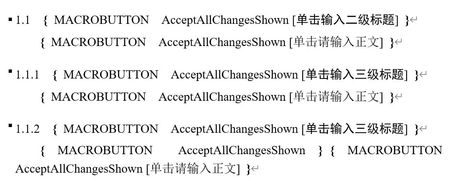
Hello. I am having trouble with my word format. All the macro parts are appeared as " { MACROBUTTON AcceptAllChangesShown } " after I opened a new reference style file from Endnote. I removed and reinstalled the office, but it didn't help. I am currently using Office Home & Student 2016. Need help!150Views0likes1Comment
Creating unique headers and footers?
I am looking for a word processing product that I can create a template with unique headers and footers that I can share with users who can only add text content but not change or delete the headers and footers. I looked at Word, but it does not have this capability. I am trying to convince my boss to use Google doc's but he is old school. I tried telling him that Word is old, outdated tech and very limited, but he asked me to check if there is another MS product that comes with our 365 platform that can do what I described here?351Views0likes1Comment
How to offset the position of a multilevel list number to the top left?
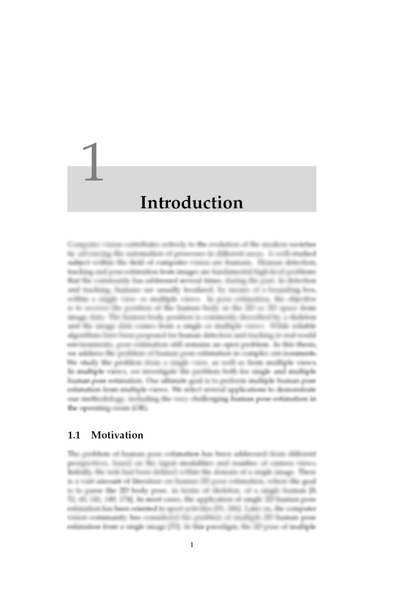
I would like to replicate a chapter title heading style in a thesis that I am writing that is similar to a document written in "LaTeX" that looks like so: I want to create a multilevel list with the top level heading having a style like the one in the screenshot (where the list number is floating to the top left with light gray background) and the rest of the list if in the 1.1, 1.1.1, etc. Can this be done in word?614Views0likes3Comments
Add a signature field and restrict editing
Hi, We're looking for a way to add a signature box where a user can draw or sign while the document is restricted. The user should be able to sign using Word Online, Desktop App, Tablet and Mobile. Please let us know the best way to achieve this.696Views0likes1Comment
How to create an editable dropdown list with more than 256 characters in Microsoft Word?
We've tried the following in Microsoft Word however, it did not meet our goal of being able to display more than 256 characters in the dropdown and edit it. We need something that works without issue with Legacy controls and restricted editing. Combo box however, the dropdown list is limited to 256 characters Quick Parts however, when sharing the document with other users, they cannot see the dropdown or quick parts Legacy form dropdown and display the text output using {IF{REF bookmark}}="exact value""text output" however the text output is not editable. If we use a check box, is it possible to hide other options once we check an option?1.7KViews0likes3Comments