2016
83 Topics
Microsoft Word "Save as PDF" - fonts not rendering
Hi all, I have a Word document which uses the Readex Pro family of fonts: https://github.com/ThomasJockin/readexpro I have all fonts installed locally and when I view it in Word, it appears as rendered: the main font used is Readex Pro Deca Light, while headings used Readex Pro Deca SemiBold. However, when I use "Save a Copy > PDF" in Word, everything is rendered as Readex Pro Deca Light. (That happens with the "Bitmap text..." in the options either on or off. If I use Print > Print to PDF, the headings are rendered in the right font. But of course I don't get features that way such as a left-hand navigation pane of headings in the resulting PDF. Does anyone know why Microsoft Word's "Save a Copy > PDF" seems not to use font families correctly? Is there a workaround here?4.2KViews3likes5CommentsEm Dash short cut not working in Word
I am using Windows 11 Pro on my Lenovo P14 laptop, and Windows 11 on my HP Pavillion x360. I often write in Word and insert Em dashes. CTRL+ALT+"-" (shortcut). Both machines have this setting automatically in Word's built-in shortcuts, however the Lenovo machine ignores the shortcut sequence and inserts nothing (the HP works fine). I have reinstalled the OS and Office Pro 16 MS Word on Lenovo, and nothing helps. Any suggestions?54KViews0likes6Comments
Copying and linking Excel tables (landscape mode) to Word (portrait mode)
Hello, I want to insert tables from Excel into a Word document. However, the Word document is in portrait orientation and has a header and footer that need to be located on the narrow side margins of the pages displaying the tables as they would in portrait mode. The tables, on the other hand, are large enough to span across multiple pages in landscape orientation and need to be separated - automatically at best. Ideally, the table would automatically repeat the header row at the top of each new page. Additionally, the inserted Excel table would be linked to the original file, so changes in the .xlsx file would reflect in the table inserted in the Word document. How can I achieve this goal? Here is what I have tried already: section breaks - helps, inserting and linking the table in landscape mode but issues with footer, header and page breaks arise creating an extra text field and rotating the table - no link and therefore no updated data in the table, next to the issue with page breaks In the end I need to insert around 20-30 multi-page long tables in landscape format and would really appreciate avoiding a tremendous amount of work, every time I need to update the data in the tables. If there is more information needed, I´d be happy to share them. Thank you for your assistance!3.1KViews0likes1CommentAdd a signature field and restrict editing
Hi, We're looking for a way to add a signature box where a user can draw or sign while the document is restricted. The user should be able to sign using Word Online, Desktop App, Tablet and Mobile. Please let us know the best way to achieve this.696Views0likes1Comment
MS Word Freezing when navigating between Chrome and Word. Safe mode works. now?
Hi All, First, a bit of context. I teach online, so I constantly navigate between MS. Word and Chrome/Firefox. It is pretty much a requirement for what I do. I am running Office 2016 on my home machine. This has worked completely fine until about two weeks ago. Now, after an indiscriminate amount of time (it varies), Word will freeze when I enter back into Word from another window. This has persisted even though I have deleted and reinstalled the program. Safe mode allows me to work within Word per normal, and is a good short term fix. However, I am stumped at how to fix this long term. Additional details Only Word freezes I have plenty of RAM (32gb DDR4) Windows is up to date Chrome is up to date Chrome does not have any extensions enabled I do not have any add-ins enabled for MS Word RAM/CPU usage are not spiking in Task manager Malware/Virus scan has no results It is not related to the computer sleeping/waking up Given all of these factors, it seems like a Word issue only. I do not have the issue in PowerPoint or Excel - just word. My guess is a bad registry entry, or a corrupted file somewhere. What is puzzling to me is that the issue persists through a re-install. Thoughts?694Views0likes3Comments
MS Word Spanish word Bug
Microsoft Office 2013 all the way to 2021 LTSC has a bug in the spanish language grammar and orthographic checker. The grammar and orthographic checker does not detect and mark the following words: doscientes trescientes cuatrocientes quinientes seiscientes Setecientes Ochocientes Novecientes Correct words would be with "a" or "o" as the last vocals: doscientos trescientos cuatrocientos quinientos seiscientos Setecientos Ochocientos Novecientos All of the former are the spanish names for numbers representing hundreds.Solved202Views0likes3CommentsAll the macro parts are appeared as "{MACROBUTTON AcceptAllChangesShown}"
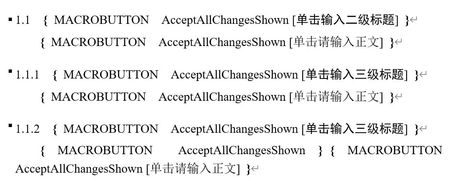
Hello. I am having trouble with my word format. All the macro parts are appeared as " { MACROBUTTON AcceptAllChangesShown } " after I opened a new reference style file from Endnote. I removed and reinstalled the office, but it didn't help. I am currently using Office Home & Student 2016. Need help!150Views0likes1CommentHow to get sharepoint properties panel enabled by default from Sharepoint Online
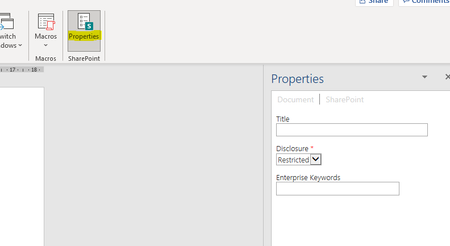
Previously with Sharepoint on prem and older Office version using the Document Information Panel (DIP) you could enable in SharePoint to always open/display the DIP when opening documents from a library. Now with the move to the SharePoint Properties Panel and using SharePoint Online I cannot find a way to have this enabled by default when opening documents. As Metadata is critical to using SharePoint as any form of a document management system this needs to be enabled. Is there some registry key or something from client side? Or some option in the maze of settings on the SharePoint Online side the equivalent of the DIP enabled one? This is what I mean by SharePoint Properties Panel:2.7KViews3likes1Comment