.net
2 TopicsHow does "com4:ManagedInProcessServer" work under a MSIX packaging scenario?
I'm trying to create a MSIX package for a classic Windows desktop app. The app is written in C# (.NET Framework 4.7.2), and it's running perfectly both before and after packaging. The problem is that the app exposes a COM class library (also written in C#) for interop with other apps. The original installer of this app registers the COM library with "regasm.exe". Given that MSIX have the ability to expose COM servers, namely with the "windows.comServer" extension, I've tried adding the following extension to package manifest, but it does not work as intended: <com:Extension Category="windows.comServer"> <com:ComServer> <com:SurrogateServer DisplayName="TheApp Class Library"> <com:Class Id="8ae249dd-05f8-403e-ac32-00feab49c1f5" Path="TheApp.Library.dll" ThreadingModel="STA" /> </com:SurrogateServer> </com:ComServer> </com:Extension> After some research I've found that C# COM libraries registers differently with normal ones; namely it requires a few more entries than DLL path and CLSID written into the registry. Digging through the documents, I've found that https://learn.microsoft.com/en-us/uwp/schemas/appxpackage/uapmanifestschema/element-com4-managedinprocessserver seems to be just what I needed. So I've tried to use the following extension instead: <com4:Extension Category="windows.comServer"> <com4:ComServer> <com4:ManagedInProcessServer Assembly="TheApp.Library, Version=1.0.0.0, Culture=neutral" RuntimeVersion="v4.0.30319"> <com4:Class Id="8ae249dd-05f8-403e-ac32-00feab49c1f5" ImplementationClass="TheApp.Library.ExtensionManager" ThreadingModel="STA" Virtualization="disabled" /> </com4:ManagedInProcessServer> </com4:ComServer> </com4:Extension> But it still does not work. In fact, this time even the "HKEY_CLASSES_ROOT\CLSID\{...}" registry entries do not get generated. I've checked the https://learn.microsoft.com/en-us/windows/win32/appxpkg/troubleshooting#get-diagnostic-information and no error has ever occurred during package installation. It is as if the extension declaration is not there. What confuses me more is that "com4:ManagedInProcessServer" does not allow specifying codebase for the assembly. With "regasm.exe" one can specify the full path to COM library with "/codebase", but "com4:ManagedInProcessServer" does not seem to be allowing this. I've been looking for relevant information for quite some time, but all I could find is the single document page on XML schema (linked above), with no real-world code examples. (And by "no" I mean literally ZERO code example on Internet.) I would like to know if "com4:ManagedInProcessServer" works under the situation described above, and if not so, what should I do to have a C# COM library exposed by a MSIX package? If it matters, I'm using the latest version of Visual Studio Community 2022 with SDK version 10.0.22621.0. The MSIX package is to be deployed on a Windows 11 23H2 system.1KViews0likes1Comment
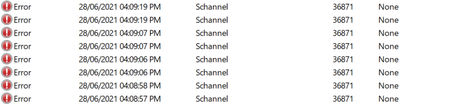
Event ID 36871 error keeps logging in a repeating pattern
Hello, I accidentally came across the following error in Event Viewer: "A fatal error occurred while creating a TLS client credential. The internal error state is 10013." Source: Schannel Event ID: 36871 Process ID points to LSASS I filtered out the results to only reveal errors of the same source (Schannel), and the earliest record registered was nearly a month ago. However the first time it logged multiple entries during a single session and then never showed up again for about a month. The first entries also had a partially different message "The certificate received from the remote server was issued by an untrusted certificate authority. Because of this, none of the data contained in the certificate can be validated. The TLS connection request has failed. The attached data contains the server certificate." and a different event ID: 36882 More than 20 days later, the current error ID 36871 logged a single entry once and didn't show up again until a couple of days ago. Over the past two days it has been logging too many times (typically 8 entries per hour) and it repeats precisely in the same pattern. Today I'm starting to notice it's logging even more entries compared to yesterday, but also in a consistent pattern. I tried looking online for an explanation and a solution but everything I found was way beyond my limited technical understanding. All I could grasp (potentially) that it has to do with establishing secure connections with the server (I don't know which server are they talking about), with some pages mentioning something about .NET framework. Please note: I'm having this issue on a personal (unmanaged) laptop running Windows 10 Home (21H1), and typically connected to my home WiFi network. I would really appreciate if someone can help me with the following questions: For an average user (like myself), should I even worry about this error being logged on my laptop? Can I safely ignore it? (considering that I haven't noticed any performance issues or other problems, besides the error itself being logged) I recently installed the latest https://support.microsoft.com/en-us/topic/june-21-2021-kb5003537-cumulative-update-preview-for-net-framework-3-5-and-4-8-for-windows-10-version-2004-windows-server-version-2004-windows-10-version-20h2-and-windows-server-version-20h2-and-windows-version-21h1-49ea0d2c-9328-4b01-a81e-1dc0b8d53548 Could it possibly be the one to blame for this type of error? I also tried checking all the other updates and changes I have done on my computer over the past month, but couldn't really find anything that particularly coincide with the error being logged in that pattern. I tried connecting my laptop to a mobile hotspot around the time when the error logs (according to the timely pattern I spotted). The error didn't log while being connected to that hotspot, but it appeared again shortly after I connected back to WiFi. Could that possibly mean the error has to do with the WiFi connection or my ISP rather than anything on the laptop iteself? Please help Update: I tried connecting my laptop to the same hotspot a bit longer, and after an hour the same error logged, but so far it only generated one entry.21KViews0likes0Comments