.net
426 Topics
MSB4184: The expression "[System.IO.Path]::GetDirectoryName('')" cannot be evaluate
Hi got this error now after I updated my VS IDE .... The path is not of a legal form. WinFormsSQLExamplePro C:\Program Files\dotnet\sdk\10.0.102\Sdks\Microsoft.NET.Sdk\targets\Microsoft.NET.Windows.targets <_WinRTRuntimeDllDirectory>$([System.IO.Path]::GetDirectoryName('%(_WinRTRuntimeDllReferencePath.FullPath)'))</_WinRTRuntimeDllDirectory> <_CsWinRTOrTargetingPackLibDirectory>$([System.IO.Path]::GetDirectoryName('$(_WinRTRuntimeDllDirectory)'))</_CsWinRTOrTargetingPackLibDirectory> Note the top most path entry contains a '%' character , whereas the 2nd path contains a '$' character... Not sure what is going on ... (happened after VS update)10Views0likes0Comments
Edm Model Generation Fails
Using an Azure ASP.NET MVC API from a Maui app, I am encountering the following error in the app when attempting to access the API. A few days ago, the initalization was working properly. The cloud app has been under further development, but the base api code has not been modified, only the response from the endpoints. The latest release NuGets are in use. What elements are being sought? System.TypeInitializationException: The type initializer for 'GeneratedEdmModel' threw an exception. ---> System.InvalidOperationException: Sequence contains no elements at System.Linq.ThrowHelper.ThrowNoElementsException() at System.Linq.Enumerable.First[TSource](IEnumerable`1 source) at SentryCloud.Models.Container.GeneratedEdmModel.CreateXmlReader()18Views0likes0CommentsImplementing A2A protocol in NET: A Practical Guide
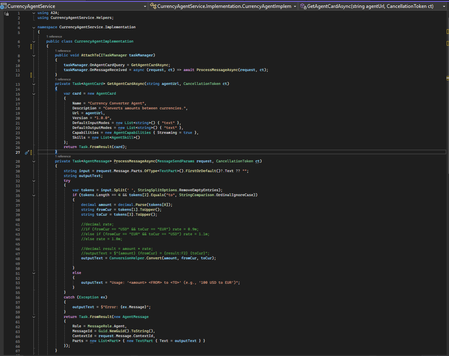
As AI systems mature into multi‑agent ecosystems, the need for agents to communicate reliably and securely has become fundamental. Traditionally, agents built on different frameworks like Semantic Kernel, LangChain, custom orchestrators, or enterprise APIs do not share a common communication model. This creates brittle integrations, duplicate logic, and siloed intelligence. The Agent‑to‑Agent Standard (A2AS) addresses this gap by defining a universal, vendor‑neutral protocol for structured agent interoperability. A2A establishes a common language for agents, built on familiar web primitives: JSON‑RPC 2.0 for messaging and HTTPS for transport. Each agent exposes a machine‑readable Agent Card describing its capabilities, supported input/output modes, and authentication requirements. Interactions are modeled as Tasks, which support synchronous, streaming, and long‑running workflows. Messages exchanged within a task contain Parts; text, structured data, files, or streams, that allow agents to collaborate without exposing internal implementation details. By standardizing discovery, communication, authentication, and task orchestration, A2A enables organizations to build composable AI architectures. Specialized agents can coordinate deep reasoning, planning, data retrieval, or business automation regardless of their underlying frameworks or hosting environments. This modularity, combined with industry adoption and Linux Foundation governance, positions A2A as a foundational protocol for interoperable AI systems. A2AS in .NET — Implementation Guide Prerequisites • .NET 8 SDK • Visual Studio 2022 (17.8+) • A2A and A2A.AspNetCore packages • Curl/Postman (optional, for direct endpoint testing) The open‑source A2A project provides a full‑featured .NET SDK, enabling developers to build and host A2A agents using ASP.NET Core or integrate with other agents as a client. Two A2A and A2A.AspNetCore packages power the experience. The SDK offers: A2AClient - to call remote agents TaskManager - to manage incoming tasks & message routing AgentCard / Message / Task models - strongly typed protocol objects MapA2A() - ASP.NET Core router integration that auto‑generates protocol endpoints This allows you to expose an A2A‑compliant agent with minimal boilerplate. Project Setup Create two separate projects: CurrencyAgentService → ASP.NET Core web project that hosts the agent A2AClient → Console app that discovers the agent card and sends a message Install the packages from the pre-requisites in the above projects. Building a Simple A2A Agent (Currency Agent Example) Below is a minimal Currency Agent implemented in ASP.NET Core. It responds by converting amounts between currencies. Step 1: In CurrencyAgentService project, create the CurrencyAgentImplementation class to implement the A2A agent. The class contains the logic for the following: a) Describing itself (agent “card” metadata). b) Processing the incoming text messages like “100 USD to EUR”. c) Returning a single text response with the conversion. The AttachTo(ITaskManager taskManager) method hooks two delegates on the provided taskManager - a) OnAgentCardQuery → GetAgentCardAsync: returns agent metadata. b) OnMessageReceived → ProcessMessageAsync: handles incoming messages and produces a response. Step 2: In the Program.cs of the Currency Agent Solution, create a TaskManager , and attach the agent to it, and expose the A2A endpoint. Typical flow: GET /agent → A2A host asks OnAgentCardQuery → returns the card POST /agent with a text message → A2A host calls OnMessageReceived → returns the conversion text. All fully A2A‑compliant. Calling an A2A Agent from .NET To interact with any A2A‑compliant agent from .NET, the client follows a predictable sequence: identify where the agent lives, discover its capabilities through the Agent Card, initialize a correctly configured A2AClient, construct a well‑formed message, send it asynchronously, and finally interpret the structured response. This ensures your client is fully aligned with the agent’s advertised contract and remains resilient as capabilities evolve. Below are the steps implemented to call the A2A agent from the A2A client: Identify the agent endpoint: Why: You need a stable base URL to resolve the agent’s metadata and send messages. What: Construct a Uri pointing to the agent service, e.g., https://localhost:7009/agent. Discover agent capabilities via an Agent Card. Why: Agent Cards provide a contract: name, description, final URL to call, and features (like streaming). This de-couples your client from hard-coded assumptions and enables dynamic capability checks. What: Use A2ACardResolver with the endpoint Uri, then call GetAgentCardAsync() to obtain an AgentCard. Initialize the A2AClient with the resolved URL. Why: The client encapsulates transport details and ensures messages are sent to the correct agent endpoint, which may differ from the discovery URL. What: Create A2AClient using new Uri (currencyCard.Url) from the Agent Card for correctness. Construct a well-formed agent request message. Why: Agents typically require structured messages for roles, traceability, and multi-part inputs. A unique message ID supports deduplication and logging. What: Build an AgentMessage: • Role = MessageRole.User clarifies intent. • MessageId = Guid.NewGuid().ToString() ensures uniqueness. • Parts contains content; for simple queries, a single TextPart with the prompt (e.g., “100 USD to EUR”). Package and send the message. Why: MessageSendParams can carry the message plus any optional settings (e.g., streaming flags or context). Using a dedicated params object keeps the API extensible. What: Wrap the AgentMessage in MessageSendParams and call SendMessageAsync(...) on the A2AClient. Outcome: Await the asynchronous response to avoid blocking and to stay scalable. Interpret the agent response. Why: Agents can return multiple Parts (text, data, attachments). Extracting the appropriate part avoids assumptions and keeps your client robust. What: Cast to AgentMessage, then read the first TextPart’s Text for the conversion result in this scenario. Best Practices 1. Keep Agents Focused and Single‑Purpose Design each agent around a clear, narrow capability (e.g., currency conversion, scheduling, document summarization). Single‑responsibility agents are easier to reason about, scale, and test, especially when they become part of larger multi‑agent workflows. 2. Maintain Accurate and Helpful Agent Cards The Agent Card is the first interaction point for any client. Ensure it accurately reflects: Supported input/output formats Streaming capabilities Authentication requirements (if any) Version information A clean and honest card helps clients integrate reliably without guesswork. 3. Prefer Structured Inputs and Outputs Although A2A supports plain text, using structured payloads through DataPart objects significantly improves consistency. JSON inputs and outputs reduce ambiguity, eliminate prompt‑engineering edge cases, and make agent behavior more deterministic especially when interacting with other automated agents. 4. Use Meaningful Task States Treat A2A Tasks as proper state machines. Transition through states intentionally (Submitted → Working → Completed, or Working → InputRequired → Completed). This gives clients clarity on progress, makes long‑running operations manageable, and enables more sophisticated control flows. 5. Provide Helpful Error Messages Make use of A2A and JSON‑RPC error codes such as -32602 (invalid input) or -32603 (internal error), and include additional context in the error payload. Avoid opaque messages, error details should guide the client toward recovery or correction. 6. Keep Agents Stateless Where Possible Stateless agents are easier to scale and less prone to hidden failures. When state is necessary, ensure it is stored externally or passed through messages or task contexts. For local POCs, in‑memory state is acceptable, but design with future statelessness in mind. 7. Validate Input Strictly Do not assume incoming messages are well‑formed. Validate fields, formats, and required parameters before processing. For example, a currency conversion agent should confirm both currencies exist and the value is numeric before attempting a conversion. 8. Design for Streaming Even if Disabled Streaming is optional, but it’s a powerful pattern for agents that perform progressive reasoning or long computations. Structuring your logic so it can later emit partial TextPart updates makes it easy to upgrade from synchronous to streaming workflows. 9. Include Traceability Metadata Embed and log identifiers such as TaskId, MessageId, and timestamps. These become crucial for debugging multi‑agent scenarios, improving observability, and correlating distributed workflows—especially once multiple agents collaborate. 10. Offer Clear Guidance When Input Is Missing Instead of returning a generic failure, consider shifting the task to InputRequired and explaining what the client should provide. This improves usability and makes your agent self‑documenting for new consumers.From Vibe Coding to Working App: How SRE Agent Completes the Developer Loop
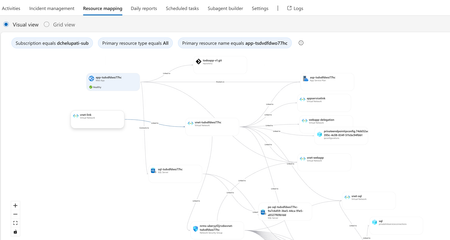
The Most Common Challenge in Modern Cloud Apps There's a category of bugs that drive engineers crazy: multi-layer infrastructure issues. Your app deploys successfully. Every Azure resource shows "Succeeded." But the app fails at runtime with a vague error like Login failed for user ''. Where do you even start? You're checking the Web App, the SQL Server, the VNet, the private endpoint, the DNS zone, the identity configuration... and each one looks fine in isolation. The problem is how they connect and that's invisible in the portal. Networking issues are especially brutal. The error says "Login failed" but the actual causes could be DNS, firewall, identity, or all three. The symptom and the root causes are in completely different resources. Without deep Azure networking knowledge, you're just clicking around hoping something jumps out. Now imagine you vibe coded the infrastructure. You used AI to generate the Bicep, deployed it, and moved on. When it breaks, you're debugging code you didn't write, configuring resources you don't fully understand. This is where I wanted AI to help not just to build, but to debug. Enter SRE Agent + Coding Agent Here's what I used: Layer Tool Purpose Build VS Code Copilot Agent Mode + Claude Opus Generate code, Bicep, deploy Debug Azure SRE Agent Diagnose infrastructure issues and create developer issue with suggested fixes in source code (app code and IaC) Fix GitHub Coding Agent Create PRs with code and IaC fix from Github issue created by SRE Agent Copilot builds. SRE Agent debugs. Coding Agent fixes. What I Built I used VS Code Copilot in Agent Mode with Claude Opus to create a .NET 8 Web App connected to Azure SQL via private endpoint: Private networking (no public exposure) Entra-only authentication Managed identity (no secrets) Deployed with azd up. All green. Then I tested the health endpoint: $ curl https://app-tsdvdfdwo77hc.azurewebsites.net/health/sql {"status":"unhealthy","error":"Login failed for user ''.","errorType":"SqlException"} Deployment succeeded. App failed. One error. How I Fixed It: Step by Step Step 1: Create SRE Agent with Azure Access I created an SRE Agent with read access to my Azure subscription. You can scope it to specific resource groups. The agent builds a knowledge graph of your resources and their dependencies visible in the Resource Mapping view below. Step 2: Connect GitHub to SRE Agent using GitHub MCP server I connected the GitHub MCP server so the agent could read my repository and create issues. Step 3: Create Sub Agent to analyze source code I created a sub-agent for analyzing source code using GitHub mcp tools. this lets SRE Agent understand not just Azure resources, but also the Bicep and source code files that created them. "you are expert in analyzing source code (bicep and app code) from github repos" Step 4: Invoke Sub-Agent to Analyze the Error In the SRE Agent chat, I invoked the sub-agent to diagnose the error I received from my app end point. It correlated the runtime error with the infrastructure configuration Step 5: Watch the SRE Agent Think and Reason SRE Agent analyzed the error by tracing code in Program.cs, Bicep configurations, and Azure resource relationships Web App, SQL Server, VNet, private endpoint, DNS zone, and managed identity. Its reasoning process worked through each layer, eliminating possibilities one by one until it identified the root causes. Step 6: Agent Creates GitHub Issue Based on its analysis, SRE Agent summarized the root causes and suggested fixes in a GitHub issue: Root Causes: Private DNS Zone missing VNet link Managed identity not created as SQL user Suggested Fixes: Add virtualNetworkLinks resource to Bicep Add SQL setup script to create user with db_datareader and db_datawriter roles Step 7: Merge the PR from Coding Agent Assign the Github issue to Coding Agent which then creates a PR with the fixes. I just reviewed the fix. It made sense and I merged it. Redeployed with azd up, ran the SQL script: curl -s https://app-tsdvdfdwo77hc.azurewebsites.net/health/sql | jq . { "status": "healthy", "database": "tododb", "server": "tcp:sql-tsdvdfdwo77hc.database.windows.net,1433", "message": "Successfully connected to SQL Server" } 🎉 From error to fix in minutes without manually debugging a single Azure resource. Why This Matters If you're a developer building and deploying apps to Azure, SRE Agent changes how you work: You don't need to be a networking expert. SRE Agent understands the relationships between Azure resources private endpoints, DNS zones, VNet links, managed identities. It connects dots you didn't know existed. You don't need to guess. Instead of clicking through the portal hoping something looks wrong, the agent systematically eliminates possibilities like a senior engineer would. You don't break your workflow. SRE Agent suggests fixes in your Bicep and source code not portal changes. Everything stays version controlled. Deployed through pipelines. No hot fixes at 2 AM. You close the loop. AI helps you build fast. Now AI helps you debug fast too. Try It Yourself Do you vibe code your app, your infrastructure, or both? How do you debug when things break? Here's a challenge: Vibe code a todo app with a Web App, VNet, private endpoint, and SQL database. "Forget" to link the DNS zone to the VNet. Deploy it. Watch it fail. Then point SRE Agent at it and see how it identifies the root cause, creates a GitHub issue with the fix, and hands it off to Coding Agent for a PR. Share your experience. I'd love to hear how it goes. Learn More Azure SRE Agent documentation Azure SRE Agent blogs Azure SRE Agent community Azure SRE Agent home page Azure SRE Agent pricing574Views3likes0Comments
Fix It Before They Feel It: Higher Reliability with Proactive Mitigation
What if your infrastructure could detect performance issues and fix them automatically—before your users even notice? This blog brings that vision to life using Azure SRE Agent, an AI-powered autonomous agent that monitors, detects, and remediates production issues in real-time. 💡 The magic: Zero human intervention required. The agent handles detection, diagnosis, remediation, and reporting—all autonomously. 📺 Watch the Demo This content was presented at .NET Day 2025. Watch the full session to see Azure SRE Agent in action: 🎬 Fix it before they feel it - .NET Day 2025 🎯 What You'll See in This Demo Watch as we intentionally deploy "bad" code to production and observe how the SRE Agent: Detects the degradation — Compares live response times against learned baselines Takes autonomous action — Executes a slot swap to roll back to healthy code Communicates the incident — Posts to Teams and creates a GitHub issue Generates reports — Summarizes deployment metrics for stakeholders 🚀 Key Capabilities Capability What It Shows Proactive Baseline Learning Agent learns normal response times and stores them in a knowledge base Real-time Anomaly Detection Instant comparison of current vs. baseline metrics Autonomous Remediation Agent executes Azure CLI commands to swap slots without human approval Cross-platform Communication Automatic Teams posts and GitHub issue creation Incident Reporting End-of-day email summaries with deployment health metrics Architecture Overview The solution uses Azure SRE Agent with three specialized sub-agents working together: Components Application Layer: .NET 9 Web API running on Azure App Service Application Insights for telemetry collection Azure Monitor Alerts for incident triggers Azure SRE Agent: AvgResponseTime Sub-Agent: Captures baseline metrics every 15 minutes, stores in Knowledge Store DeploymentHealthCheck Sub-Agent: Triggered by deployment alerts, compares metrics to baseline, auto-remediates DeploymentReporter Sub-Agent: Generates daily summary emails from Teams activity External Integrations: GitHub (issue creation, semantic code search, Copilot assignment) Microsoft Teams (deployment summaries) Outlook (summary reports) What the SRE Agent Does When a deployment occurs, the SRE Agent autonomously performs the following actions: 1. Health Check (DeploymentHealthCheck Sub-Agent) When a slot swap alert fires, the agent: Queries App Insights for current response times Retrieves the baseline from the Knowledge Store Compares current performance against baseline If degradation > 20%: Executes rollback and creates GitHub issue If healthy: Posts confirmation to Teams Healthy Deployment - No Action Needed (Teams Post): The agent confirms the deployment is healthy — response time (22ms) is 80% faster than baseline (116ms). Degraded Deployment - Automatic Rollback (Teams Post): The agent detects +332% latency regression (212ms vs 116ms baseline), executes a slot swap to rollback, and creates GitHub Issue. 2. Daily Summary (DeploymentReporter Sub-Agent) Every 24 hours, the reporter agent: Reads all Teams deployment posts from the last 24 hours Aggregates deployment metrics Sends an executive summary email Daily Summary (Outlook Email): The daily report shows 9 deployments, 6 healthy, 3 rollbacks, and 3 GitHub issues created — complete with response time details and issue links. Demo Flow View Step-by-Step Instructions → Step Action Step 1 Deploy Infrastructure + Applications Step 2 Create Sub-Agents, Triggers & Schedules Step 3 Swap bad code, watch agent remediate Setting Up the Demo Prerequisites Azure subscription with Contributor access Azure CLI installed and logged in (az login) .NET 9.0 SDK PowerShell 7.0+ Step 1: Deploy Infrastructure cd scripts .\1-setup-demo.ps1 -ResourceGroupName "sre-demo-rg" -AppServiceName "sre-demo-app-12345" This script will: Prompt for Azure subscription selection Deploy Azure infrastructure (App Service, App Insights, Alerts) Build and deploy healthy code to production Build and deploy problematic code to staging Full Setup Instructions → Step 2: Configure Azure SRE Agent Navigate to Azure SRE Agents Portal Sub Agent builder tab and create three sub-agents: Sub-Agent Purpose Tools Used AvgResponseTime Captures baseline response time metrics QueryAppInsightsByAppId, UploadKnowledgeDocument DeploymentHealthCheck Detects degradation and executes remediation SearchMemory, QueryAppInsights, PostTeamsMessage, CreateGithubIssue, Az CLI commands DeploymentReporter Generates deployment summary reports GetTeamsMessages, SendOutlookEmail Creating Each Sub-Agent In the Github links below you can find gif images that capture the creation flow AvgResponseTime + Baseline Task: Detailed Instructions → DeploymentHealthCheck + Swap Alert: Detailed Instructions → DeploymentReporter + Reporter Task: Detailed Instructions → Step 3: Run the Demo .\2-run-demo.ps1 This triggers the following flow: Slot Swap Occurs (demo script) ▼ Activity Log Alert Fires ▼ Incident Trigger Activated ▼ DeploymentHealthCheck Agent Runs ─ Queries current response time from App Insights ─ Retrieves baseline from knowledge store ─ Compares (if >20% degradation) ─ Executes: az webapp deployment slot swap ─ Creates GitHub issue (if degraded) ─ Posts to Teams channel Full Demo Instructions → Demo Timeline Time Event 0:00 Run 2-run-demo.ps1 0:30 Swap staging → production (bad code deployed) 1:00 Production now slow (~1500ms vs ~50ms baseline) ~5:00 Slot Swap Alert fires ~5:04 Agent executes slot swap (rollback) ~5:30 Production restored to healthy state ~6:00 Agent posts to Teams, creates GitHub issue How the Performance Toggle Works The app has a compile-time toggle in ProductsController.cs: private const bool EnableSlowEndpoints = false; // false = fast, true = slow The setup script creates two versions: Production: EnableSlowEndpoints = false → ~50ms responses Staging: EnableSlowEndpoints = true → ~1500ms responses (artificial delay) Get Started 🔗 Full source code and instructions: github.com/microsoft/sre-agent/samples/proactive-reliability 🔗 Azure SRE Agent documentation: https://learn.microsoft.com/en-us/azure/sre-agent/ Technology Stack Framework: ASP.NET Core 9.0 Infrastructure: Azure Bicep Monitoring: Application Insights + Log Analytics Automation: Azure SRE Agent Scripts: PowerShell 7.0+ Tags: Azure, SRE Agent, DevOps, Reliability, .NET, App Service, Application Insights, Autonomous Remediation338Views0likes1CommentBuild Long-Running AI Agents on Azure App Service with Microsoft Agent Framework
UPDATE 10/22/2025: An alternative implementation of this sample app has been added to this blog post. The alternate version uses a WebJob for background processing instead of an in-process hosted service. WebJobs are a great alternative for background processing in App Service, providing better separation of concerns, independent restarts, and dedicated logging. To learn more about WebJobs on App Service, see the Azure App Service WebJobs documentation. The AI landscape is evolving rapidly, and with the introduction of Microsoft Agent Framework, developers now have a powerful platform for building sophisticated AI agents that go far beyond simple chat completions. These agents can execute complex, multi-step workflows with persistent state, conversation threads, and structured execution—capabilities that are essential for production AI applications. Today, we're excited to share how Azure App Service provides an excellent platform for running Agent Framework workloads, especially those involving long-running operations. Let's explore why App Service is a great choice and walk through a practical example. 🔗 Quick link to sample app GitHub repo: https://github.com/Azure-Samples/app-service-agent-framework-travel-agent-dotnet 🔗 Quick link to WebJob sample app GitHub repo: https://github.com/Azure-Samples/app-service-agent-framework-travel-agent-dotnet-webjob The Challenge: Long-Running Agent Framework Flows Agent Framework enables AI agents to perform complex tasks that can take significant time to complete: Multi-turn reasoning: Iterative calls to large language models (LLMs) where each response informs the next prompt Tool integration: Function calling and external API interactions for real-time data Complex processing: Budget calculations, content optimization, multi-phase generation Persistent context: Maintaining conversation state across multiple interactions These workflows often take 30 seconds to several minutes to complete—far too long for synchronous HTTP request handling. Traditional web applications run into several constraints: ⏱️ Timeout Limitations: HTTP requests have timeout constraints (typically 30-230 seconds) ⚠️ Connection Issues: Clients may disconnect due to network interruptions or browser navigation 📈 Scalability Concerns: Long-running requests block worker threads and don't survive app restarts 🎯 Poor User Experience: Users see endless loading spinners with no progress feedback The Solution: Async Pattern with App Service Azure App Service provides a robust solution through the asynchronous request-reply pattern combined with background processing: API immediately returns (202 Accepted) with a task ID Background worker processes the Agent Framework workflow Client polls for status with real-time progress updates Durable state storage (Cosmos DB) maintains task status and results This pattern ensures: ✅ No HTTP timeouts—API responds in milliseconds ✅ Resilient to restarts—state survives deployments and scale events ✅ Progress tracking—users see real-time updates (10%, 45%, 100%) ✅ Better scalability—background workers process independently NOTE! This pattern can be implemented with either an in-process BackgroundService or as a separate WebJob process. Deployment Patterns: BackgroundService vs WebJob The following compares the two deployment options you have for this implementation. BackgroundService Pattern: ✅ Simpler deployment (single project) ✅ Shared process and memory ✅ Good for moderate workloads ⚠️ API and worker restart together WebJob Pattern (alternative): ✅ Separate processes (API + WebJob) ✅ Independent restart without API downtime ✅ Dedicated WebJob monitoring in portal ✅ Better for production operations ⚠️ Slightly more complex deployment (manual WebJob upload) Either of these options are a great way to help you get started with implementing long-running processes on App Service. To learn more about WebJobs on App Service, see the Azure App Service WebJobs documentation. Rapid Innovation Support The AI landscape is changing at an unprecedented pace. New models, frameworks, and capabilities are released constantly. Azure App Service's managed platform ensures your applications can adapt quickly without infrastructure rewrites: Framework Updates: Deploy new Agent Framework SDK versions like any application update Model Upgrades: Switch between GPT-4, GPT-4o, or future models with configuration changes Scaling Patterns: Start with combined API+worker, split into separate apps as needs grow New Capabilities: Integrate emerging AI services without changing hosting infrastructure App Service handles the platform complexity so you can focus on building great AI experiences. Sample Application: AI Travel Planner To demonstrate this pattern, we've built a Travel Planner application that uses Agent Framework to generate detailed, multi-day travel itineraries. The agent performs complex reasoning including: Researching destination attractions and activities Optimizing daily schedules based on location proximity Calculating detailed budget breakdowns Generating personalized travel tips and recommendations The entire application runs on a single P0v4 App Service with both the API and background worker combined—showcasing App Service's flexibility for hosting diverse workload patterns in one deployment. Key Architecture Components Azure App Service (P0v4 Premium) Hosts both REST API and background worker in a single app "Always On" feature keeps background worker running continuously Managed identity for secure, credential-less authentication Azure Service Bus Decouples API from long-running Agent Framework processing Reliable message delivery with automatic retries Dead letter queue for error handling Azure Cosmos DB Stores task status with real-time progress updates Automatic 24-hour TTL for cleanup Rich query capabilities for complex itinerary data Azure AI Foundry Hosts persistent agents with conversation threads Structured execution with Agent Framework runtime GPT-4o model for intelligent travel planning One of the powerful features of using Azure AI Foundry with Agent Framework is the ability to inspect agents and conversation threads directly in the Azure portal. This provides valuable visibility into what's happening during execution. Viewing Agents and Threads in Azure AI Foundry When you submit a travel plan request, the application creates an agent in Azure AI Foundry. You can navigate to your AI Foundry project in the Azure portal to see: Agents The application creates an agent for each request Important: Agents are **automatically deleted** after the itinerary is generated to keep your project clean Tip: You'll need to be quick! Navigate to Azure AI Foundry right after submitting a request to see the agent in action Once processing completes, the agent is removed as part of the cleanup process Conversation Threads Unlike agents, threads persist even after the agent completes You can view the complete conversation history at any time See the exact prompts sent to the model and the responses generated Useful for debugging, understanding agent behavior, and improving prompts The ephemeral nature of agents (created per request, deleted after completion) keeps your Azure AI Foundry project clean while the persistent threads give you full traceability of every interaction. Alternative Architecture: WebJob Pattern The alternate version of this app uses a WebJob for background processing instead of an in-process hosted service. However, just a single App Service is still required. WebJobs are a great alternative for background processing in App Service, providing better separation of concerns, independent restarts, and dedicated logging. To learn more about WebJobs on App Service, see the Azure App Service WebJobs documentation. Get Started Today The complete Travel Planner application is available as a reference implementation so you can quickly get started building your own apps with Agent Framework on App Service. Try one or both of these today! 🔗 GitHub Repository for background process version: https://github.com/Azure-Samples/app-service-agent-framework-travel-agent-dotnet 🔗 GitHub Repository for WebJob version: https://github.com/Azure-Samples/app-service-agent-framework-travel-agent-dotnet-webjob The repo includes: Complete .NET 9 source code with Agent Framework integration Infrastructure as Code (Bicep) for automated deployment Web UI with real-time progress tracking Comprehensive README with deployment instructions Deploy in minutes: git clone https://github.com/Azure-Samples/app-service-agent-framework-travel-agent-dotnet.git cd app-service-agent-framework-travel-agent-dotnet azd auth login azd up IMPORTANT! For the WebJob version, you will also need to manually deploy the WebJob. See the instructions in the README to learn how to do this. Key Takeaways ✅ Agent Framework enables sophisticated AI agents beyond simple chat completions ✅ Long-running workflows (30s-minutes) require async patterns to avoid timeouts ✅ App Service provides a simple, cost-effective platform for these workloads ✅ Async request-reply pattern with Service Bus + Cosmos DB ensures reliability ✅ Rapid innovation in AI is supported by App Service's adaptable platform Whether you're building travel planners, document processors, research assistants, or other AI-powered applications, Azure App Service gives you the flexibility and reliability you need—without the complexity of container orchestration or function programming models. What's Next? Build on This Foundation This Travel Planner is just the starting point—a foundation to help you understand the patterns and architecture. Agent Framework is designed to grow with your needs, making it easy to add sophisticated capabilities with minimal effort: 🛠️ Add Tool Calling Connect your agent to real-time APIs for weather, flight prices, hotel availability, and actual booking systems. Agent Framework's built-in tool calling makes this straightforward. 🤝 Implement Multi-Agent Systems Create specialized agents (flight expert, hotel specialist, activity planner) that collaborate to build comprehensive travel plans. Agent Framework handles the orchestration. 🧠 Enhance with RAG Add retrieval-augmented generation to give your agent deep knowledge of destinations, local customs, and insider tips from your own content library. 📊 Expand Functionality Real-time pricing and availability Interactive refinement based on user feedback Personalized recommendations from past trips Multi-language support for global users The beauty of Agent Framework is that these advanced features integrate seamlessly into the pattern we've built. Start with this sample, explore the Agent Framework documentation, and unlock powerful AI capabilities for your applications! Learn More Microsoft Agent Framework Documentation Azure App Service Documentation Async Request-Reply Pattern Azure App Service WebJobs documentation Have you built AI agents on App Service? We'd love to hear about your experience! Share your thoughts in the comments below. Questions about Agent Framework on App Service? Drop a comment and our team will help you get started.2KViews1like3Comments
Unlocking Application Modernisation with GitHub Copilot
AI-driven modernisation is unlocking new opportunities you may not have even considered yet. It's also allowing organisations to re-evaluate previously discarded modernisation attempts that were considered too hard, complex or simply didn't have the skills or time to do. During Microsoft Build 2025, we were introduced to the concept of Agentic AI modernisation and this post from Ikenna Okeke does a great job of summarising the topic - Reimagining App Modernisation for the Era of AI | Microsoft Community Hub. This blog post however, explores the modernisation opportunities that you may not even have thought of yet, the business benefits, how to start preparing your organisation, empowering your teams, and identifying where GitHub Copilot can help. I’ve spent the last 8 months working with customers exploring usage of GitHub Copilot, and want to share what my team members and I have discovered in terms of new opportunities to modernise, transform your applications, bringing some fun back into those migrations! Let’s delve into how GitHub Copilot is helping teams update old systems, move processes to the cloud, and achieve results faster than ever before. Background: The Modernisation Challenge (Then vs Now) Modernising legacy software has always been hard. In the past, teams faced steep challenges: brittle codebases full of technical debt, outdated languages (think decades-old COBOL or VB6), sparse documentation, and original developers long gone. Integrating old systems with modern cloud services often requiring specialised skills that were in short supply – for example, check out this fantastic post from Arvi LiVigni (@arilivigni ) which talks about migrating from COBOL “the number of developers who can read and write COBOL isn’t what it used to be,” making those systems much harder to update". Common pain points included compatibility issues, data migrations, high costs, security vulnerabilities, and the constant risk that any change could break critical business functions. It’s no wonder many modernisation projects stalled or were “put off” due to their complexity and risk. So, what’s different now (circa 2025) compared to two years ago? In a word: Intelligent AI assistance. Tools like GitHub Copilot have emerged as AI pair programmers that dramatically lower the barriers to modernisation. Arvi’s post talks about how only a couple of years ago, developers had to comb through documentation and Stack Overflow for clues when deciphering old code or upgrading frameworks. Today, GitHub Copilot can act like an expert co-developer inside your IDE, ready to explain mysterious code, suggest updates, and even rewrite legacy code in modern languages. This means less time fighting old code and more time implementing improvements. As Arvi says “nine times out of 10 it gives me the right answer… That speed – and not having to break out of my flow – is really what’s so impactful.” In short, AI coding assistants have evolved from novel experiments to indispensable tools, reimagining how we approach software updates and cloud adoption. I’d also add from my own experience – the models we were using 12 months ago have already been superseded by far superior models with ability to ingest larger context and tackle even further complexity. It's easier to experiment, and fail, bringing more robust outcomes – with such speed to create those proof of concepts, experimentation and failing faster, this has also unlocked the ability to test out multiple hypothesis’ and get you to the most confident outcome in a much shorter space of time. Modernisation is easier now because AI reduces the heavy lifting. Instead of reading the 10,000-line legacy program alone, a developer can ask Copilot to explain what the code does or even propose a refactored version. Rather than manually researching how to replace an outdated library, they can get instant recommendations for modern equivalents. These advancements mean that tasks which once took weeks or months can now be done in days or hours – with more confidence and less drudgery - more fun! The following sections will dive into specific opportunities unlocked by GitHub Copilot across the modernisation journey which you may not even have thought of. Modernisation Opportunities Unlocked by Copilot Modernising an application isn’t just about updating code – it involves bringing everyone and everything up to speed with cloud-era practices. Below are several scenarios and how GitHub Copilot adds value, with the specific benefits highlighted: 1. AI-Assisted Legacy Code Refactoring and Upgrades Instant Code Comprehension: GitHub Copilot can explain complex legacy code in plain English, helping developers quickly understand decades-old logic without scouring scarce documentation. For example, you can highlight a cryptic COBOL or C++ function and ask Copilot to describe what it does – an invaluable first step before making any changes. This saves hours and reduces errors when starting a modernisation effort. Automated Refactoring Suggestions: The AI suggests modern replacements for outdated patterns and APIs, and can even translate code between languages. For instance, Copilot can help convert a COBOL program into JavaScript or C# by recognising equivalent constructs. It also uses transformation tools (like OpenRewrite for Java/.NET) to systematically apply code updates – e.g. replacing all legacy HTTP calls with a modern library in one sweep. Developers remain in control, but GitHub Copilot handles the tedious bulk edits. Bulk Code Upgrades with AI: GitHub Copilot’s App Modernisation capabilities can analyse an entire codebase and generate a detailed upgrade plan, then execute many of the code changes automatically. It can upgrade framework versions (say from .NET Framework 4.x to .NET 6, or Java 8 to Java 17) by applying known fix patterns and even fixing compilation errors after the upgrade. Teams can finally tackle those hundreds of thousand-line enterprise applications – a task that could take multiple years with GitHub Copilot handling the repetitive changes. Technical Debt Reduction: By cleaning up old code and enforcing modern best practices, GitHub Copilot helps chip away at years of technical debt. The modernised codebase is more maintainable and stable, which lowers the long-term risk hanging over critical business systems. Notably, the tool can even scan for known security vulnerabilities during refactoring as it updates your code. In short, each legacy component refreshed with GitHub Copilot comes out safer and easier to work on, instead of remaining a brittle black box. 2. Accelerating Cloud Migration and Azure Modernisation Guided Azure Migration Planning: GitHub Copilot can assess a legacy application’s cloud readiness and recommend target Azure services for each component. For instance, it might suggest migrating an on-premises database to Azure SQL, moving file storage to Azure Blob Storage, and converting background jobs to Azure Functions. This provides a clear blueprint to confidently move an app from servers to Azure PaaS. One-Click Cloud Transformations: GitHub Copilot comes with predefined migration tasksthat automate the code changes required for cloud adoption. With one click, you can have the AI apply dozens of modifications across your codebase. For example: File storage: Replace local file read/writes with Azure Blob Storage SDK calls. Email/Comms: Swap out SMTP email code for Azure Communication Services or SendGrid. Identity: Migrate authentication from Windows AD to Azure AD (Entra ID) libraries. Configuration: Remove hard-coded configurations and use Azure App Configuration or Key Vault for secrets. GitHub Copilot performs these transformations consistently, following best practices (like using connection strings from Azure settings). After applying the changes, it even fixes any compile errors automatically, so you’re not left with broken builds. What used to require reading countless Azure migration guides is now handled in minutes. Automated Validation & Deployment: Modernisation doesn’t stop at code changes. GitHub Copilot can also generate unit tests to validate that the application still behaves correctly after the migration. It helps ensure that your modernised, cloud-ready app passes all its checks before going live. When you’re ready to deploy, GitHub Copilot can produce the necessary Infrastructure-as-Code templates (e.g. Azure Resource Manager Bicep files or Terraform configs) and even set up CI/CD pipeline scripts for you. In other words, the AI can configure the Azure environment and deployment process end-to-end. This dramatically reduces manual effort and error, getting your app to the cloud faster and with greater confidence. Integrations: GitHub Copilot also helps tackle larger migration scenarios that were previously considered too complex. For example, many enterprises want to retire expensive proprietary integration platforms like MuleSoft or Apigee and use Azure-native services instead, but rewriting hundreds of integration workflows was daunting. Now, GitHub Copilot can assist in translating those workflows: for instance, converting an Apigee API proxy into an Azure API Management policy, or a MuleSoft integration into an Azure Logic App. Multi-Cloud Migrations: if you plan to consolidate from other clouds into Azure, GitHub Copilot can suggest equivalent Azure services and SDK calls to replace AWS or GCP-specific code. These AI-assisted conversions significantly cut down the time needed to reimplement functionality on Azure. The business impact can be substantial. By lowering the effort of such migrations, GitHub Copilot makes it feasible to pursue opportunities that deliver big cost savings and simplification. 3. Boosting Developer Productivity and Quality Instant Unit Tests (TDD Made Easy): Writing tests for old code can be tedious, but GitHub Copilot can generate unit test cases on the fly. Developers can highlight an existing function and ask Copilot to create tests; it will produce meaningful test methods covering typical and edge scenarios. This makes it practical to apply test-driven development practices even to legacy systems – you can quickly build a safety net of tests before refactoring. By catching bugs early through these AI-generated tests, teams gain confidence to modernise code without breaking things. It essentially injects quality into the process from the start, which is crucial for successful modernisation. DevOps Automation: GitHub Copilot helps modernise your build and deployment process as well. It can draft CI/CD pipeline configurations, Dockerfiles, Kubernetes manifests, and other DevOps scripts by leveraging its knowledge of common patterns. For example, when setting up a GitHub Actions workflow to deploy your app, GitHub Copilot will autocomplete significant parts (like build steps, test runs, deployment jobs) based on the project structure. This not only saves time but also ensures best practices (proper caching, dependency installation, etc.) are followed by default. Microsoft even provides an extension where you can describe your Azure infrastructure needs in plain language and have GitHub Copilot generate the corresponding templates and pipeline YAML. By automating these pieces, teams can move to cloud-based, automated deployments much faster. Behaviour-Driven Development Support: Teams practicing BDD write human-readable scenarios (e.g. using Gherkin syntax) describing application behaviour. GitHub Copilot’s AI is adept at interpreting such descriptions and suggesting step definition code or test implementations to match. For instance, given a scenario “When a user with no items checks out, then an error message is shown,” GitHub Copilot can draft the code for that condition or the test steps required. This helps bridge the gap between non-technical specifications and actual code. It makes BDD more efficient and accessible, because even if team members aren’t strong coders, the AI can translate their intent into working code that developers can refine. Quality and Consistency: By using AI to handle boilerplate and repetitive tasks, developers can focus more on high-value improvements. GitHub Copilot’s suggestions are based on a vast corpus of code, which often means it surfaces well-structured, idiomatic patterns. Starting from these suggestions, developers are less likely to introduce errors or reinvent the wheel, which leads to more consistent code quality across the project. The AI also often reminds you of edge cases (for example, suggesting input validation or error handling code that might be missed), contributing to a more robust application. In practice, many teams find that adopting GitHub Copilot results in fewer bugs and quicker code reviews, as the code is cleaner on the first pass. It’s like having an extra set of eyes on every pull request, ensuring standards are met. Business Benefits of AI-Powered Modernisation Bringing together the technical advantages above, what’s the payoff for the business and stakeholders? Modernising with GitHub Copilot can yield multiple tangible and intangible benefits: Accelerated Time-to-Market: Modernisation projects that might have taken a year can potentially be completed in a few months, or an upgrade that took weeks can be done in days. This speed means you can deliver new features to customers sooner and respond faster to market changes. It also reduces downtime or disruption since migrations happen more swiftly. Cost Savings: By automating repetitive work and reducing the effort required from highly paid senior engineers, GitHub Copilot can trim development costs. Faster project completion also means lower overall project cost. Additionally, running modernised apps on cloud infrastructure (with updated code) often lowers operational costs due to more efficient resource usage and easier maintenance. There’s also an opportunity cost benefit: developers freed up by Copilot can work on other value-adding projects in parallel. Improved Quality & Reliability: GitHub Copilot’s contributions to testing, bug-fixing, and even security (like patching known vulnerabilities during upgrades) result in more robust applications. Modernised systems have fewer outages and security incidents than shaky legacy ones. Stakeholders will appreciate that with GitHub Copilot, modernisation doesn’t mean “trading one set of bugs for another” – instead, you can increase quality as you modernise (GitHub’s research noted higher code quality when using Copilot, as developers are less likely to introduce errors or skip tests). Business Agility: A modernised application (especially one refactored for cloud) is typically more scalable and adaptable. New integrations or features can be added much faster once the platform is up-to-date. GitHub Copilot helps clear the modernisation hurdle, after which the business can innovate on a solid, flexible foundation (for example, once a monolith is broken into microservices or moved to Azure PaaS, you can iterate on it much faster in the future). AI-assisted modernisation thus unlocks future opportunities (like easier expansion, integrations, AI features, etc.) that were impractical on the legacy stack. Employee Satisfaction and Innovation: Developer happiness is a subtle but important benefit. When tedious work is handled by AI, developers can spend more time on creative tasks – designing new features, improving user experience, exploring new technologies. This can foster a culture of innovation. Moreover, being seen as a company that leverages modern tools (like AI Copilot) helps attract and retain top tech talent. Teams that successfully modernise critical systems with Copilot will gain confidence to tackle other ambitious projects, creating a positive feedback loop of improvement. To sum up, GitHub Copilot acts as a force-multiplier for application modernisation. It enables organisations to do more with less: convert legacy “boat anchors” into modern, cloud-enabled assets rapidly, while improving quality and developer morale. This aligns IT goals with business goals – faster delivery, greater efficiency, and readiness for the future. Call to Action: Embrace the Future of Modernisation GitHub Copilot has proven to be a catalyst for transforming how we approach legacy systems and cloud adoption. If you’re excited about the possibilities, here are next steps and what to watch for: Start Experimenting: If you haven’t already, try GitHub Copilot on a sample of your code. Use Copilot or Copilot Chat to explain a piece of old code or generate a unit test. Seeing it in action on your own project can build confidence and spark ideas for where to apply it. Identify a Pilot Project: Look at your application portfolio for a candidate that’s ripe for modernisation – maybe a small legacy service that could be moved to Azure, or a module that needs a refactor. Use GitHub Copilot to assess and estimate the effort. Often, you’ll find tasks once deemed “too hard” might now be feasible. Early successes will help win support for larger initiatives. Stay Tuned for Our Upcoming Blog Series: This post is just the beginning. In forthcoming posts, we’ll dive deeper into: Setting Up Your Organisation for Copilot Adoption: Practical tips on preparing your enterprise environment – from licensing and security considerations to training programs. We’ll discuss best practices (like running internal awareness campaigns, defining success metrics, and creating Copilot champions in your teams) to ensure a smooth rollout. Empowering Your Colleagues: How to foster a culture that embraces AI assistance. This includes enabling continuous learning, sharing prompt techniques and knowledge bases, and addressing any scepticism. We’ll cover strategies to support developers in using Copilot effectively, so that everyone from new hires to veteran engineers can amplify their productivity. Identifying High-Impact Modernisation Areas: Guidance on spotting where GitHub Copilot can add the most value. We’ll look at different domains – code, cloud, tests, data – and how to evaluate opportunities (for example, using telemetry or feedback to find repetitive tasks suited for AI, or legacy components with high ROI if modernised). Engage and Share: As you start leveraging Copilot for modernisation, share your experiences and results. Success stories (even small wins like “GitHub Copilot helped reduce our code review times” or “we migrated a component to Azure in 1 sprint”) can build momentum within your organisation and the broader community. We invite you to discuss and ask questions in the comments or in our tech community forums. Take a look at the new App Modernisation Guidance—a comprehensive, step-by-step playbook designed to help organisations: Understand what to modernise and why Migrate and rebuild apps with AI-first design Continuously optimise with built-in governance and observability Modernisation is a journey, and AI is the new compass and Copilot to guide the way. By embracing tools like GitHub Copilot, you position your organisation to break through modernisation barriers that once seemed insurmountable. The result is not just updated software, but a more agile, cloud-ready business and a happier, more productive development team. Now is the time to take that step. Empower your team with Copilot, and unlock the full potential of your applications and your developers. Stay tuned for more insights in our next posts, and let’s modernise what’s possible together!1.4KViews4likes1Comment.NET 10 and Memory: Less Heap, Smarter GC, Faster Apps
As Microsoft steps into the Ignite 2025 era of “AI-first everything” across Azure, Foundry, and cloud-native workloads, .NET quietly got its own big upgrade: .NET 10, a new long-term support (LTS) release and the official successor to .NET 9, supported for three years. The release was celebrated at .NET Conf 2025 in November, where Microsoft shipped .NET 10 alongside Visual Studio 2026 and highlighted performance, memory efficiency and cloud-readiness as core pillars of the platform. A few days later at Microsoft Ignite 2025 in San Francisco, the story zoomed out: AI agents, Azure-hosted workloads, and App Service / Functions all moved forward with first-class .NET 10 support, positioning this runtime as the default foundation for modern cloud and AI solutions. I’m Hazem Ali, a Microsoft MVP, Principal AI & ML Engineer / Architect, and Founder & CEO of Skytells. In this article, I’ll walk through what .NET 10 actually changes in memory, heap, and stack behavior—and why that matters if you’re building high-throughput APIs, AI agents, or cloud-native services in the post-Ignite world. At a high level, .NET 10 does three big things for memory: Allocates more objects on the stack instead of the heap. Teaches the JIT to understand more “hidden” allocations (delegates, spans, small arrays). Leans on a smarter GC mode (DATAS) that adapts heap size to your app instead of your machine. Let’s unpack that in plain language. 1. Heap vs Stack in 60 Seconds Quick mental model: Stack Used for short-lived data. Allocation is extremely fast — often just advancing a pointer. Memory is released automatically when the function returns. Very cache-friendly due to tight, contiguous layout. Heap Used for long-lived or shared objects. Allocation is slower and requires runtime management. Objects are tracked by the garbage collector (GC) in managed runtimes. Creating too many short-lived objects on the heap increases GC pressure, which can lead to pauses and more cache misses. So any time the runtime can say: “This object definitely dies when this method returns” …it can put it on the stack instead, and the GC never has to care. .NET 10’s main memory trick is expanding how often it can safely do that. 2. From Heap to Stack: .NET 10 Gets Serious About Escape Analysis The JIT in .NET 10 spends more effort answering one question: “Does this object escape the current method?” If the answer is “no”, it can be stack-allocated. This is called escape analysis, and .NET 10 pushes it much further than .NET 9. 2.1 Delegates and Lambdas That Don’t Leak Consider this simple closure: int SumTwice(int y) { Func<int, int=""> addY = x => x + y; return DoubleResult(addY, y); static int DoubleResult(Func<int, int=""> f, int v) => f(v) * 2; }</int,></int,> The C# compiler turns that into: A hidden closure class with a field y . A delegate object pointing at a method on that closure. In .NET 9, both of these lived on the heap. In .NET 10, if the JIT can inline DoubleResult and prove the delegate never escapes the method, the delegate object is stack-allocated instead. Benchmarks in the official performance blog show: ~3× faster for this pattern ~70% fewer bytes allocated (only the closure remains on the heap) You don’t change the code; the JIT just stops paying the “lambda tax” as often. 2.2 Small Arrays of Value Types on the Stack .NET 10 adds the ability to stack-allocate small, fixed-size arrays of value types (that don’t hold GC references) when they clearly don’t outlive the method. Example from the official docs: static void Sum() { int[] numbers = { 1, 2, 3 }; int sum = 0; for (int i = 0; i < numbers.Length; i++) sum += numbers[i]; Console.WriteLine(sum); } The runtime article explicitly states that numbers is now stack-allocated in this scenario, because: The size is known at compile time ( int[3] ). The array never escapes the method. Result: no heap allocation for that small buffer, and one less thing for the GC to track. 2.3 Small Arrays of Reference Types Historically, arrays of reference types ( string[] , object[] , etc.) have always been heap allocations in .NET, and this remains true in .NET 10. The GC must track the references stored in these arrays, which makes stack allocation impossible. However, .NET 10 significantly reduces the cost of using small ref-type arrays by improving escape analysis around the patterns that create and consume them. While the array itself still lives on the heap, many of the associated allocations that previously accompanied these patterns can now be eliminated entirely. Example: static void Print() { string[] words = { "Hello", "World!" }; foreach (var s in words) Console.WriteLine(s); } In .NET 9, using a small string[] like this typically incurred extra hidden allocations (iterator objects, closure artifacts, helper frames). In .NET 10, if the JIT can prove the code is fully local and non-escaping: Iterator-related allocations can be removed, Delegate and closure helpers may be stack-allocated or optimized away, The only remaining heap object is the array itself — with no additional GC noise. A similar pattern appears in the performance blog’s benchmark: [Benchmark] public void Test() { Process(new string[] { "a", "b", "c" }); static void Process(string[] inputs) { foreach (string input in inputs) Use(input); static void Use(string s) { } } } On .NET 10, this benchmark shows zero additional heap allocations beyond the array itself, because the runtime eliminates the iterator and closure allocations that .NET 9 would create. The array still resides on the heap, but the overall memory footprint effectively drops to zero for the surrounding pattern. 2.4 Structs, Spans, and “Hidden” References .NET 10’s improved escape analysis can recognize when neither the struct nor its referenced array escapes, enabling the runtime to eliminate unnecessary heap allocations around the pattern. From the runtime docs: struct GCStruct { public int[] arr; } public static int Main() { int[] x = new int[10]; GCStruct y = new GCStruct() { arr = x }; return y.arr[0]; } In .NET 9, x is treated as escaping (through y ) and lives on the heap. In .NET 10, the JIT understands that neither y nor x escapes, so it can stack-allocate the array and associated data. This also benefits types like Span (which is just a struct with a reference and a length) and unlocks more cases where spans and small arrays become stack-only, not heap noise. 3. DATAS: The GC That Adapts to Your App Size On the GC side, the key concept is DATAS – Dynamic Adaptation To Application Sizes. Introduced as an opt-in mode in .NET 8. Enabled by default in .NET 9. By the time you land on .NET 10 LTS, DATAS is the default GC behavior for most apps, with more tuning and guidance from the GC team. 3.1 What DATAS Actually Does Official docs describe DATAS as a GC mode that: Adapts the heap size to the app’s memory requirements, Keeps the heap size roughly proportional to the live (long-lived) data size, Shrinks when the workload gets lighter and grows when it gets heavier. That’s different from classic Server GC, which: Assumes your process “owns” the machine, Grows the heap aggressively if there’s memory available, May end up with very different heap sizes depending on hardware. DATAS is especially targeted at bursty workloads and containerized apps where memory actually costs money and you might have many processes on the same node. 3.2 How You Control It From the GC configuration docs: DATAS can be toggled via: Environment variable: DOTNET_GCDynamicAdaptationMode=1 → enable DOTNET_GCDynamicAdaptationMode=0 → disable runtimeconfig.json : "System.GC.DynamicAdaptationMode": 1 or 0 MSBuild property: 1 But again: starting with .NET 9, it’s on by default, so in .NET 10 you typically only touch this if you have a very specific perf profile where DATAS isn’t a good fit. 4. What This Means for Your Apps Putting it together: You get fewer “silly” allocations for free .NET 10’s runtime now: Stack-allocates more delegates, closures, spans, and small arrays when they don’t escape. Reduces the abstraction penalty of idiomatic C# (LINQ, foreach , lambdas, etc.), so you don’t have to micro-optimize everything yourself. The GC behaves more like “pay for what you really use” With DATAS: Your heap won’t balloon just because you moved your app to a bigger SKU. Memory usage tracks live data instead of “whatever the machine has spare”. You still keep control when needed If you have: A latency-critical, always-hot service on a big dedicated machine, Or you’ve benchmarked and found DATAS not ideal for a specific scenario, …you can still flip DOTNET_GCDynamicAdaptationMode off and go back to classic Server GC semantics. 5. TL;DR for Busy Teams If you’re scanning this on a Friday: Upgrading from .NET 8 → 10 LTS gives you: Tuned DATAS GC as the default, Better JIT escape analysis, Stack-allocation of more small arrays and delegates. You don’t need to rewrite your code to benefit; just recompile and deploy. For critical services, benchmark with and without DATAS (toggle via DOTNET_GCDynamicAdaptationMode ) and pick what fits your SLOs. That’s the memory game-changer in .NET 10: the runtime quietly moves more stuff off the heap, while the GC learns to grow and shrink based on your real live data, not just the machine it’s sitting on.1.6KViews1like1CommentHost remote MCP servers on Azure Functions
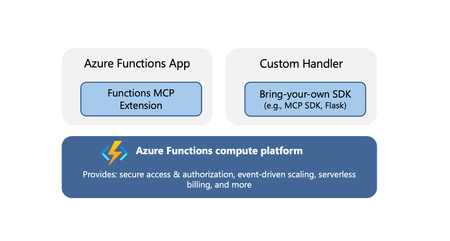
Model Context Protocol (MCP) servers allow AI agents to access external tools, data, and systems, greatly extending the capability and power of agents. When you’re ready to expose your MCP servers externally, within your organization or to the world, it’s important that the servers are run in a secure, scalable, and reliable environment. Azure Functions provides such a robust platform for hosting your remote MCP servers, offering high scalability with the Flex Consumption plan, built‑in authentication feature for Microsoft Entra and OAuth, and a serverless billing model. The platform also offers two hosting options for added flexibility and convenience. The options allow for hosting of MCP servers built with Azure Functions MCP extension or the official MCP SDKs. Azure Functions MCP Extension (GA) The MCP extension allows you to build and host servers using Azure Functions programming model, i.e. using triggers and bindings. The MCP tool trigger allows you to focus on implementing tools you want to expose, instead of worrying about handling protocol and server logistics. The MCP extension launched as public preview back in April and is now generally available, with support for .NET, Java, JavaScript, Python, and Typescript. New features in the extension Support for streamable-http transport Support for the newer streamable-http transport is added to the extension. Unless your client specifically requires the older Server-Sent Events (SSE) transport, you should use the streamable-http. The two transports have different endpoints in the extension: Transport Endpoint Streamable HTTP /runtime/webhooks/mcp Server-Sent Events (SSE) /runtime/webhooks/mcp/sse Defining server information You can use the extensions.mcp section in host.json to define MCP server information. { "version": "2.0", "extensions": { "mcp": { "instructions": "Some test instructions on how to use the server", "serverName": "TestServer", "serverVersion": "2.0.0", "encryptClientState": true, "messageOptions": { "useAbsoluteUriForEndpoint": false }, "system": { "webhookAuthorizationLevel": "System" } } } } Built-in server authentication and authorization The built-in feature implements the requirements of the MCP authorization protocol, such as issuing 401 challenge and hosting the Protected Resource Metadata document. You can configure it to use identity providers like Microsoft Entra for server authentication. In addition to server authenticating, you can also leverage this feature to implement on-behalf-of (OBO) auth flows where the client invokes a tool that accesses some downstream services on-behalf-of the user. Learn more about the built-in authentication and authorization feature. Mavin Build Plugin for Java For Java applications, the Maven Build Plugin (version 1.40.0) parses and verifies MCP tool annotations during build time. This process automatically generates the correct MCP extension configuration, ensuring that the MCP tool defined by the user is properly set up. The build-time analysis is especially beneficial for Java apps, as it allows developers to utilize the MCP extension without concerns about increased cold start times. We'll continuously enhance the plugin’s capabilities. Upcoming improvements, such as property type inference, will reduce manual configuration and make it even easier to use the McpToolTrigger. Get started Checkout the quickstarts to get an MCP extension server deployed in minutes: C# (.NET) remote-mcp-functions-dotnet Python remote-mcp-functions-python TypeScript (Node.js) remote-mcp-functions-typescript Java remote-mcp-functions-java References Learn more about the MCP extension and tool trigger in official documentations. Self‑hosted MCP server (public preview) In addition to the MCP extension, Azure Functions also supports hosting MCP servers implemented with the official SDKs. This is a suitable option for teams that have existing SDK‑based servers or who favor the SDK experience over the Functions programming model. There is no need to modify your server code; you can lift and shift these MCP servers to Azure Functions— which is why they are termed self‑hosted. The hosting capability supports the following features: Stateless servers that use the streamable-http transport. If you need your server to be stateful, consider using the Functions MCP extension for now. Servers implemented with Python, TypeScript, C#, or Java MCP SDK. Built-in server authentication and authorization like the MCP extension Hosting requirement Self-hosted MCP servers are deployed to the Azure Functions platform as custom handlers. You can think of custom handlers as lightweight web servers that receive events from the Functions host. The only requirement for hosting the MCP server is a file called host.json. Add this file to your project root to tell Functions how to run the server. An example host.json for a Python server looks like: { "version": "2.0", "configurationProfile": "mcp-custom-handler", "customHandler": { "description": { "defaultExecutablePath": "python", "arguments": ["path to main python script, e.g. hello.py"] }, "port": "8000" } } Get started Check out quickstarts to get your self-hosted MCP server deployed in minutes: C# (.NET) mcp-sdk-functions-hosting-dotnet Python mcp-sdk-functions-hosting-python TypeScript (Node.js) mcp-sdk-functions-hosting-node Java Coming soon! References Read the official documentation of self-hosted MCP servers and learn about integrations with Azure services like Foundry and API Center. For .NET developers - check out the overview of self-hosted MCP servers from the recent .NET Conference! We’d love to hear from you! Let us know your thoughts about hosting remote MCP server on Azure Functions. Does either of the options meet your needs? What other MCP features are you looking for? Let us know what you’d like us to prioritize next!968Views3likes1Comment