.net
124 Topics
MSB4184: The expression "[System.IO.Path]::GetDirectoryName('')" cannot be evaluate
Hi got this error now after I updated my VS IDE .... The path is not of a legal form. WinFormsSQLExamplePro C:\Program Files\dotnet\sdk\10.0.102\Sdks\Microsoft.NET.Sdk\targets\Microsoft.NET.Windows.targets <_WinRTRuntimeDllDirectory>$([System.IO.Path]::GetDirectoryName('%(_WinRTRuntimeDllReferencePath.FullPath)'))</_WinRTRuntimeDllDirectory> <_CsWinRTOrTargetingPackLibDirectory>$([System.IO.Path]::GetDirectoryName('$(_WinRTRuntimeDllDirectory)'))</_CsWinRTOrTargetingPackLibDirectory> Note the top most path entry contains a '%' character , whereas the 2nd path contains a '$' character... Not sure what is going on ... (happened after VS update)8Views0likes0Comments
Edm Model Generation Fails
Using an Azure ASP.NET MVC API from a Maui app, I am encountering the following error in the app when attempting to access the API. A few days ago, the initalization was working properly. The cloud app has been under further development, but the base api code has not been modified, only the response from the endpoints. The latest release NuGets are in use. What elements are being sought? System.TypeInitializationException: The type initializer for 'GeneratedEdmModel' threw an exception. ---> System.InvalidOperationException: Sequence contains no elements at System.Linq.ThrowHelper.ThrowNoElementsException() at System.Linq.Enumerable.First[TSource](IEnumerable`1 source) at SentryCloud.Models.Container.GeneratedEdmModel.CreateXmlReader()17Views0likes0CommentsHow to respond to upgrade-assistant cli prompts?
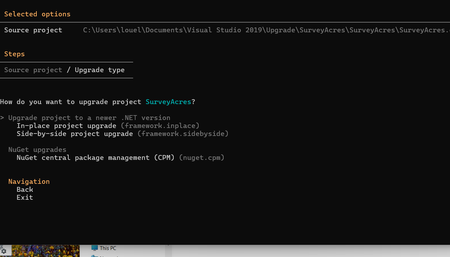
Bear with me please, I have not touched this stuff in a few years. Trying to upgrade Xamarin project to .Net Maui using CLI (latest version of VS 2022 cannot find the Upgrade assistant extension). I have downloaded the upgrade-assistant, but am not familiar with how to reply\how to make a selection of what is displayed after I enter "upgrade-assistant upgrade project-name" (it does not execute and instead displays information...see attached image). Is what is being display telling me that I need to ctrl-c out of this and re-enter the command using what they are showing? Please give me an example of using the Side-by-side upgrade. Is is also telling me that I need to do something with NuGet also on the command line? Thanks.173Views0likes1Comment
dotnet on linux - Signing key on ... is not bound
dotnet on linux gpg key not working.... Warning: https://packages.microsoft.com/ubuntu/25.04/prod/dists/plucky/InRelease: Policy will reject signature wi thin a year, see --audit for details Controle: https://packages.microsoft.com/ubuntu/25.04/prod/dists/plucky/InRelease: Sub-process /usr/bin/sqv returned a n error code (1), error message is: Signing key on BC528686B50D79E339D3721CEB3E94ADBE1229CF is not bound: No binding signature at time 2025-09-12T15:59:00Z because: Policy rejected non-revocation signature (PositiveCertification) requiring second pre-image resistance because: SHA1 is not considered secure since 2026-02-01T00:00:00Z74Views0likes0CommentsTrying to add new Type to Dotnet Runtime from github
Hi I'm trying to modify the .NET runtime from github.com/dotnet/runtime. I created a copy of the Dictionary class called Dictionary2 in these source code files: C:\rt5\src\libraries\System.Collections\ref\System.Collections.cs C:\rt5\src\libraries\System.Private.CoreLib\src\System\Collections\Generic\Dictionary.cs When I use dot peek from Jetbrains, Dictionary2 exists in my System.Collections.dll, but when I import System.Collections.dll in my main console C# application, Dictionary2 gives me compiler errors. Am, I missing some code somewhere? Can you guys help me out here? Thanks!193Views4likes2CommentsWont install Framework ect automaticly ???
I have an app/program (an EXE-file) I made way back when King of Spade was a Knight and I've used it for years on Windows 10 where it automaticly downloaded and installed the dependencies ! Now I run it under Windows 11 ... it just DON'T ! I know I SHOULD go back and make an "install package" but isn't there a 'Work-Around' ?218Views1like4CommentsDo I need to upgrade Microsoft.AspNetCore.* NuGet packages after upgrading the .NET Runtime?
Hi, I'm encountering an issue with our SCA (Software Composition Analysis) scan, which reports several known vulnerabilities in .NET Core components. Specifically, the scan detects that the following packages are still on version 8.0.0, which are flagged as vulnerable: Microsoft.AspNetCore.Authorization Microsoft.AspNetCore.Components Microsoft.AspNetCore.Http.Connections.Client Microsoft.AspNetCore.SignalR.Client The scanner recommends upgrading these packages to version 8.0.15 to resolve the issues. To address this, I upgraded the .NET Runtime on our environment to version 8.0.15. However, the SCA scan still reports the same vulnerabilities, indicating that the vulnerable component versions have not changed. My question is: Do I also need to manually upgrade the corresponding NuGet package versions in the project to 8.0.15, or is upgrading the .NET Runtime alone sufficient to ensure these components are updated as well? Any clarification would be appreciated. Thank you!200Views0likes1Comment
Can't able to Upload Images on Azure Server if it is more than 128KB
Hi Everyone , I am trying to upload image and store but when i do it in my local server its working fine but when i push the same code in server i am getting entity too large I reached out microsoft support they are telling that "The content type format is supposed to be image as example given to upload the image file otherwise the application gateway will not understand the image and tries to accept only 128KB which is why the request is not accepted with Application Gateway. " when i am debugging i am getting same content type = image/jpeg . Code snippet for storing private void SaveImage(int vendItemID) { try { string folderPath = @"C:\UploadedImages\"; Directory.CreateDirectory(folderPath); string fileExtension = Path.GetExtension(fileUpload.FileName).ToLower(); string fileName = Path.GetFileNameWithoutExtension(fileUpload.FileName); string newImageName = string.Empty; dbCon.Server = "***"; dbCon.OpenConnection(); // Optimize and compress the image byte[] optimizedImageBytes = CompressImageToTargetSize(fileUpload.PostedFile.InputStream, fileExtension); // Convert to Base64 string base64String = Convert.ToBase64String(optimizedImageBytes); using (SqlCommand cmd = new SqlCommand("***", dbCon.Cnn)) { cmd.CommandType = CommandType.StoredProcedure; AddImageParameters(cmd, vendItemID, fileName, fileExtension); cmd.Parameters.AddWithValue("@ImageBase64", base64String); var outputCodeParam = new SqlParameter("@ImageNewName", SqlDbType.NVarChar, 200) { Direction = ParameterDirection.Output }; cmd.Parameters.Add(outputCodeParam); cmd.ExecuteNonQuery(); newImageName = outputCodeParam.Value.ToString(); } string newFilePath = Path.Combine(folderPath, newImageName); File.WriteAllBytes(newFilePath, optimizedImageBytes); UpdateImagePath(newImageName, newFilePath); } catch (Exception ex) { ShowMessage("Error while saving image: " + ex.Message, Color.Red); LogError("Image save failed", ex); throw; } finally { dbCon.CloseConnection(); } } I also try to compress and change it to base 64 but its not working. Kindly assist on what steps i need to take. Thanks, Shahid Note :WebForm i m working on .173Views0likes1Comment
[Suggestion 1][Allow Language Selection During .NET Installation]
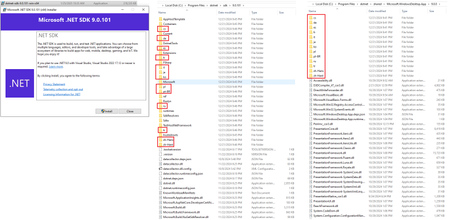
Hi, 1. Context: Currently, when installing the .NET SDK or runtime, multiple language resource folders are automatically included in the installation directory. 2. Problem: Many developers only require a single language, typically English and the additional localization files take up unnecessary disk space and clutter the installation directory. Currently, the installer does not provide an option to select which languages should be installed. Removing these manually is time-consuming and could potentially break application dependencies if done incorrectly. 3. Proposed Solution: Introduce an option in the .NET installer that allows users to select or deselect language packs during installation. This feature could be similar to the "Individual components" selection available in the Visual Studio Installer, where users can choose exactly what they need, ensuring a more streamlined installation. This would help: Reduce disk space usage. Improve installation customization. Provide a cleaner development environment. 4. What do you think about this suggestion ? Thank you for considering this request and I’m happy to provide additional details or insights if needed.227Views1like1Comment
Applications are not correctly detecting .NET Desktop Runtime 6.0.1 (x64)
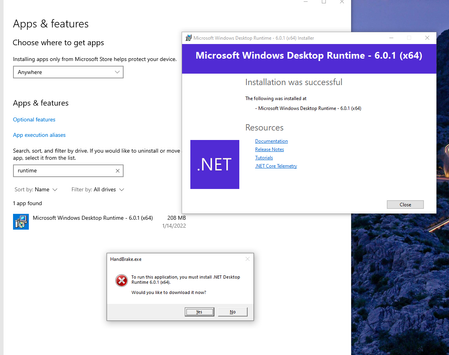
Even though I have .NET Desktop Runtime 6.0.1 (x64) installed, I'm still getting an error when launching a .NET application Windows 10 21H2 OS Build 19044.1466 Event log shows event 1023 - Description: A .NET application failed. Application: HandBrake.exe Path: C:\Program Files\HandBrake\HandBrake.exe Message: Failure processing application bundle. Bundle header version compatibility check failed. A fatal error occured while processing application bundle9KViews0likes7Comments