Forum Discussion

Aleqq
Oct 21, 2021Copper Contributor
Windows 11 color management not working? Chrome on secondary display is not color managed
Hi, I have the feeling color management is not working completely. I have ThinkPad with external Eizo display. There is ICC profile installed for the external display (settings compared to my older ...

Omelette14123123
Nov 07, 2021Copper Contributor
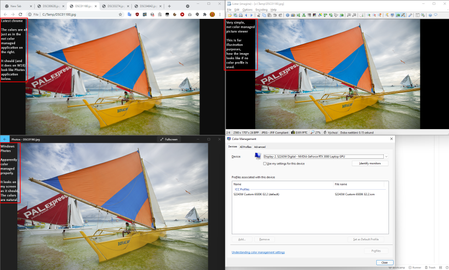
This is a bug of the OS. There is a manual and temporal workaround, though. You can open Windows' "Color Management", go to the "Advanced" tab and choose your monitor's color profile in "Device profile", as I show in the attached screenshot. One of the drawbacks of doing this is that you will have to do the same thing every time you get a new profile (in case you calibrate your monitor again), but at least this will fix your issue.


Irfanintekhab
Nov 07, 2021Copper Contributor
I have a triple monitor setup. How would it work in that case?
 yamma_maNov 07, 2021Copper ContributorYou will have to wait until the Windows bug is fixed or the apps apply a workaround (using WcsGetDefaultColorProfile() or ColorProfileGetDisplayDefault()).
It is recommended that you send feedback if possible.- IrfanintekhabNov 07, 2021Copper Contributor
yamma_ma i dont know how to send the feedback
- yamma_maNov 08, 2021Copper ContributorFor feedback on Windows, use the "Feedback Hub" app.
For feedback on the app you are using, please check the app's website or contact user support.