Forum Discussion

How to remove file association as Choose a default in Windows 10?

Deletedthank you replying for my question.
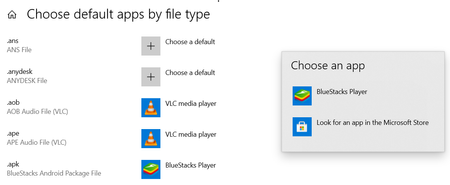
Apk is an android application file. I keep apk files in my computer. If required, I copy them to android phone and install. I never used any application in my Windows 10 PC for opening apk files.
That's why no appropriate application in the computer for apk files.
Since I installed BlueStack 5 in my computer, apk files automatically get associated with apk files and icon changed.
I am really sorry that I couldn't find steps you explained.
I opened File Explorer by Windows+E. I didn't find apk files. With Windows+E, I see This PC.
Pls let me know different way or elaborate steps you explained.
Best Regards
NndnG

I understand , I think you can change the default program to decompress APK files and this path
I meant .