User Profile

PurSpyk
Iron Contributor
Joined Jan 08, 2021


User Widgets
Recent Discussions
Re: Errors in Event Viewer
Its February 2026, and this error is still present. Been reporting this error now for almost 4 years, and still not fixed. Failed to parse element: VersionOverrides Id=65ff8bd9-e8d3-4581-a27a-75840c41de94, DisplayName=Microsoft Forms, Provider=Microsoft Office Services, StoreType=SdxRdx, StoreId=(null) P1: Apps for Office P2: 16.0.19823.20000 P3: 0x8004323E P4: New Document43Views0likes0CommentsWindows 11 version 26100.712
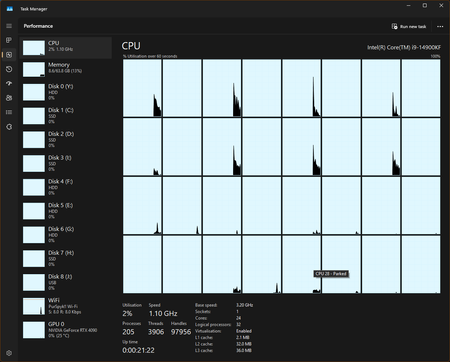
Hi, Upgrade to build 26100.712 but now Task Manager has this issue if I use Dark Mode (before the update there was no issue) I have even booted into Safe Mode assuming it was a display driver issue, same results. In light mode the graphs show correctly2.6KViews0likes5CommentsErrors in Event Viewer
Since the latest beta update the following is appearing in Event Viewer: Failed to parse element: Requirements Id=87b35109-b1d7-4cdf-9cbb-84c1d946d22b, DisplayName=CV Surveys Win32, Provider=Amplify Signals and Insights Team, StoreType=SdxRdx, StoreId=(null) P1: Apps for Office P2: 16.0.15511.20000 P3: 0x8004323E P4: New Document Not too sure what is triggering this error, or which Office app is reporting it.17KViews2likes14CommentsRe: Errors in Event Viewer
I do agree MS support is really poor. You barely get your question answered, they never seem to read what you say, and then in most cases they refer you to third party web sites with steps that if followed can cause more issues than the issue you originally reported. Pay a yearly subscription for Office 365, and this type of service is unacceptable.20KViews0likes9CommentsRe: Windows 11 Calendar Widget "Sorry, events from this account can't be displayed"
Having to use an @outlook account is absolutely idiotic. This seems to affect the To Do widget as well. Widgets are a joke, the equivalent feature in Windows 10, although not widgets worked so much better. Widgets should work with your logon email, and not be limited. If this email can log onto outlook.com, then the information should be shown. Far to many stupid limitations to tools that could be of great benefit, but limited due to poor design choices.27KViews2likes0Comments
Recent Blog Articles
No content to show