User Profile

YDN10
Copper Contributor
Joined Jan 06, 2021


User Widgets
Recent Discussions
Re: Automatically adding the date/time to a cell when another cell is updated
This sort of worked for me, however these are some changes I made to make this work: I changed "Now" to "Date" to give me the date of the change. I did not create a module, instead I right clicked the sheet of interest in the VBA code and clicked "view code" - which is where I subbed in the code you shared. The updated code I used (specific to my excel): Private Sub Worksheet_Change(ByVal Target As Range) Dim ws As Worksheet Set ws = ThisWorkbook.Worksheets("Partners") ' Ensure this matches your sheet name. ' Check if the change occurred in Column F If Not Intersect(Target, ws.Columns("F")) Is Nothing Then Application.EnableEvents = False ' Disable events to avoid recursion Dim cell As Range For Each cell In Intersect(Target, ws.Columns("F")) ' Update the corresponding cell in Column G with the current date ws.Cells(cell.Row, "G").Value = Date Next cell Application.EnableEvents = True ' Re-enable events End If End Sub I used GPT to check and update it so hopefully it works as well as yours tomorrow... fingers crossed!158Views0likes0CommentsRe: Code to Delete Duplicates After Copying To Another Sheet
Thank you NikolinoDE. I used a counter variable in a For Next loop which is working for now. It moves duplicates to the next sheet. Now I want to automate the new sheet's creation and automatically run the macro per new sheet until there are no sheets with duplicates.4KViews0likes0CommentsCode to Delete Duplicates After Copying To Another Sheet
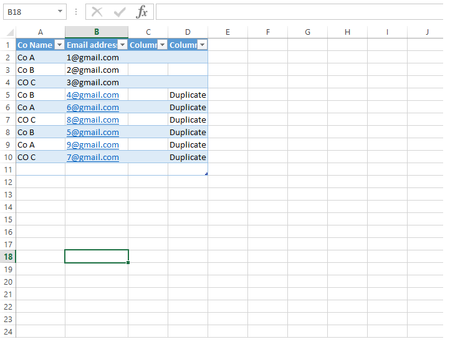
Hi All, Hope you are all well! Background: This is my test excel sheet: The duplicates column is created from this excel function: =IF(COUNTIF($A$2:$A2,A2)>1, "Duplicate",""). I will have lots of data where each row has a different email but some rows will be from the same company (eg CoA - A2 & A6). All the data is important. Overall Aim: I would like to move all the duplicate Co A; Co B; Co C; etc rows to another sheet and then in that sheet move the duplicates into a third sheet and so on. That way I'll have sheet 1 with Co A; Co B; Co C; Co D; etc only once and the same with sheet 2 and so on (i.e. for CoA: the A2 row will be in sheet 1, A6 row will be in sheet 2, A9 row will be in sheet 3 and so on; same with CoB and CoC). In the above example, I'd end up with three sheets. Ideally, I'd like the code to automatically create a new sheet to move duplicates to and then continue this cycle as there can be up to 70 duplicates for one "Co X" field. So I'd have 70 sheets with one instance of each Co line (all with different emails and other data). Initial Script: This script allows me to copy the bottom three duplicates into sheet 2, but I have to re-run the code which then takes 2 duplicates over to sheet 2, and then on the third re-run it takes the last remaining duplicate over to sheet 2. In reality, I'll have a lot more data so I'd like it to execute in one run. 'VBA Code to move the entire row if cells in column 4 has the value Duplicate Sub move_rows_to_another_sheet() For Each myCell In Selection.Columns(4).Cells 'Need a for loop iteration If myCell.Value = "Duplicate" Then myCell.EntireRow.Copy Sheet2.Range("A" & Rows.Count).End(3)(2) myCell.EntireRow.delete End If Next End Sub Second Script: I realised that the delete line is what is causing the problem. The first Sub copies all the duplicates over to sheet 2, in one run. However, the second sub still only deletes the bottom three duplicates and must be run a total of three times to remove the duplicates. I would prefer to run both subs in one and not have to re-run the delete Sub. 'VBA Codeto movethe entire row if cells in column 4 has the value Duplicate Sub move_rows_to_another_sheet() For Each myCell In Selection.Columns(4).Cells 'Need a for loop iteration If myCell.Value = "Duplicate" Then myCell.EntireRow.Copy Sheet2.Range("A" & Rows.Count).End(3)(2) End If Next End Sub Sub delete_duplicates_in_sheet1() For Each myCell In Selection.Columns(4).Cells 'Need a for loop iteration If myCell.Value = "Duplicate" Then myCell.EntireRow.delete End If Next End Sub My next steps: I will be learning how to use a for loop so that I can have the delete Sub execute continuously until all duplicates have been deleted. If anyone knows a better way please let me know. Any help would be greatly appreciated. 🙂 Thank you. Kind regards, Y4.4KViews0likes2CommentsRe: Is it possible to select multiple options (which each have multiple associated values) and sum them.
Hi mathetes Thank you for your response. I'm a little confused as to how to use the "FILTER" function. I've tried to select the top "chicken with skin" item with an x in the first column. I'd like it to display the totals on the right hand side but I'm not sure how to get this function to work. I've watched the video, thanks. Please see attached excel. Any help would be much appreciated.1.9KViews0likes3CommentsRe: Is it possible to select multiple options (which each have multiple associated values) and sum them.
From looking online, it looks like checklists are possible but only in normal excel not excel online. I'm still looking if it's possible to select multiple cells and add them to a separate row (i.e. the meal plan row) which I can then add up to get my totals.1.9KViews0likes5CommentsIs it possible to select multiple options (which each have multiple associated values) and sum them.
Hi, I'd like to create a meal plan with excel. I've used excel to calculate the protein, carbs, calories and fat for the amount of grams of that item. For example, rice 100g gives 350 kcal 8 protein 0.5 fat and 78 carbs. I'd like to select multiple items like check or tick the ones I want, eg rice, chicken, etc and then add them to a meal plan which has separate columns. I'm using excel online. Is this possible? Please see image attached for an idea of what I mean. Any help would be greatly appreciated. Thanks 🙂 Kind regards, YDN10Solved
Recent Blog Articles
No content to show