User Profile

JohnMM
Brass Contributor
Joined Aug 26, 2020


User Widgets
Recent Discussions
Message Options Menu Items Change Position after Opening Menu to Edit Message
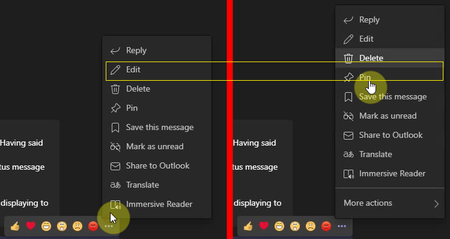
At some point in the last few months or so, I started noticing that I (and others on our team) started accidentally pinning messages. I realized this was happening when clicking to edit a message. When you click the three dots to open the options menu for a message in a Chat, if you quickly move your cursor up to the Edit item to click it, suddenly the "More Actions" item will be added to the bottom of that options list, which pushes all the action items up in position: The screenshot on the left is what the menu looks like immediately upon clicking the three dots options button. The screenshot on the right (to the right of the red line) is what the menu looks like about .5 to 1 second later. Note the yellow box showing that if you click where the Edit button was in the menu, you will end up clicking the Pin button instead if you click very quickly. Why is this "More actions" button getting added after the menu is displayed on the screen? Please help us stop accidentally pinning messages and having to unpin them! https://motominer-my.sharepoint.com/:v:/p/john_washam/EZPGR66Z1jxDjjXa5ID6s8kBcfzRPC5BnritNHGxQvOl7A?e=WptUVM showing the issue as well.2.6KViews7likes3CommentsRe: Can't Configure Azure DevOps Connector in Teams (HTTP ERROR 500)
Mary Jane Cruz As many of you who can should get a message into Microsoft to let them know this is going on. I'm afraid that if Octavio_Vallejo is the only one who has submitted a support request on this, they won't think it's that big of a problem. Octavio can correct me, but I believe the way to submit a request is through: https://admin.microsoft.com/11KViews1like7CommentsCan't Configure Azure DevOps Connector in Teams (HTTP ERROR 500)
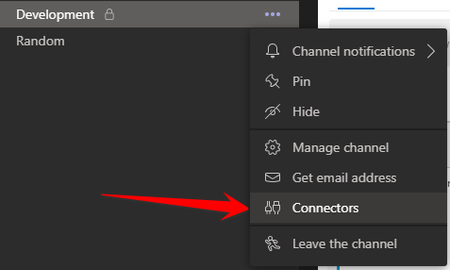
We are trying to configure the "Azure DevOps" connector in a Teams channel. It has already been added to the channel, so I go to the channel, click the three dots, and click "Connectors." Then, I click the "Configure" button next to "Azure DevOps": That then opens a window that says, "To add this connector, sign in to your Azure DevOps account", so I click the "Log in" button. That then browses the login window to a screen that looks like this: I click "Continue", and it takes me to a screen to login to my MS account, and I click on my MS account that is currently "Connected to Windows": After clicking the account, it redirects a few times and ends up showing "https://outlook.office.com" in the window header and nothing but a blank, white screen below: I've tried this process over and over again, and even had another coworker follow the same process, and none of us can get anything to appear in the window. I went to the browser version of Teams and did the same process. There was one difference once I got to the blank, white screen bug, which was that the popup window showed a 500 error: "This page isn’t working outlook.office.com is currently unable to handle this request. HTTP ERROR 500" Anyone have any idea what's going on?Solved22KViews9likes40Comments
Recent Blog Articles
No content to show