User Profile

KentMitchell
 Microsoft
Joined May 26, 2020


User Widgets
Recent Discussions
Re: Unable to assign phone number to resource account
For those looking for guidance on this topic, the Teams Phone Advanced Deployment Guide provides guidance on adding Resource Accounts to Call Queues. In addition to covering this topic, the Teams Phone Advanced Deployment Guide provides a detailed checklist of all Steps required to deploy Teams Phone to your organization. Please note that the Teams Phone Advanced Deployment Guide is located in the M365 Admin Center, so you will need to login with a Tenant Admin account to view this deployment guide.3.5KViews0likes0CommentsRe: Unable to assign a Teams Phone number to a brand new user account (Error: we can't save changes)
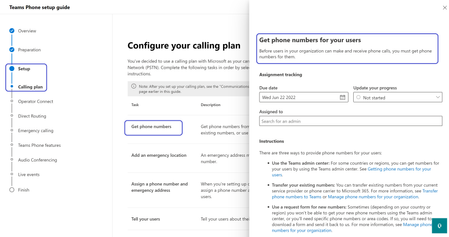
Although Manoj discovered his root cause here, and Andy also posted additional experiences and insights, want to raise to the Community's attention that the Teams Phone Advanced Deployment Guide provides thorough coverage of three different techniques to assign phone numbers to users. In addition to covering this topic, the Teams Phone Advanced Deployment Guide provides a detailed checklist of all Steps required to deploy Teams Phone to your organization. Please note that the Teams Phone Advanced Deployment Guide is located in the M365 Admin Center, so you will need to login with a Tenant Admin account to view this deployment guide.31KViews0likes0CommentsRe: Advanced Delivery for third party phishing attack scenario
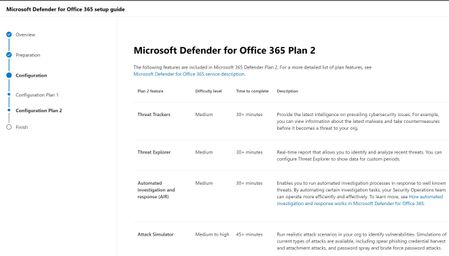
The Microsoft Defender for Office (MDO) Advanced Deployment Guide in the M365 Admin Center has configuration steps that cover this Attack Simulator topic area. In addition to covering this Attack Simulator topic area, the MDO Advanced Deployment Guide also covers Licensing, Safe Links, Safe Attachments, and Threat Tracker configuration and deployment topics. Please note that you will need to have Tenant Admin login permissions to the M365 Admin Center to view the MDO Advanced Deployment Guide.8.9KViews0likes0CommentsRe: Enabling MFA on admin level access to On premise AD
In addition to the prior answers, you can also find information on multi-factor authentication (MFA) in the Plan your Passwordless Deployment Setup Guide, specifically go to the Combine registration section. The Plan your Passwordless Deployment Setup Guide in the Admin Center simplifies selecting and deploying the right authentication method for IT Admins. Note: If you don't have Microsoft 365 admin permissions, open the guide in a test or POC tenant to get instructions.76KViews0likes1CommentRe: Microsoft Defender Advanced Threat Protection license requirements
In addition to the prior answers, you can also find the licensing requirements in the Microsoft Defender for Endpoint setup guide, specifically go to the Requirements section. The MDE setup guide in the Admin Center simplifies the deployment of endpoint security for IT Admins. Note: If you don't have Microsoft 365 admin permissions, open the guide in a test or POC tenant to get instructions.28KViews0likes0CommentsRe: Data Loss Provention Policy not working
In case improving these MIP/DLP replication times is something anyone finding this post is passionate about Please feel free to upvote this Desired Change Request to encourage the MIP/DLP product team to improve the replication times. Your upvotes help! https://feedbackportal.microsoft.com/feedback/idea/a72c8ea1-8eb6-ec11-a81c-000d3a7ce4531.1KViews0likes0CommentsRe: Roadmap for Information Protection & Governance?
Great question! I checked with a lead Engineer, and his feedback on this topic is that most Customers deploy in this order: Information Protection - MIP DLP Sensitivity Labels/ AIP Scanner D&R (eDiscovery) MIG (Information Governance) IRM (Insider Risk Management) The rationale given is that deploying MIP first enables richer signals to IRM. The engineer informed that often, customers will deploy D&R and MIG together, as they are similar in theme. Lastly, D&R before IRM because D&R features help with the IRM escalations or investigations. When you're ready to get started with your deployment, the MIP Setup Guide in the M365 Admin Center gives a simplified list of deployment steps, offering step-by-step guidance and automation.1.2KViews0likes1CommentRe: Best practice advice
In case folks are still coming across this topic, this documentation might help: Documentation article: Order and precedence of email protection. More holistic within this topic’s theme, the Microsoft Defender for Office 365 (MDO) setup guide in the M365 Admin Center contains step by step guidance on deploying MDO. The MDO setup guide simplifies deployment of MDO. Note: If you don't have Microsoft 365 admin permissions, open the guide in a test or POC tenant to get instructions.4.7KViews0likes0CommentsRe: MCAS Licensing
In addition to the prior answers, you can also find the licensing requirements in the Microsoft Cloud App Security (MCAS) setup guide, located in the M365 Admin Center. Specifically go to the Planning section, then the Prerequisites subsection. The MCAS setup guide in the Admin Center simplifies deployment for IT Admins. Note: If you don't have Microsoft 365 admin permissions, open the guide in a test or POC tenant to get instructions.6KViews0likes0CommentsRe: Sensitivity Button not showing in Office Web Apps
Although this specific question was answered, there is solid guidance in the Microsoft 365 Admin Center on the general topic of MIP deployment, including configuration of Sensitivity Labels so that they work for Office Web Apps. If you are an IT Admin with access to the Admin Center, and you are planning or deploying Microsoft Information Protection (MIP) (or would like to review your deployment), be sure to check-out the MIP setup guide. The setup guide simplifies MIP deployment, with steps in chronological order, including automating some deployment steps. If you do not have access to the Admin Center, similar content (with less automation) can be found at the MIP setup guide, located at the assistants.microsoft.com M365 Deployment site.16KViews0likes0CommentsRe: Trying to learn Intune - stuck at MDM "Your device is already being manged by an organization"
Although this specific question was answered, the thread originated with the original contributor learning about deployment of Intune, Cloud Managed Endpoint (CME) and Mobile Device Management (MDM). If you are an IT Admin with access to the Microsoft 365 Admin Center, and you want step-by-step guidance on how to manage organization-owned or bring-your-own-device (BYOD) mobile devices and applications, be sure to review the Intune setup guide. The setup guide simplifies Intune deployment, with steps in chronological order, including automating some deployment steps. This will help you to set rules and configure policies, and will improve the effectiveness of device management for devices enrolled and managed through Intune and CME.81KViews0likes1CommentRe: MDATP - Deployment Guide & Best Practices?
If anyone reading this is looking for step-by-step guidance on how to install Microsoft Defender for Endpoint, be sure to review the Defender setup guide in the Microsoft 365 admin center. The guide has a great feature where it can detect settings in your tenant to provide tailored guidance. Additionally, the setup guide is used to view and configure features as well as save time with automated investigation and response. Microsoft Defender for Endpoint enables enhanced security by protecting cyber threats, advanced attacks and data breaches, automate security incidents, and enhance the current level of security already in place. Note: If you don't have Microsoft 365 admin permissions, open the guide in a test or POC tenant to get instructions.23KViews0likes0CommentsRe: Microsoft Defender AV client for Windows Server 2008R2 & 2012 R2
If anyone reading this is looking for step-by-step guidance on how to install Microsoft Defender for Endpoint, be sure to review the Defender setup guide in the Microsoft 365 admin center. The guide has a great feature where it can detect settings in your tenant to provide tailored guidance. Additionally, the setup guide is used to view and configure features as well as save time with automated investigation and response. Microsoft Defender for Endpoint enables enhanced security by protecting cyber threats, advanced attacks and data breaches, automate security incidents, and enhance the current level of security already in place. Note: If you don't have Microsoft 365 admin permissions, open the guide in a test or POC tenant to get instructions.33KViews0likes0CommentsRe: How to: Enabling MFA for Active Directory Domain Admins with Passwordless Authentication
Excellent article! If anyone reading this is looking for step-by-step guidance on how to enable multi-factor authorization (MFA), be sure to review the MFA setup guide in the Microsoft 365 admin center. The setup guide is used to efficiently identify which MFA option is best for the organization as well as set up the application. This integration provides an additional layer of security and accounts are 99.9% less likely to be compromised. Note: If you don't have Microsoft 365 admin permissions, open the guide in a test or POC tenant to get instructions.116KViews1like0CommentsRe: Error 65000 with Settings Catalog
If anyone reading this is looking for step-by-step guidance on how to manage organization-owned or bring-your-own-device (BYOD) mobile devices and applications, be sure to review the Intune setup guide in the Microsoft 365 admin center. The setup guide is used to set rules and configure policies needed to protect access to data and networks. This integration improves the effectiveness of device management for devices enrolled and managed through Intune. Additionally, if you wish to co-manage between Intune and Configuration Manager, visit the Comanage setup guide. Note: If you don't have Microsoft 365 admin permissions, open the guide in a test or POC tenant to get instructions.218KViews0likes1Comment

Recent Blog Articles
No content to show