User Profile

_K_O_
Copper Contributor
Joined Jul 17, 2017


User Widgets
Recent Discussions
Re: External users cannot open encrypted email
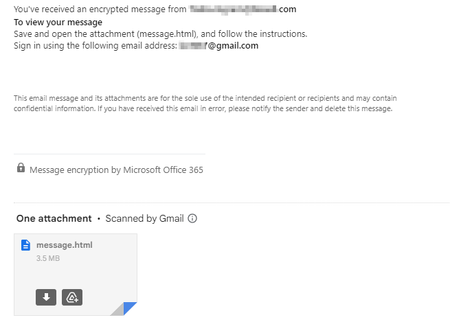
ashmelburnian I am with you. Microsoft and Google need to work together on this. I use Gmail. When an outlook user sends me an email I get this. If I click the message.html attachment I get a new Chrome window with this message. If I download the message.html and doubleclick/run the file it does nothing different that if I click the file from within Gmail (i.e. it opens a new chrome window/tab) like this. Now I have to sign in with my Microsoft account to see the message. My issues is the I'm already signed in to my Microsoft account with "stay signed in checked" so when I get an encrypted message in Gmail just display the freaking message. I'm already signed in to my Microsoft account so stop making me jump through hoops to see the message. Sometimes I get a couple dozen encrypted messages a day and I have to go through the ridiculous process for every single message.2KViews0likes0CommentsBug in Compatibility Checker
I think this is a bug but want to check with some experts. =INDEX($A2:$D2,1,$A$9) is being reported as a compatibility issue against version 2019. Because this is being reported as a compatibility issue against version 2019 I'm thinking it is due to INDEX possibly returning an array function with the new calc engine. However, I can't think of any way with the 2nd argument being a constant and the 3 argument not referencing a range (e.g. $A$9:$A$10) and not referencing a spilled array (e.g. $A$9#) that this can return an array and thus is being inaccurately reported as a compatibility issue.702Views0likes1CommentRe: Unexpected result from new calc engine using IF, INDIRECT, ROW
JKPieterse Thanks and I tend to agree I think there is a bug in the formula evaluator. I'm not certain the problem is solely with the INDIRECT function. In formula 1 ROW returns a single value (as would be expected) and thus INDIRECT has no problem. In formula 2 (when inside an IF function) ROW returns an array which then causes INDIRECT to return an array (even though there is only 1 cell reference inside ROW). Further testing I removed the INDIRECT so just =ROW(A28) which returns 1 value (not an array) and =IF(ROW(A28),1,"") in which case ROW also only returns 1 value (not an array). So the problem is only when ROW is inside an INDIRECT and INDIRECT is inside an IF.2.3KViews0likes3CommentsUnexpected result from new calc engine using IF, INDIRECT, ROW
So I got more unexpected results with the new calculation engine. See formulas 1, 2, and 3 below with commentary. You can get the same results as I get if you use the Evaluate Formula (Data ribbon > Evaluate Formula) for each. 1) =INDIRECT("C"&ROW(A1)) returns "Bob" (the value in C1) 2) =IF(INDIRECT("C"&ROW(A1))="","x","") returns "" but when evaluated using Evaluate Formula ROW returns {1} and the INDIRECT returns {#Value!}. 3) =IFERROR(IF(INDIRECT("C"&ROW(A1))="","x",""),"error") does not return "error" even thought INDIRECT evalutes to an error {#Value!}. Now if you use the F9 function key to break down each formula (instead of Evaluate Formula) the INDIRECT function will return the same value/result from formula 1 within formula 2 and 3 . This explains why 3 doesn't truly evaluate to an error condition when wrapped in IFERROR but it's a real problem debugging formulas when the Evaluate Formula function is inaccurate. I found the Evaluate Formula problem in trying to investigate the real issue which is this. With Excel 365 not upgraded to the new calc engine Formula 1 has no problem but formula 2 returns a #VALUE! error even though the ROW function only returns 1 row and thus the INDIRECT function is only evaluating 1 cell. I would think that if formula 1 returns a value that formula 2 should not produce an error. Thanks in advance for any insight.2.7KViews0likes11CommentsConditional Formatting :) ... :(
I love the concept of Conditional Formatting and I try to use it frequently but its a love/hate relationship. Recently I upgraded from 2010 to 2016 as the new formulas (maxifs, etc) were a help in getting rid of some array functions. I was hoping that there would be updates to address the hate part of the love/hate relationship with Conditional Formatting to no avail. MS needs to take conditional formatting to the next step and make the entry/edit box for conditional formatting formulas work like a true cell with predictive functions, identification of errors in function construction, allow table references, allow the Find function to look in conditional formatting formulas, etc. I've wasted more time looking through conditional formatting to find invalid references and references to tabs or ranges where the name has changed that I care to discuss. Its time to bring Conditional Formatting up to a real usable feature.1.3KViews0likes2Comments- 1.3KViews0likes0Comments
Recent Blog Articles
No content to show