User Profile

HennSarv
Brass Contributor
Joined Jun 23, 2017


User Widgets
Recent Discussions
Re: Is that bUG or FEATURE in excel
SergeiBaklan no difference - formating with wrap or without don't help there My intention is following on col-s A:F is 'unsorted' list of people to be generated as alphabetically sorted list for Wikipedia using following formulas (might be better idea) col I =UNIQUE(LEFT(INDEX(A2#;;4);1)) col J ="=="&UNIQUE(LEFT(INDEX(A2#;;4);1))&"=="&CHAR(13)&CHAR(10)&"{{tähed}}" col L result must contain ORDERED list of names inserted with ==X== {{tähed}} for each letter ==X== produces heading style row in wikipedia {{letters}} produces linkable letter-index I have 3 ways to producse this result * old-style excel functions (yes sorting was available with old excel functions) * PowerQuery cenerating desired result * Dynamic Array - as above My concern is - WHY cells containing LF or CR during copy-paste generation unwanted "" around result is that I have during copypaste land in "notepad", Ctrl-H remove "-s and after that copypaste to wikipedia source Henn1.2KViews0likes3CommentsIs that bUG or FEATURE in excel
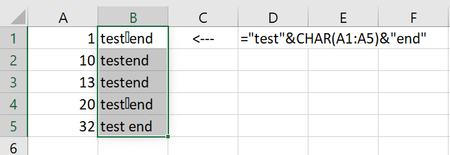
I'm a bit surpriced and a bit frustrated I need to "create text" to external source (actually automatically created tabe into Wikipedia) data I have in Excel and I tried to create text using Dynamic Arrays - and on requirement - generated text have to contain LF (char(10)) symbol inside. And I really was surpriced - this works weird. Some reason - when You text contains Char(10) or Char(13) - excel (or who else?) add during copy-paste absolutely unwanted "" around line THere is my example I select column B and copy paste to notepad: Only lines containing something like LF or CR surrounded with " WHY and how to prevent this? Really long time Excel-user Henn1.4KViews0likes5CommentsOutlook - tech community goes allways to junk
Hi friends, I've long running issue with outlook - might someone helps? ALL notifications from MIcrosoft Tech Community goes directly to junk? My 1st question is - WHY - what strange in Tech Community so they are recognized as junk? Then I mark them as 'not junk' and confirm allways trust e-mail from mailto:notify@mstechcommunity.microsoft.com Surprice - this confirm is absolutely useless My 2nd question is - WHY there is option to report as not junk with confirm when this don't work Anyone can explain? thanks in advance Henn569Views0likes0CommentsRe: LAMBDA Examples: Distance between two cities
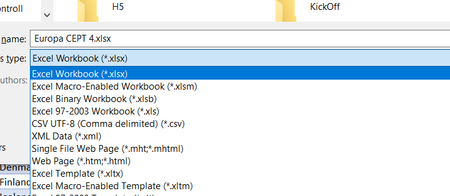
sadece_Bilal -are You tried to change file format OPen file - ignore warning Press F12 (save as command) Select new file type - Excel Workbook (xlsx) rather than Excel 2003 wrokbook (xls) then close and reopen file (the last step is for safety) CHeck - can Yu now work with?31KViews0likes0CommentsRe: LAMBDA Examples: Distance between two cities
One thing with =LET function I dont undestand On this example You use parameter as city datatype and col param.latitude when I use folowing example =LET(t1, SomeTable, XLOOKUP(7, t1[keycolumn], t1[valuecolumn]) - dont work so .-operator works with variables but [] indexer don't work I quess sometime might be usefull to have =LAMBDA(SomeTable, Key, XLOOKUP(Key, SomeTable[KeyColumn], SomeTable[ValueColumn])) as named funktion32KViews0likes1Comment

Recent Blog Articles
No content to show