User Profile

jmhiggin
Copper Contributor
Joined Apr 22, 2020


User Widgets
Recent Discussions
Feature Request: Convert from Spilled to "Standard" Array for use in formulas like SUMIFS
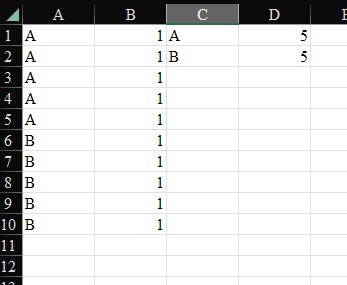
I would like to request a feature, or at least see if anyone else has an interest in the following feature idea: It would be very useful to have a formula that converts a spilled array into a "standard" array. First Example To illustrate what I mean, consider the following examples using SUMIFS: In Cell C1, I have the formula: =UNIQUE(A1:A10) In Cell D1, I have the formula: =SUMIFS($B$1:$B$10,$A$1:$A$10,C1#) This all works as expected. Second Example However, if I were to do the following, the subtotaling by unique values would not work: =LET( _data,{"A",1;"A",1;"A",1;"A",1;"A",1;"B",1;"B",1;"B",1;"B",1;"B",1}, _crit_col,CHOOSECOLS(_data,1), //You could also use INDEX(_data,1), you still get errors _val_col,CHOOSECOLS(_data,2), //You could also use INDEX(_data,2), you still get errors _criteria,UNIQUE(_crit_col), _subtotals,SUMIFS(_val_col,_crit_col,_criteria), HSTACK(_criteria,_subtotals) ) As one would expect, this would give a spilled array of mostly #VALUE errors: My request is that Excel provide a formula that would cause formulas like SUMIFS to treat a spilled array as an argument in the same manner as a regular reference as in the first example. Assuming this formula is called CONVERT_TO_STANDARD_ARRAY, the new LET forumula would look like the following: =LET( _data,{"A",1;"A",1;"A",1;"A",1;"A",1;"B",1;"B",1;"B",1;"B",1;"B",1}, _crit_col,CHOOSECOLS(_data,1), _val_col,CHOOSECOLS(_data,2), _criteria,UNIQUE(_crit_col), _subtotals, SUMIFS( CONVERT_TO_STANDARD_ARRAY(_val_col), CONVERT_TO_STANDARD_ARRAY(_crit_col), _criteria ), HSTACK(_criteria,_subtotals) ) Here, SUMIFS would treat CONVERT_TO_STANDARD_ARRAY(_val_col) as it does $B$1:$B$10 in the first example. Likewise, SUMIFS would treat CONVERT_TO_STANDARD_ARRAY(_crit_col) as it does $A$1:$A$10 in the first example. The resulting spilled array would be identical to C1:D2 in the first example: I have run into several scenarios where such a formula would be extremely helpful. Often, this involves large formulas with intermediate calculation results that would stand in place of _data in the example LET formula. In these scenarios, spilling the intermediate calculation results into the worksheet first is not an option. I fully acknowledge that there might be a workaround or other syntax I am not aware of that negates the need for such a formula. Please chime in and let me know if that is the case.936Views0likes0Comments
Recent Blog Articles
No content to show