User Profile

M1Storyteller
Copper Contributor
Joined Mar 04, 2020


User Widgets
Recent Discussions
OneDrive Link Sharing Glitch
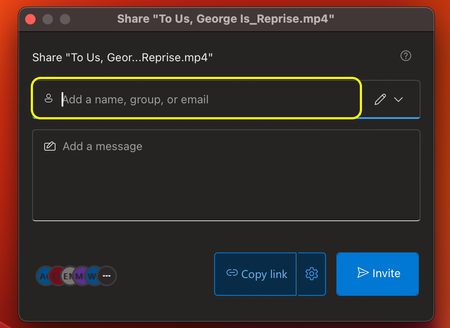
One of the problems I've been experiencing with OneDrive is when sharing links to files, sometimes OneDrive will automatically generate an email to a user even though I didn't specifically intend to send them one. When I send out a link to a file (a video, in my case) for review, I limit permissions to certain individuals by typing their names into the field highlighted below. Later, when I want to grant access to additional users via that already-created link, I will click on the three dots below to "manage access." Then, I will select the cog icon to go into the link settings. My last step is to add new users, click "Apply" (not visible here) at the bottom of the window and click "Copy." What sometimes happens, though, is OneDrive will seemingly glitch and auto-send email notifications to certain added users, even though I never click "Send" or "Invite." Is this a known issue? Or can anyone offer insight?686Views0likes0CommentsManage Access Sends Unwanted Emails
I use OneDrive for a lot of internal projects and collaborations. Often times, I will create a link to share a file with certain users for the sake of review and approval. Later, as I need to grant access to additional users, I will utilize the "Manage Access" feature. Sometimes (randomly, it seems), when I grant that access, unbeknownst to me, OneDrive will send an email to the new users to whom I've granted access, which is not my intention. My intention is to grant those users access, copy the link and then send a more formal email or Teams message. As a professional communicator, there are professional ramifications when this glitch occurs. The fact that it happens intermittently tells me this has to be a bug. Has anyone else experienced this? Are there known solutions?362Views0likes0CommentsVideo Quality Default Setting
I'm a video creator at my org. So, I'm generally viewing things through a hybrid, technical+creative lens. As we begin to share internal videos via Stream (SP), I'm regularly noticing that the video quality playback settings are set to "Auto." Often, that leads to the video playing entirely in a low resolution, where it's mostly pixelated; even the thumbnail image previews with the same low resolution. I understand there are various contributing factors here, but I also discovered that users can toggle the video settings to "1080p." Still, it always defaults back to "auto." I'm wondering if there is a way to lock that setting to 1080p for all users within our organization, because it's not realistic to communicate such a setting change to all users.Re: OneDrive Client, Files on Demand and Syncing large libraries
dustintadamI'm seeking feedback on a recent mass file migration I attempted from OneDrive to Sharepoint. I'm a video creator for my organization. I moved a large amount of media files - videos/photos - from my company OneDrive to a company Sharepoint site. My colleague (also a video creator) and I both sync Sharepoint back to our OneDrives, so this was an attempt to create a more collaborative, cloud-based workflow - rather than each of us having our work live in silo-ed OneDrive folders. I'm now realizing I may have overtaxed the platform, and it's trying to slowly play catch up. Because, a week later, my OneDrive client is still "preparing to upload" and certain files that I now try to add to OneDrive are stuck in a perpetual "Syncing" state. The other byproduct of this attempt is that I now see a large number of duplicate files with a suffix ID in the filename based on my device's name. I did not consult this site or others like it for advice before making this migration - obviously. Can anyone with a similar experience offer advice?6.1KViews0likes1Comment
Recent Blog Articles
No content to show