User Profile

Dodge-1350
Brass Contributor
Joined Feb 09, 2020


User Widgets
Recent Discussions
Re: Windows 365 and Multiple Monitors
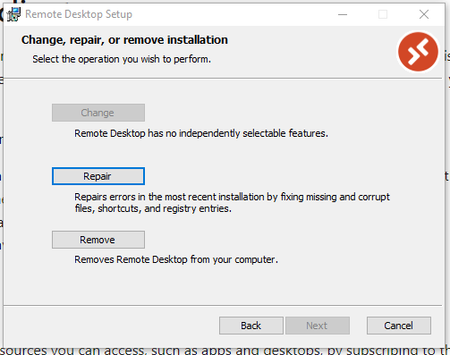
jasonhand Sorry guys, I went to the link you provided to download the client and it is the same link that is provided in the Windows 365 page when logged in. Exactly the same. When I try to install, it states the following, which indicates that the client is already installed and it is operating properly from all I can determine, except for "Settings" to enable multiple monitors: This has been my dilemma from the beginning, the documentation and the actual app to use the features in the documentation don't match. Need to know why this is so I can remedy if there is a remedy. Client OS: Windows 10 Pro Version: 10.0.19043 Remote Deskop Client: Microsoft Remote Desktop Version: 10.2.1817.0 Hope that helps figure out what's going on.70KViews0likes2CommentsRe: Windows 365 and Multiple Monitors
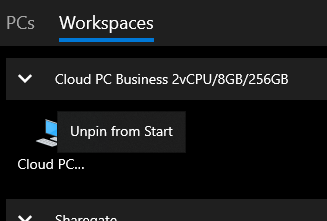
Sumon9007 Hi Sumon, When I right click on the Cloud PC icon, this is what I see... no other settings are present. Do you have a screen shot that could help identify where it is you are clicking? Mine just has "Unpin from Start" as the only option.72KViews0likes5CommentsWindows 365 and Multiple Monitors
I have searched far and wide for information on how to use the Windows Remote Desktop client to use the supposedly supported multiple monitor configuration but without any success. We reached out to Microsoft support responded that this functionality isn't supported. Documentation seems to suggest that support for it does exist. Using 64 bit version of the Microsoft Desktop Client, per the recommendations in the Windows 365 client web page. Not sure where to go here, anyone have any idea or suggestions? Anyone get this to work? Update: Adding the referenced documentation: https://docs.microsoft.com/en-us/windows-server/remote/remote-desktop-services/clients/windowsdesktopSolved83KViews0likes15CommentsRe: Azure Automation - Hybrid Worker - Connect-Azure AD
Can you explain a scenario whereby you would see the run as account being used in Azure Automation to access those permissions exceeding the necessary authority and providing access to someone that shouldn't have it? Wouldn't they need to do that from Azure Automation, where the credential is registered?6.1KViews0likes0CommentsRe: Save list as template on modern team site
No kidding, how are we supposed to tell our users that 'words' matter and that they need to use the proper terminology to describe aspects of our environment so we can help them when Microsoft constantly keeps reusing the same words to describe different things? It's a crime.3.9KViews0likes0CommentsRe: Azure Automation - Hybrid Worker - Connect-Azure AD
Pretty sure this is the reference to get the AzureRunAsConnection involved in the action: https://docs.microsoft.com/en-us/azure/automation/automation-hrw-run-runbooks Please let me know if you know of other references for it or any additional issues that could result from missing modules in the hybrid runbook worker.6.9KViews0likes5CommentsRe: Azure Automation - Hybrid Worker - Connect-Azure AD
That registration of the module in the hybrid runbook worker appears to have worked properly and we are past that error, which then lead us to the next error: Connect-AzureAD : CertificateNotFoundInStore At line:56 char:1 + Connect-AzureAD –TenantId $servicePrincipalConnection.TenantId –Appli ... + ~~~~~~~~~~~~~~~~~~~~~~~~~~~~~~~~~~~~~~~~~~~~~~~~~~~~~~~~~~~~~~~~~~~~~ + CategoryInfo : AuthenticationError: (:) [Connect-AzureAD], ArgumentException + FullyQualifiedErrorId : Connect-AzureAD,Microsoft.Open.Azure.AD.CommonLibrary.ConnectAzureAD Apparently the hybrid runbook worker can't see the certificate associated with the service principal? Do we have to register the certificate too on the hybrid runbook worker? Failing line: Connect-AzureAD –TenantId $servicePrincipalConnection.TenantId –ApplicationId $servicePrincipalConnection.ApplicationId –CertificateThumbprint $servicePrincipalConnection.CertificateThumbprint This code works perfectly well if run within the Azure Automation side of things, but running it in the hybrid runbook worker generates that error.6.8KViews0likes6CommentsRe: Azure Automation - Hybrid Worker - Connect-Azure AD
hspinto - I tried that along with many other methods known to work in Azure Automation. For your information, this is what I receive when I attempt to run that: Connect-AzureAD : The term 'Connect-AzureAD' is not recognized as the name of a cmdlet, function, script file, or operable program. Check the spelling of the name, or if a path was included, verify that the path is correct and try again. At line:56 char:1 + Connect-AzureAD –TenantId $servicePrincipalConnection.TenantId –Appli ... + ~~~~~~~~~~~~~~~ + CategoryInfo : ObjectNotFound: (Connect-AzureAD:String) [], CommandNotFoundException + FullyQualifiedErrorId : CommandNotFoundException So, based upon your comments and the error, maybe I do need to install the AzureADPreview module on the hybrid worker. Do you have any information on how that is done? A reference to the documentation that explains the steps necessary to get it done right and efficiently? Google is good, but 100 links to pour over to find a solution to a Microsoft installation issue is a bit much to have to pour over and determine efficacy. Any help with the documentation to get that done would be appreciated.6.9KViews0likes9CommentsAzure Automation - Hybrid Worker - Connect-Azure AD
Is there a way to use Connect-AzureAD in Azure Automation when integrating a hybrid worker? I have tried multiple ways to try to get it to work and have had zero success. What is best practice for connecting to Azure when integrating a hybrid worker into your automations?7.2KViews0likes11CommentsRe: OneDrive for Business file limits
Rudy_Ooms_MVP Thanks for that info Rudy. I guess we all have to be OneDrive guru's these days since Microsoft refuses to address the core issues associated with their client. Those issues impose severe limitation upon our teams to conduct business properly; which is the sole purpose for Microsoft 365 app ecosystem after all. 1. 300000 files or greater in a document library can and often does lock up the OneDrive client from being able to continue to perform any synchronization of files with that document library or any other, no matter the size. 2. The sync buttons on document libraries that contain larger than 300000 files exist; no effort at all is made to restrict end users from getting into trouble and locking up their OneDrive client. 3. A OneDrive client that is locked up may appear to be functioning perfectly; when in reality it is not syncing anything any longer due to being locked up by a large syncing document library. 4. Absolutely zero documentation exists from Microsoft that points to any of these issues, only in passing can you find some documentation associated with these things and it is usually from the users, not the owners. As I regularly am asked to migrate large file shares into document libraries as part of a migration path, it is critical to our operations that we understand these limits and deal with them accordingly. If this new client is able to handle greater than 300000 files without the risk of locking up, it would be a game changer towards how we are able to integrate file share migrations in our tenant. I figured asking the question in a Microsoft forum would be a good avenue to get that information. Please let us know Microsoft, this is extremely important.34KViews1like1Comment
Recent Blog Articles
No content to show