User Profile

bkuppens
Copper Contributor
Joined Dec 04, 2019


User Widgets
Recent Discussions
Re: The option "Add a content type" is gone for SharePoint Lists
Already found a different way... I just appended the following to my site URL: "_layouts/15/SiteAdmin.aspx#/contentTypes" This brings me to the content type gallery. From there, I can create them and then proceed to add them to the list as existing content type.843Views0likes0CommentsThe option "Add a content type" is gone for SharePoint Lists
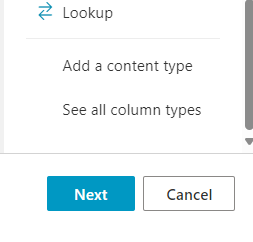
Hi, I have a problem with adding a new content type to a SharePoint list. NOT a library. A list. To add a new content type to a list, you can click the "Add column" and then scroll to the bottom and there you *should* find the option "Add a content type". Well, It's not there anymore. This is what I see for every list, on every site, on every tenant I tried. Enabling/disabling content type management doesn't help. I can add existing content types but I can't add a new one. So, what's going on? Has this moved? Thanks, Bart1.1KViews0likes3CommentsRe: SharePoint 2019 Search throws a HTTP Error
I see you found a solution for your issue. Just wanted to add a possible cause for this. One of my colleagues had this issue yesterday and it was because the search service application was not associated with the web application. After adding the service application into the application proxy group, the error disappeared.1.3KViews0likes0CommentsHidden Debug Pane in SharePoint Online when using Edge
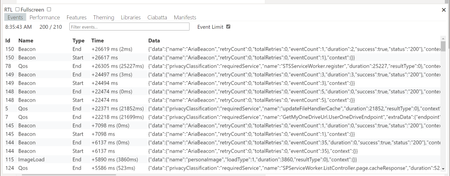
Hello, has anyone ever noticed there's a debug pane in SharePoint Online? I'm not talking about the developer dashboard which you can display using [CTRL-F12]. But when you use the Edge browser and you press [ALT-´], you get a completely different pane with several tabs. A colleague found this by accident. We have been looking for information or documentation on this but there is nothing to be found of this pane. I also asked around and actually nobody has ever seen this. It only works in Edge.699Views0likes0CommentsRe: People/Group Column Converts Name to a Number in SharePoint Online
It's not only a SharePoint Online issue. I have the exact same behaviour in SharePoint 2019 with the modern view. Names show up and when the pageload is complete, they switch to numbers. Sorting the column solves it.6.1KViews0likes0Comments
Recent Blog Articles
No content to show