User Profile

kenneho
Brass Contributor
Joined Oct 10, 2019


User Widgets
Recent Discussions
Custom SPFx app on SPO: How to roll back to previous version?
Hi. We've developed a simple SPFx app, and installed it on a couple of sites on our intranet. I package-solution.json I can set the app version that's used by our SPO sites' app store. Say I have deployed version 1.0.0, and then deploy version 1.0.1. Can I roll back to version 1.0.0 using only SPO app store? Or do I have to delete the app from the app store, and upload version 1.0.0 and re-install it on the sites?975Views0likes0CommentsRe: Copy page/news template between sites using powershell
Matti Paukkonen , copying the templates works perfectly. However, when I have a template containing images, and copy that template to a new site, we find that the image doesn't seem to get copied. Is this a case even for you? Have you found a way to get this working?7KViews0likes1CommentHide “Add event” button in calendar web part for read-only users
On our modern sharepoint online site, we have a calendar web part. For visitors, i.e. read-only users, the "Add event" button is grayed out. For our visitors, we'd rather remove the "Add event" button instead of just disabling it. Is there a way to remove this button for users who don't have access to actually create new events?4.1KViews2likes0CommentsCopy page/news template between sites using powershell
Hi. I'd like to be able to create a page/news template on site A, and copy it over site B. I found a way to copy files over from site A to site B by running something like Get-PnPFile to download the template from site A, and Add-PnPFile -Path './mytemplate.aspx' -Folder 'templates' to upload the file to site B's "templates"-folder, but on site B the template is not listed under the templates gallery when creating new pages/news, so I must have missed something. Any pointers as to how to both copy the template file and also get it to appear on site B's templates gallery will be appreciated.Solved7.6KViews0likes5CommentsFor some users on some sites, the "Share via email"-button does not appear
Hi. On our SPO intranet, some of our users, on some of our sites, are missing the "Share via e-mail"-button. It appears to be due to a permission setting of some sorts, as one of our power users do get the button when signing in with his admin account, but not with his regular account. I'm not quite sure which setting to look for, so if anyone could point me in the right direction I'd appreciate it. Best regards, Ken594Views0likes0CommentsGet notified when users create sites and news based on built-in templates
Hi. We're planning on rolling our own sites and news templates, and tell our content creators to use those instead of the SPO build-in templates. As it's not supported to remove or modify the build-in templates, we'd like to instead be notified if and when content creators create a site or page based on a build-in template. Is this at all possible - is there any attribute or whatever that indicates from which template a news article or site was built, that we can query for example from powershell?880Views0likes1CommentRe: Enable people search in Microsoft search bar
jcgonzalezmartin Thanks for your input. I'm not quite sure what you mean by "Search Naviagation" - are you referring to the Search Navigation web part (https://support.microsoft.com/en-us/office/about-configuring-the-search-navigation-web-part-449b414f-0d49-4b07-8221-45e1b717205d)?7.5KViews0likes1CommentEnable people search in Microsoft search bar
Hi. We'd like our users to be able to find people by using the "Microsoft search" bar on the top of our SharePoint Online modern (hub) sites. As of now, when our users search for content using the search bar, only the tabs "Files", "Sites" and "News" are displayed. To search for users, our users need to click one of the tabs, and then the "Search all contents for ...", which makes for a pretty un-intuitive user experience. Is there a setting of something we can tweak to get the "People" tab by default to show up in the search results page?7.6KViews0likes3CommentsSite title apply only for editing user's language
Hi. I've set up my Office 365 account to use English as display language, while my co-workers are using Norwegian as their display language. So menus and so forth on our Sharepoint online sites are for me displayed in English. I've create a few, modern communication sites, in which the default title was set to "Communication site", and locale set to Norwegian. When my co-workers who are using Norwegian as display language, set a new title, the new title does not affect me - I still get the default "Communication site" title. So it seems that when we create and customize new sites and their titles, the page's title will be different depending on the visiting user's default display language - users like myself who use English as display language, won't get the correct page title, while users with Norwegian display language get the correct title. How does other companies handle this sort of issue? The way it works now, it seems we have no control over what page's title will be displayed to our users, as this seems to be totally depending on whatever display language setting they've defined.1.2KViews0likes1CommentRe: Recommendations for custom theming of modern SPO sites
jcgonzalezmartin Thanks. I see that the referenced SPFx project looks quite outdated, as it requires Node v10. Likely the project dependencies are old as well, meaning that there may be critical bugs I don't want to deploy to my production environment. If other SPO admins have created a custom theme and could like to advice on which approach they went for, I'd appreciate it.804Views0likes0CommentsRecommendations for custom theming of modern SPO sites
Hi. We'd like to adjust fonts, menu item styling, colors and so forth to match our company branding. I came across https://github.com/pnp/sp-dev-fx-extensions/tree/master/samples/react-application-injectcssthat allows for uploading custom CSS files to SPO, which looks promising. Is this the approach other SPO users (w/modern sites) use? Have you managed to get the above SPFx project working, and custom CSS applied to your sites? If possible, we'd like to apply the custom theming only to a subset of our sites, so if there's a way to use for example powershell to loop through our sites and apply a custom CSS we'd probably do that.863Views0likes2CommentsBuilding sp-dev-fx-extensions fail with "Could not find any Visual Studio installation to use"
Hi. I'm looking to apply a custom CSS to our SPO sites, to apply company theming. I came across https://github.com/pnp/sp-dev-fx-extensions/tree/master/samples/react-application-injectcsswhich looks promising, but I'm having some issues. According to the documentation, I thought that simply uploading the custom CSS file would suffice, but apparently it doesn't (unless I'm doing something wrong). Have anyone gotten this to work? As a plan B, I though I'd build and deploy the SPFx project, just in case this indeed is a prerequisite. I've got Visual Studio 2019 installed, but it looks like the SPFx project isn't compatible with this version: gyp ERR! find VS msvs_version not set from command line or npm config gyp ERR! find VS running in VS Command Prompt, installation path is: gyp ERR! find VS "C:\Program Files (x86)\Microsoft Visual Studio\2017\Professional" gyp ERR! find VS - will only use this version gyp ERR! find VS could not use PowerShell to find Visual Studio 2017 or newer gyp ERR! find VS looking for Visual Studio 2015 gyp ERR! find VS - not found gyp ERR! find VS not looking for VS2013 as it is only supported up to Node.js 8 gyp ERR! find VS gyp ERR! find VS ************************************************************** gyp ERR! find VS You need to install the latest version of Visual Studio gyp ERR! find VS including the "Desktop development with C++" workload. gyp ERR! find VS For more information consult the documentation at: gyp ERR! find VS https://github.com/nodejs/node-gyp#on-windows gyp ERR! find VS ************************************************************** gyp ERR! find VS gyp ERR! configure error gyp ERR! stack Error: Could not find any Visual Studio installation to use gyp ERR! stack at VisualStudioFinder.fail (C:\Program Files\nodejs\node_modules\npm\node_modules\node-gyp\lib\find-visualstudio.js:121:47) gyp ERR! stack at C:\Program Files\nodejs\node_modules\npm\node_modules\node-gyp\lib\find-visualstudio.js:74:16 gyp ERR! stack at VisualStudioFinder.findVisualStudio2013 (C:\Program Files\nodejs\node_modules\npm\node_modules\node-gyp\lib\find-visualstudio.js:351:14) gyp ERR! stack at C:\Program Files\nodejs\node_modules\npm\node_modules\node-gyp\lib\find-visualstudio.js:70:14 gyp ERR! stack at C:\Program Files\nodejs\node_modules\npm\node_modules\node-gyp\lib\find-visualstudio.js:372:16 gyp ERR! stack at C:\Program Files\nodejs\node_modules\npm\node_modules\node-gyp\lib\util.js:54:7 gyp ERR! stack at C:\Program Files\nodejs\node_modules\npm\node_modules\node-gyp\lib\util.js:33:16 gyp ERR! stack at ChildProcess.exithandler (child_process.js:310:5) gyp ERR! stack at ChildProcess.emit (events.js:310:20) gyp ERR! stack at maybeClose (internal/child_process.js:1021:16) gyp ERR! System Windows_NT 10.0.17763 gyp ERR! command "C:\\Program Files\\nodejs\\node.exe" "C:\\Program Files\\nodejs\\node_modules\\npm\\node_modules\\node-gyp\\bin\\node-gyp.js" "rebuild" gyp ERR! cwd C:\Users\me\projects\sp-dev-fx-extensions\samples\react-application-injectcss\node_modules\deasync gyp ERR! node -v v12.16.3 gyp ERR! node-gyp -v v5.1.0 gyp ERR! not ok Build failed Does this mean that the SPFx project doesn't support Visual Studio 2019? Will I have to install Visual Studio 2017 to build this project?3.4KViews0likes0CommentsCan't upload custom CSS file to Style Library
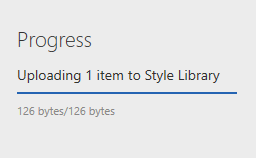
Hi. I'd like to upload a custom CSS to SPO, so that we can brand our pages according to company policies. I'm using my Office 365 admin account to upload a CSS to our SPO style library, but when I try and upload the file, the upload get stuck here: As desribed in https://docs.microsoft.com/en-us/sharepoint/allow-or-prevent-custom-script, I've run the Set-SPOsite https://ourtenant.sharepoint.com -DenyAddAndCustomizePages 0 command, waited 24 hours, but still it doesn't work. Does anyone know what may be causing the upload to be stuck like this? I've read that other people get some kind of permissing denied, which is resolved by running the above mentioned command, but it seems that this is not the issue for me.3.6KViews0likes0CommentsRe: SPO: Make people search more accessible
Alireza Rahimifarid Thanks for your input. Maybe I'm missing something, but the links you provided doesn't seem to be related to my particular issue - I'm not missing search results from particular sites, but rather missing people altogether in the search results, and I have to do two searches before the people directory is searched and the "people" tab appears in the search result.860Views0likes0CommentsSPO: Make people search more accessible
Hi. In our intranet SPO modern landing page, we have a search box just below the "Share"-button on the right part of the screen. When I type in a name and hit enter, I get redirected to a search screen (https://eduumb.sharepoint.com/sites/MittNMBU/_layouts/15/search.aspx), and get the "We found 0 results for John Doe." message. When I press the "Search all content for John Doe" link at the bottom, I get the expected result. Is there a way to configure the search box to search our user directory the first time I search for a user, rather than having to search twice before locating the user? Can I have a dedicated search box for user searches only?911Views0likes2CommentsAre we still not allowed to modify/remove build-in templates in SharePoint Online?
Hi. There are at least a couple of old threads on the subject on modifying or removing the built-in templates in SPO, so that the content creators are limited to fewer and/or only custom templates when creating news and pages. Both threads concluded that this was not supported. Is this still the case? Greetings, KennethSolved2.1KViews0likes2CommentsLimit search sources to a subset of our SPO sites?
Hi. In our upcoming SPO based intranet, the URL for our Intranet related sites all start with the same keyword (example: http://acme.sharepoint.com/sites/intranet_"). Ideally, when our users search for contents on any of our intranet sites, we'd like to limit the search results to content from our Intranet sites, i.e. contents from sites whose URL starts with http://acme.sharepoint.com/sites/intranet_. Is this possible accomplish out of the box?562Views0likes0Comments
Recent Blog Articles
No content to show