User Profile

utkangezer
Brass Contributor
Joined Aug 18, 2019


User Widgets
Recent Discussions
Updating the custom search engine label requires browser restart or keyword change
When a custom search is initiated on the address bar (e.g. when you write "bing.com" on the address bar and hit the Tab key), the address bar starts saying "Search [Label]" (e.g. "Search Bing") where [Label] is the label of the respective custom search. One can change the labels of the custom search engines from edge://settings/searchEngines (by editing any search engine and changing it in the first one of the three boxes). However, the change in the label reflected only when you do either of the following: a) Close Microsoft Edge and restart b) Change the keyword for the search engine and initiate a custom search with that new keyword, change the keyword back to what it was and initiate a custom search with the original keyword again Since option b is a thing, I think the change in labels should be reflected immediately, just as if the user had opened a new tab and done all those things, without requiring the user to go through all those hops.553Views0likes0CommentsCustom search engines failing to work automatically with some of the websites (with a quirk!)
I'm not sure whether this is still the place to make this inquiry. I reported the issue via the feedback module, but that thing doesn't look very promising. The problem is that the custom search engines are not working with some of my sites on Edge (Version 101.0.1210.53) and Edge Beta (Version 102.0.1245.25), while they do on Edge Dev (Version 103.0.1264.2). Here's what I did: 1) Delete both YouTube and Amazon from the list on edge://settings/searchEngines 2) Go to YouTube and Amazon and search for the term "test", which adds them back onto that list 3) Type "youtube.com" and then hit the Tab key, which allows me to make a YouTube search immediately from the address bar 4) Try the same with "amazon.com", but it doesn't work HERE's the QUIRK: 5) Go back to edge://settings/searchEngines 6) Edit the entry for "amazon.com", change only the label (i.e. the first of the three input boxes) and save 7) Strangely enough, now it finally works with "amazon.com" (although we did not change anything regarding the functional parts, i.e. the keyword or the URL) It keeps on working fine even after changing the label back into "amazon.com". Some further investigation: - The following websites behave just like "amazon.com" (and are automatically labelled the same as their domain names, all in lowercase letters): "amazon.de", "amazon.com.tr", "akakce.com", "aliexpress.com", "alarm.com" - "aol.com" (automatically labelled as "AOL Search") works just fine! - "sahibinden.com" (automatically labelled as "sahibinden.com") works just fine! Could have something to do with the automatic labels starting with the lowercase "a"?687Views0likes0CommentsRe: Poor text rendering in PDFs
Mid 2021 update: This issue is still very much with us. My system details are as follows: Windows 10 Education, 20H2 1440p display on 125% scaling Edge Version 92.0.902.55 (Official build) beta (64-bit) I am still forced (objectively, it's not a breaking issue, but it is so given an obsessive personality) to use Firefox when it comes to working with PDF documents on Overleaf. My question to anyone reading this: Has this really NEVER occurred to you? If so, what are your system details? The non-100% display scaling is the only thing I can think of that might have something to do with this, and the high resolution screens are so common nowadays that I think most of you should already be in the same boat as mine. And in my boat, it seems that one has to be very lucky to not have the issue, or be very carefree about it to not have a notice.21KViews0likes2CommentsRe: Duplicate Tab Shortcut
It is currently available on Beta (Version 85.0.564.36). It's the first time I've seen it on the new Chromium Edge, and I am very happy that it is back! Came here just to say that. I had been using Vimium's shortcut 'yt' as a workaround, but Ctrl+K is much better.12KViews2likes1CommentRe: Poor text rendering in PDFs
Update: The situation is cleared up within the day. Mutual respect has been regained! More details in later posts. Deleted I have just received a message from Microsoft regarding this Shift+Alt+I feedback I had sent. I had meticulously reproduced the issue to readily include a screenshot in that feedback, and also provided a link to this thread. Microsoft's response says: In order to investigate your feedback, we would like to get some additional information from you. Please reply back to this email and attach one or more of the following: The steps you took before you experienced an issue in the app Any documents you were working on when you submitted the feedback A screenshot of the experience This is rude. Everything they requested there is already available in this thread. A screenshot was directly included in the feedback, and several others are again here. This is essentially on par with asking for a slave to provide comfort. For this once, I honored their "request"; used the link I had sent, downloaded stuff from there (here), and sent them back as a reply. Just because they couldn't be bothered to visit the link themselves. Respect is reciprocal; if Microsoft does not treat their customers with respect, it's very hard for the customers to take Microsoft seriously. I will not comply with such disrespectful requests of Microsoft anymore. I'm writing this here as a feedback.23KViews0likes8CommentsRe: Poor text rendering in PDFs
posinha I'm happy to hear that my report made sense. Above all, thank you for your contact. I don't feel let down as before anymore. The thing is, I enjoy helping. That part of me was yearning to help, even if it amounts to digital-legwork, and rehashing of previously stated. And so I did, but then my sense of equity was upset by that, feeling abused. Had I not had either one of those parts, I would either delete that mail immediately, or rather help-and-forget. Either way, this wouldn't come up as a problem here. I apologize for having such a personality with inner conflicts. I wish you and the whole PDF team wonderful achievements!23KViews1like0CommentsRe: Poor text rendering in PDFs
Deleted I have just received another reply. This time a sincere one, telling that it was a mistake. I appreciate a personal contact, and honesty. I responded back with my thanks for their correspondence. I do not mind if this issue remains with Edge for another year. It's not at all important to me, compared to people's sincerity and respect. I'm glad that they've been uplifted swift. I had came here to bring the updates, and have seen your message only now (3 hours late, sorry). Thank you for getting involved.23KViews1like4CommentsRe: Poor text rendering in PDFs
posinha I am sorry for the (very) late reply; I once was receiving a lot of uninteresting replies to a post of mine, and then e-mail notifications for each. I thought that experience (uninteresting replies) as an example of this portal, and so I had disabled the notifications altogether. Back to the topic... Of course, but I cannot share the document used for the screenshots in the original post. I can send you the aforementioned Microsoft Word generated, and Apple Keynote generated PDFs. I also have just reproduced this with another Latex generated PDF of mine, which I can share. Here's a screenshot of the latest incident: Particularly great example, since all the lines containing the minus sign has been garbled out, making the fraction weird. I couldn't find out how I can send the example documents to you only... The personal message feature doesn't support attachments. I will post them right here, although I would be happier if I hadn't have to share them this publicly. Finally, and again; this happens in every PDF on all 3 of my machines, both Windows and Mac. Thus, I actually think that these PDFs I've shared have no use -- you may just use any other. It doesn't happen consistently, i.e. you most definitely will not see the problem occurring at the exact same lines. The document may turn out perfect, too, by chance. I once had to re-open a short (~2 page) document about 10 times to reproduce the issue, carefully examining it top-to-bottom each time. If you can never (seemingly, as you can never be sure) reproduce the problem on your end, then (maybe) it means this is due to a combination of parameters, and one that your machines don't satisfy, while mine do. Microsoft Edge is definitely a parameter -- it doesn't happen on my machines with Firefox, SumatraPDF (Windows), PDF Expert (Mac), etc.. I am very positive that this happens with Chrome, too (or at least was happening when I was using it). The second parameter might be the display scaling. Not using display scaling is not a solution. It would be very curious if you indeed cannot reproduce this. I am ready and willing to provide any system details that might be relevant, to pinpoint other parameters causing this. I would also be interested in knowing the specs of a machine that never experiences this issue. I still haven't enabled notifications. I apologize for any late replies, Utkan23KViews1like0CommentsRe: Poor text rendering in PDFs
Deleted Thank you for your help. I just have. There was no reference number to my submission, so I cannot provide any pointers to it to you. I have yet another example, this time from a Microsoft Word generated PDF: See that the bottom of each symbol is deformed. I indeed am using Firefox now for working on Overleaf, and there the PDFs are rendered perfectly, as far as I can notice.23KViews0likes2CommentsPoor text rendering in PDFs
Hello, It's been a long time since using Chrome, but AFAIR it had been so with Chrome, too. So I believe this issue is not specific to Edge, and rather a remnant of Chrome. It's the text rendering with PDFs. It's imperfect. I think Chrome/Edge is rendering the document line-by-line in pixels, and every so often, repeats a line once/twice or misses it. The more, the worse it looks. Some observations: It is inconsistent; i.e. different lines of the document are mis-drawn every time the document is re-opened. Zooming in/out or selecting the text with cursor may fix the issue. Sometimes when it does, it also shifts the issue to someplace else, i.e. some other line gets broken. After 10-15 tries or so, I managed to capture two examples: See the A_before.png (hint: middle of 2nd line and top of 3rd line) and B_before.png (hint: 2nd line) attached. I did not put them as inline resized images, as it is hard to see in the original resolution already, let alone resized. Their "after"s are after fixing the lines by selecting them. Also note that, especially in case B, things move around a lot, almost as if they were carelessly thrown at the page before, and placed carefully after. I have 3 computers with Edge installed. The issue is present in all of them. I list their relevant specs for the reference: Windows 10, version 1909, 1440p, 125% display scaling Windows 10, version 1909, 2736x1824, 200% display scaling macOS Catalina, 1440x900, not retina (2012 MacBook Air) Finally, I also have evidence that the issue occurs on PDFs generated by some other means than Latex. See the "keynote.png" screenshot that is from a PDF generated by Apple's Keynote. As a personal note: For documents that are supposed to look gorgeous as a product of Latex, I find this is mildly annoying and upsetting. Maybe I'm a person that cares too much for aesthetics, but I'm thinking about installing/using Firefox until this is fixed, at least for my group projects on Overleaf. Utkan27KViews3likes21CommentsRe: Discussion - Set Aside Tabs and Warn on Close
Elliot Kirk Here's my take on Set Tabs Aside. I loved that the feature existed. It was a refreshing feeling to use it. I felt more free when I had it, that I could put things on hold. I was more agile, that I could interrupt when I want (in a good sense) whatever, and have a fresh/undistracted view of this immediate, more important task. Now, in its absence, I feel chained down to my open tabs. They pose detriment against a context switch. Even if there are weeks until the time I will use many of my tabs, I cannot set them aside, and they surely diminish my focus when they are 9/10 of my active tabs. Think of a CPU without interrupts. That's how it's kind of like to not have the Set Tabs Aside. Suggestions for improvement: Please auto-close the single empty new tab page, when the user retrieves a stack of tabs set aside: Setting tabs aside, and retrieving another stack was a common workflow of mine. However, every time you did this, you'd have an empty new tab page, which was annoying. Same thing happened also when you'd open a fresh new browser, and retrieve a stack. A means to conjoin the currently open tabs with a stack of tabs set aside. I.e. stack tabs aside INTO some other set of tabs set aside. Really, this was the number 1 feature I was advertising people back in old Edge times. I was making Mac people envious with it...3.1KViews1like0CommentsRe: [Bug] Password manager exposes the password length and decrypts without a private key!
To reiterate, Edge does not blindly trust the person sitting in front of the computer. It does ask the PIN from the user before showing the password in clear text. However, while it doesn't fully trust the person sitting in front, it apparently trusts them "somewhat". It displays the true length of the password without PIN. I don't see any reason for this "human-like" behavior, where the software (Microsoft Edge) doesn't fully trust or distrust the user, but trusts them "somewhat".2.3KViews0likes1Comment[Bug] Password manager exposes the password length and decrypts without a private key!
This is a security issue that is out in the wild, though I do not think it is that so severe that it poses a risk to mention it here. The page edge://settings/passwords allows the person in front of the computer to reveal passwords after they convince the browser about their ownership by entering their account's password, or their PIN on that device. That's cool! The problem is, it also displays their actual lengths of the passwords without any proof of ownership! The problem here is two fold: How, even? How is it even able to do that in the first place? I would expect the passwords to be encrypted in such ways that even the browser itself cannot decipher the passwords, nor their lengths, without the private key, which should have been a derivative of the credential that the user should be entering. A premature hint! Exposing the length of the password is too much of a hint to tell someone who hasn't yet provided their proof of ownership. The browser is reluctant to expose the password as a whole; it asks for an authentication before doing that. Then, why is the browser even giving this piece of hint out? To convince the person in front of the computer that it really has the actual password? Aesthetics? Just now I realized that the auto-fill somehow also enters my password in plain text to the websites, without asking any private key or sorts... I guess then being the person in front of an unlocked computer is enough to get the passwords deciphered (and entered via auto-fill). Then my question is in reverse: What is the point of keeping them censored on edge://settings/passwords at all, if we trust this person so much? Windows in and of itself does not trust so easily: Fire up the "Credential Manager" (type that onto Start menu search). It displays the censored passwords with the dummy length of 8 or something. They are revealed only after authentication. I hope that, without authentication, it does not decipher the passwords nor give them away either. Why does a the browser give in? Could you provide an option on edge://settings/passwords to let us choose to require authentication before auto-filling the passwords? Just like the one that pops up when you hit the "peek" button to reveal the passwords. I personally find the auto-fill as it is kind of insecure. I would rather enter my PIN every time I log in (with cookies, this doesn't happen so frequently anyway), than to have the equivalent of keeping my passwords in a passwords.txt that I hid deep in my Documents. Sincerely, Utkan2.7KViews0likes6CommentsRe: Option for a slimmer tab and address bar
On Mac, Safari is the clear winner when it comes to the screen real estate. If it was not for the cross-device synchronization, I would definitely be skipping Edge on a Mac. With a single tab open, Safari's entire top UI is narrower than half of the thickness of Edge's top UI: [[37px vs. 82px]] With multiple tabs open, Safari's entire top UI is 3/4 as thick as the top UI of Edge: [[62px vs. 82px]] See the image for comparison: It isn't that big of an issue on Surface Pro with the taller aspect ratio, but it is very much obnoxious on a short-screen (=wide-screen={16:10, 16:9}) device. I dream of a future without 16:10/9 devices, and 3:2 being the most widespread option. For now, 16:10/9 is the most widespread, calling for this to be addressed.2.8KViews1like0CommentsRe: Hide/show toggle for the address bar
HotCakeX Thank you, I like it. I will be using this occasionally. For anybody who wants to use the focus mode, after enabling it from edge://flags/#focus-mode and restarting your browser; the focus mode is enabled for a tab from its right click menu on the tab bar. Within focus mode, the address bar is lost altogether, unfortunately. I hoped that it would temporarily re-appear with Ctrl+L. It doesn't. Better than nothing, though. Thanks again, and bye!1KViews0likes1CommentHide/show toggle for the address bar
I think it would be cool if we were able to hide/show the address bar by clicking on the active tab (or by some other means). This would also match the UI of the Office applications, where you can click on the ribbon tab to collapse and expand the ribbon. Just like in the Office, we sometimes like to have more space to us while browsing. Being able to do this by clicking on the active tab would be a true match, but any other way is also welcome for me. Thanks, and bye!1.1KViews0likes3CommentsBeing able to combine the tab bar with the address bar
I personally wish I could combine the tabs bar and the address bar into just one bar. I'm not sure, was this a thing on the Internet Explorer at some point? My concern is not nostalgia though. I merely just want to have the most amount of space for web browsing. Address bar isn't much useful to me than putting in an address to me. I make it so infrequent, that having a bar as wide as my screen, always sitting on top, almost like an ad, bothers me ever so slightly. Just my two cents. I'd like to be able to do this. Thanks, and bye!2KViews1like1CommentOption for a slimmer tab and address bar
I personally find the tab and address bar slightly obstructive. I both have a classical desktop and a Surface. The size of the tab bar and the address bar is nice for a touch-friendly interface perhaps, but for either of my devices, I would prefer a slimmer border in my browser accommodating a larger area for browsing. Firefox has the "compact" option (alongside Normal and Touch) for such a feature, and I find it neat. I think just 2 options will be better/fine, like in the Office products. Thanks, and bye!3.2KViews3likes5CommentsPinning the Favorites?
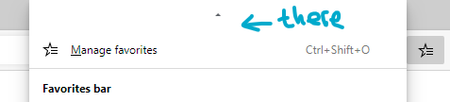
I have 323 favorites that I have to work with. There might be others like me who have more than just a couple of favorites. Edge used to allow us to pin the Favorites slide-in. This allows us to open a page from our Favorites list, yet still keep the Favorites list for further use. It eliminates a precision-movement and a click from the mouse, and also keeps where you were on your long list of favorites. If you had expanded a favorites folder, it also keeps that. All so handy! "Pin favorites" can be a list item right above the current "Manage favorites" list item on the cascading menu: Or perhaps a double-click on the favorites button could get it pinned, an inconspicuous feature. Or, even better, both! This was suggested in the Discussion #408478 a couple of times, but not in the original post, so I wanted it to have a discussion to itself to make sure it doesn't get overlooked. I will also note an idea I've seen there that I found cool: Unlike the one in Edge, pinned Favorites pane could be horizontally re-sizable. Peace, out! I have disabled notifications, apologies.1.1KViews0likes1CommentNext closing-button to move under the cursor, after closing a tab
A short narrative: You are bingeing on information on the Internet, depth-first, vising page after another, leaving a trail of 10-20 tabs on the way. Then, you are done, and now start closing the tabs. For whatever reason, you prefer mouse, start hitting those ×'es. When there are too many tabs (>6 on a 1080p monitor with 100% scaling), you can rapidly click on your mouse to close one tab after another. This is possible, because the tabs had shrunk in size to fit to the screen's width, and they grow back as much as they can as you close some tabs. This activity provides a brief moment of joy to many users I believe; it does to me at least. It's a good UX, imo. The joy ends when the number of remaining open tabs drops low enough. Then, you sadly have to hunt for the closing buttons, or switch to keyboard, rapidly click on W instead, holding CTRL. This is slightly a bad UX, imo. There are browsers that employ some neat tricks that brings the tab-closing-button of some still-open tab underneath the user's cursor. Safari is one of them, with tabs spanning always the whole window-width. Internet Explorer also is! See the animation I've prepared demonstrating this: This is persistently the good UX, and never the bad UX, so I personally would like to have it. IE's way is not the only, evident from the fact that there's the Safari. I can think of ways different from both, even. So, take this just as a sample, and perhaps find something else, better! I will be abandoning this suggestion and unsubscribing from discussion, as soon I post it. I apologize for not replying to any responses. Thank you for reading, Utkan1.1KViews0likes1Comment




Recent Blog Articles
No content to show