User Profile

Gekkouga
Brass Contributor
Joined Apr 08, 2019


User Widgets
Recent Discussions
Creating named range from cell values
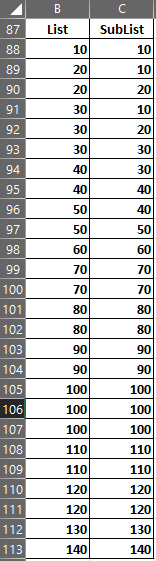
Hi, I have some lists and each of these lists has sub-lists. I am trying to create conditional data validated cells i.e. the validated list on the second cell should change depending on the value selected in the first cell. I realised that the easiest way to do this is by creating named ranges of the sublists creating a data list with the main-list and sub-list name on the worksheet using vlookup on the first value with the data-list as a range Finally, using the result of vlookup (the named range) though INDIRECT in the data validation window. Everything works fine but the problem is, it is really cumbersome to create a named range for all the sub-lists especially when there are hundreds of them. Since I already have the name and the range listed on the sheet, I was wondering if there is a way to create a named range automatically from this data instead of entering it manually in the name manager.994Views0likes1CommentSpin off Edge PDF reader as a standalone app
Any thoughts on spinning off the PDF capabilities of Edge as a separate app like the Windows 8 Reader app. I have a lot of PDFs and open them all simultaneously. But using a complete browser for PDF reading is such overkill and is not only memory intensive with all the extensions but also drains the battery fast. Instead, a standalone offline PDF reader will make the process much more efficient and a browser plug-in can be used to open PDF inside the browser just like Adobe does. I seriously want to use Edge's PDF capabilities especially with touch and inking but the memory utilisation and battery drain issues are forcing me to use the subpar experiences with Adobe and Foxit.1KViews1like0CommentsRe: Dev channel update to 95.0.1000.0 is live
Hey josh_bodner, The Share UI location is inconsistent with the rest of Edge UI. All other UI dialogues appear just below the button but the new share UI opens at the center of the search bar. I have to move my cursor again to reach the share UI which kills the whole point of having this quick share UI (At this point, its easier and faster to copy the link directly from the search bar).25KViews3likes1CommentRe: Dev channel update to 91.0.825.0 is live
josh_bodner When is the sync option coming to Linux? Why are other features given higher priorities than sync? I don't see sync in the roadmap and I am starting to doubt if it will ever make it's way to Linux. Life is so hard working without content sync on browsers.11KViews10likes4CommentsRe: Dev channel update to 83.0.478.5 is live
josh_bodner When are the EdgeHTML PDF features coming in? It's really taxing to use the new Edge as a PDF reader. It's better than Chrome but it's still not Edge. Please add the following features 1. Option to enable/disable Touch Drawing. Can't scroll with fingers when using a pen without exiting Ink mode. 2. Add a highlighter to the toolbar. Using the contextual menu to highlight text is 3 extra steps. Without a mouse, it's really hard to select and highlight. And it doesn't work in Ink mode because text can't be selected while inking. 3. Add a Save button. The current Save As button doesn't help with productivity and file management. Please bring back these features or at least hold off updating the Old Edge with the newer one. I'm still using it as my default PDF reader (I use new Edge for browsing ). Thanks.15KViews3likes0Comments
Recent Blog Articles
No content to show