User Profile

Hubert_Lam
Copper Contributor
Joined Feb 12, 2019


User Widgets
Recent Discussions
Re: Now in Public preview & Targeted release: New channels experience in Teams
Jan_Steberl I guess we're still awaiting on the following to roll out: Channel headers (to make it look more like a Viva Engage community?) Uploadable JPGs for channel conversation headings (currently only solid colours are permitted) A better compose box - at the moment the classic channel compose box has shortcut keys that have since been removed in the Teams Chat (e.g. pressing ">" will allow the quotation to appear (in HTML, it's wrapped around as <blockquote>...</blockquote>). In its current form, it's still nowhere near what was announced in October 2022: https://techcommunity.microsoft.com/t5/microsoft-teams-blog/enhance-collaboration-with-microsoft-teams-chat-and-channels/ba-p/3644534Re: Remove seconds from JSON view format
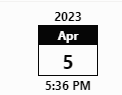
After a bit of fiddling and reading up on the indexOf/substring functions: txtContent": "=substring(@currentField.displayValue, indexOf(@currentField.displayValue,' '), indexOf(@currentField.displayValue + '*','*'))" Explanation: The substring will try to remove the date (e.g. 5/4/2023) The first indexOf will try to find the first space in the date field The second indexOf will try to find the position of the last character in the string The 5:36 pm that appears in the following formatted column arises from the use of the substring/indexOf: Norman Young1.3KViews0likes0CommentsRe: Hiding Office 365 Groups Created by Teams from Exchange Clients
TonyRedmond Bit of a shame that there's no easy flick switch to make the M365 Group that arises as a result of a Team being created, to be visible in Exchange Clients, instead we're having to resort to PowerShell + admin rights. The M365 Group Calendar itself is probably one of the most useful - as any Teams Channel Meeting scheduled within a Team will appear in that Team's M365 Group Calendar. However, for most teams created after 2018, this Group Calendar can't be used to schedule appointments which don't have a meeting associated with it. Ironically there's also a Group Calendar web part in SharePoint Modern! Which now is only able to display Teams Meetings. The Event List that can be created as part of a SharePoint site is not useful in this regard, as it requires the end user to sync the "calendar" (which is a SharePoint list) to Outlook manually, and of course, it won't have all of their Teams Channel Meetings. So whilst I appreciate others in here that are frustrated with the Groups surfacing in Exchange Clients, there's another batch of us who are frustrated at exactly the reverse 😂5.7KViews1like0Comments
Recent Blog Articles
No content to show