User Profile

BaselFawal
Brass Contributor
Joined Jan 24, 2019


User Widgets
Recent Discussions
Re: Exchange DLP detection is not working
Hi tshinkle1, it should detect in both the attachment and message body, you better open a ticket with Microsoft Just wondering if you have tested the policy for other locations, like SharePoint, I mean uploading a document with SSN in SharePoint site, it should be visible in activity explorer in the DLP.4.9KViews0likes2CommentsExchange DLP detection is not working
I have a customer that has "Microsoft 365 E5 Information Protection and Governance" Add-on license, they also have the M365 E3 license. We have setup DLP policies in Exchange to detect Credit card numbers, (policy has no actions, no alerts or incident) we just need to see the DLP matches, nothing is showing in Activity explorer or in DLP matches report after many tries. Also we have another policy to detect in Teams but also nothing is showing in Activity explorer The same policy works fine in another tenant and I could see the detections in the Activity explorer but it has the Full E5. What might be the issue that DLP policies are no showing any activities or detections. Note: the same policy is working for SharePoint DLP detections6.4KViews0likes8CommentsRe: Exchange DLP detection is not working
Hi IsmKay Actually we discovered that DLP is working for SharePoint, we have set up a DLP policy has the three locations, Exchange, SharePoint and Teams, the DLP detections are working For SharePoint, documents uploaded etc.., not for Exchange emails There is no detection in Activity explorer for Exchange email send and received that contains the same sensitive info as it is one policy. So now Exchange DLP is not working all mailboxes are migrated to Exchange online5.8KViews0likes1CommentRe: Analytic Rules are not Deployed as part of a solution from Content Hub
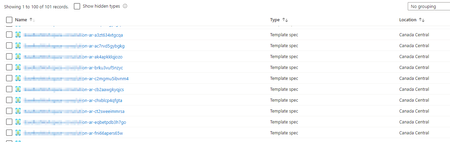
Thanks Gary, Sorry if I can ask how to create the rules from templates, when I try to deploy those template spec items that are in the resource group (shown in the above screen shot) I got a deployment failed. However I can go to the sentinel interface and I can create the Analytic rules, but this is similar to the old way , for example I don't seem find a way to select all the Analytic rules in the Solution and deploy. So far the solution only deploys the connector, doesn't deploy any analytic rule or playbooks. it would be easier if I can select all the Analytic rules in the solution and deploy. Thank you so much1.3KViews0likes1CommentAnalytic Rules are not Deployed as part of a solution from Content Hub
I am trying to deploy "Azure Active Directory" solution from Content hub, non of the 59 Analytic rules that are part of the solution is deployed. The deployment is showing success and all the components are showing "created" But in Sentinel Analytic rules non is created, only the connectors and two workbooks, but no Analytic rules. Any idea why the analytic rules are not deployed as part of the solution? When I look into the resource group , where the solution is deployed, I saw some template objects as in the screen shotSolved1.5KViews0likes3CommentsEnabling VMware ESXi (Preview) data connector
Hi, I have ingested ESXi server logs to Sentinel through on-premises log forwarder. I could see the logs in syslog table in Sentinel, but I don't see the VMware ESXi data connector enabled, also the VMwareESXi table is not there Any additional steps I have to do to enable this VMware ESXi data connector? Also what is the recommended facilities to enable for this syslog type.1.8KViews0likes2CommentsRe: Misconfiguration error message when setting auto-provision in Defender for Servers
The issue is resolved after changing from the default workspace to the dedicated one, it seems at the beginning we were not saving the changes the issue was the new GUI interface you have to remember to click Apply > then click Continue > then click on the Save on the third screen, for the new settings to apply2.1KViews1like0CommentsMisconfiguration error message when setting auto-provision in Defender for Servers
I am receiving error message (Misconfiguration) when configuring auto provisioning for servers. Error message: Different configuration exist for virtual machines and Azure arc machines. Please select a single configuration to be applied on both source types The environment has both Azure VMs and Azure Arc from On-premises servers I cannot set the default agent or the default workspace as I receive the error message, what could be the cause of this conflict. (attached is error messages)Solved2.1KViews0likes1CommentDisaster Recovery Design for Microsoft Sentinel
I would like to know if there is a recommended design for disaster recovery of Sentinel SIEM like placing another Log Analytic workspace in a paired region. then pointing the DR servers to report to this LAW. If in case I need a live DR then do I have to replicate the log analytic workspace to the other paired region and what is the best method to do this replication? Thanks8KViews0likes4CommentsRe: Server is still showing " Install endpoint protection solution on virtual machines"
it Seems there are two Recommendations: 1- "Install endpoint protection solution on virtual machines" which shows unhealthy 2- "Endpoint protection should be installed on machines" (Preview) which shows healthy So it looks like there is an old recommendation and there is a new one. this is might be confusing as it should be one recommendation related to endpoint protection. Any how when you click on the first recommendation it informs you there is an updated version, however you still have one recommendation not satisfied.8.6KViews0likes7CommentsServer is still showing " Install endpoint protection solution on virtual machines"
Windows server 2019 has AMA (Azure Monitor Agent) and has Defender for Endpoint onboarded but it still showing in the recommendation to "Install endpoint protection on virtual machine" as unhealthy. Defender for endpoint is onboarded and is listed in the installed application and confirmed running. Do I have to install MMA as well? or there is something else missing to update the recommendation.8.9KViews1like10CommentsRe: Can I Connect on-premises management console to Defender for IoT Portal
Thank you Deleted , also I noticed that the device inventory collected by the management console is not showing in the IoT portal (I am not sure if this is by design). Also I don't find a documentation showing how to forward alerts from management console to Sentinel or to the IoT portal1.7KViews1like0CommentsCan I Connect on-premises management console to Defender for IoT Portal
I have setup on-premises management console and activated it. I connected one offline sensor using the connection string, the sensor is connected to the management console and sending its device inventory to the management console. I don't see that device inventory in Defender for IoT portal, (like the online sensor) is that an expected behavior? the management console doesn't show in the IoT portal!, how to forward the alerts from management console to IoT portal? (or To Microsoft Sentinel). in the forwarding rule section it asks about the Azure Sentinel host name, not sure what to enter in this field?1.9KViews0likes2CommentsCollecting Investigation Package - Autorun entries
Using Defender for Endpoint I have Collected Investigation package for a computer, but seems the Autorun registry entries only include the HKEY_LOCAL_MACHINE not HKEY_Current_User I mean entries like Computer\HKEY_CURRENT_USER\Software\Microsoft\Windows\CurrentVersion\Runonce is this something by design?1.6KViews0likes0Comments
Recent Blog Articles
No content to show