User Profile

TRBrown
Copper Contributor
Joined Nov 29, 2023


User Widgets
Recent Discussions
Re: How do I format column I to highlight based on the value in column H
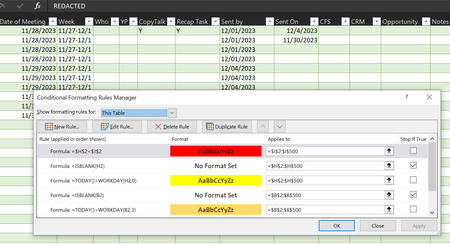
It still isn't working for me yet, could my issue be that column H is populated by a formula to auto fill the date based on column B? The formula being "=IF(B2="","",TEXT(WORKDAY.INTL(B2,3,"0000011"),"m/dd/yyyy"))" Unfortunately, the sheet I'm using has PII and I can't share it as is.1.1KViews0likes3CommentsHow do I format column I to highlight based on the value in column H
I'm working on a tracking sheet where Column H (2-500) is the due date and Column I (2-500) is the date actually complete. I want to conditionally format it where if the date it was complete is any time after the due date it highlights red. I've tried most routes I can think of and haven't been able to find a good answer, anytime I do "=H2<I2" nothing changes in the sheet. What am I missing?1.2KViews0likes6Comments
Recent Blog Articles
No content to show