User Profile

Preston_B
Copper Contributor
Joined Nov 28, 2023


User Widgets
Recent Discussions
Re: Help with Excel formula summing numbers based on separate criteria(unique & list)
Hello! I apologize for the late response. I have tried this solution and it does not calculate properly. The sum should be 124 and it returns 44. I have, however, found a formula that does work: SUM(IFNA(IF(P22:P20022=X7,INDEX(UNIQUE(M22:R20022),,5)),0),IFNA(IF(P22:P20022=X8,INDEX(UNIQUE(M22:R20022),,5)),0), etc for all of the x values.802Views0likes0CommentsHelp with Excel formula summing numbers based on separate criteria(unique & list)
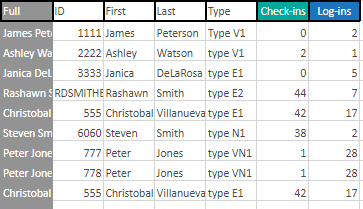
Hello Excel experts! I have a bit of a complex formula that I need help with. I'm looking to sum the 'check-ins' numbers (column Q with range of 22:20022 to handle any volume of users) if the ID(Column M) is unique and the 'Type' matches a list somewhere else (X7:X16) Here's a screenshot of the data (don't worry, fake names & ID's) So far, I have =SUMIF(P$22:P$20022,X7,Q$22:Q$20022) but that only returns the sum of one value in the 'Type' range (X7) versus the entire range (X7:X16) and it does not ignore duplicates (ID 555 / column M). I know I can =sum( 10 variants of the above formula to cover the entire range, but I'd like to learn a better way. I'd rather not make a helper column to return 1's if the ID(Column M) is unique if possible.Solved908Views0likes2Comments
Recent Blog Articles
No content to show