User Profile

AWDarby
Copper Contributor
Joined Nov 27, 2023


User Widgets
Recent Discussions
Re: Formula that sums inventory items from multiple sheets using 2 criteria
NikolinoDE For some reason, your formula is working perfectly now. I tinkered around for awhile. Not sure what or if I changed anything, but it's now working across 6 different sheets. Thanks! I may try to do the PowerQuery route later on if the workbook becomes to unwieldy with additional sheets.1.2KViews0likes0CommentsRe: Formula that sums inventory items from multiple sheets using 2 criteria
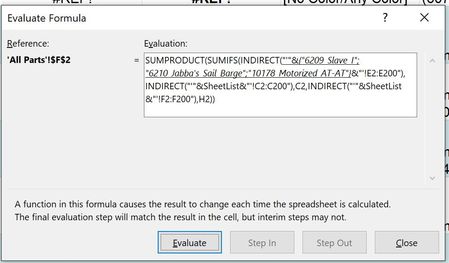
NikolinoDE Hello, When I tried this formula, I got the same #REF error I did with mine. The problem seems to be with the formula trying to reference more than one sheet, as the formula works fine when I edit the SheetList to just include one of the sheet names. I used the Evaluate Formula tool and these were the first steps that led to the #REF error. I can try to upload my workbook to OneDrive if that's helpful.1.2KViews0likes2CommentsFormula that sums inventory items from multiple sheets using 2 criteria
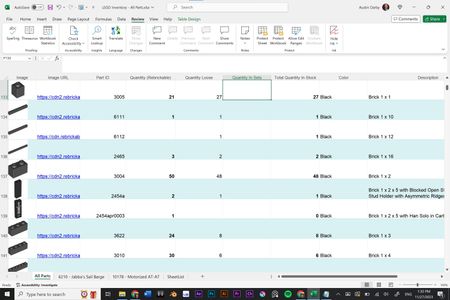
Hello! I'm using a workbook to keep track of a large collection of LEGO parts. The first sheet is master list of every part, sorted by part #, color, and name. Column E is the quantity of parts that are loose in storage. I want Column F to show me the quantity of parts that are bundled together in sets. The other sheets in the workbook are inventories of the parts in these sets (also sorted by #, color, and name). What I would like is a formula in Column F on the master list that will scan the other sheets, find part quantities based on Part# and Color, and give me the total in the master list. I had some success using SUMIFS and INDIRECT functions to do this with 2 of the sheets, but it failed to work once I started including 3 or more sheets. This is the formula that worked when only referencing 1 sheet, but not more. "SheetList" is the name assigned to the list of sheet names I created in another tab. =SUM(SUMIFS(INDIRECT("'"&SheetList&"'!"&"E2:E200"),INDIRECT("'"&SheetList&"'!"&"C2:C200"),C137,INDIRECT("'"&SheetList&"'!"&"F2:F200"),H137)) I'm on a Windows 10 laptop using Excel (Version 2310 Build 16.0.16924.20054). Thanks!Solved1.6KViews0likes5Comments
Recent Blog Articles
No content to show