User Profile

morfidon
Copper Contributor
Joined Oct 16, 2023


User Widgets
Recent Discussions
Re: how to change default placement of microsoft store apps on taskbar?
Thank you for the swift and comprehensive response. I understand that Microsoft Store apps are integrated with the Windows 11 taskbar and why it is designed this way. However, I would like to emphasize a few points: Arguments for Greater User Configuration: Application Diversity: Not all users utilize applications in the same way. What is useful for one person may be annoying for another. Advanced Users: There is a substantial user base familiar with more advanced features and who prefer to customize settings to their needs. Freedom of Choice: Providing users with more options enhances their satisfaction with the product. It can also serve as a marketing argument for the operating system. Flexibility vs. Simplicity: While I understand that some design decisions aim to simplify the user interface, it's a trade-off. Advanced options could be offered in a separate section to avoid complicating things for less tech-savvy users. Hiding the Taskbar - Is It the Solution? Hiding the taskbar may not be the optimal solution as it does not address the needs of those who would like more control over how and where application icons appear. Conclusions: Flexibility and the ability to customize settings are always valued features. It might be worth considering introducing such an option in future updates 🙂 Hiding the taskbar may not be the optimal solution as it does not address the needs of those who would like more control over how and where application icons appear. As highlighted in a discussion on https://www.displayfusion.com/Discussions/View/windows-1011-known-issues/?ID=e71e1f5e-9e07-4f7d-b179-22253db2c30f, there's a known issue where taskbar buttons for Universal apps remain on the Windows taskbar when the app is moved to another monitor. This indicates that a significant number of users are seeking a solution to this problem, and having the option for greater user configuration would be a valuable step in addressing their needs.1.4KViews0likes0Commentshow to change default placement of microsoft store apps on taskbar?
These are my settings: can you tell me why microsoft store applications are always shown on windows 11 monitor PRIME taskbar, even tho they are opened only on another monitor? It happens to sticky notes/ Microsoft to do app/settings etc. but not to programs that were installed outside of microsoft Store, is it possible to change it? Best regards1.7KViews0likes2CommentsHow to automatically set mouse jump from one monitor to another (5 monitor setup)
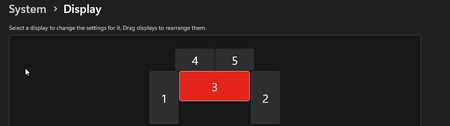
I) My main monitor is nr 3 Monitor nr 4 and 5 resolution: 1920x 1080 Monitor nr 3 (main) resolution: 3440x1440 Monitor nr 1 and 2 resolution is: 1440x2560 Is there a way to make jump of mouse when I move from monitor nr 3 to 2 fluent? Right now my mouse jumps from main to 1 or 2 like 720px in wrong place. 1) Is there a way to solve this through Windows? 2) If not, is there a way to somehow catch event: a) of mouse moving from one monitor to another? b) from which monitor I moved my mouse to another and automatically change the position of mouse? and program it, so the jump of mouse from one monitor to another is proper? Or maybe there is an option in Windows that could automatically solve it? II) I tried a second way of positioning things This way I can't jump directly from nr 3 to 1 or 2. I need to go through 4 to get to 1. Is there somehow a way to make 'gap' between monitor 3 and 1/2 to not prevent me from entering another monitor? III) I also tried making resolution smaller of monitor 4 and 5: The problem about this solution is that now I can't jump from 4 to 5 and well I have lower resolution on 4 and 5 which is not nice. Have a good day!400Views0likes0Comments

Recent Blog Articles
No content to show