User Profile

Alexander_Novikov
Copper Contributor
Joined Oct 10, 2023


User Widgets
Recent Discussions
Re: Video in Teams causes Surface Pro to overheat
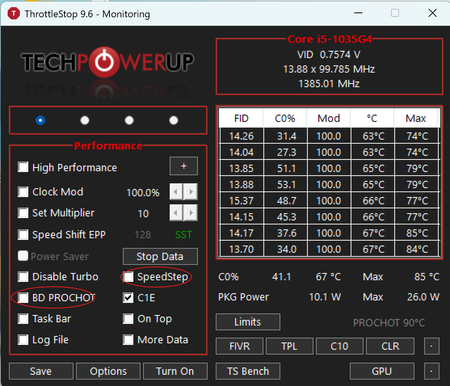
zafero1975 Here’s another useful thing I’ve learned. It’s very helpful to disable the DPTF sensors. There’s no need to disable the Processor Participant or Battery Participant, so the system can still manage frequencies, but you should disable the chassis sensors specifically. You can do this in the Device Manager, but if the tablet has already overheated, it might get stuck in the wrong settings. So, it’s better to search for the "NoDPTF registry file" and apply it. Next, you need to enable ThrottleStop because, by default, DPTF sets PL2/PL1 to 61/25 watts, which, without dynamic management, will lead to immediate overheating. Here are the settings I settled on: I disabled SpeedStep because it’s an outdated technology, and by default, the Surface uses SpeedShift. BD Prochot doesn’t work particularly well, so I disabled that too. It triggers even when the chassis and the processor are still at safe temperatures. I set PL1 to 15 watts. I tested it for an hour in Cinebench and during Teams conferences. Everything works great, and nothing freezes, even when running on power. When running on battery and just browsing, the tablet stays completely cool and doesn’t slow down. I tested 20 watts – the tablet shut down after about an hour in Teams, plus I think it’s harmful to the battery. I believe the threshold can be raised to around 18 watts, but that requires further testing. I tried another hour in Teams with video calls while on AC power with 18 watts, and everything was fine. But, personally, I’m sticking with 15 watts because everything works perfectly as is. The processor runs at 2 GHz and sometimes boosts to over 3 GHz. Even during prolonged use while plugged in, under full load, the chassis temperature doesn’t rise above 55 degrees. Yes, this exceeds Intel’s 50 degrees standards, but you end up with a slightly warm but efficient device, not a useless piece of metal. And I doubt the battery degrades more from an extra 5 degrees. In all these tests, the CPU temperature never exceeded 85 degrees, which is also great, as the safe limit for Intel is around 100 degrees, after which the device will shut down. You can still use Windows power modes, and power efficiency is maintained since they mostly control the SpeedShift EPP setting. We haven’t blocked Windows or DPTF from managing frequencies. So, I can wholeheartedly recommend these settings. I take no responsibility for your devices, but I believe my conclusions are sound. I personally ended up buying a new laptop with a cutting-edge processor for development and audio processing, but I'm confident that with the current settings, my Surface will last many more years as a tablet for calls and browsing. I hope I was able to help someone!1.1KViews0likes0CommentsRe: Video in Teams causes Surface Pro to overheat
zafero1975 The most stupid thing is that the problem happens only on Windows. On Linux everything works perfectly. Well, I will go to buy a new laptop very soon and it is so sad that Microsoft didn't fix the problem at the end for more than 3 years. I just tested it in Furmark and gives 1 fps on Windows and 13 fps on Ubuntu. I think the reason is in Intel Thermal Framework because removing of Intermal Thermal Framework participants from Device Manager fixes the problem for a couple of minutes until the processor starts throttle by BD PROCHOT which can be disabled only by Throttlestop. Interesting is there a way to ping Microsoft support to highlight the topic back?1.5KViews0likes2CommentsRe: Video in Teams causes Surface Pro to overheat
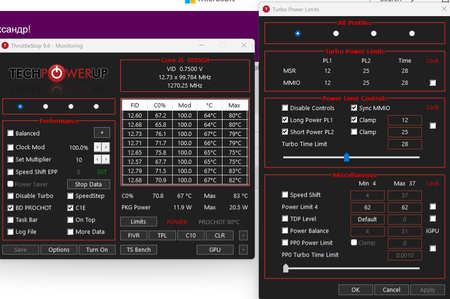
zafero1975 My settings. Power limit is activated because an audio editor works in a separate window. I personally add ThrottleStop to autorun. I also noted that PL4 somehow impacts maximum frequency, so, your high value is correct! All the best to you!2.3KViews0likes0CommentsRe: Video in Teams causes Surface Pro to overheat
Marek_Vit I'm really happy to help! It is not clear why Microsoft didn't solve the problem by themself. Small advice - please, don't try to improve performance dramatically or significantly increase turbo time if you don't have extra cooling like water cooler etc. Because even if you won't catch throttling immediately it will happen after several minutes/hours and you won't be able to disable throttling until the tablet cool down. This values 12/25 I took from official Intel documentation, I added 1 watt to pl2 but it doesn't make sense to increase them more without extra cooling. (I tested different configurations)2.2KViews1like0CommentsRe: Video in Teams causes Surface Pro to overheat
zafero1975 I finally solved the problem by setting pl2 to 13 watt and pl1 to 25 watt in ThrottleStop. Pl1 time is 28 sec. ThrottleStop is in "turned off" mode and doesn't control Speed Shift epp (it is controlled by Windows) . Now my Surface works on 2.5-3GHz I don't have any throttling anymore. I probably spent a year to realized how to correctly set it but now everything works pretty fine even in heavy apps. P. S. So, in reality the problem is that some Surface software sets pl1 to 61 watt on Windows. For example everything works correctly on Linux from the box. So, ThrottleStop just correctly sets Pl1 limit and that's it. P. P. S. Please, like my answer if it helps you because it may help other users (I hope)2.8KViews3likes10Comments
Recent Blog Articles
No content to show