User Profile

Binghan
Copper Contributor
Joined Sep 05, 2023


User Widgets
Recent Discussions
Re: Why Excel read "31/12/2022" as text instead of date?
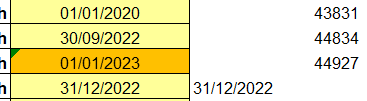
HansVogelaar Hi Hans, Thanks for your reply. The dates in other cells are working well... that's the part puzzled me. Please find the screen shot below (the left column is the original dates I input and the right column is using formula "=xxx" so only that cell returns text). Cheers,1.8KViews0likes3CommentsWhy Excel read "31/12/2022" as text instead of date?
Hi there, My Excel file reads one cell "31/12/2022" as text rather than date. This caused error in other cells with formula referencing to this file (should be read as date but it is text so returns error). There are other cells with other dates which are read as date (no issue). And when I re-enter 31/12/2023 into the same cell, it reads as date... It happened in the Excel file I did in Jan 2023 and I just picked it up a few days ago. I couldn't replicate the same issue now... I'm wondering if there was a bug in Excel then and got fixed afterwards so it is ok now? Anybody faced the same issue or knows what has happened? I'm trying to avoid same issue happening again in future which Excel reads it as text but we thought it should be date... Thanks. Cheers2KViews0likes5Comments
Recent Blog Articles
No content to show