User Profile

StephenH830
Copper Contributor
Joined Aug 30, 2023


User Widgets
Recent Discussions
Re: Lookbook Contracts Site not provisioning
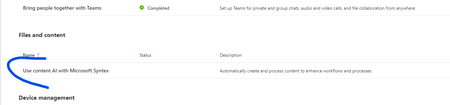
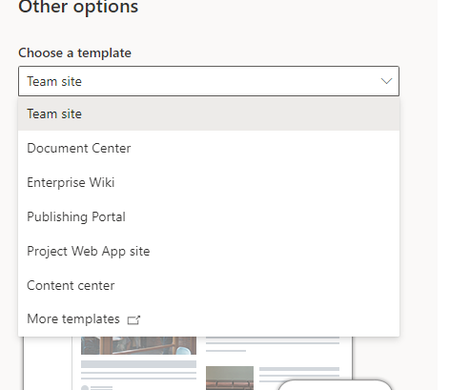
Finally figured this out. Ignore the Lookbook – no bueno Setup a Syntex Resource Group in portal.azure.com and attach a subscription. Go ahead and create a SharePoint Content Center – Go to SharePoint Admin. New Site More Options Site Template – Content Center Next, go to O365 Admin – admin.microsoft.com (Make sure you are on an elevated account that can do billing and admin. Go to Setup in the left menu. Scroll to the Header “Files and Content” and select “Use content AI with Microsoft Syntex” Choose “Manage Microsoft Syntex” A slide out menu will pop up on the right hand side. Select your content center. *** See above: If you have not created a content center, go to SharePoint admin and create a site collection. Select “More options” and then choose the template “Content Center” ***** For the rest of the options – and this was the key – while you are creating the Contracts Template, turn each of the processors on for ALL SHAREPOINT sites. If you restrict it, Syntex blows up and says that there are no sites. This will allow you to create a blank site and then apply the Contracts Template. Next go and create your base site. Make sure it is a TEAMS site. Once its finished provisioning, go in and change the template – you will see Contracts: Hit it! It will take about 2 or 3 minutes. Once its finished provisioning, go back to the Admin Center (step 4) and navigate back to Syntex. Change each “Processing” model back to the Contracts Site (otherwise Syntex will show up in every document library and that could be a financial disaster with a crazy clicker – we all have them. Hopefully that will work….. This wasn’t as straightforward as it should have been.459Views0likes1CommentRe: Lookbook Contracts Site not provisioning
sbouldin got sidetracked on another project. Looks like my GA account does not have access to the Syntax resource group that we attached to our Azure subscription; but I can see it when I go on my billing/reduced admin account. Getting with my security guy to see whats going on.2.8KViews0likes1CommentRe: Lookbook Contracts Site not provisioning
So... Am a GA, went to SharePoint Admin to site creation - Standard models present (Teams or Communication). Went to "Browse More sites". And again, standard sites are present. Creating a Content Center, of course will just create another model library and "More Templates" will give you all the ancient site templates. So not sure what I am missing.2.9KViews0likes3CommentsRe: LookBook SharePoint Syntex contract management site not provisioning
Yeah - this has been an issue for a bit. Here is a thread thats following it. I tried again today, and got the same error. https://techcommunity.microsoft.com/t5/sharepoint/lookbook-contracts-site-not-provisioning/m-p/3950392/emcs_t/S2h8ZW1haWx8dG9waWNfc3Vic2NyaXB0aW9ufExOSzlQM0ZPUkRBSDI3fDM5NTAzOTJ8U1VCU0NSSVBUSU9OU3xoSw#M755061.3KViews1like1CommentRe: Lookbook Contracts Site not provisioning
Still getting the error message. Syntex has been provisioned per the Resources. Pre-requirements not fulfilled! The SharePoint Syntex Contract Managemant template is built on top of SharePoint Syntex and can only be installed if you as a user have a SharePoint Syntex license assigned.3KViews0likes1CommentLookbook Contracts Site not provisioning
Trying to use the lookbook to work with Syntex. I have Syntex configured on the tenant and have created a content center but when trying to create the Contracts Site, I get the following error. Pre-requirements not fulfilled! The SharePoint Syntex Contract Managemant template is built on top of SharePoint Syntex and can only be installed if you as a user have a SharePoint Syntex license assigned. I can't get past this. Also, management is misspelled in the error - that's a whole other thing 🙂 Any idea what I'm missing?Solved4.8KViews0likes22Comments
Recent Blog Articles
No content to show