syntex
61 Topics
Auto Tagging of document using MS Syntex not working
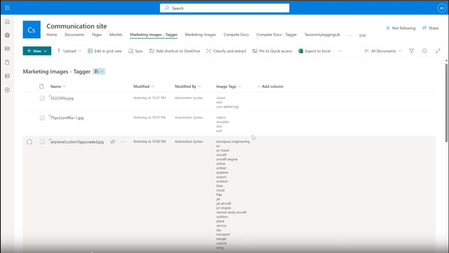
Hi, I tried the above steps, but the document tagging is not happening. Waited almost for 3 days and no updates to columns. I do have Syntex license attach to azure subscription. I had uploaded sample files with the name and content matching the Term. But the tagging is not happening. Steps: 1) Created SP Column as managed metadata with Term having the word "Commercial". Selected the Automatically tag document with term. 2) Uploaded documents in library. 3) Post 24 hrs. still the tags are not applied Links :https://www.leonarmston.com/2023/10/effortless-document-tagging-with-microsoft-syntex-taxonomy-tagging/#comment-2803 https://learn.microsoft.com/en-us/microsoft-365/syntex/taxonomy-tagging-setup1.2KViews0likes3CommentsContent lifecycle management using Microsoft Syntex
I understand that Syntex content extraction capabilities helps to identify the document types (such as Insurance document or Invoice) and then apply retention policies (such as 5 years or 10 years) based on the document type. One of our customer would like to analyze their SharePoint content properties (last accessed date, orphan state, access frequency, PII state etc.,) and then take appropriate action such as retain or archive. Does Microsoft Syntex provide any built-in capability to address this requirement? J Justin1.1KViews0likes1Comment
Microsoft Syntex Workshops and Sessions
Dive deep into Syntex at 365 EduCon Chicago, a Microsoft 365 and Power Platform Conference, Oct 30 - Nov 3! McCormick Place South. Join top-notch speakers to transform your content knowledge. Unlock the future of content understanding and automation! https://t.co/1lSyizLbBt365edu.io/Syntex538Views1like0CommentsNew Microsoft Syntex updates and features
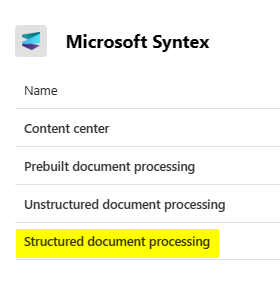
The recent blog post, Microsoft Syntex adds taxonomy and image tagging, OCR, content query, annotations, and more shares all about the new Syntex updates and features. In this article you can get updates on Syntex taxonomy tagging and image tagging; a set of Syntex capabilities coming to preview for pay-as-you-go users; the general availability of the Syntex optical character recognition (OCR) expanding to include PDF and TIFF support; and lastly, news about how both Syntex OCR and Syntex structured document processing are moving to general availability. What new Syntex update do you think will be most helpful for you and your organization?995Views1like0Comments
Regd. Issue with data extraction when file is dropped from Power Automate into the primed library
Hello all, I am facing an issue , where if a file is being dropped to the primed library using flow . The flow action account has syntex License and the document looks fine (the pdf opens) once it gets dropped to the primed library , but the extraction is not happening , but when I click on Classify And Extract , it is working fine , anyone facing similar scenario?Solved557Views0likes1CommentMicrosoft Syntex Licencing
Since the per-user licence is no longer available (as of July 1st, 2023), can I use all features with a pay-as-you-go licence? Features like uloading content to a library where a custom model has been applied only have been availbe for users with a per-user licence. How can I use those features if the corresponding licence isn't available anymore? Grateful for any input on this one!971Views0likes1Comment
LookBook SharePoint Syntex contract management site not provisioning
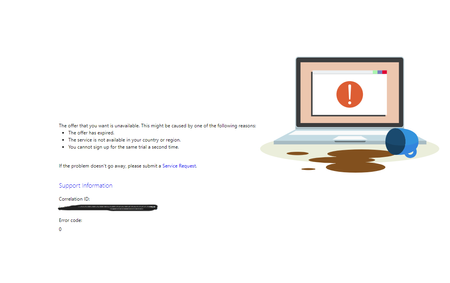
Trying to use the lookbook to work with Syntex. I have recently configured Syntex at our tenant and have created a content center but when trying to create the SharePoint Syntex contract management site from the lookbook, I get the following error. Pre-requirements not fulfilled! The SharePoint Syntex Contract Managemant template is built on top of SharePoint Syntex and can only be installed if you as a user have a SharePoint Syntex license assigned. I tried to do some troubleshooting, but all Microsoft documentation stated that SharePoint Syntex contract management would be allowed only for licensed users. As you know, now the Syntex is configured only for pay-as-you-go subscriptions. I also tried to enable MS Syntex trial from https://www.microsoft.com/en/microsoft-syntex link. It prompts me with the below error.1.6KViews0likes3Comments
Configuration Content Assembly Issue
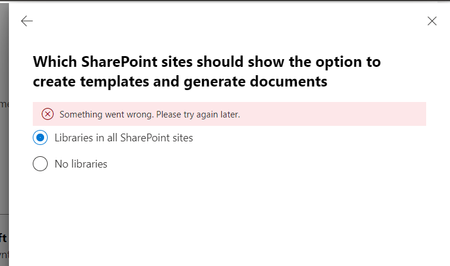
Hello, While configuring the content assembly for all libraries in all SharePoint Sites, we receive a "Something went wrong. Please try again later" message. We have already configured Syntex's pay-as-you-go pricing model. https://learn.microsoft.com/en-us/microsoft-365/syntex/content-assembly https://learn.microsoft.com/en-us/microsoft-365/syntex/content-assembly-setup Please advise if we missed anything in the configuration. Any help is greatly appreciated. Best regards, Julien4.1KViews0likes6Comments