User Profile

JoNC_NZ293
Copper Contributor
Joined Jun 11, 2023


User Widgets
Recent Discussions
Re: Help with Spill function issue
Yes that is what I need. I'm not sure why it was set up as it was when only a single value was required. And yes i have adjusted the threshold to use a value from elsewhere in the sheet so that I can adjust it as needed, ie. =MIN(IF(AF6:AQ6>=$I$1,AF6:AQ6))1.8KViews0likes0CommentsRe: Help with Spill function issue
NikolinoDE thank you very much for your feedback. That is interesting about how to enter the array formula key combination... I will file that in my memory banks. For my example I only wanted a single value being the minimum value above my threshold, so I didn't want it to spill into the subsequent columns. I got around the problem in the end by simplifying the equation to =MIN(IF(AF6:AQ6>2.5,AF6:AQ6) This seemed to do the job when I compare to the original spreadsheet I was supplied and adjusted the number back to 1.5, the figures matched.1.8KViews0likes2CommentsHelp with Spill function issue
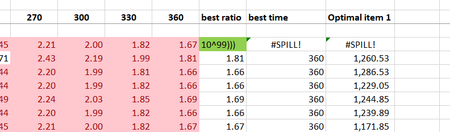
Hi all I have inherited this spreadsheet and I need to adjust the threshold that is used in the calculation. It seems to be a simple change but I am getting a #SPILL error that I can't resolve. Device and OS platform, pc windows 10 pro Excel product name and version number Microsoft® Excel® for Microsoft 365 MSO (Version 2304 Build 16.0.16327.20200) 64-bit Excel file you’re working with or sample file with data – not sure how to attach? What I am trying to do I'm trying to adjust the formula in column AR (which is =IF((AF6:AQ6<1.5),0,MIN(IF((AF6:AQ6>=1.5),AF6:AQ6,10^99)))) to use the values 2.5 instead of 1.5 - this is the ONLY thing I have changed (I'd actually like to pull the value from another cell eventually but i can see if I can solve this first). When I edit it I get a #SPILL error saying the spill range isn't blank. I have read up on this but can't really see how to solve this and why it is happening given the formula in the cell (see green). Even if I edit it back to be the old value I still get an error so I am wondering if there has been some Excel functionality change since it was created??? Expected result I want to be have the formula adjust to use 2.5 instead of 1.5 and in all other ways be the same Can anyone help please?Solved2.2KViews0likes6Comments
Recent Blog Articles
No content to show