User Profile

trevorharrisABMG
Copper Contributor
Joined May 22, 2023


User Widgets
Recent Discussions
Re: Lack of Windows update group policy for Win 10/11 - "Reschedule Automatic Updates"
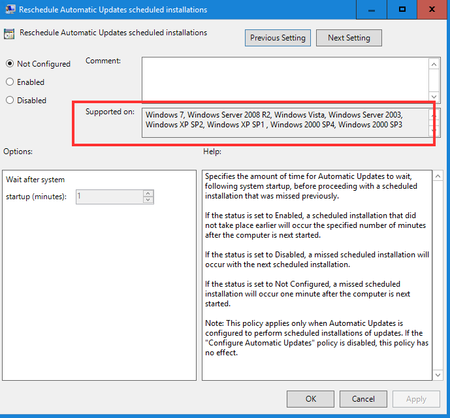
Unfortunately even Win 10/11 Pro/Enterprise do not have this policy anymore either. It was discontinued after Windows 7. I have found now the only reasonable alternative is to set an update deadline, which isn't as great for our use case, but will work.76Views0likes0CommentsLack of Windows update group policy for Win 10/11 - "Reschedule Automatic Updates"
Hello, is there an equivalent policy or registry key for "Reschedule Automatic Updates shcheduled installations" for Windows 10 or 11? Currently, we have no way to use group policy to schedule updates for users who missed updates, which results in PCs missing updates for several months. We have the latest ADMX templates, and the policy is showing in the "Legacy Policies" section and only works on Windows 7 or lower.327Views0likes2CommentsRe: No longer able to see users Inbox rules through EAC Online?
Talamasca The link the other individual gave you is a link to Exchange Classic admin center, which is being phased out. I guess some people still have access to it. For now, our only two options are: 1- Create a powershell script to manage mailbox rules of other users (using ExchangeOnlineManagement module) 2- use the delegate method if your company allows it: assign yourself as a delegate to the mailbox, open the mailbox in OWA using https://outlook.office.com/mail/email address removed for privacy reasons/options/mail/rules Unfortunately, our org was affected by this un-announced change by Microsoft as well. In our org, it is common for us to manage rules of other users on a routine basis, so this change definitely slowed the process down.17KViews2likes7CommentsRe: How to Search Video transcripts using Microsoft Search or any other Search API
I know this is an old post but I couldn't find anything more recent. I wanted to say the Microsoft Search API does search Transcripts; however, in the API Response, it doesn't return the video file URL; it returns the 'hidden URL' of the transcript file itself, which is usually something like https://contosocompany.sharepoint.com/sites/marketing/Shared Documents/Forms?FormID=xxx wondering if anyone else has found a way to manipulate the search API headers or response so that it returns the URL of the video file itself? For example, if I POST the following to the Search API: { "requests": [ { "entityTypes": [ "driveItem" ], "query": { "queryString": "erla" } } ] } I get something like this in the Response (note the webURL returned): { "value": [ { "searchTerms": [ "erla" ], "hitsContainers": [ { "hits": [ { "hitId": "01SSPF7JBTDLFZZEVMOFCIAZHBVFPCQ3UJ", "rank": 1, "summary": "<ddd/><c0>ERLA</c0> for John and bite, we would go to the <c0>ERLA</c0> borrower info, his buttons going to show <ddd/>", "resource": { "@odata.type": "#microsoft.graph.driveItem", "size": 3850, "fileSystemInfo": { "createdDateTime": "2023-04-10T13:47:10Z", "lastModifiedDateTime": "2023-05-19T15:56:49Z" }, "listItem": { "@odata.type": "#microsoft.graph.listItem", "fields": {}, "id": "9ccb1a33-ac92-4471-8064-e1a95e286e89" }, "id": "01SSPF7JBTDLFZZEVMOLCIAZHBVFPCQ3UJ", "createdBy": { "user": { "displayName": "Emily Robertson", "email": "email address removed for privacy reasons" } }, "createdDateTime": "2023-04-10T13:47:10Z", "lastModifiedBy": { "user": { "displayName": "SharePoint App" } }, "lastModifiedDateTime": "2023-05-19T15:56:49Z", "name": "Byte Bit - Adding or Removing.mp4", "parentReference": { "driveId": "b!C0PSVS8R9kah0tiOIPRQ_6Ea4VgHFMZPr2XrzfQ0hpla1dEKVvL4Sow7A3NEXkgr", "id": "01SSPF7JDKXI2HP25BXJEIZ2HRDCNPIKVZ", "sharepointIds": { "listId": "0ad1d56b-f256-4af8-8c3b-0373445a482b", "listItemId": "174", "listItemUniqueId": "9ccb1a33-ac92-4471-8064-e1a95e286a89" }, "siteId": "contoso.sharepoint.com,55d2430b-112f-46f6-a1d2-d88e20f450fe,58e11aa1-1407-4fc6-af65-ebcdf4348690" }, "webUrl": "https://contoso.sharepoint.com/sites/BayTraining/Shared Documents/Forms/DispForm.aspx?ID=174" } } ], "total": 1, "moreResultsAvailable": false } ] } ], "@odata.context": "https://graph.microsoft.com/v1.0/$metadata#Collection(microsoft.graph.searchResponse)" }562Views0likes0Comments
Recent Blog Articles
No content to show