User Profile

Rob_Elliott
Silver Contributor
Joined Apr 06, 2023


User Widgets
Recent Discussions
Re: Trying to use Lists as a very basic CRM but having search issues
I would do this with a SharePoint list as the database but a Power Apps app as the front end. That way you can filter the list based on any number & combination of different parameters: name, company, job, gender, product etc etc. Rob Los Gallardos Microsoft Power Automate Community Super User Principal Consultant, Power Platform, WSP Global (and classic 1967 Morris Traveller driver)19Views0likes1CommentRe: Leave Request System in SharePoint
Michal Golka it wasn't me who asked the question, I answered it and would still only use SharePoint + the Power Platform. No 3rd party tools required. Rob Los Gallardos Microsoft Power Automate Community Super User. Principal Consultant, Power Platform, WSP Global (and classic 1967 Morris Traveller driver)36Views0likes0CommentsRe: Add a heading or column containing instructions for New Item in SharePoint List
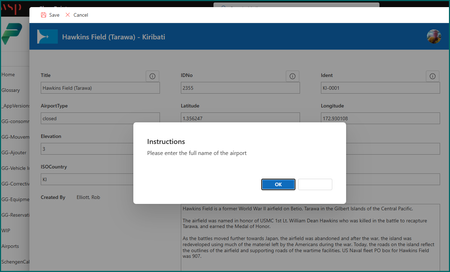
There are a couple of approaches you could take. 1) Power Apps Customised Form You could have a Power Apps customised form and have popup dialogs (using the new confirm() function) with the instructions on the dialog. In the example below there is an information button next to each field which pops up the instruction dialog. From the List-Settings -> Form settings select customize with Power Apps. 2) Configure the Modern List Form But probably an easier approach is to configure the list form body and include your instructions there. So click on the + Add new item button and in the top right click on the edit form icon and select configure layout. You then add JSON formatting into the header, body and/or footer areas. In the example shown below I've added the instructions and set which fields are to be displayed in which each section of the body area. The JSON is formatted like this: { "sections": [ { "displayname": "Please enter the information in the fields below using the official codes & data", "fields": [ "Title", "IATA", "AirportType", "Elevation", "ScheduledService" ] }, { "displayname": "Location", "fields": [ "Country", "ISOCountry", "ISORegion", "Continent", "ISOContinent", "Municipality" ] }, { "displayname": "Coordinates", "fields": [ "Latitude", "Longitude" ] }, { "displayname": "Codes", "fields": [ "Idno", "Ident", "GPS", "LocalCode", "IDNumber" ] } ] } The instructions will then be shown whenever a user adds a new item or edits an item in the list as shown below. A video by Reza Dorrani about configuring list forms is at https://www.youtube.com/watch?v=H4HyWJ9Seps Rob Los Gallardos Microsoft Power Automate Community Super User. Principal Consultant, Power Platform, WSP Global (and classic 1967 Morris Traveller driver)1View0likes0CommentsRe: Can we fill *.pdf in File Identifier on Get file metadata
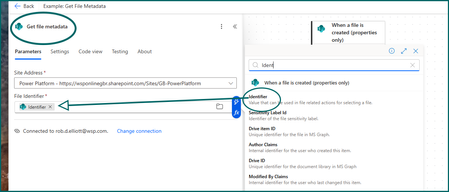
You would never use *.pdf in that context because that would indicate you want to get all pdf files. You don't, you want to get the identifier of the file that was created in the library. So what you need to do is to select Identifier from the "when a file is created" section of the dynamic content box. Rob Los Gallardos Microsoft Power Automate Community Super User. Principal Consultant, Power Platform, WSP Global (and classic 1967 Morris Traveller driver)Re: Document Library - Add "Navigation/Info Elements"
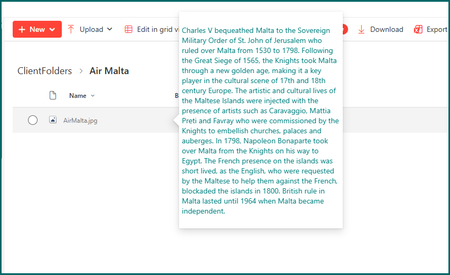
It is not possible to add web parts to a library or list, they are for pages only. What you could do is to format one or more columns with a custom JSON hover card displaying instructions for each column. When the user hovers over the column data the hover card is displayed: To do this you format the column in advanced mode with the following JSON, adjusting it to taste: { "$schema": "https://developer.microsoft.com/json-schemas/sp/v2/column-formatting.schema.json", "elmType": "div", "style": {}, "txtContent": "@currentField", "customCardProps": { "formatter": { "elmType": "div", "txtContent": "Charles V bequeathed Malta to the Sovereign Military Order of St. John of Jerusalem who ruled over Malta from 1530 to 1798. Following the Great Siege of 1565, the Knights took Malta through a new golden age, making it a key player in the cultural scene of 17th and 18th century Europe. The artistic and cultural lives of the Maltese Islands were injected with the presence of artists such as Caravaggio, Mattia Preti and Favray who were commissioned by the Knights to embellish churches, palaces and auberges. In 1798, Napoleon Bonaparte took over Malta from the Knights on his way to Egypt. The French presence on the islands was short lived, as the English, who were requested by the Maltese to help them against the French, blockaded the islands in 1800. British rule in Malta lasted until 1964 when Malta became independent. ", "style": { "font-size": "14px", "color": "teal", "padding": "5px", "width": "300px", "height": "400px" } }, "openOnEvent": "hover", "directionalHint": "bottomLeft", "isBeakVisible": true, "beakStyle": { "backgroundColor": "white" } } } Rob Los Gallardos Microsoft Power Automate Community Super User. Principal Consultant, Power Platform, WSP Global (and classic 1967 Morris Traveller driver)3Views1like0CommentsRe: Is it possible to add a Power Automate button to Form view
It's not possible to add a JSON button to trigger a flow in a SharePoint list form, it needs to be on the list itself. This is because the customRowAction doesn't work from the form. Rob Los Gallardos Microsoft Power Automate Community Super User. Principal Consultant, Power Platform, WSP Global (and classic 1967 Morris Traveller driver)36Views1like0CommentsRe: Collaborate or Duplicate with user without a MS Forms license
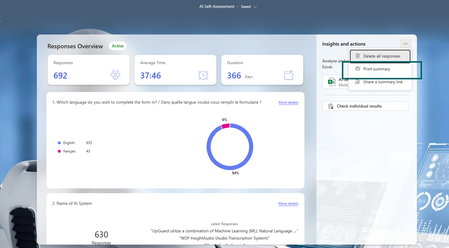
Your user would need to have one of the following M365 licences for this: Microsoft 365 business basic, standard, and premium; Microsoft 365 A3/A5 and E3/E5; Office 365 A1/A3/A5 and E1/E3/E5; Microsoft 365/Office 365 F3; and OneDrive for Business Plan 1. But you could print the summary of the results or download the excel file of the results and send that to the user. Rob Los Gallardos Microsoft Power Automate Community Super User. Principal Consultant, Power Platform, WSP Global (and classic 1967 Morris Traveller driver)19Views0likes0CommentsRe: Making list form anonymous
In Microsoft Forms anonymous users cannot upload files, only users in your organisation can. "Hi nerdy, when you submit this form, the owner will see your email and name." There a way to remove that disclaimer?" No, because the users are within your organisation, they are not anonymous and there is no way to remove that message.95Views1like0CommentsRe: Create a person field in MS form to transfer to SP list
nerdyplayer there is no way to create a person field in MS Forms, you will need a question asking for their email address. Rob Los Gallardos Principal Consultant, Power Platform, WSP Global (and classic 1967 Morris Traveller driver)250Views0likes0CommentsRe: Central Forms repository
Best practice is to create a M365 group and add those of your staff who are allowed to create & edit forms. Then from the Forms home screen select the 3 dots and move each of your forms to the group. That way, when you win the lottery or get hit by the number 12 bus from Dulwich your colleagues can still edit the forms. Rob Los Gallardos Microsoft Power Automate Community Super User. Principal Consultant, Power Platform, WSP Global (and classic 1967 Morris Traveller driver)89Views0likes0CommentsRe: PromotedState does not update anymore
After seeing your post I checked my JSON column formatting on Site Pages and had the same issue, so it looks as though Microsoft have made some changes somewhere to block this from being possible. Rob Los Gallardos Microsoft Power Automate Community Super User. Principal Consultant, Power Platform, WSP Global (and classic 1967 Morris Traveller driver)102Views1like1CommentRe: JSON for list form body
If there is just a single field on a row it will always keep it just in the first column, it can't stretch over all the columns to full width. Rob Los Gallardos Principal Consultant, Power Platform, WSP Global (and classic 1967 Morris Traveller driver)37Views0likes0CommentsRe: Conditional formatting in lists using JSON condition is between numbers
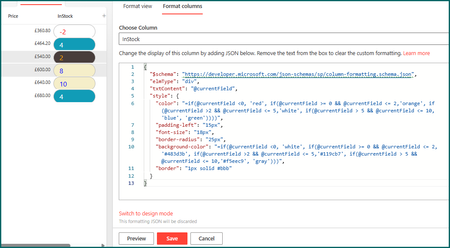
dmann1 you can still have pills using a combination of background-color, border and border-radius as shown below: { "$schema": "https://developer.microsoft.com/json-schemas/sp/column-formatting.schema.json", "elmType": "div", "txtContent": "@currentField", "style": { "color": "=if(@currentField <0, 'red', if(@currentField >= 0 && @currentField <= 2,'orange', if(@currentField >2 && @currentField <= 5,'white', if(@currentField > 5 && @currentField <= 10,'blue', 'green'))))", "padding-left": "15px", "font-size": "18px", "border-radius": "25px", "background-color": "=if(@currentField <0, 'white', if(@currentField >= 0 && @currentField <= 2,'#483d3b', if(@currentField >2 && @currentField <= 5,'#119cb7', if(@currentField > 5 && @currentField <= 10,'#f5eec9', 'gray'))))", "border": "1px solid #bbb" } } Rob Los Gallardos Principal Consultant, Power Platform, WSP Global (and classic 1967 Morris Traveller driver)4Views0likes0CommentsRe: Collapsible Headings Changed
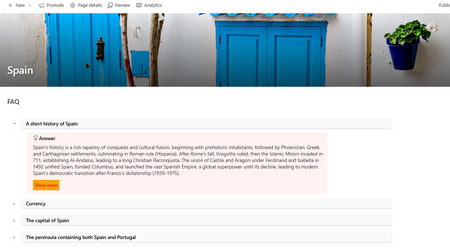
This is an unwelcome recent design change by Microsoft that users at my company are complaining about. But there is no setting to force it to display on a single line. I have spent today suggesting to our users that they add an accordion web part using JSON column formatting. It works but is not really a substitute for an unnecessary and stupid change by Microsoft. Rob Los Gallardos Principal Consultant, Power Platform, WSP Global (and classic 1967 Morris Traveller driver)32Views1like0CommentsRe: Conditional formatting in lists using JSON condition is between numbers
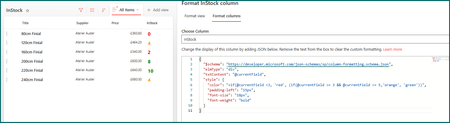
dmann1 you can do this with a shorter json code: { "$schema": "https://developer.microsoft.com/json-schemas/sp/column-formatting.schema.json", "elmType": "div", "txtContent": "@currentField", "style": { "color": "=if(@currentField <3, 'red', (if(@currentField >= 3 && @currentField <= 5,'orange', 'green'))", "padding-left": "15px", "font-size": "18px", "font-weight": "bold" } } Rob Los Gallardos Principal Consultant, Power Platform, WSP Global (and classic 1967 Morris Traveller driver)61Views0likes0CommentsRe: Get email notification of each response to a specific mailbox
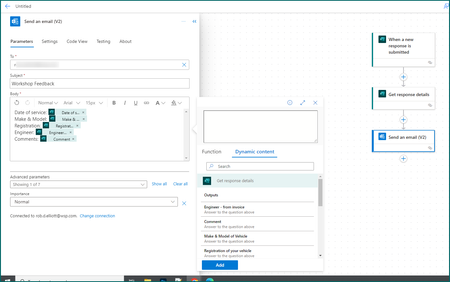
CraigPauley you would need to do this with a flow in Power Automate. A simple example is shown in the image below. Rob Los Gallardos Principal Consultant, Power Platform, WSP Global (and classic 1967 Morris Traveller driver)49Views0likes0CommentsRe: Partially pre-filled form
You can pre-fill responses and send out the pre-fill link to users. Details are at Pre-fill Responses in Your Microsoft Forms | Microsoft Community Hub Rob Los Gallardos Microsoft Power Automate Community Super User. Principal Consultant, Power Platform, WSP Global (and classic 1967 Morris Traveller driver)167Views1like0CommentsRe: Microsoft Form
I spent an hour today building a quick & dirty Power App based on SharePoint lists and that is shown in the attached video. As I said in my previous post this is not possible with Forms because it cannot connect to data, and it's not possible to do something for Forms with React, Python, SPFx, web developing or Power Automate (other than geting each response but then you need to do something with that). But yes, with Power Apps instead of Forms it's quite easy. Come back with any questions. Students Video Rob Los Gallardos Microsoft Power Automate Community Super User. Principal Consultant, Power Platform, WSP Global (and classic 1967 Morris Traveller driver)123Views0likes0Comments
Recent Blog Articles
No content to show